


Verizon Connect
Last Updated

Overview
Verizon empowers construction projects with real-time GPS tracking and insights. Users can optimize routes, monitor driver behavior, and improve safety. While some users might find the reporting features less customizable compared to other solutions, Verizon Connect excels with its ease of use and comprehensive fleet management functionalities for construction companies.
Verizon Connect Specifications
- Vehicle Tracking (GPS)
- Maintenance Scheduling
- Driver Management
- Telematics Integration
What Is Verizon Connect?
Verizon Connect is a fleet management platform built around GPS tracking, driver safety tools, and compliance reporting. It runs on Verizon's own network infrastructure, which lets it draw on wider coverage than platforms tied to a smaller third-party carrier.
Fleet managers can use it to track vehicle and equipment locations in near real time. Its AI dashcams flag unsafe driving as it happens inside the cab. Digital tools also handle DOT compliance work, such as hours-of-service logs and vehicle inspections, instead of paper forms. The platform is organized as several connected product lines covering tracking, video safety, compliance, and asset monitoring, so a fleet can draw on the pieces that fit its setup.
What Is Verizon Connect Best For?
The platform is best known for its OEM hardware integration, which connects compatible vehicles to the platform without installing a separate tracking device on each one. Ford and GM fleets can activate coverage over the air and pull manufacturer-level data like tire pressure, seat belt use, and oil life. This matters most for larger fleets standardized on those makes, where equipping every vehicle by hand adds a lot of time and labor cost.
How Much Does Verizon Connect Cost?
Verizon Connect pricing is estimated to range between $20–$45/month. However, the exact cost may vary significantly depending on the needs and size of an organization.
Apart from the base price, buyers should also consider the following additional costs:
- Dashcams And Additional Camera Equipment: Custom Pricing; adding road-facing, driver-facing, or other camera systems can increase the overall cost
- Hardware Replacement, Transfer, Or Removal: $150/Device; Verizon Connect may charge this fee for technician-assisted hardware removal, transfer, or replacement services
- Hardware And GPS Tracking Devices: $43–$146+/Device. Businesses may need to purchase or replace tracking units, Driver ID kits, and other related equipment
- Missed Installation Appointments: $150–$450/vehicle; the fees may apply when an installation appointment is canceled late or the vehicle is unavailable for the scheduled visit
Several reviewers find Verizon Connect as a higher-priced solution. While some users were satisfied with the product's functionality, some suggest evaluating the overall cost in relation to their specific needs and expected value.
Disclaimer: Pricing references are based on publicly available third-party information and industry benchmarks. Actual costs may vary.
Verizon Connect Integrations
How Does Verizon Connect Work?
Here's how a fleet manager would move through the platform day to day:
- Log in to the Verizon Connect portal using the account credentials
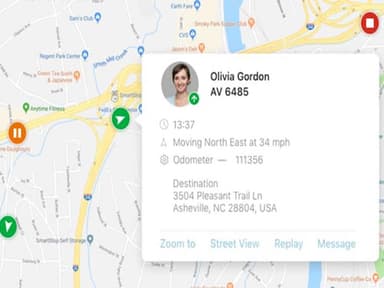
- Track vehicle and asset locations on the live map in near real time
- Set up geofences around job sites or facilities to trigger arrival and departure alerts
- Configure custom alerts for idling, speeding, or unauthorized vehicle use
- Review driver safety scorecards to monitor harsh braking, cornering, and acceleration
- Manage vehicle maintenance schedules and respond to diagnostic alerts from the dashboard
- Generate reports on fuel use, driver behavior, and vehicle utilization
Who Is Verizon Connect For?
Verizon Connect serves small to large businesses across a range of industries, including:
- Utilities
- Oil, gas, and mining
- Government and public safety
- Transportation and logistics
- Services and specialty trades
Verizon Connect Use Case
Based on our analysis of user reviews and Verizon Connect features, we have identified key scenarios where this software is a good fit:
Fleets Transitioning To A Mix Of Electric And Combustion Vehicles
Verizon Connect can support fleets transitioning to a mix of electric and traditional vehicles. Managing both types of vehicles can create additional challenges around tracking, charging status, battery levels, and location. Having EVs and diesel vehicles visible within the same system can help fleet managers monitor the entire fleet without switching between different tools during the transition.
Operations Teams Disputing False Accident Or Injury Claims
The platform can be useful for fleets that regularly deal with accident-related disputes. When drivers, witnesses, and other parties provide conflicting accounts of an incident, determining what happened can become difficult. In these situations, fleet managers can use the available video record to review the incident and support their account when handling insurance or liability claims.
Fleets Preparing For A DOT Safety Audit
Fleets subject to DOT requirements may need to pull together hours-of-service and vehicle inspection records during a safety audit. Verizon Connect can support this process by keeping these records in a digital format. This makes it easier for fleet managers to review and organize when documentation is requested. It is most relevant to fleets operating under DOT regulations, rather than local fleets without those requirements.
Field Service Teams Fielding Last-Minute Job Requests
For service businesses handling urgent or changing requests, Verizon Connect can help dispatchers make faster assignment decisions. When a technician becomes available while a new customer request comes in, dispatchers can use their current location to identify who is best positioned to take the job. This is more relevant to field service and specialty trade businesses than fleets that operate on fixed daily routes.
Contractors Tracking Equipment Across Multiple Job Sites
Non-powered equipment, generators, trailers, compressors, doesn't report its own location, which is exactly why it goes missing between sites. Verizon Connect's asset tracking gives contractors a way to locate that equipment directly rather than relying on whoever last used it to remember where it was left. For businesses running several active job sites at once, this could reduce the time spent simply locating gear before a crew can start work.
Is Verizon Connect Right For You?
Verizon Connect scales across fleet sizes, with separate solution paths built for small business, mid-market, and enterprise operations. The platform's OEM integrations extend that scalability further, since compatible Ford and GM vehicles connect into the system as a fleet grows. This doesn’t require adding any hardware installs to the rollout.
On the security side, the platform's ELD tools are built around FMCSA's tamper-proof requirements. This means driving data can't be altered outright and any correction has to be reviewed and certified by the driver before it becomes part of the record. Verizon Connect also holds Better Business Bureau accreditation and has picked up industry recognition, including Stevie Award wins in 2026.
FMCSA has spent the past year clearing non-compliant devices from its Registered ELDs list, and fleets are now expected to periodically confirm their device is still registered. Verizon Connect's own guidance to fleets reflects this shift, and its ELD tools are built to meet the current technical standards under 49 CFR Part 395.
Still doubtful if Software is the right fit for you? Connect with us at (661) 384-7070 for further guidance.
Verizon Connect Features
Vehicle History
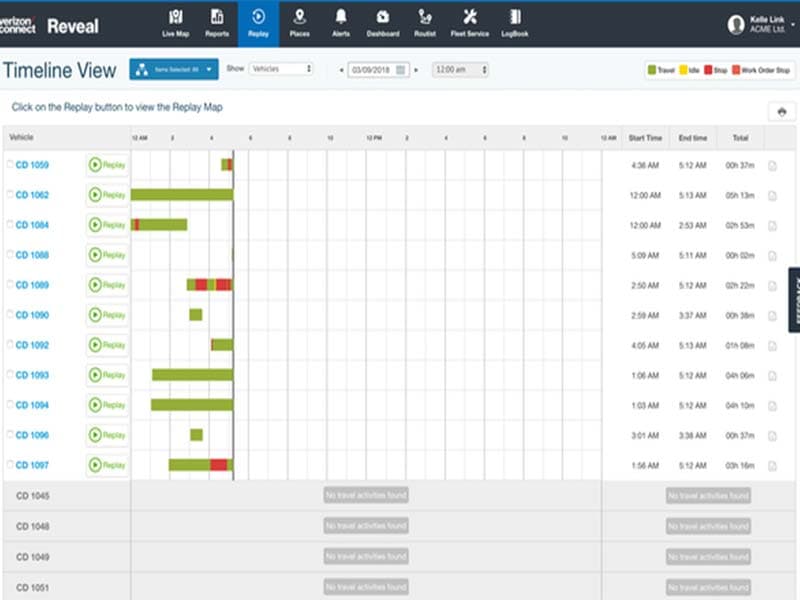
Route replay lets a fleet manager pull up any vehicle's past movement and view it as an interactive breadcrumb trail on the map, stop by stop. Because the trail marks exact timestamps and locations along the route, it becomes a straightforward way to verify hours worked or confirm a technician actually visited a job site.
Standard Reports
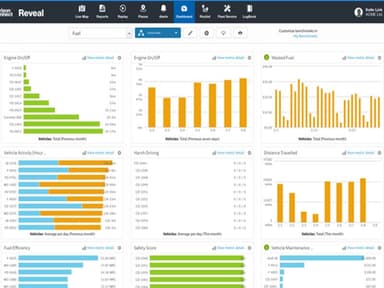
Automated reporting pulls fleet data into preset dashboards covering fuel efficiency, driver behavior, and vehicle utilization. So, the numbers arrive already organized. That structure makes it easier to spot a pattern, like one vehicle burning more fuel than the rest of the fleet, before it becomes a larger cost.
Safety Scorecards
This Verizon Connect feature helps track and benchmark harsh braking, cornering, and acceleration for each driver. It then presents the results in a comparable, transparent format. Presenting the data this way turns coaching into a conversation grounded in specific numbers rather than a general impression of how someone drives.
Custom Alerts
Using the software, alerts can be configured around a set list of triggers, activity, idling, speeding, harsh driving, geofence crossings, late starts, sensor activation, towing, and video events. They reach a manager through the mobile app on Android or iOS. Because each trigger is set individually, a manager can flag the specific behaviors that matter most to their fleet instead of monitoring everything at the same threshold.
Pros And Cons of Verizon Connect
Pros
Vehicle setup and management feels straightforward
GPS updates provide useful fleet visibility
Vehicle history replay helps investigate incidents
Reporting supports detailed fleet performance reviews
Live tracking makes vehicle locations easier to monitor
Cons
Hardware can create vehicle compatibility problems
Installation may require complicated third-party work
Some users report unreliable device performance
Verizon Connect Reviews
Total 1 reviews
3
All reviews are from verified customers
Rating Distribution
5
Stars0%
4
Stars0%
3
Stars100%
2
Stars0%
1
Stars0%
Share your experience
Construction, 51-100 employees
“The best software is simply worth your money.”
Pros
We have been enjoying this software, which appears to be performing fine right now. The fact that my scheduling department wants to install this system for our whole fleet of work trucks after testing it out on a small number of them for the past few months suggests that the software works, is reasonably simple to use, and is worth the money.
Cons
We have a big issue with their customer support, though. Weeks can pass while we wait for their team to respond to an email. Since their various departments do not communicate with one another internally, none of the departments I have had to deal with have any clue what to do about the problems.
Rating Distribution
Ease of use
8
Value for money
7
Customer Support
6
Functionality
7
Frequently Asked Questions
Does Verizon Connect software offer an API?
Yes, it offers an API.
Does Verizon Connect offer a mobile app?
Yes, Verizon Connect offers mobile apps for both Android and iOS devices.
What language does Verizon Connect support?
The software supports English language.
What types of pricing plans does Verizon Connect offer?
The estimated cost of Verizon Connect ranges from $20–$45 per month, with pricing varying depending on factors such as business size and selected services. Contact us for a Verizon Connect cost estimate.
What other apps does Verizon Connect integrate with?
The platform integrates with various third-party tools, including Dusk FSM, CareAR, GoCanvas, WorkWave, Traffio, and Techsbook.
Who are the typical users of Verizon Connect?
Verizon Connect is suitable for businesses of all sizes operating in industries such as utilities, oil and gas, mining, public safety, transportation, logistics, and specialty trades.
What level of support does Verizon Connect offer?
Verizon Connect offers support through phone and chat.