


Help Scout
Last Updated
Key Takeaways
Generated from the text of customer reviews
Help Scout is a customer support and communication platform used by teams in industries such as healthcare, financial services, and education. Users often say it is easy to use, but a common concern is that its reporting capabilities are a bit limited. In August 2026, Help Scout released Customer Portal, which allows customers to view and reply to their support conversations.
Our Verdict
The platform works well for small to mid-sized support teams that handle customer conversations across shared inboxes and other support channels. Users often say the price feels high for startups and small teams, though many still find the cost justified. We recommend it for growing B2B companies and teams in regulated industries that need organized, coordinated support as their ticket volume grows.
Overall Rating
Based on 60 users reviews
4.4
Rating Distribution
Positive
83%
Neutral
15%
Negative
2%
Starting Price
$30
per user per month
Help Scout Specifications
- Live Chat
- Omnichannel Support
- Canned Responses
- Analytics And Reporting
What Is Help Scout?
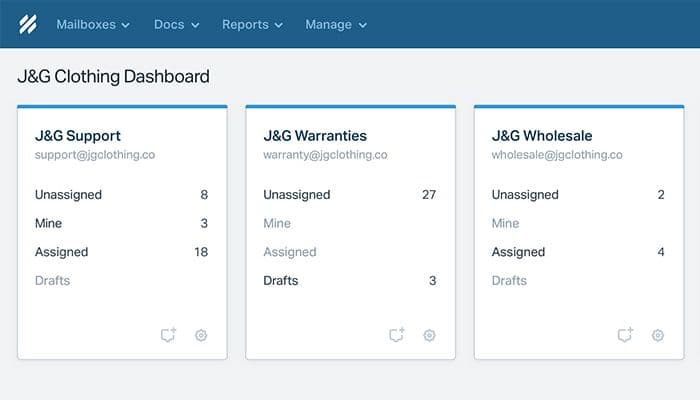
Help Scout is a customer support platform for managing customer conversations and support requests. It includes a shared inbox which keeps conversations and customer context in one place. The platform also includes AI tools that can summarize a long thread, translate a reply, or write a draft response. It can also automate routine steps such as assigning a conversation, applying a tag, changing a status, or sending a reply. These tools help reduce the time agents spend sorting requests and let them reply sooner.
What Is Help Scout Best For?
The software is best known for Beacon, a support widget that can be added to a website or app. Beacon has a contact form, live chat, help articles, and AI answers in one tool. When a visitor asks a common question, Beacon searches the knowledge base and the website content for an answer. If that does not solve the problem, the visitor can reach a human agent in two clicks. Contact form submissions and chats can be connected to same Help Scout Inbox.
This suits teams that want to replace separate tools for self-service and customer messages or those that want visitors to look for an answer before they contact an agent.
How Much Does Help Scout Cost?
Help Scout pricing starts at $30/user/month. This basic plan, known as Standard, includes multiple inboxes, live chat and SMS, multiple knowledge bases, and more. Further pricing tiers of the software are as follows:
- Plus: $54/user/month
- Pro: $90/user/month
A free plan is also available. The software also offers an AI Answers add-on priced at $0.75/resolution.
In addition to the base subscription costs, organizations should keep the following potential costs in mind based on the industry benchmarks:
- Implementation: $0–$2,500 (one-time)
- Data Migration: $0–$5,000 (one-time)
- Customization And Configuration: $500–$3,000 (one-time)
- Knowledge Base Content Creation: $500–$5,000 (one-time)
- Integrations: $300–$3,000/year
- Extra Shared Inboxes: $120–$600/year
Users generally describe Help Scout's pricing as moderate to high. Some think the cost is fair for what the product offers. Smaller organizations and startups with limited budgets often flag affordability concerns and note that additional features cost extra.
Disclaimer: The pricing is subject to change.
Help Scout Integrations
The software supports integration with platforms such as:
How Does Help Scout Work?
Log in to your Help Scout account, then follow the steps below to use its features:
- Set up inboxes to sort incoming conversations and send them to the right teams
- Assign conversations, add internal notes, apply tags, and insert saved replies for fast answers
- Reply to customers by email and live chat through Inbox and Beacon
- Write Docs articles so customers can find answers in Beacon
- Create workflows that assign, tag, or close conversations or send emails when conditions are met
- Send messages, surveys, and Net Promoter Score (NPS) requests to selected customers
- Check reports for conversation volume, response metrics, and team activity
Who Is Help Scout For?
Help Scout is suitable for industries and sectors, including:
- Healthcare
- Financial services
- Education
- Real estate
- SaaS
- Manufacturing and logistics
- Professional services
Help Scout Use Cases
Based on our analysis of user reviews and Help Scout's current capabilities, we have identified key scenarios where this software is a good fit for customer support teams:
Growing Teams Handling Customer Emails Scattered Across Personal Mailboxes
When customer emails land in personal mailboxes, nobody can tell who is dealing with which request. Two people end up answering the same customer, while another message sits because each person assumes a colleague has it. Help Scout moves emails and other interactions into shared inboxes, where a conversation can be assigned to one person. Everyone can see who owns it, and double replies happen less often.
B2B Companies Supporting Accounts With Multiple Recurring Contacts
Help Scout shows customer profiles and conversation history next to each request, along with details about the customer's company. This helps B2B teams whose accounts have several contacts writing in over months, with a different agent answering each time. Before replying, the agent can read what was discussed earlier and answer with the whole account in mind rather than just the person who wrote in.
Support Teams Managing Manual Ticket Sorting And Assignment
Sorting requests by hand takes queue managers away from replying. A refund question goes to one person, a billing query goes to another, and someone has to decide this for every incoming message. Help Scout workflows can assign conversations, add tags, change statuses, or send replies once conditions set by the team are met. Recurring request types go to the right person without anyone sorting them.
Teams Handling Lengthy Or Escalated Customer Conversations
Help Scout's AI Summarize gives a short overview of a conversation, so an agent joining midway does not have to read the whole exchange. This applies to threads that have passed through several agents or been escalated. Without a summary, each new person has to read the full history before replying, which can delay the handoff and resolution.
Companies Fielding High Volumes Of Repetitive Customer Questions
A company can maintain a help center and still get the same questions every week. The answers are already written, but customers ask anyway. Help Scout's AI Answers uses Docs and other knowledge sources to respond through Beacon before the customer reaches an agent.
Is Help Scout Right For You?
If you need a customer support platform to manage shared inboxes, customer conversations, self-service content, and support workflows, then Help Scout could be a strong fit. It has customers in more than 140 countries and is used by companies such as Buffer, Gusto, Vimeo, Litmus, and Privy. Help Scout is SOC 2 and HIPAA compliant and runs on Amazon Web Services (AWS), which provides the cloud infrastructure along with security and privacy features.
More support teams are using AI, and questions about data privacy and oversight have grown alongside that adoption. Help Scout does not train AI on customer data. Its AI Agents can only act within the permissions a team sets. Teams can also configure guardrails so that specified topics go to human staff.
Still not sure if Help Scout is right for you? Get in touch with us at (661) 384-7070 for further guidance.
Help Scout Features
Shared Inbox
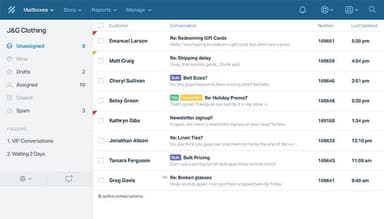
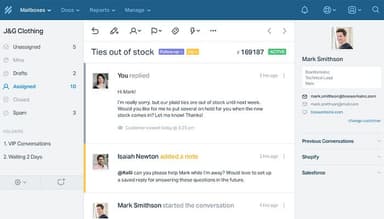
Help Scout has a shared inbox that gathers email, chat, phone, and social conversations in one place. Conversations can be assigned automatically or with a click. Teammates can add internal notes before they reply. Customer profiles show details from other apps along with past conversations. The inbox also collects satisfaction ratings, and AI Summarize gives a short overview of a thread.
Knowledge Base
Docs is a knowledge base builder that needs no code. Teams can publish a branded help center and adjust its colors, formatting, and CSS. Access can be public, restricted, or authorized through the API. AI tools can expand, shorten, or translate an article into more than a dozen languages. Beacon shows articles on a website or inside an app. The Docs Report tracks searches and article ratings.
AI-Powered Support
Help Scout offers two AI features called AI Answers and Inbox Assistant. AI Answers replies to customers using knowledge bases, web sources, and custom instructions. Teams control where it appears and can test it in a private mode. Inbox Assistant drafts replies and summarizes threads. It can also change the tone of a message, fix grammar, and translate text. Help Scout tracks resolutions, escalations, and satisfaction ratings for AI Answers conversations.
Insights And Analytics
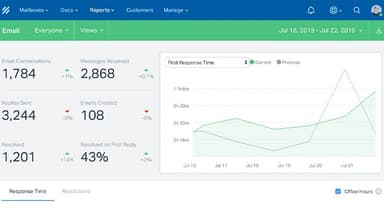
Reports cover conversation volume, response time, handle time, and wait time across email, chat, phone, and social channels. Custom reports can be filtered by company or conversation type. Search data from Docs shows which customer questions have no answer yet and satisfaction scores appear in the same reports as the operational metrics.
Customer Messaging
Help Scout supports five message types. These are standard, NPS®, survey, modal, and banner messages, and they can appear in an app or on a website. Targeting rules depend on events such as page URL, time on page, and number of visits. Views, clicks, and survey results show how each message performs. There is no limit on how many messages a team can send.
Automation And Workflows
Workflows are made of conditions and actions and work much like Gmail filters. Automatic workflows run in the background on new and existing conversations. Manual workflows apply all of their actions when a user runs them. Available actions include assigning, tagging, sending replies, and changing status. Workflows can also be copied across inboxes.
Pros And Cons of Help Scout
Pros
Support teams can sort and find customer conversations quickly
Teams gather and review customer feedback with less effort
Customers can find answers themselves without contacting an agent
Automation takes over repeated tasks and lowers agent workload
Teams keep context from earlier conversations with each customer
Cons
Email signatures sometimes have formatting problems
Knowledge base template options may feel somewhat limited
Some users find the mobile app difficult to use
Help Scout Pricing
Standard | Plus | Pro |
|---|---|---|
$30 per user per month | $54 per user per month | $90 per user per month |
|
|
|
Disclaimer: The pricing details were last updated on Sep 25, 2026 from the vendor's website. Please contact us for a tailored pricing list.
Help Scout Reviews
Total 60 reviews
4.4
All reviews are from verified customers
Rating Distribution
5
Stars58%
4
Stars25%
3
Stars15%
2
Stars0%
1
Stars2%
Share your experience
Legal Services, 51-100 employees
Less than a year
“streamlined portal for support”
Pros
This platform has completely transformed how our team collaborates. It provides an incredibly intuitive portal where we seamlessly manage support tickets together, while simultaneously building a comprehensive knowledge base filled with practical, helpful articles that benefit everyone.
Cons
There is no easy way to turn on dark mode, email signatures sometimes look wrong because of the portal's formatting and I often have to refresh the page to see new notifications.
Rating Distribution
Ease of use
6
Value for money
9
Customer Support
10
Functionality
7
Health, Wellness and Fitness, 11-50 employees
More than a year
“helpful templates and great AI tools”
Pros
Using pre-written email templates saves us a huge amount of time. The reporting tools are great for tracking our team's work and making sure we maintain high quality. The new AI tools are also the best for helping us write polite and professional replies quickly and easily.
Cons
I feel like having a direct connection to MindBody software would be a fantastic addition.
Rating Distribution
Ease of use
10
Value for money
10
Customer Support
10
Functionality
9
Information Technology and Services, 1-10 employees
More than a year
“Clean and logical design”
Pros
The clean and logical design is my favorite part. New users can figure it out immediately but help guides are still right there if they are needed.
Cons
If my internet is spotty or slow, the system becomes hard to work with and I have occasionally lost email drafts I was writing.
Rating Distribution
Ease of use
10
Value for money
10
Customer Support
10
Functionality
8
Frequently Asked Questions
Does Help Scout offer an API?
Yes, Help Scout offers an API.
What language does Help Scout support?
Help Scout supports multiple languages depending on the feature.
What other apps does Help Scout integrate with?
Help Scout integrates with platforms such as Asana, Gmail, Slack, WordPress, Mailchimp, Trello, and SurveyMonkey.
Does Help Scout have a mobile app?
Yes, Help Scout offers a dedicated mobile app for both iOS and Android.
What types of pricing plans does Help Scout offer?
Help Scout pricing starts at $30/user/month for Standard, followed by Plus at $54/user/month and Pro at $90/user/month. A free plan is also available. Get a detailed Help Scout cost breakdown to make an informed decision.
Who are the typical users of Help Scout?
Help Scout is typically used by customer support teams, small businesses, and growing companies.
What level of support does Help Scout offer?
Help Scout CRM offers email support, an onboarding specialist, a customer support manager, live chat, and a dedicated help center.