


Last Updated
Overview
Studio Ninja enables creative businesses to coordinate client workflows, approvals, and transactions within a single system. The automation tools, multilingual client portal features, and responsive support make it a dependable option for managing ongoing client interactions. However, its functionality is tailored more towards creative use cases than complex sales operations.
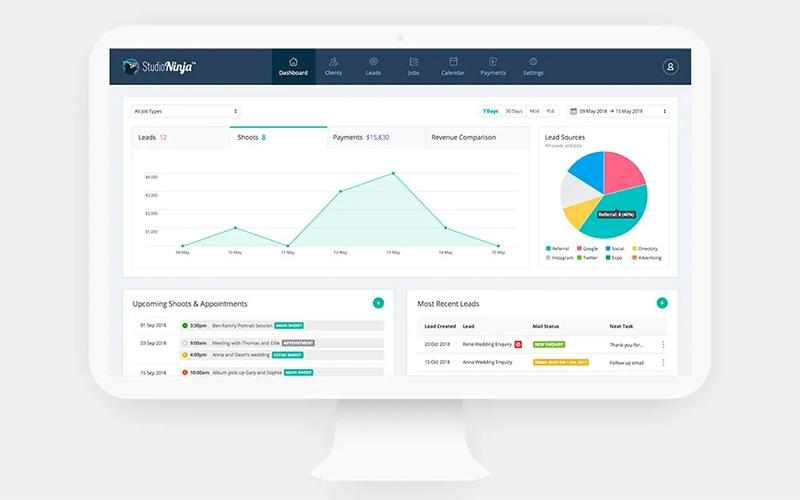

Studio Ninja Specifications
- Contact Management
- Lead Management
- Customer Communication Tracking
- Email Integration
What Is Studio Ninja?
Studio Ninja is a client management and business operations Customer Relationship Management (CRM) platform built primarily for photographers and creative small businesses. It offers features such as online booking that lets clients schedule and pay automatically, workflow automation to manage tasks and reminders, and tools for tracking jobs, quotes, and invoices. These capabilities help users keep all client interactions and administrative tasks organized while reducing manual effort and improving consistency.
Studio Ninja Pricing
The Studio Ninja cost is offered through flexible subscription plans with a 7-day free trial designed for photographers and creative businesses. The plans include:
- Starter: $16/month for 1 user (billed monthly)
- Pro: $27/month for 3 users (billed monthly)
- Master: $40/month for unlimited users (billed monthly)
Disclaimer: The pricing is subject to change.
Studio Ninja Integrations
Studio Ninja software supports direct integrations with select tools used for payments, accounting, scheduling, email, and gallery delivery, such as:
- Xero Accounting Solution
- ShootProof
- PayPal software
- Stripe
- Pic-Time
- Fundy Designer
Who Is Studio Ninja For?
Studio Ninja software is ideal for a wide range of industries and sectors, including:
- Photographers
- Videographers
- Creative studios
- Wedding professionals
- Event creatives
Is Studio Ninja Right For You?
Studio Ninja is a strong fit for photographers and creative businesses that rely on booking-led workflows, client approvals, and automated administration. The platform has earned industry recognition, including awards at the Pause Awards and MyBusiness Awards, reflecting its impact in the creative software space. With a growing global user base, Studio Ninja is used by thousands of photographers across more than 70 countries. Built on secure AWS cloud infrastructure, the platform supports scalable operations for growing studios while maintaining data protection standards suited for client-focused businesses.
Still unsure if Studio Ninja is the right fit for you? Connect with our customer support staff at (661) 384-7070 for further guidance.
Studio Ninja Features
Online Booking
Designed to simplify appointment scheduling, online booking allows clients to view availability and secure sessions at any time. This reduces back-and-forth communication and helps businesses capture bookings faster. Integrated payment options ensure confirmations and deposits are handled efficiently.
Leads Management
Incoming inquiries are captured and organized automatically, making it easier to track prospects from first contact through conversion. Automated follow-ups and centralized lead records help reduce missed opportunities and support consistent responses. This is especially for businesses handling high volumes of client requests.
Jobs Tracking
Clear visibility into active projects is provided through structured job tracking tools. Tasks, deadlines, and billing status can be monitored in one place. This helps users stay organized, meet client expectations, and reduce the risk of missed deliverables across multiple ongoing projects.
Workflow Automation
Repetitive administrative tasks are reduced through customizable workflows that manage emails, contracts, questionnaires, and reminders. These automated processes improve consistency in client communication and allow creative professionals to spend more time on billable work rather than manual coordination.
Quotes And Contracts
Professional quotes and contracts can be created and shared quickly using branded client portals. Clients are able to review documents, sign digitally, and submit payments online. Automated payment reminders help keep approvals and payments on schedule without requiring constant follow-ups.
Pros And Cons of Studio Ninja
Pros
Intuitive interface simplifies daily workflow
Workflow automation improves efficiency and productivity
Supports payments and branded invoices
Cons
Limited advanced customization features
Client communication options could be broader
Studio Ninja Reviews
Total 24 reviews
4.5
All reviews are from verified customers
Rating Distribution
5
Stars79%
4
Stars4%
3
Stars4%
2
Stars13%
1
Stars0%
Share your experience
Kate W.
Photography, 1-10 employees
More than a year
“missing key email features”
Pros
I find it has a few decent tools for client management and setting up workflows. Also another plus side is that their team is quick to respond whenever I send a message.
Cons
At $360 a year this software still misses very basic features it really should have. You can't choose specific dates for automated workflow emails, send bulk emails to grouped lead or client categories or even set up a monthly email newsletter. Whenever I raise these issues I'm told it's not possible and sometimes they mention passing the feedback along. I've been using it for 5 years now and those features still haven't been added.
Rating Distribution
Ease of use
5
Value for money
5
Customer Support
6
Functionality
6
Adam P.
Photography, 1-10 employees
More than a year
“gdpr issues hurt trust”
Pros
There isn't much to appreciate once you get past the advertising.
Cons
A serious problem is that it isn't GDPR compliant. When you close your account your clients can still access personal data and continue receiving invoice reminders.
Rating Distribution
Ease of use
6
Value for money
4
Customer Support
2
Functionality
6
Don E.
Photography, 1-10 employees
Less than a year
“basic core features are absent”
Pros
Settings interface is clean, clear and easy to work with.
Cons
That said it is still missing a lot of basic core features that many other CRMs already include.
Rating Distribution
Ease of use
5
Value for money
5
Customer Support
4
Functionality
4
Frequently Asked Questions
Does Studio Ninja offer an API?
The vendor has not shared information regarding its API
What other apps does Studio Ninja integrate with?
The software integrates with Xero Accounting Solution, ShootProof, PayPal, Stripe, Pic-Time, and Fundy Designer, supporting accounting, payments, and gallery management workflows.
Does Studio Ninja have a mobile app?
Yes. The platform offers a dedicated mobile app for both iOS and Android.
What language does Studio Ninja support?
The platform main interface is available in English only. Its client portal supports multiple languages for client-facing content, including French, German, Spanish, Italian, Portuguese, Dutch, Swedish, Norwegian, Polish, and Czech.
What level of support does Studio Ninja offer?
Studio Ninja offers support through its official Help Center, including documentation, tutorials, and guides, along with in-app chat and email support for active users.
What types of pricing plans does Studio Ninja offer?
The Studio Ninja price is structured across three plans: the Starter plan at $16/month, the Pro plan at $27/month, and the Master plan at $40/month, with each tier offering progressively higher limits and features to support different business sizes. Get a personalized Studio Ninja pricing quote.
Who are the typical users of Studio Ninja?
Typical Studio Ninja users include photographers, videographers, creative studios, wedding professionals, and event creatives who need client management and workflow tools tailored to creative business operations.