



Last Updated
Key Takeaways
Generated from the text of customer reviews
doxy.me is a telehealth platform used by clinicians, therapists, and healthcare administrators, particularly in mental health and private practices. Users praise its simple interface and download-free patient access, though unexpected connectivity issues can interrupt appointments. In October 2026, doxy.me introduced PIE-format clinical notes in Scribe, expanding its documentation options.
Our Verdict
doxy.me is a practical option for solo practitioners looking to expand their virtual care services. Its free plan suits budget-conscious providers, while paid tiers offer additional features for growing practices that need greater customization. We recommend it for practices prioritizing accessible and cost-effective telehealth delivery.
Overall Rating
Based on 579 users reviews
4.7
Rating Distribution
Positive
96%
Neutral
3%
Negative
1%
Starting Price
$35
per user per month

doxy.me Specifications
- Compliance Tracking
- Customizable Forms/Reports
- Telemedicine
- Reporting And Analytics
What Is doxy.me?
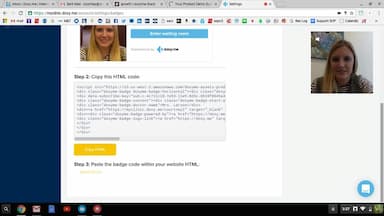
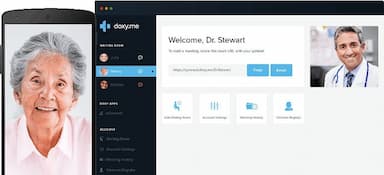
doxy.me is a browser-based telehealth platform that enables healthcare providers to conduct video consultations with patients remotely. Providers can create a virtual waiting room, share a session link, and meet patients without requiring them to download an application or create an account. Additionally, the platform supports patient transfers between providers, allowing care teams to hand off patients without requiring them to restart the appointment.
What Is doxy.me Best For?
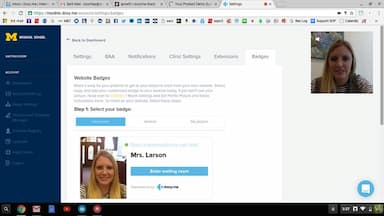
A standout function of doxy.me is its branding and customization features. Providers can add their clinic name, upload logos, select brand colors, and customize their patient waiting rooms with welcome messages, appointment instructions, images, and videos. They can also use a unique clinic URL and customize email invitations and reminders to maintain a consistent identity across patient interactions.
How Much Does doxy.me Cost?
doxy.me pricing starts at $35/user/month for the Premium plan, offering features such as photo capture, adaptive video, group calls, and more. Additionally, the Free Plan offers essential telehealth features, making it suitable for healthcare providers who are just starting out.
Other than the base subscription, organizations should account for the following additional expenses:
- Interpreter App: $0.99/minute
- Payment Processing: Providers accepting patient payments through doxy.me may incur Stripe processing fees of 2.9% + $0.30/transaction; actual rates may vary by country and payment method
Users generally describe doxy.me as competitively priced, considering the steady addition of new telehealth features. Users also appreciate that the platform balances affordability with functionality, while the paid plan offers advanced customization and enhanced workflow tools for practices needing more robust virtual care support.
Disclaimer: The pricing is subject to change.
doxy.me Integrations
doxy.me software connects with the following applications:
- Auth0
- Calendly software
- Azure SSO
- Okta
- Juvonno
How Does doxy.me Work?
Follow the steps below to make the most of doxy.me features:
- Log in to your doxy.me account using your credentials to access the provider dashboard
- Configure your provider profile and virtual waiting room settings to establish how patients see your practice
- Share a personal waiting room link with patients, or send an invitation through email or SMS
- Manage patient check-ins through the waiting room and patient queue, where you can see who is ready for an appointment
- Start the video consultation by selecting the patient from the queue and launching the call
- Review available session history and reporting tools to check previous visits and monitor practice activity
Who Is doxy.me For?
doxy.me caters to healthcare providers across clinics, hospitals, and organizations of all sizes that offer telehealth services. Its platform supports medical professionals, including:
- Physicians
- Therapists
- Counselors
- Social workers
doxy.me Use Cases
Based on our analysis of user feedback and doxy.me’s current capabilities, we have identified the following scenarios where the platform is a good fit:
Public Health Programs Managing Multi-Site Telehealth Services
Government health departments and publicly funded healthcare initiatives often coordinate virtual services across multiple facilities, regions, and provider teams. doxy.me supports centralized management of users, roles, and permissions, allowing administrators to oversee deployments across locations. Its browser-based patient access also suits programs serving geographically dispersed populations that may not have the resources or technical expertise to install additional software.
Research Teams Conducting Remote Clinical Studies
Academic institutions, clinical researchers, and study coordinators may need to conduct screening interviews, obtain informed consent, perform remote evaluations, and maintain contact with participants between study milestones. doxy.me supports these activities through remote video sessions, group consultations, and its Teleconsent app for reviewing and signing consent documents. It is particularly relevant to studies involving participants in different locations, where requiring repeated on-site visits could complicate recruitment and follow-up.
Community Health Centers Serving Underserved Populations
Community health centers frequently serve patients who face transportation difficulties, limited internet access, language barriers, or competing work and family responsibilities. doxy.me allows patients to join consultations through a browser link without creating an account or installing an application. Low-bandwidth mode, multilingual support, and interpreter access can also help centers accommodate patients with different connectivity and communication needs. This makes it relevant to safety-net providers extending behavioral health, primary care, and community-based services beyond their physical facilities.
Health Systems Coordinating Care Across Departments And Locations
Hospital networks and multi-location health systems need consistent virtual care processes while allowing teams to coordinate patient visits across departments. doxy.me supports just-in-time (JIT) user provisioning through single sign-on (SSO), allowing new users to be created and assigned through the authentication process. Its Shared Rooms also let multiple authorized providers or staff members access the same patient check-in room and transfer patients between rooms. These capabilities support coordinated care workflows across departments and locations.
Is doxy.me Right For You?
If you are looking for a secure and scalable telehealth platform for virtual consultations, doxy.me can be a suitable choice for independent practitioners and multi-provider clinics. Its security framework includes HIPAA, GDPR, and CCPA compliance, SOC 2 accreditation, and encryption to protect patient information. The platform also provides a Business Associate Agreement (BAA).
Still unsure whether doxy.me meets your needs? Call our experts at (661) 384-7070 to discuss your requirements, explore your options, and make an informed decision.
doxy.me Features
Scribe
Scribe processes audio from telehealth sessions and uses AI to generate structured clinical notes in SOAP, DAP, PIE, or Intake formats. Providers can launch it directly during a doxy.me appointment or use it from the dashboard to document in-person visits through live dictation, typed notes, or uploaded documents and recordings. They can configure Scribe to start automatically at the beginning of sessions, set a default note format, and generate a full transcript alongside their notes.
Photo Capture
doxy.me features Photo Capture that lets providers take high-resolution photographs during a live telehealth appointment. It can capture visible symptoms, injuries, identification cards, and insurance cards. Before a photo can be taken, the patient must grant consent through an on-screen prompt. Providers can preview the image, retake it if necessary, and download it as a file.
EMDR
This EMDR app provides bilateral stimulation tools for conducting Eye Movement Desensitization and Reprocessing therapy during remote consultations. Providers can display a moving shape on the patient's screen, play alternating sounds through headphones, or combine both stimuli. Visual settings include horizontal, vertical, and diagonal movement patterns, adjustable speed, dot colors, and backgrounds. Audio settings offer multiple sound styles.
Whiteboard
This feature provides a shared digital canvas where providers and patients can draw, type, create shapes, insert notes, and annotate uploaded materials during a video consultation. Users can upload images, worksheets, and supported documents, then mark specific areas to explain a concept or discuss a clinical observation. The canvas also supports zooming and panning, allowing users to navigate larger diagrams or documents.
Teleconsent
Teleconsent enables providers to present digital consent and privacy forms during telehealth appointments, complete required fields, and collect electronic signatures from patients. Its split-screen interface allows both parties to view the document while continuing the consultation. Providers can highlight specific text for patients or direct them to particular sections of a form.
Pros And Cons of doxy.me
Pros
Easy-to-use interface simplifies telehealth sessions for providers and patients
HIPAA-compliant platform supports secure communication and patient confidentiality
Easy screen sharing lets providers show patients exactly what’s on their screen
Cons
Incoming phone calls can briefly interrupt audio and video during telehealth sessions
Limited scheduling capabilities complicate appointment management
doxy.me Pricing
Free Plan | Premium Plan |
|---|---|
$0 | $35 per user per month (billed monthly) |
|
|
Disclaimer: The pricing details were last updated on Oct 02, 2026 from the vendor's website. Please contact us for a tailored pricing list.
doxy.me Reviews
Total 579 reviews
4.7
All reviews are from verified customers
Rating Distribution
5
Stars73%
4
Stars23%
3
Stars2%
2
Stars1%
1
Stars1%
Share your experience
Mental Health Care, N/A employees
More than a year
“reliable platform”
Pros
It's dependable and lets me use my biolateral music to support the healing process. Also, the app has a solid set of features that make it feel fully equipped.
Cons
Everything about it works for me. The biggest reason I'm confident using it is that it's HIPAA compliant and secure so I'm not sure what else you'd want me to add for this question.
Rating Distribution
Ease of use
10
Value for money
10
Customer Support
10
Functionality
9
Health, Wellness and Fitness, N/A employees
Less than a year
“feature-rich telehealth”
Pros
Doxy.me has been a standout for me its feature set really puts it ahead of a lot of other telehealth options. I can generate a reliable link for patients, preview my camera, mic and audio, track when patients actually log into the session and start the visit right from a single screen. They've also rolled out billing and payment options recently which makes the whole workflow more complete. Between their different plans, the pricing feels strong and support has been quick and genuinely helpful whenever I run into bugs. Switching over from other video platforms was simple too, the learning curve is basically nonexistent.
Cons
Would be useful to have some kind of automated notification or email sent to providers when service is expected to be down or when downtime is happening. I also keep a stable backup option ready so I can quickly redirect patients if Doxy.me is unavailable. Downtime doesn't happen often but when it does, it tends to be sudden.
Rating Distribution
Ease of use
10
Value for money
9
Customer Support
8
Functionality
9
Health, Wellness and Fitness, N/A employees
More than a year
“top-notch tool”
Pros
I've been using Doxy.Me because it's simple for my patients. Clinicians don't need to jump through hoops to get started and patients also don't run into a learning curve.
Cons
The paid subscription is the only downside though it still ends up being less expensive than most alternatives. When I was in private practice, I used the Clinic version for a few months and it was absolutely worth the added peace of mind.
Rating Distribution
Ease of use
9
Value for money
8
Customer Support
10
Functionality
9
Frequently Asked Questions
Does doxy.me have an app?
No, doxy.me does not require a dedicated mobile app. It runs directly in a web browser on mobile devices and desktop computers.
Is doxy.me a video calling platform?
Yes, doxy.me is a web-based video calling platform designed specifically for telehealth appointments.
Does doxy.me support multiple providers and locations?
Yes, doxy.me supports multiple providers and clinic locations under one account. Each provider has a dedicated virtual room, while administrators can manage clinic operations across locations.
How does the doxy.me waiting room work?
doxy.me places patients in a virtual waiting room before their consultation. Providers can monitor arrivals and start sessions when ready. Patients can also complete forms, make payments, share files, and communicate through chat while waiting.
Can staff transfer patients to another provider in doxy.me?
Yes, doxy.me allows staff to transfer patients to another provider’s waiting room without requiring them to rejoin the session.