

MediTouch
Last Updated
Key Takeaways
Generated from the text of customer reviews
MediTouch, now NextGen Office, is a cloud-based EHR and practice management platform for independent medical practices. Physicians and practice staff use it across specialties such as primary care, internal medicine, and cardiology. Reviewers appreciate its ease of navigation and customizable templates, while others report technical glitches and inconsistent support. Recent updates include enhancements in the practice management system.
Our Verdict
MediTouch is worth considering for independent practices looking to manage clinical and administrative workflows through one platform. Its customizable templates and broad functionality may suit practices with varied needs. Pricing tends to be on the higher side, making it less suitable for smaller practices. We recommend it for practitioners looking to consolidate their day-to-day operations through an integrated healthcare platform.
Overall Rating
Based on 13 users reviews
3.8
Rating Distribution
Positive
85%
Neutral
8%
Negative
8%
Starting Price
Custom Pricing
MediTouch Specifications
- Appointment Management/Scheduling
- e-Prescriptions
- Lab Integration
- Patient Portal
What Is MediTouch?
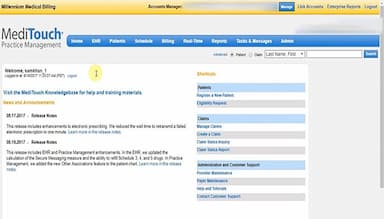
MediTouch, now known as NextGen Office, is a cloud-based EHR, practice management, and billing solution with an embedded patient portal. Because everything runs through a browser, staff can work from a laptop, tablet, or desktop without maintaining servers. The software allows healthcare staff to verify eligibility in real time before every appointment. For small offices balancing clinical and financial work with limited staff, this consolidation helps keep revenue visibility close to the chart.
What Is MediTouch Best For?
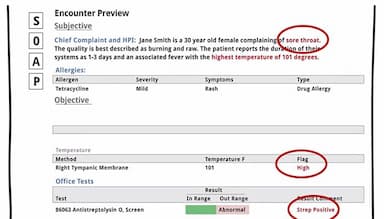
MediTouch stands out for NextGen Office Clinical AI, which helps clinicians turn natural patient-provider conversations into structured SOAP notes that flow directly into the EHR. The notes can be generated within seconds, so providers can review and sign instead of typing from a blank screen. Because charting is the task that most often spills into evenings, this capability suits independent providers with a steady daily patient load. The result is less after-hours work and more attention on the patient during the visit.
How Much Does MediTouch Cost?
MediTouch cost is estimated to fall between $300 and $600/provider/month, based on third-party estimates and comparable small-practice EHR solutions. Actual costs can differ based on the number of providers, provider type, specialty, chosen modules, and contract terms.
In addition to the base subscription costs, practices should account for the following potential expenses:
- Clinical AI Documentation: $100-$300/provider/month
- Revenue Cycle Management Services: T1,000 to $3,500/provider/month, or roughly $12,000 to $42,000/provider/year
- Data Migration From A Legacy System: $1,000-$10,000
- Third-Party Interfaces (Labs, Imaging, And Other Systems): $500-$5,000/interface
MediTouch pricing has received mixed user feedback. Some users consider the software cost-effective, appreciating the range of features it offers. However, others find its cost too high for practices operating on tight budgets.
Disclaimer: Pricing references are based on publicly available third-party information and industry benchmarks. Actual costs may vary.
MediTouch Integrations
MediTouch supports integration with multiple, such as:
- Cozeva
- CareTrax
- OpiSafe
- Payer Connect
- Physiotec
How Does MediTouch Work?
Once you have logged into the MediTouch software, here's how you can navigate further:
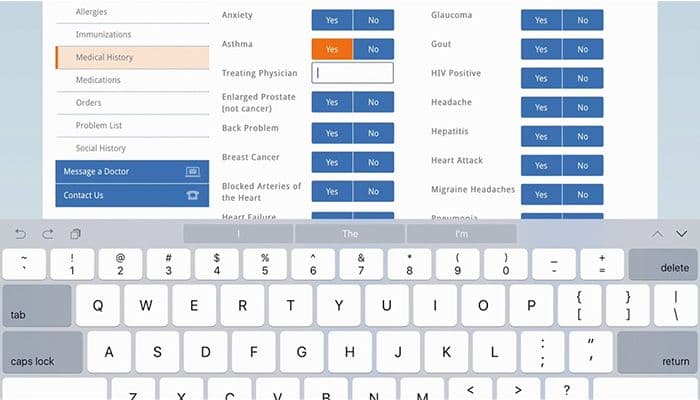
- Enter or import patient demographics and insurance details, and start a chart from an eligibility response
- Schedule appointments across providers and locations, then send text or email reminders ahead of each visit
- Document encounters by touching, talking, or typing, or let Clinical AI draft a SOAP note from the visit conversation for provider review
- Prescribe electronically and order labs from within the chart, then review results as they return
- Submit claims through the integrated clearinghouse, post remittances, and follow up on denied or rejected claims
- Review MACRA/MIPS and financial reports to monitor quality measures and practice performance
Who Is MediTouch For?
MediTouch serves the following:
- Primary care
- Internal medicine
- Podiatry
- Behavioral health
- Cardiology
- Ophthalmology
MediTouch Use Cases
Based on our analysis of MediTouch features and user reviews, we have identified key scenarios where this software is a good fit for small independent practices:
1. Small Clinics Reducing Data Reconciliation Across EHR, Billing, And Patient Portal Systems
Small clinics often have to deal with patient records, billing, appointments, and communication across different systems. MediTouch brings these functions together, so staff don't have to switch between multiple vendors to manage everyday practice activities. This capability can reduce the administrative effort involved in reconciling information across vendors.
2. Multi-Provider Practices Adapting Clinical Documentation To Different Specialties And Visit Types
Practices with physicians and other clinicians can use MediTouch to configure chart tabs according to specialty, practice, provider, and visit type. This allows clinicians to access documentation sections relevant to their encounters instead of working from a uniform layout for every patient. The flexibility can support more consistent charting across a multi-provider team while accommodating differences in clinical workflows.
3. Practice Managers Investigating Claim Denials And Coordinating Appeals Without A Dedicated Billing Team
Keeping up with denied claims and appeals can be difficult for smaller practices, especially when there isn't a dedicated billing team to handle follow-ups. MediTouch can help in this regard. It enables practice managers to maintain visibility into claim issues by connecting billing activity with the associated encounter documentation.
4. Multi-Location Practices Coordinating Provider Schedules And Patient Records Across Offices
Providers who rotate between office locations need scheduling workflows that reflect availability across sites. MediTouch allows staff to view and manage physician schedules across multiple locations and move appointments as needed. Additionally, its cloud-based records support access to patient information across offices. These functionalities can help practices coordinate appointments and reduce scheduling conflicts when providers work at different sites. Reviewers also appreicate the ease of appointment scheduling it offers.
MediTouch User Sentiments
Most Positive Sentiments | Least Positive Sentiments |
Customizable Clinical Templates 80% positive 8% negative 12% neutral/mixed Users appreciate the ability to modify clinical templates and documentation to fit their practice workflows. This flexibility can help clinicians adapt records to their documentation needs. One reviewer noted: “Easy to modify ‘template’ or document on the fly.” | Customer Support Consistency 25% positive 60% negative 15% neutral/mixed Some users report delayed callbacks and difficulty getting technical or administrative issues resolved. These experiences can prolong disruptions and require additional follow-up from practice staff. One reviewer described support as “Average customer support, at best.”
|
Scheduling and Financial Reporting 75% positive 10% negative 15% neutral/mixed Reviewers value the scheduling and financial reporting capabilities for managing appointments and monitoring practice finances. These tools can support routine administrative coordination. One reviewer stated that the “Scheduling portion is good” and “Financial reports are good.”
| System Reliability and Technical Glitches 20% positive 65% negative 15% neutral/mixed Some users experience intermittent system glitches that interrupt routine tasks. Problems with reports or appointment-related functions can require staff to verify information and repeat actions. One reviewer observed: “The system glitches. They seem to happen one after the other when they do happen.”
|
Ease of Use and Navigation 80% positive 8% negative 12% neutral/mixed Some users find MediTouch relatively straightforward to navigate and learn, helping staff become familiar with everyday tasks. One reviewer said: “It’s easy to navigate and pretty simple to learn.” | Clinical Workflow Efficiency 30% positive 55% negative 15% neutral/mixed Some clinicians find routine charting and information retrieval cumbersome because of excessive clicks and repetitive steps. These workflow demands can increase documentation time. One reviewer described the experience as involving “lots of clicks to perform the very simplest retrieval of information or data entry.” |
Is MediTouch Right For You?
MediTouch suits independent practices that want clinical, billing, and patient communication handled in one ONC-certified cloud system. It maintains HITRUST CSF alignment, SOC 2 Type II and SOC 3 audits, and ISO 27001 certification for its AWS-hosted cloud environment. The software also provides encryption in transit and at rest and role-based access controls.
The platform’s practice management software has been ranked first by Black Book Research. Its client base includes family and internal medicine offices such as Friendswood Family Medicine. On interoperability, MediTouch remains engaged with TEFCA initiatives.
NextGen Healthcare takes part in the framework as a Participant under Kno2, a designated QHIN, and its clients connect as Subparticipants.
Healthcare practices are increasingly adopting integrated EHR and practice management solutions to reduce administrative workloads. Upcoming CMS requirements further emphasize electronic prior authorization and standardized data exchange.
MediTouch addresses these priorities through AI-assisted SOAP note generation, clinical documentation, insurance eligibility verification, claims management, and electronic remittance posting.
Need to compare MediTouch’s capabilities with your practice’s needs? Call us at (661) 384-7070 to get started.
MediTouch Features
Patient Portal
The patient portal sits inside the MediTouch EHR and helps users handle online scheduling, appointment reminders, telehealth access, online payments, and medication refill requests. Patients can complete routine tasks without phoning the office, which can lower call volume at the front desk.
E-Prescribing And Lab Connectivity
With MediTouch, providers can send prescriptions through Surescripts-certified e-prescribing and exchange orders and results with major laboratories directly from the patient chart. Its immunization and specialty registry connections let practices submit required public health and quality data without separate portals. By keeping medication, lab, and registry activity inside the clinical record, clinicians can shorten routine order workflows.
Virtual Visits
MediTouch lets providers hold real-time video consultations and review remote patient monitoring data. Clinicians can attach notes, orders, and billing details to the same encounter record used for in-office care. This feature helps practices reach patients who cannot travel easily, follow chronic conditions between appointments, and keep documentation consistent across both care settings.
Revenue Cycle Management
Practices can pair the billing software directly with NextGen’s expert RCM services, which focus on reducing A/R time and increasing collections. The service targets rejected claims, denials, and overlooked charges that can steadily erode small-practice revenue. The use of MediTouch can also lower the medical billing burden on in-house staff, so teams can hand off time-consuming follow-up while still seeing exactly where each claim stands.
Reporting And Analytics
MediTouch supports MACRA/MIPS compliance and provides practice-wide financial analytics and business intelligence. Administrators can review quality performance alongside collections, which makes it easier to spot gaps well before reporting deadlines arrive. Because the data comes from the same clinical and billing records, practices can avoid assembling reports from manual spreadsheets.
Pros And Cons of MediTouch
Pros
Helps practices keep patient care and administrative activities organized
Simplifies coordination between clinical and administrative teams
Appointment scheduling supports coordination across clinic locations
Electronic prescribing keeps medication orders within clinical workflows
Patient portals let patients review records and request appointments
Cons
System updates may lead to crashes
Duplicate records can complicate patient matching and chart management
Complex reporting may require training to produce practice-specific reports
MediTouch Pricing
EHR and Clinical Workflows | Practice Management | Revenue Cycle Management |
|---|---|---|
Custom Pricing | Custom Pricing | Custom Pricing |
|
|
|
Disclaimer: The pricing details were last updated on Oct 23, 2026 from the vendor's website. Please contact us for a tailored pricing list.
MediTouch Reviews
Total 13 reviews
3.8
All reviews are from verified customers
Rating Distribution
5
Stars23%
4
Stars62%
3
Stars0%
2
Stars8%
1
Stars8%
Share your experience
Primary Care, 11-50 employees
More than a year
“stuck with them”
Pros
it was easy to learn
Cons
they deactivated us by mistake and is taking DAYS and counting to reactivate. will nt own up to their mistake and we are now going through red tape to start it back up. customer service is a mess. they cannot function without certain departsments whoare ot aviaalbel after office hours.
Rating Distribution
Ease of use
5
Value for money
5
Customer Support
1
Functionality
3
Faith Healthcare, LLC, 10-49 employees
“Saves a lot of time”
Pros
The software requires a bit more effort to master it completely but the after sales service is a great help.
Cons
There are too many choices for some of the sections. Makes it confusing at times.
Rating Distribution
Ease of use
9
Value for money
8
Customer Support
8
Functionality
8
Compass Physical Therapy, 2-9 employees
“A bit overpriced”
Pros
It’s a very large EMR service providing company and offers way more features than competitors.
Cons
The price is not suitable for small businesses.
Rating Distribution
Ease of use
7
Value for money
7
Customer Support
7
Functionality
8
Frequently Asked Questions
Can MediTouch handle both clinical documentation and medical billing?
Yes. The platform combines EHR, practice management, billing, and claims processing. This allows practices to document patient encounters and manage administrative and revenue-related workflows within one system.
Does MediTouch help practices migrate data from an existing EHR?
Yes. MediTouch offers data conversion services to help practices move information from existing clinical and practice management systems to NextGen Enterprise.
What training does MediTouch provide for medical practices?
MediTouch offers online learning modules, hands-on exercises, and trainer-led sessions for physicians and administrative staff. Training can take place online or onsite, depending on the practice's needs.
Can MediTouch verify patients' insurance eligibility before appointments?
Yes. The software includes real-time insurance eligibility verification, with re-verification available before appointments. This helps staff identify potential coverage issues earlier in the billing process rather than discovering them after claims are submitted.
Can MediTouch exchange data with third-party healthcare systems?
Yes. MediTouch supports data exchange through interfaces for laboratory systems, medical devices, immunization registries, document management systems, and picture archiving and communication systems (PACS). Its NextGen Rosetta solution supports document interfaces, while HL7 v2.5 is its preferred standard for connecting with third-party systems.
Does MediTouch offer a patient portal for online appointments and payments?
Yes. The embedded patient portal supports features such as online scheduling, appointment reminders, online payments, virtual visits, and medication refill requests.