


Practice EHR
Last Updated
Key Takeaways
Generated from the text of customer reviews
PracticeEHR is an EHR platform for clinical documentation, scheduling, and billing, used by healthcare providers and front-desk teams. Users praise its remote access capabilities, though some note that note fields do not always carry over between visits. Recently, PracticeEHR introduced AI inbound payment calls, group visit management, and a new CRM module.
Our Verdict
PracticeEHR is a dependable option for practices that want to manage billing and clinical workflows without investing in multiple systems. Pricing is favorable for part-time and solo providers, while additional charges may increase the overall cost. We recommend it for these groups after a careful quote comparison.
Overall Rating
Based on 54 users reviews
4.4
Rating Distribution
Positive
85%
Neutral
13%
Negative
2%
Starting Price
$229
per provider per month
Practice EHR Specifications
- Appointment Management/Scheduling
- e-Prescriptions
- Lab Integrations
- Patient Portal
What Is Practice EHR?
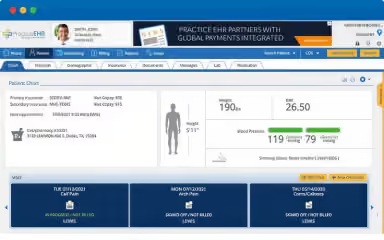
PracticeEHR is an AI-powered electronic health record (EHR) and practice management solution designed to help healthcare practices manage clinical, administrative, and billing tasks in one system. Providers can use it to document patient encounters, schedule appointments, manage claims, and engage with patients. The platform’s AI tools also assist with clinical notes, claims, payer follow-up, and routine phone calls.
What Is Practice EHR Best For?
PracticeEHR stands out for its AI agents that help handle front desk and billing calls. The agents can answer scheduling requests, capture appointment requests, process reschedules and cancellations, and route details into PracticeEHR for staff review. They can also help manage routine patient inquiries, explain payment balances, check claim status, verify insurance eligibility, and support prior authorization checks.
How Much Does Practice EHR Cost?
PracticeEHR pricing starts at $229/provider/month for the Essential plan. This tier includes core progress notes, scheduling, e-prescribing, telehealth, patient portal, and patient self-scheduling. Other plans include:
- Pro: $379/provider/month
- Elite: Custom pricing
The vendor offers two additional modules with plans, including:
- EHR + PM
- Essential: $349/provider/month
- Pro: $499/provider/month
- Elite: Custom Pricing
- RCM
- RCM: Custom pricing
- RCM Elite: Custom pricing
- Practice Complete: Custom pricing
Other than the base price, buyers should also consider the following estimated additional costs:
- Training: $500–$12,00 one-time for staff training based on practice size and vendor waiver
- Check-In Kiosk Hardware: $500–$2,500/station for tablets, scanner units, etc.
- Payment Processing: 2.5%–3.5%/card transaction on patient payments, charged by the processor rather than the software vendor
User feedback highlights mixed views on Practice EHR’s pricing. Some users describe the software as cost-effective, particularly for solo and part-time practices, while others say the cost is high. One user also reports that à la carte feature charges can make the total cost higher.
Disclaimer: The pricing is subject to change.
Practice EHR Integrations
PracticeEHR software supports integration with Zoom.
How Does Practice EHR Work?
Here's how you can get started with PracticeEHR:
- Log in to access charting, scheduling, billing, and AI tools
- Book appointments and send automated reminders to patients
- Chart visits as AI Scribe drafts the initial clinical note during patient conversations
- Send prescriptions electronically, including controlled substances through EPCS
- Start a TeleVisit and complete charting and billing within the same workflow
- Review and submit claims after AI Claim Editor flags potential errors and warnings
- Utilize AI Assist to manage patient billing, scheduling, and results
Who Is Practice EHR For?
PracticeEHR serves professionals working across the following specialties:
- Cardiology
- Bariatrics
- Primary care
- Chiropractic
- Behavioral health
- Aesthetic medicine
Practice EHR Use Cases
Based on our analysis of user feedback and PracticeEHR's current capabilities, we have identified the following key business scenarios where it is well suited:
Multi-Site Clinics Losing Appointments To Overwhelmed Front Desks
Across a network of clinics, front-desk staff fielding appointment calls at every site often struggle to keep up. Missed or delayed responses can leave some providers' schedules underfilled while patient flow remains uneven across locations. PracticeEHR's AI Agents handle appointment calls across multiple locations, reducing hold times and handling calls that front desk would otherwise miss. This helps recover appointment opportunities that would have been lost and keeps scheduling more consistent across the whole network.
Practices Buried Under Manual Check-In Paperwork
Patients lining up at the front desk to complete paperwork can create delays and add work for an already busy staff. Practice EHR's self-check-in kiosks let patients check in, update insurance information, and complete forms electronically. As a result, this cuts down both the front desk's workload and the time patients spend waiting.
Practices Struggling To Reach Patients Who Can’t Visit In Person
Practices that rely only on in-person visits can lose appointments when patients are unable to travel, and those empty slots are often hard to recover. Practice EHR’s TeleVisit lets a practice run virtual consultations from the same system used for scheduling and charting. This allows providers can see more patients, fill gaps in the day, and retain patients who struggle to visit.
Providers Falling Behind On Documentation After Every Visit
Writing detailed notes after each visit eats into the time providers could spend with patients and tends to pile up into an end-of-day backlog that leaves both staff and patients worn down. PracticeEHR's AI Scribe captures notes live during the visit itself, removing the burden of lengthy documentation after hours. Because of this, providers spend less time on documentation and get more time back for patient care.
Is Practice EHR Right For You?
Are administrative tasks slowing down practice operations? PracticeEHR's may be a suitable solution. The platform also supports HIPAA compliance and maintains a SOC 2 attestation, with audited controls covering the security, availability, and confidentiality of healthcare data.
However, practices that only need basic clinical documentation may find its broader practice management and administrative functionality more than necessary.
Still doubtful if Practice EHR is the right fit for you? Connect with us at (661) 384-7070 if you need help making the right decision.
Practice EHR Features
Patient Check-In Kiosk
This tool lets patients check themselves in at the front desk on a self-service device. They confirm demographic and insurance details and pay their balance at check-in. The AI Scanner reads ID and insurance cards, with the captured information added to the patient's chart.
TeleVisit
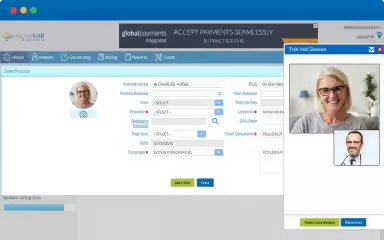
With the TeleVisit feature, providers can run virtual visits from within the EHR. They launch HD video and audio calls from the PracticeEHR home screen, send patients secure links with automated reminders, and manage virtual appointments in the same system as the rest of the schedule.
AI Scribe
Clinicians can use this functionality to convert patient conversations into clinical notes. It transcribes in more than 20 languages and drafts SOAP sections with medications, labs, and follow-ups. Suggested ICD and CPT codes are included for the next check, and providers review and approve the draft when the encounter ends.
AI Claim Editor
The platform gives billing staff a way to catch claim problems before they go out. It reviews each claim for coding, modifier, and payer-rule issues and flags potential errors. The team corrects them, then sends the claim to the payer.
Revenue Cycle Management (RCM)
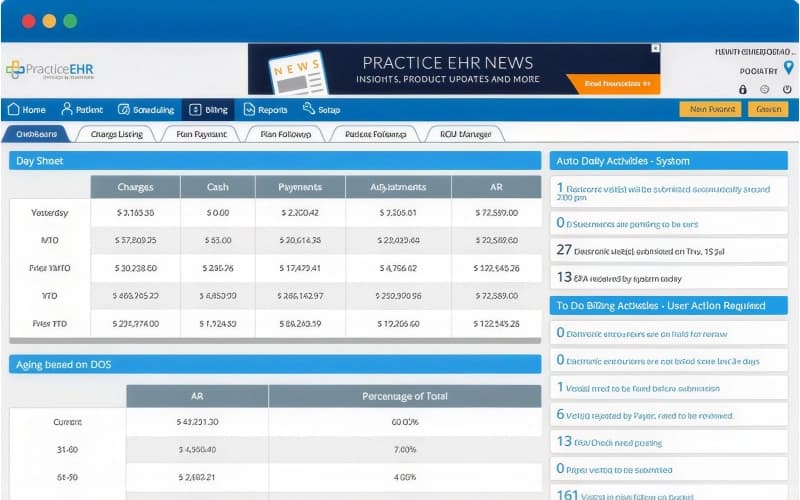
With this feature, practices can hand off billing to a certified team starting from the encounter. The team works denials, posts payments, reconciles accounts, while credentialing comes with higher RCM plans. Dashboards show claims, denials, accounts receivable, collections, and billing performance with live data and customizable reports.
Patient Portal
Practice EHR provides a HIPAA-compliant patient portal that connects patients with their practice outside of visits. Patients can access health records, request or cancel in-office and telehealth appointments, securely message providers, complete forms, and view and pay bills online. They can also update demographic information, submit health data for provider review, and receive automated reminders for refills, labs, and follow-ups. Caregiver access allows authorized individuals to help patients manage their care through the portal.
Pros And Cons of Practice EHR
Pros
Claims dashboard flags rejections, so staff resolve billing issues early
Text and email reminders notify patients ahead of visits
In-app faxing sends documents without a separate tool
Cons
E-prescribing sends one drug at a time
Scheduling view shows overlapping appointments
Practice EHR Pricing
Essential (EHR) | Pro (EHR) | Elite (EHR) | Essential (EHR + PM) | Pro (EHR + PM) | Elite (EHR + PM) | RCM | RCM Elite | Practice Complete (RCM) |
|---|---|---|---|---|---|---|---|---|
$229 per provider per month | $379 per provider per month | Custom pricing | $349 per provider per month | $499 per provider per month | Custom pricing | Custom pricing | Custom pricing | Custom pricing |
|
|
|
|
|
|
|
|
|
Disclaimer: The pricing details were last updated on Oct 09, 2026 from the vendor's website. Please contact us for a tailored pricing list.
Practice EHR Reviews
Total 54 reviews
4.4
All reviews are from verified customers
Rating Distribution
5
Stars61%
4
Stars24%
3
Stars7%
2
Stars6%
1
Stars2%
Share your experience
Mental Health Care, 1-10 employees
Less than 6 months
“Made our switch completely smooth!”
Pros
The team really went the extra mile to make switching over to this EHR completely smooth. The system itself is thorough, user friendly and handles all our scheduling, billing and patient management without a hitch.
Cons
I did not have any issues with it at all. Some unexpected events meant I could not keep my practice going but I am hoping my current job will consider switching to this EHR system.
Rating Distribution
Ease of use
10
Value for money
10
Customer Support
10
Functionality
10
Medical Practice, 1-10 employees
More than a year
“incredibly helpful team”
Pros
The main reason we picked Practice EHR is that when you call, a real person answers I mean no automated menus. Also the support team is incredibly helpful, friendly and kind. They were especially patient while I was learning the billing side, always ready to help me out anytime.
Cons
If I make an error like entering the wrong service date after a claim is already billed, I have to submit a ticket for them to correct it. I'd also like it if they could highlight the patient's most recent wellness or screening visit automatically.
Rating Distribution
Ease of use
8
Value for money
10
Customer Support
10
Functionality
9
Mental Health Care, 1-10 employees
More than a year
“Consistently available!”
Pros
They are consistently available and eager to assist. Their staff knows the system inside and out. They are also continuously rolling out updates which really helps keep things running well.
Cons
There is not anything about it that we dislike. They have treated us well for over six years now and we'd recommend them to any other practice.
Rating Distribution
Ease of use
10
Value for money
10
Customer Support
10
Functionality
10
Frequently Asked Questions
Does Practice EHR have a mobile app?
Yes, Practice EHR offers a mobile app for both iOS and Android.
Is any special software or hardware needed for Practice EHR?
No, Practice EHR is cloud-based software and can work in modern browsers. The optional hardware can include tablets for a patient self-check-in kiosk.
Does Practice EHR integrate with labs?
Yes, Practice EHR connects with labs, pharmacies, health networks, and devices, so teams can access information without chasing records by phone or fax. Its built-in interoperability requires no custom integration, IT team, or setup for most connections.
Can I customize templates to fit my specialty in Practice EHR?
Yes, Practice EHR lets users build customized documentation templates around their specialty, helping avoid rigid structures and reduce unnecessary clicks.
How easy is it to migrate to Practice EHR?
The vendor offers free migration, which users remark as straightforward due to specialized vendor support. One user mentioned that the Practice EHR team migrated all their data for them, which made the switch easy.