


Arcoro
Last Updated

Key Takeaways
Generated from the text of customer reviews
Arcoro is an HR platform built for the construction industry, used by HR managers, field supervisors, and payroll teams. It serves general contractors, specialty trades, and federal contractors. Users consistently highlight its construction-specific hiring tools as a strength, while some note that certain integrations require additional setup. Arcoro recently expanded its AI-assisted recruiting capabilities within the hiring module.
Our Verdict
Arcoro suits mid-to-large construction firms managing field-based, trade-specific, or federally regulated workforces. Its industry focus makes it a practical choice for organizations with high-volume hiring across jobsites. Pricing may present a barrier for smaller contractors, but larger operations with complex compliance and workforce needs will find it a worthwhile investment.
Overall Rating
Based on 1 users reviews
3
Rating Distribution
Positive
0%
Neutral
100%
Negative
0%
Starting Price
$9
per employee per month
Arcoro Specifications
- Employee Information Management
- Recruitment and Applicant Tracking
- Performance Management
- Attendance And Time Tracking
What Is Arcoro?
Arcoro is a cloud-based HR and workforce management platform designed specifically for construction companies. It covers recruiting and onboarding alongside employee management, time tracking, payroll, benefits, learning, and performance management. The platform also connects with construction ERP, accounting, payroll, and project-management systems.
What Is Arcoro Best For?
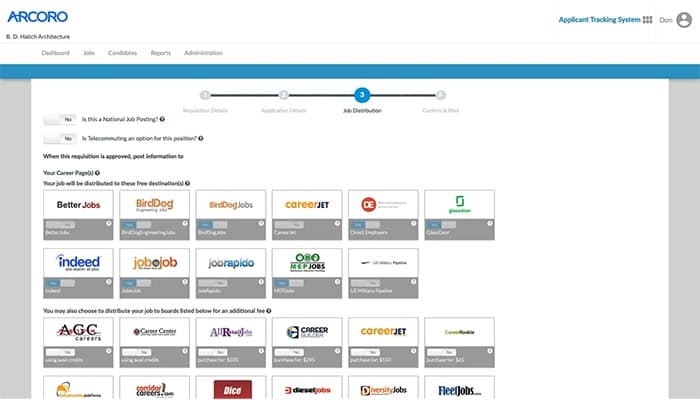
The platform stands out for its 'hire' module. Its hiring tools let companies post positions to construction-focused job boards, Moreover, they can communicate with applicants by text and accept applications through mobile devices or jobsite kiosks. When onboarding new employees, hiring teams can also manage background checks, E-Verify, WOTC screening, and federal contractor requirements from the hiring process.
How Much Does Arcoro Cost?
The platform’s starting price is $9/employee/month under its Time Essential plan. Features include mobile time and attendance tracking, location tracking, meal break tracking and notifications, etc. Additional Arcoro pricing tiers include:
- Time Professional: $11/employee/month
- Time + Payroll: $19/employee/month
Besides the monthly subscription costs, users should also account for additional charges to consider the total cost of ownership. It includes, but is not limited to, the following:
- Implementation And Setup Fees: $500 – $2,500 on time fee depending upon the company size
- Hardware And Field Equipment For Kiosk Tablets: $1,050/device
- ERP/Payroll Integration Connector: $1,200/year
Reviewers generally note that pricing delivers mixed value for mid-market companies. While larger teams save on job boards, smaller businesses face steep post-contract hikes. Overall satisfaction remains moderate due to these aggressive cost shifts.
Disclaimer: The pricing is subject to change.
Arcoro Integrations
The platform integrates with multiple systems and platforms, such as:
- CMiC
- Sage 100
- Sage 300
- Procore
- Viewpoint Vista
How Does Arcoro Work?
After logging in to the system, here's how you can get started:
- Post job openings and attract candidates by publishing listings directly to construction-specific job boards using the Applicant Tracking system
- Digitize new hire onboarding by sending electronic offer letters, standard forms, and tax documents for mobile sign-off before the first day on site
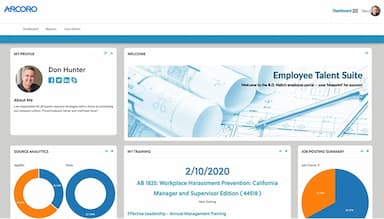
- Centralize employee records in the HRIS dashboard to manage personnel profiles, benefits eligibility, and key worker documentation in one place
- Track field hours and locations by having workers clock in via the mobile app or job site kiosk mode with GPS verification
- Review and approve timecards to streamline project job-costing and sync accurate labor hours directly with your payroll accounting system
- Manage employee benefits enrollment by letting staff select coverage options and automated plan deductions through the self-service portal
- Assign and track safety training in the Learning Management System to enforce OSHA compliance and keep track of active certifications
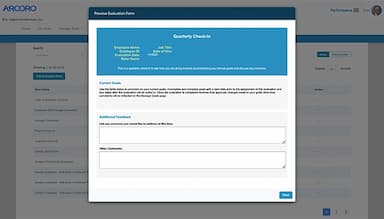
- Conduct performance reviews and map out succession plans to identify high-potential workers and build clear career growth paths
Who Is Arcoro For?
Arcoro is mainly suitable for businesses within the construction industry. These include:
- General contractors
- Concrete
- Electrical
- Heavy civil
- Plumbing
Arcoro Use Cases
Based on our assessment of Arcoro features, we have identified several situations where the platform is well suited for organizations responsible for managing physical assets and equipment:
1. Construction Companies Hiring Skilled Tradespeople
Arcoro can be used by recruiters to post openings to construction-specific boards, including MEPjobs and the Procore Construction Career Board. Candidates can apply through mobile-friendly forms, while recruiters can continue conversations through text messaging. This setup fits contractors regularly hiring electricians, plumbers, HVAC technicians, laborers, and other trade workers.
2. Contractors Recruiting Workers At Jobsites
General contractors running a hiring event at a jobsite can set up a tablet as an on-site application station using Arcoro's kiosk mode. Field candidates who show up in person can apply on the spot without needing a personal device or office access. This keeps the hiring process moving in environments where workers are present but may not engage through traditional online channels.
3. HR Teams Handling New-Hire Paperwork
HR staff can use Arcoro to collect digital I-9s, W-4s, and state-specific tax forms during onboarding. The platform also supports background checks, drug testing, and E-Verify. This gives HR teams a place to handle hiring documentation before a new worker begins.
4. Federal Contractors Managing Hiring Requirements
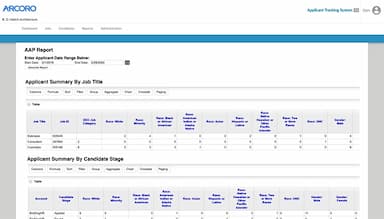
Companies working under federal contracts can use Arcoro to track VEVRAA and OFCCP requirements. Its hiring tools also include compliance reporting and WOTC screening. This is relevant when recruiting involves documentation and reporting obligations beyond ordinary applicant tracking.
Is Arcoro Right For You?
Arcoro is a practical option for mid-to-large construction companies that manage ongoing, high-volume hiring across multiple jobsites or trades. General contractors, electrical contractors, plumbing firms, HVAC companies, heavy civil operators, and federal contractors will find the platform structured around their specific compliance and workforce needs. These include including multi-state payroll, certified payroll reporting, OSHA safety training, and union wage calculations.
The platform was recently featured on Construction Executive’s Top Tech™ List for 2026. It was also ranked among the Top Construction Technology Firms™ for 2025 by Construction Executive.
Want to learn more about the Arcoro Software? Contact our expert team at (661) 384-7070 for detailed guidance.
Arcoro Features
Construction Specific Job Boards
Arcoro lets recruiters distribute openings across general and construction-focused job boards. Its ‘Hire’ module specifically mentions sites such as MEPjobs and the Procore Construction Career Board. This gives contractors a way to advertise trade positions in places where construction professionals are already searching rather than relying entirely on broad employment websites.
Candidate Texting
Recruiters can contact applicants through text messaging during the hiring process. Arcoro supports both automated and personal messages, giving hiring teams another channel for communicating with candidates. This can be useful for construction employers whose applicants may spend much of their working day away from desks and therefore may not regularly monitor email.
Kiosk Mode
Arcoro features a kiosk mode that turns a tablet or other supported device into an application station. Construction companies can place these devices at jobsites, hiring events, or other field locations where candidates can apply directly. The same approach can also be used for onboarding, making it practical for employers whose workers are not normally sitting at office computers.
Digital Onboarding Forms
The onboarding module lets companies replace paper employment documents with digital forms. Arcoro specifically supports electronic I-9s, W-4s, and state-specific tax forms. New hires can complete paperwork electronically, while the system keeps employee documentation available for tracking. This gives HR teams a digital alternative to collecting, sorting, and storing physical hiring paperwork.
Background Screening
Arcoro connects background screening with the hiring process. Recruiters can initiate and track background checks, drug tests, and other pre-employment screenings from the hiring system. This is useful for construction employers that need screening before placing workers on jobsites, particularly when different positions have different screening requirements before employment begins.
e-Verify Integration
The platform includes a direct connection to the federal E-Verify system for employment eligibility checks. Rather than treating eligibility verification as a separate hiring task, HR teams can include it within their existing recruitment and onboarding process. The platform also keeps related employment documentation available alongside other new-hire records.
Pros And Cons of Arcoro
Pros
Allows cross-posting to multiple sites
Job posting integrates well with website’s careers page
Providers visibility into everyone’s time and their leave requests
Cons
ERP and payroll integration syncs can experience delays during peak usage
During annual reviews users may get logged out at times
Arcoro Pricing
Time Essential | Time Professional | Time + Payroll |
|---|---|---|
$9 per employee per month (billed annually) | $11 per employee per month (billed annually) | $19 per employee per month (billed annually) |
|
|
|
Disclaimer: The pricing details were last updated on Sep 25, 2026 from the vendor's website. Please contact us for a tailored pricing list.
Arcoro Reviews
Total 1 reviews
3
All reviews are from verified customers
Rating Distribution
5
Stars0%
4
Stars0%
3
Stars100%
2
Stars0%
1
Stars0%
Share your experience
Not Specified, 500+ employees
More than a year
“Okay system for smaller busineses”
Pros
The simplicity and ease of use are what I appreciate about Arcoro. The step-by-step job posting procedure is straightforward, and the system provides effortless report generation.
Cons
Arcoro struggles to handle larger industries or companies, as the system becomes overwhelmed with a significant amount of information. This makes it quite cumbersome to search for candidates or conduct performance evaluations. If you need to translate the application or job postings into a different language, manual translation using Google Translator and copy-pasting is required. Arcoro is not very mobile-friendly for candidates applying through a mobile device. Furthermore, Arcoro couldn't fully replicate our existing performance evaluation process, resulting in a significant amount of manual work.
Rating Distribution
Ease of use
8
Value for money
6
Customer Support
4
Functionality
6
Frequently Asked Questions
Does Arcoro offer an API?
Yes, Arcoro offers an API to its users.
What language does Arcoro support?
Arcoro supports English language only.
What other apps does Arcoro integrate with?
Arcoro integrates with Sage 300, Sage 100, Procore, etc.
Does Arcoro have a mobile app?
Yes, Arcoro has a mobile app available on iOS and Android devices.
What type of pricing plans does Arcoro offer?
The Arcoro pricing starts at $9/employee/month for its Time Essential plan. Time Professional starts at $11/employee/month, while Time + Payroll starts at $19/employee/month. Get a flexible Arcoro cost today.
Who are the typical users of Arcoro?
Typical users of Arcoro include HR administrators, payroll accountants, and field superintendents.
What level of support does Arcoro offer?
Arcoro provides support central containing user guides, alongside email, phone and mailing address.