


Attendance on Demand
Last Updated

Overview
Attendance on Demand helps employers manage time, scheduling, and labor law compliance in a single platform. While its main dashboard may feel a bit overcrowded, it minimizes calculation errors with its benefit balances. It is a suitable option for mid-sized organizations with consistently changing hourly shifts.
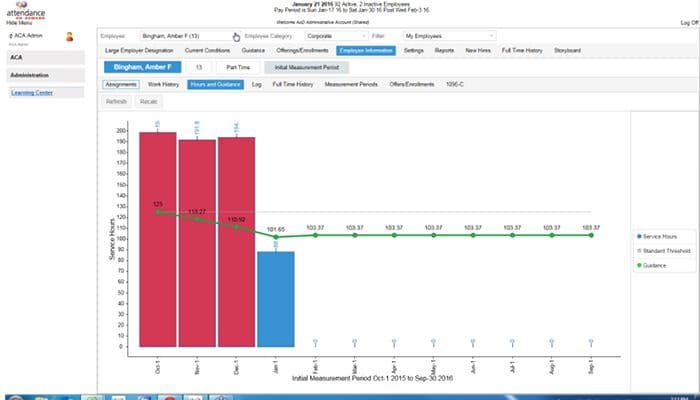
Attendance on Demand Specifications
- Attendance And Time Tracking
- Employee Self-Service Portal
- Workforce Analytics
- Employee Information Management
What Is Attendance on Demand?
Attendance on Demand is a cloud-based workforce management software that automates employee time tracking and labor scheduling. It can replace manual timekeeping with a single record that records hours and schedules and supports compliance with complex, evolving labor laws.
Combining these parameters in one place gives managers reliable hours data to plan labor and control costs without reconciling separate records. Its communication and collaboration tools also keep teams connected and informed throughout the scheduling process.
What Is Attendance on Demand Best For?
This platform stands out for its time and labor management system, through which organizations can keep the right number of employees on a shift while controlling labor costs. Its coverage calculations apply an organization’s own formula, working out the labor needed for each position and updates the scheduling template to match.
When an employee is absent, managers can simply look for replacements with the qualifications the shift requires. This way, coverage gaps can be closed faster. In addition, its parameter-based engine automates complex pay rules, which makes it a suitable choice in ensuring compliance.
How Much Does Attendance on Demand Cost?
Attendance on Demand pricing typically falls between $4 and $10/user/month. This estimate is based on industry benchmarks for cloud-based time and attendance platforms with integrated scheduling and compliance tools.
Besides the base price, organizations should also consider the following additional costs:
- Implementation And Onboarding: $1,000–$5,000
- Payroll And HCM Integration: $500–$3,000
- Compliance Rule Configuration And Extended Support: $500 to $2,500/year
Disclaimer: Pricing references are based on publicly available third-party information and industry benchmarks. Actual costs may vary.
Attendance on Demand Integrations
There is no publicly available information on the platform’s integrations.
How Does Attendance on Demand Work?
After successful onboarding, here’s how you can get started with Attendance on Demand:
- Log in to the platform to access the main dashboard and configure core workforce settings
- Define pay rules in the ‘time and labor’ engine so overtime and other labor requirements calculate automatically
- Set up leave policies and accrual rules, such as vacation, sick, personal, PTO, and FMLA
- Enter ‘coverage formulas’ based on census, time zones, or acuity so the system calculates the labor needed for each position
- Build the scheduling template and publish schedules to the digital shift board for employees to review
- Review compliance settings for overtime, paid sick leave, and fair scheduling rules
- Hand off day-to-day tasks like timecard approvals to managers
Who Is Attendance on Demand For?
This platform is used by professionals across different industries and sectors, including:
- Healthcare
- Staffing
- Manufacturing
- Retail
Attendance on Demand Use Cases
Based on our analysis of Attendance on Demand features and market positioning, we have identified some of its real-world applications:
1. Staffing Agencies Covering Last-Minute Call-Offs Across Sites
Attendance on Demand software can be used by staffing agencies placing temporary and contract workers with multiple clients. It helps them fill gaps when a worker calls out. The platform lets workers report absences through a mobile app, text, or phone, quickly starting the replacement process. Managers can filter available workers by skills, certification, availability, and proximity.
2. Skilled Nursing Facilities Managing Staffing Levels And PBJ Reporting
Long-term care and nursing facilities use Attendance on Demand to build schedules around resident census and unit zones. By integrating with the existing EHR, labor planning stays connected to current patient data. Per-patient-day and full-time equivalent analysis also helps administrators see whether coverage matches care needs.
3. Unionized Manufacturers Applying Shift Premiums And Overtime Rules
Attendance on Demand supports manufacturers running multiple shifts with collective bargaining agreements. They can calculate shift premiums, holiday pay, and paid time-off rules automatically. This gives plant managers visibility into unplanned overtime and under-scheduled shifts before they affect production commitments.
4. Multi-Store Retailers Managing Fair Schedules And Minor Labor Rules
Retailers operating several locations often find it hard to schedule against customer demand while following fair scheduling and overtime requirements. Attendance on Demand helps with exactly that: it handles rules for underage employees, like their work-hour limits. Its visual cues flag over and under-scheduled shifts along with employees nearing overtime, letting managers adjust before the week begins.
Is Attendance on Demand Right For You?
Attendance on Demand is a suitable choice for organizations that want a single time and labor system across their newly added locations, shifts, and worker types. Its time clock accommodates this by supporting touchscreens, facial readers, and PIN readers.
Aspen Management, Carolina Urological Associates, and Anesthesia Management Solutions are some of its well-known customers.
The platform also puts relevant security measures in place. Some of these are encryption in transit and at rest, account management and access control, regular backups, and network and endpoint protection.
Fair workweek laws now require advance schedule notice and extra pay for late charges in cities like Oregon, New York, and Chicago. Attendance on Demand keeps up with its scheduling tool, which automates schedule change notices and penalties.
Still unsure about Attendance on Demand? Connect with us at (661) 384-7070 so we can help you make the right choice!
Attendance on Demand Features
Scheduling
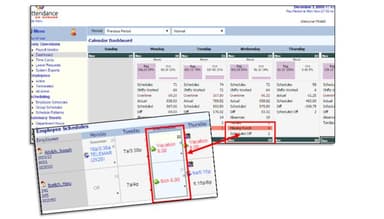
Attendance on demand lets employees pick up, swap, or drop shifts on their own. Staff can enter their availability and work preferences, and the system calculates leave, including sick time and vacation, based on factors like hours worked. This lets managers find suitable replacements when someone is absent.
Compliance
With this function, teams can automate the administration of paid sick leave laws, including accrual caps and carryover, according to regional laws. Its calculation engine applies overtime rules under the Fair Labor Standards Act. Meanwhile, timecard approvals, objections, and record-keeping can be handled at the clock or through mobile.
Time Clock
There are four time clock models available in Attendance on Demand: GT10, GT8, GT4, and GT4 Lite. All of these offer support for HID Proximity, RFID, and barcode badges, along with finger readers and PIN entry. These combine facial recognition and employee attestation, allowing staff to confirm each shift, supporting labor regulation compliance.
Pros And Cons of Attendance on Demand
Pros
Simplifies time card corrections and time-off requests
Prevents calculation errors with its benefit balances
Handles varied work schedules
Eliminates manual payroll calculations
Combines timekeeping and accrual tracking
Cons
Key features like accrual balances may be hard to find
Main screen is too crowded
Reporting features need improvement
Attendance on Demand Reviews
Total 1 reviews
4
All reviews are from verified customers
Rating Distribution
5
Stars0%
4
Stars100%
3
Stars0%
2
Stars0%
1
Stars0%
Share your experience
Utility, 500+ employees
More than a year
“Employees tracker and leave manager”
Pros
This software offers numerous practical additions. It provides various approaches to track operational costs and offers several reports to help you find the necessary information within the platform. It's an excellent choice for companies in need of timekeeping software for their personnel.
Cons
The user interface and calendar function are not very intuitive, especially when it comes to identifying dates for vacation and sick leave. However, once you understand how to navigate it, everything works well.
Rating Distribution
Ease of use
6
Value for money
8
Customer Support
6
Functionality
5
Frequently Asked Questions
Can Attendance on Demand track employee certifications and licenses?
Yes. It tracks skills, certifications, and licenses, with automated alerts before they expire. This helps employers whose staff need current credentials to work.
Does Attendance on Demand automate attendance warnings?
Yes. When an employee’s attendance triggers a policy event, the system creates a warning letter automatically and stores the incident in the employee’s attendance history for reporting. Its workflows that spot attendance trends and trigger consistent notices of formal disciplinary action.
Can employees clock in from their phones with Attendance on Demand?
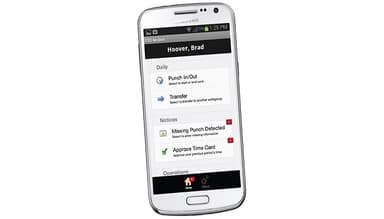
Yes. Employees can punch in and out from a desktop, a mobile device, or a time clock. They can also check benefit balances and request leave from any of those.
Is biometric data stored securely on Attendance on Demand time clocks?
The platform’s biometric identification data is encrypted in transit and cannot be exported from the system. It adds that templates can be deleted at the clock or by an authorized system user.
Can Attendance on Demand handle seasonal and temporary workers?
Yes. Employers can schedule and budget employees and seasonal staff to match year-over-year consumer demand across locations. That supports businesses whose headcount changes throughout the year.