


HR4
Last Updated

Overview
HR4 transforms people's operations with AI-powered solutions that are intuitive in time tracking, talent acquisition, learning, and development. It streamlines HR processes through automated payroll, compliance and engagement management. While customization requires expertise, HR4's modern approach to HR technology ensures organizations build a highly engaged workforce through precision and insight.
HR4 Specifications
- Employee Information Management
- Recruitment and Applicant Tracking
- Performance Management
- Attendance and Time Tracking
HR4 Features
Employee Onboarding
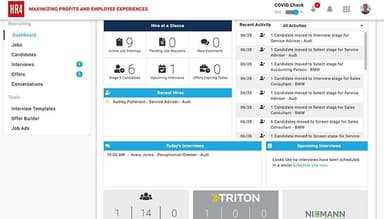
Applicant tracking and recruitment management help attract more applicants and fill roles faster by providing tools for job posting, candidate evaluation, and applicant management. It streamlines the hiring process, allowing businesses to hire new employees efficiently.
Time Management
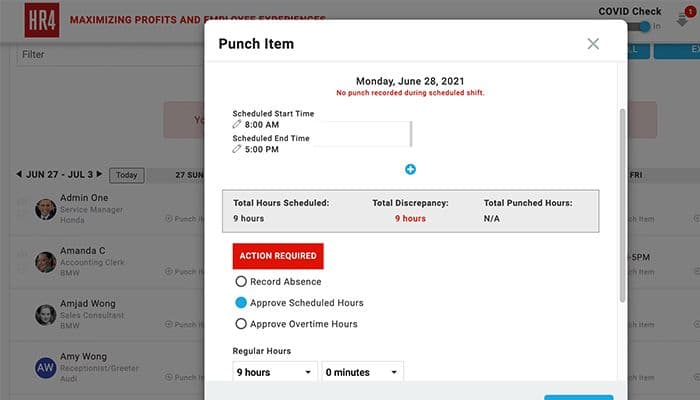
HR4 offers an AI-powered time-tracking feature that enables businesses to track employee working hours, manage attendance, and optimize workforce scheduling. Advanced features like biometric facial recognition AI, geo-fencing, and integrated health screening prompts ensure accurate time tracking and reduce time theft.
Business Development
It encompasses appraisal tools, goal-setting features, and feedback mechanisms to focus on employee growth and performance management. The platform facilitates ongoing conversations and supports the development of employees' skills and capabilities.
Employee Compensation
The software simplifies the management of employee compensation and benefits. It helps businesses define and administer salary structures, manage variable pay, and track employee benefits. HR4 ensures accurate and efficient compensation management, supporting employee satisfaction and retention.
Employee Engagement
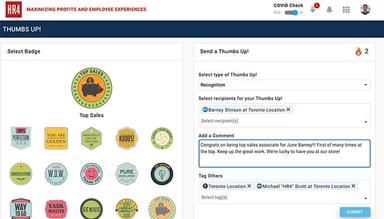
It promotes employee engagement and collaboration through various tools for surveys, feedback, and recognition programs. HR4 enables organizations to measure and improve engagement levels, fostering a positive work environment.
Pros And Cons of HR4
Pros
Makes the hiring process less time-consuming
User-friendly interface
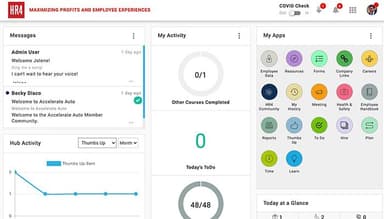
All-inclusive centralized dashboard
Automated payroll processing reduces errors and saves time
Cons
Some users faced difficulties with customization, according to HR4 reviews
integrating HR4 with existing systems may be challenging
HR4 Reviews
Total 3 reviews
4.7
All reviews are from verified customers
Rating Distribution
5
Stars67%
4
Stars33%
3
Stars0%
2
Stars0%
1
Stars0%
Share your experience
Small Business, 11-50 employees
Less than 6 months
“Amazing Program - Amazing People”
Pros
HR4 is a very beautifully designed software for all employee related tasks. Personally, this software majorly optimizes and saves time in the hiring process, document organization and employee training completion. In addition to the program, the customer support was exceptional from beginning to end. Also the highly communicative internal team ensured a seamless customer setup experience. Integration was simple too.
Cons
I have yet to discover any drawbacks with this company. I am completely satisfied overall
Rating Distribution
Ease of use
10
Value for money
10
Customer Support
10
Functionality
10
Recruitment, 101-500 employees
More than a year
“Great tool”
Pros
What I like the most is that the software is a detailed for workforce management. The tool is quite user friendly with a UI that is easy to navigate which makes tasks like managing directories, compliance and performance a hassle free task.
Cons
When I first used this tool, I faced few issues. For example the app hanging during workforce management. Logging out and back in resolved this but later there were a few instances where the tool stopped working and displayed errors on the webpage even though this happened only 2 to 3 times.
Rating Distribution
Ease of use
10
Value for money
9
Customer Support
9
Functionality
10
Not Specified, N/A employees
Less than 6 months
“User friendly and productive tool”
Pros
In our organization, we consider the hiring process feature one of the best features of HR4. The integration of digital methods benefits managers, associates and new candidates. This is something that has streamlined onboarding process ensures that new hires feel welcomed and quickly become part of the company. Additionally, we value the convenience of having all company policies, links, and employee information consolidated in a single, easily accessible platform for everyone in the organization. A key factor that truly sets our experience with HR4 apart is the exceptional support provided by their staff. They have been accommodating and responsive throughout the implementation process, ensuring a smooth transition. Even post-implementation, the HR4 team has continued to offer timely and effective support, making them a pleasure to work with!
Cons
Understanding the dashboard can be a bit challenging for beginners. It is necessary to familiarize oneself with all the elements and features to use this tool properly.
Rating Distribution
Ease of use
8
Value for money
9
Customer Support
9
Functionality
8
Frequently Asked Questions
Does HR4 offer an API?
No, the software does not offer an API.
What language does HR4 support?
HR4 supports the English and French languages.
What other apps does HR4 integrate with?
Triton, Microsoft 365, Employer D, and Beepzz.
Does HR4 support mobile devices?
Yes, it supports mobile devices.
What types of pricing plans does HR4 offer?
The software offers tailored pricing plans based on the organization's needs; you can request a custom HR4 pricing quote now!
Who are the typical users of HR4?
Organizations from various industries, including healthcare, corporate, construction, and automotive, can use the software.
What level of support does HR4 offer?
The software offers chat and a knowledge base.
Does HR4 have alternatives?
DayForce HCM, UKG Ready, and BambooHR are HR4 alternatives.