


Hubdrive
Last Updated

Overview
Hubdrive transforms HR management with its seamlessly integrated solution on the Microsoft Dynamics 365 platform. Trusted globally by leading companies like Nestle, it optimizes administrative tasks, facilitates digital transformation, and prioritizes data security. While its comprehensive features empower workforce management, some users may find the advanced functionalities overwhelming.
Hubdrive Specifications
- Employee Information Management
- Recruitment and Applicant Tracking
- Performance Management
- Attendance and Time Tracking
What Is Hubdrive?
Overview
Hubdrive provides an HR management solution built on the Microsoft Dynamics 365 business platform. It integrates the innovative HR components from Hubdrive, Microsoft, and partners, creating a seamlessly integrated HR solution for customers globally. Moreover, this tool proves to be a game changer for HR departments worldwide as it brings in a digital transformation.
Hubdrive Pricing
Hubdrive has a modular pricing structure, available as purchase or monthly subscriptions. The licensing model is very flexible, so users only have to pay for what they actually want to use.
Based on your business needs, you can change your subscription model at any time to react quickly to your employee base. The licensing models available are for:
- Staff
- Employees
- Supervisor
- Recruiter
- HR Manager
Disclaimer: The pricing is subject to change.
Hubdrive Integrations
The platform offers integration with various third-party applications. However, the vendor has not disclosed specific details about integrations.
Who Is Hubdrive For?
Features that Hubdrive offers are given below:
- Information Technology
- Energy Equipment
- Home Decor
- Manufacturing
- Food and Beverages
Is Hubdrive Right For You?
Are you looking for innovative HR management software to optimize and manage your operational needs? If yes, look no further than Hubdrive, as it provides diverse features to manage your workforce and is trusted globally by many companies, including Nestle.
The software prioritizes the protection of sensitive employee data and ensures adherence to industry-standard security practices. Additionally, it can accommodate the needs of growing businesses, allowing them to easily scale their HR operations.
Hubdrive Features
Time And Attendance
Hubdrive helps organizations manage and track employee attendance, working hours, and vacation management. By seamlessly integrating with Microsoft Teams and leveraging the dynamic capabilities of the Dynamics 365 platform, it offers a complete solution for efficient time and attendance management.
Objectives And Key Results Management
The platform helps businesses to effectively implement the OKR management method. Integrated seamlessly with the Dynamics 365 business platform, it helps companies align their goals, enhance focus, and drive strategic execution.
HR Management
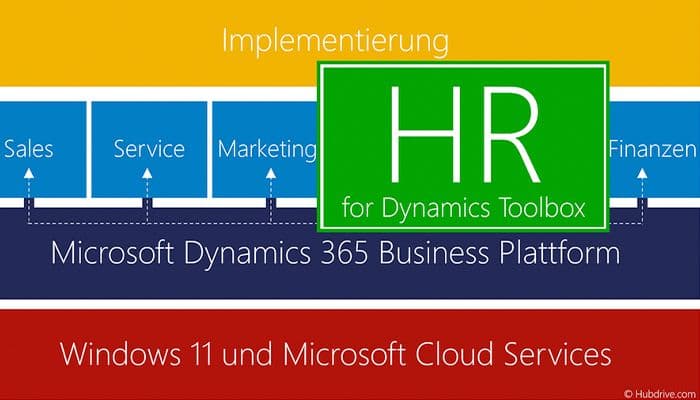
The software is a global solutions provider that optimizes administrative tasks and HR management processes. It's fully integrated with Dynamic 365 Power Platform, eliminating data islands and allowing all departments to work in a fully integrated manner.
Pros And Cons of Hubdrive
Pros
Dynamics Toolbox Provides 16 new HR tools from Hubdrive
Comprehensive features
Great customer support
Facilitates efficient digital transformation
Cons
Advanced functionalities overwhelm
Integration dependencies, as per some of the Hubdrive reviews
Hubdrive Reviews
Total 11 reviews
4.4
All reviews are from verified customers
Rating Distribution
5
Stars64%
4
Stars27%
3
Stars0%
2
Stars0%
1
Stars9%
Share your experience
Medical Practice, 101-500 employees
“centralized file access boosts productivity”
Pros
It has made it much more convenient to access, store and organize work-related files. Keeping everything in one place really helps me manage my day-to-day tasks with less back-and-forth and I can usually finish things faster because I'm not wasting time hunting for documents. When I'm juggling multiple assignments, it's especially helpful to quickly pull up the exact files I need without running into unnecessary complications. Overall, it feels like a solid workplace tool that supports productivity and simplifies document management.
Cons
If there's one thing worth improving, it would be the file search. Adding more advanced search options and better filters to quickly narrow down specific documents would make the experience even better especially for people working with lots of files every day and could save even more time.
Rating Distribution
Ease of use
10
Value for money
9
Customer Support
10
Functionality
9
Retail, 500+ employees
“useful drag-and-drop resource planning”
Pros
This has resource management feeling surprisingly simple. The interface is clean and user-friendly so you can schedule projects quickly, monitor availability and handle workloads without hitting a steep learning curve. Drag-and-drop planning plus the clear visual views make it easy to tweak schedules as things change. Even when the planning gets more complex, the built-in automation and customizable options help it stay manageable. If you want a low-hassle way to simplify resource planning, it really delivers.
Cons
Editing a submission requires supervisor permission.
Rating Distribution
Ease of use
10
Value for money
9
Customer Support
10
Functionality
9
Outsourcing/Offshoring, 101-500 employees
“deceptive sales process”
Pros
If you're willing to sink in enough time and effort, you can eventually get this to integrate across parts of the MS ecosystem. That said, you may also need to work around licensing "obstructions," which ends up pushing costs higher.
Cons
Dealing with Hubdrive has been genuinely awful. Their billing feels extortionate, they'll even cut off system access for a disputed license you're not actively using. Account management doesn't help either, you end up stuck trying to resolve issues through only their accounts department which can't actually fix anything and instead just keeps escalating the money side. The sales process is also heavily deceptive, with promises that never land, "free" license inclusions that turn out to be temporary and a license setup that only allows the most expensive "HR Manager" tier to cover every role. Meanwhile, the budgeted licenses come with restrictions that don't match how our organization works at all. On top of that they don't really support their own product, outside of a poorly written knowledge base there's essentially no feature support. If you pay an extra 20% per year, support is shifted to an external third-party provider that's still ramping up with the product which says a lot about how seriously they treat customer care. Overall, it's clear they don't value the customer relationship once onboarding is done, getting out later takes a lot of effort making it a classic vendor-lock nightmare. The product itself is "okay" only after you've invested enough time to learn it and handle basic customizations (you're expected to have Power Platform knowledge for modifications). Learning it takes longer than it should because the user manuals are basically useless and the interface is confusing. Even the app/module naming is a mess, labels like HR Hub, HR Administration and HR Hub Administration, plus HR Manager, are all presented as different "apps" that supposedly do different things which makes the whole structure harder to navigate than it needs to be.
Rating Distribution
Ease of use
3
Value for money
1
Customer Support
1
Functionality
2
Frequently Asked Questions
Does Hubdrive offer an API?
Hubdrive does not provide an API.
What language does Hubdrive support?
The software supports the German and English languages.
What other apps does Hubdrive integrate with?
The hubdrive HR management for Microsoft Dynamics 365 platform integrates with a number of third-party applications; however, the information has not yet been revealed.
Does Hubdrive support mobile devices?
The vendor has not specified whether Hubdrive supports mobile devices.
What types of pricing plans does Hubdrive offer?
The platform offers three pricing plans: Dynamics 365 Human Resources ($120/month), D365 Team Member ($8/ month), and D365 Self-Service ($4/ month). You can also get a personalized Hubdrive cost today!
Who are the typical users of Hubdrive?
The software serves several domains, including food and beverages, information technology, energy equipment, manufacturing, and home décor.
What level of support does Hubdrive offer?
Hubdrive offers chat and phone support.
Are there any Hubdrive alternatives?
BambooHR, Paylocity, and SAP Concur are some of the Hubdrive alternatives.