


OnePoint HCM
Last Updated

Overview
OnePoint HCM simplifies HR operations for diverse business systems, offering modules for tax calculations, workforce analytics, and multiple databases. Despite some users experiencing customization complexity, its intuitive interface and extensive support make it a top choice. Get rid of paper forms, track and manage employee lifecycle through a single platform.
OnePoint HCM Specifications
- Employee Information Management
- Recruitment and Applicant Tracking
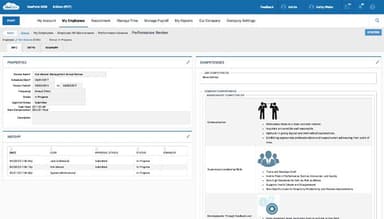
- Performance Management
- Attendance and Time Tracking
What Is Onepoint HCM?
Overview
OnePoint HCM is a cloud-based software that automates human resources (HR) operations for organizations to elevate user experience. It offers modules for managing HR and payroll processes, benefits administration, leave management, and performance management. It provides a centralized dashboard, enabling easy access to employee information and simplifying administrative tasks.
What Is OnePoint HCM Best For?
The platform provides an all-in-one human capital management system that integrates various aspects of HR processes into a unified platform. Businesses can unify employee data into a single database while eliminating the need for multiple systems and spreadsheets.
OnePoint HCM Pricing
OnePoint HCM Integrations
The platform integrates with the following third-party applications:
- Office365
- Sharepoint
- Workspace
How Does OnePoint HCM Work?
You can make use of the OnePoint HCM features with this step-by-step guide:
- Login to the website to access its features available on the dashboard
- Automate HR processes and manage employee records with the 'Human Resource' section
- Monitor employee work hours, track absences, and generate attendance reports by accessing 'Time and Labor' feature
- Process payroll, manage tax compliance, and generate payroll reports using 'Payroll' feature
- Navigate to the benefits administration module to manage employee benefits and track enrollment
- Engage with the employee self-service portal, allowing employees to access HR information, submit requests, and update personal details
Who Is OnePoint HCM For?
OnePoint HCM caters to businesses of all sizes, including small to large companies and non-profit organizations as well. The software caters to the following industries and sectors:
- Retail
- Manufacturing
- Healthcare
Is OnePoint HCM Right For You?
If you are looking for a platform to simplify your employee recruitment and onboarding, payroll and HR processes, then OnePoint HCM might be what you need. It keeps your data secure with 2-factor authentication and single sign-on (SSO) access.
The software follows a modular structure, allowing organizations to select and implement only the modules they require. As the organization grows and its needs evolve, additional modules can be seamlessly added to the system. This approach ensures that the software can scale with the organization's changing requirements.
Still contemplating whether this software will meet your needs? Contact us at (661) 384-7070 to learn more.
OnePoint HCM Features
Unified HR Infrastructure
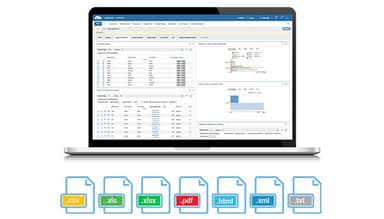
OnePoint HCM offers a unified platform that combines multiple HR functions into a single solution. This includes modules for human resources, benefits administration, recruitment and applicant tracking, time and labor management, payroll, scheduling, leave management, and advanced reporting capabilities.
Benefits Administration
This feature helps organizations manage employee benefit plans, enrollments, and eligibility, as well as streamline communication with benefit carriers. This feature helps organizations manage employee benefit plans, enrollments, and communicate with benefit carriers.
Recruitment And Applicant Tracking
OnePoint HCM offers tools to streamline the recruitment process, from job posting and applicant sourcing to candidate evaluation and onboarding. It integrates with job boards and provides a centralized platform to track and manage applicants. This optimized process facilitates real-time data of listings to sponsored jobs with a simple click.
Learning Management
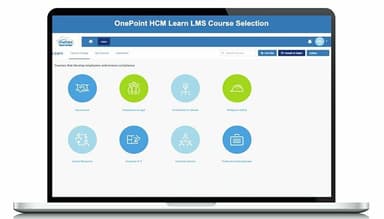
The platform provides access to 300 training courses to help your employees learn about the entire platform and understand non-compliance penalties. It can also facilitate their professional performance and development.
Time And Labor Management
OnePoint enables accurate tracking of employee time and data. It helps organizations optimize workforce productivity and ensure compliance with labor regulations. You can configure leaves and rules based on local, state, and federal laws and prevent unauthorized leaves.
Pros And Cons of OnePoint HCM
Pros
Great customer support
Easy-to-use interface
Convenient PTO submission
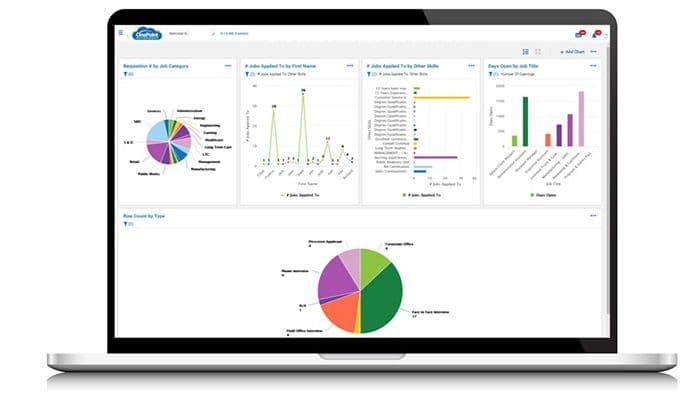
Robust graphs and analytics
Cons
Potential information overload
Customization complexity, as per some OnePoint HCM reviews
OnePoint HCM Reviews
Total 6 reviews
4.8
All reviews are from verified customers
Rating Distribution
5
Stars83%
4
Stars17%
3
Stars0%
2
Stars0%
1
Stars0%
Share your experience
Religious Institutions, 51-100 employees
More than a year
“A solid HR tool”
Pros
One Point makes it easy to fill out timesheets, submit PTO requests, and locate tax documents. The mobile app works well, allowing convenient access to information when a computer is not available. Plus, there's even a turtle game integration!
Cons
Upon logging in, there are frequently irrelevant announcements that pop up, causing annoyance.
Rating Distribution
Ease of use
10
Value for money
10
Customer Support
10
Functionality
10
Consumer Goods, 500+ employees
More than a year
“Great analytics!”
Pros
I am absolutely thrilled with the dashboards, graphs, and analytics provided by this software. It is incredibly user-friendly yet offers powerful features, enabling my team and me to make data-driven business decisions.
Cons
I am extremely satisfied with OnePoint. I genuinely cannot think of any changes I would make to the software.
Rating Distribution
Ease of use
10
Value for money
10
Customer Support
10
Functionality
10
Banking, 500+ employees
More than a year
“Customizable and great customer support team”
Pros
What sets OnePoint apart is the honesty of their salesperson. They provided upfront information about the software's capabilities and limitations. We were able to configure it according to our needs, rather than being forced to adhere to a rigid structure. The staff has been incredibly helpful throughout the process.
Cons
We wanted our employees to clock in using a temperature-checking clock, but this feature is on their roadmap. I appreciate that the clock is "smart" and can prompt our employees with questions after their initial punch.
Rating Distribution
Ease of use
10
Value for money
10
Customer Support
10
Functionality
10
Frequently Asked Questions
Does OnePoint HCM offer an API?
Yes, OnePoint HCM provides an API.
What language does OnePoint HCM support?
The software supports several languages including English, French, and Spanish.
What other apps does OnePoint HCM integrate with?
OnePoint HCM integrates with various third-party applications such as Workspace, Office365, and Sharepoint.
Does OnePoint HCM support mobile devices?
Yes, the platform supports mobile devices.
What types of pricing plans does OnePoint HCM offer?
OnePoint HCM offers different pricing plans depending on your organizational needs and requirements. Get personalized OnePoint HCM cost!
Who are the typical users of OnePoint HCM?
The software serves different industries and sectors such as healthcare, retail, and manufacturing.
What level of support does OnePoint HCM offer?
OnePoint HCM offers a knowledge base, chat, and a help desk.
Are there any OnePoint HCM alternatives?
Some of the OnePoint HCM alternatives are CyberArk, Frontline Education, and InforObjects.