


SecurTime
Last Updated

Key Takeaways
Generated from the text of customer reviews
Our Verdict
Overall Rating
Based on 11 users reviews
4.9
Rating Distribution
Positive
100%
Neutral
0%
Negative
0%
Starting Price
Custom Pricing
SecurTime Specifications
- Access Controls/Permissions
- Budget Management
- Data Import/Export
- Employee Management
SecurTime Features
Attendance System
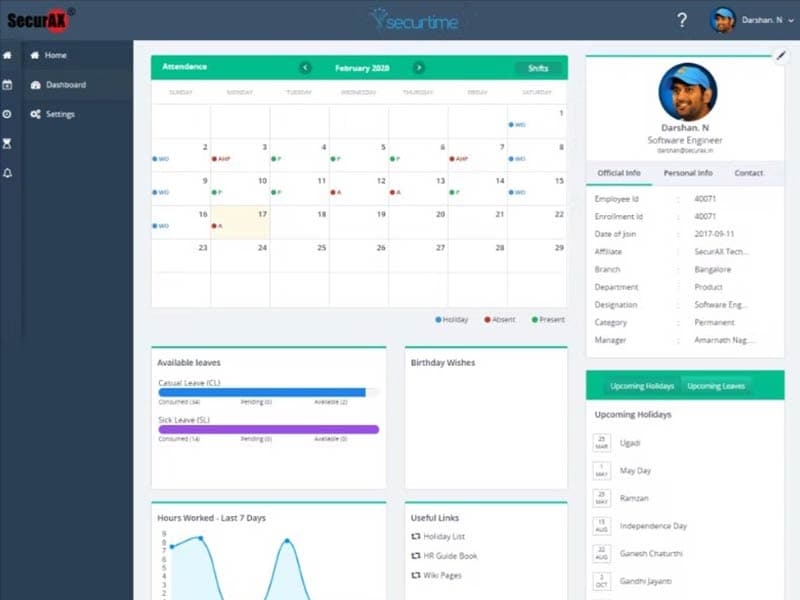
SecurTime workforce management solution provides a single, accurate, real-time view of your workforce's attendance, performance, productivity, cost, and compliance. It helps organizations track employee hours in real-time and stop time leakage, time fraud, and ghost employees. SecurTime's advanced attendance management feature streamlines attendance processes and ensures effective workforce use.
Workforce Management
The software offers an employee self-service portal where employees can view their attendance records, request time off, and manage their personal information. It empowers team members to take control of their data and reduces the administrative burden on HR staff. Furthermore, the employee self-service management tool enables users to easily access their information and make necessary changes.
Leave Management
SecurTime’s leave management streamlines employee time‑off workflows by letting staff apply for leave and enabling managers to approve requests on the go. It supports defining leave policies for different employee groups and tracks absence data alongside attendance and schedules to improve workforce oversight and reduce administrative burden.
Shift Management
The platform offers shift management features to help organizations manage employee shift schedules. It includes auto shift scheduling, shift cut-off, shift rotation, and on-call tracking. These tools help corporations improve shift scheduling. It allows you to create and manage employee schedules to improve workforce management and reduce scheduling conflicts.
Timesheets
Employees can easily record their work hours through SecurTime, whether via a mobile app or web portal. This real-time tracking ensures precise recording of work hours, breaks, and project/task details. For businesses managing projects or tasks, SecurTime allows allocating work hours to specific projects or tasks. This feature mainly benefits businesses billing clients based on time spent on projects or optimizing resource allocation.
Pros And Cons of SecurTime
Pros
Employees can easily punch in through the mobile app while in the field
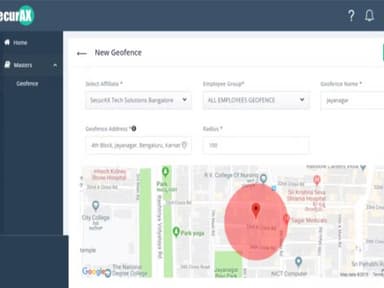
Tracks employee’s location helping HR verify visits to client places
Facilitates remote workforce management and data retrieval
Offers hassle-free workforce management systems
Keeps a track of employee expenses
Cons
Potential information overload, according to some SecurTime software reviews
Limited third-party integrations
SecurTime Pricing
Track | Engage | Optimize |
|---|---|---|
Custom Pricing | Custom Pricing | Custom Pricing |
|
|
|
Disclaimer: The pricing details were last updated on Sep 14, 2026 from the vendor's website. Please contact us for a tailored pricing list.
SecurTime Reviews
Total 11 reviews
4.9
All reviews are from verified customers
Rating Distribution
5
Stars91%
4
Stars9%
3
Stars0%
2
Stars0%
1
Stars0%
Share your experience
Human Resources, 11-50 employees
Less than a year
“time attendance features for all enterprise needs”
Pros
I find that Securtime includes all the features an enterprise needs in time attendance software and it can easily be tailored to fit any organization's requirements. Employees can clock in using a mobile app even when they are out in the field.
Cons
I felt that the devices could be more intelligent, although the software compensates for the lack of intelligence in the hardware.
Rating Distribution
Ease of use
8
Value for money
8
Customer Support
9
Functionality
10
Retail, 11-50 employees
More than 1 year
“A must-have platform for time and attendance management”
Pros
The ease of use, flexibility, customization options, report generation, and the standout feature for me: the excellent support system and the mobile app to manage the sales workforce.
Cons
I think the devices should be more efficient but the software makes up for the loss of hardware intelligence.
Rating Distribution
Ease of use
9
Value for money
10
Customer Support
10
Functionality
9
Human Resources, 500+ employees
More than a year
“Great product and excellent service”
Pros
I was in search of a dependable vendor with a strong support system.
Cons
There's not much to mention.
Rating Distribution
Ease of use
10
Value for money
10
Customer Support
10
Functionality
10
Frequently Asked Questions
What level of support does SecurTime offer?
SecurTime offers support through phone, and a ticket system.
What types of pricing plans does SecurTime offer?
SecurTime offers three flexible pricing plans, which include Track, Engage, Optimize. The pricing is based on the number of employees and features required. You can get a personalized cost quote that fits your needs.
Does SecurTime offer a mobile app?
Yes, SecurTime offers a mobile app.
Does SecurTime offer an API?
Yes, it offers an API.
What language does SecurTime support?
SecurTime supports the English language.
What other apps does SecurTime integrate with?
SecurTime integrates with several third-party applications, including Ramco Systems, Zoho, GreytHR, SAP, Paybooks, and 1Clique.
Who are the typical users of SecurTime?
SecurTime is used by manufacturing, transport and logistics, e-commerce, retail, banking and finance, healthcare, and information technology industries.