


Stratustime
Last Updated

Overview
Stratustime helps managers track hours across locations with mobile clock-ins, geofencing, and attendance reports. While its navigation can be confusing at first, its time-off management and scheduling tools bring more workforce tasks into one place. Overall, it suits small and midsize businesses managing hourly employees across multiple sites.
Overall Rating
Based on 1 users reviews
5
Rating Distribution
Positive
100%
Neutral
0%
Negative
0%
Starting Price
$4
per employee per month
Stratustime Specifications
- Attendance And Time Tracking
- Employee Self-Service Portal
- Workforce Analytics
- Employee Information Management
What Is Stratustime?
Stratustime, developed by Nettime Solutions, is a cloud-based time and attendance management system that helps businesses track employee hours across multiple locations. It provides employee self-service, timesheet management, and labor reporting to help managers monitor attendance and workforce costs. Its advanced modules include ‘Enterprise Reporting’, ‘Advanced Scheduling’, and ‘Time Forecasting’, which predicts employee hours for the current pay period and reconciles them against the next paycheck.
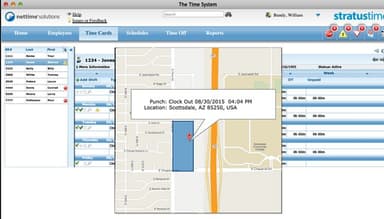
The software also supports geofencing to restrict clock-ins to designated locations and configurable alerts for attendance-related events.
What Is Stratustime Best For?
Among multiple Stratustime features, ‘Time Forecasting’ stands out as it helps estimate employee hours for the remaining days of the current pay period. It considers overtime and adjusts any differences between estimated and actual hours in the next paycheck. This module also exports time records for payroll processing. This helps payroll teams calculate employee payments before the pay period ends without manually estimating the remaining work hours.
How Much Does Stratustime Cost?
Stratustime pricing starts at $4/employee/month for basic features. The total subscription cost depends on the number of employees and the selected features.
Beyond the basic subscription fee, businesses may also incur the following additional costs:
- Implementation And Setup: $250 – $2,500 (one-time)
- Biometric Time Clock Hardware: $200 – $1,500+/unit (one-time)
- Proximity Cards Or Fobs: $2 – $10/card (one-time)
- Advanced Scheduling Module: $2 – $3/employee/month
- Labor-cost Forecasting: $1 – $3/employee/month
- ACA Compliance Tracking: $1 – $2/employee/month
Disclaimer: The pricing is subject to change.
Stratustime Integration
Stratustime software supports integration with multiple payroll and HR platforms, such as:
How Does Stratustime Work?
Log in with your credentials to access the dashboard, then follow these steps to get started:
- Set up employee profiles and configure attendance rules according to your business requirements
- Create work schedules and assign employee shifts using the scheduling tools
- Track work hours with attendance records stored in the cloud
- Manage time-off requests submitted by employees and review their available leave balances
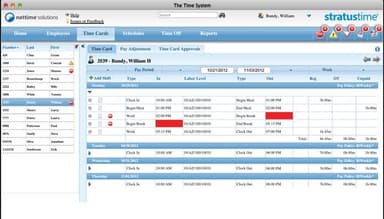
- Monitor employee attendance and approve timesheets after checking for errors
- Generate labor reports to review employee hours and overtime
- Transfer approved time and attendance data to your connected payroll system for payment processing
Who Is Stratustime For?
Stratustime serves small and midsize businesses across various industries and sectors, including:
- Healthcare
- Manufacturing
- Retail
- Retail
- Hospitality
- Education
- Nonprofit organizations
Stratustime Use Cases
Based on our analysis of user reviews and documented Stratustime features, we have identified the notable scenarios where the software is a good fit:
Multi-Location Operations Requiring Centralized Oversight
Tracking attendance across different job sites can be difficult when employees do not have access to a shared time clock. Stratustime supports mobile clock-ins with GPS location tracking, so managers can verify where employees record their hours. Users note that mobile and computer-based clock-ins with GPS tracking help drivers and warehouse employees record attendance across locations.
Retail And Hospitality Businesses Managing Shift Swaps
Stratustime is a good option for retail and hospitality businesses where employees frequently need to exchange assigned shifts. It lets employees arrange shift swaps with coworkers and submit changes for manager approval. This makes it a practical fit for organizations that need to maintain shift coverage and keep a record of approved changes.
Growing Businesses Needing Scalable Time Tracking
Stratustime supports growing businesses that need more than basic timekeeping as their workforce expands. It lets companies start with basic timekeeping functions and add modules as their requirements change. This helps businesses manage more complex workforce requirements without replacing their existing timekeeping system.
Teams Managing Employee Leave Requests And PTO Balances
HR teams can use Stratustime to manage employee leave requests and track available paid time off. Employees can submit requests and check their remaining leave balances, and managers can review and approve them. Reviewers appreciate the ability to manage vacation and sick leave records, even when their organizations have complex PTO policies.
Organizations Monitoring Overtime And Labor Costs
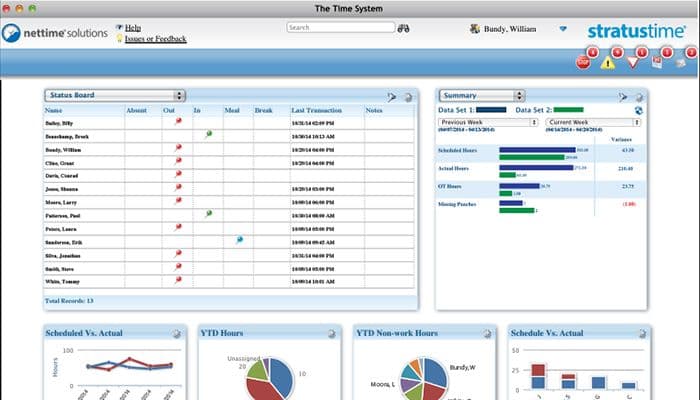
Stratustime lets managers monitor employee overtime and compare scheduled hours with actual hours worked to review labor costs. Its reporting tools help them identify differences between planned and recorded hours. User feedback also highlights the ability to view overtime for each employee directly from the main page.
Is Stratustime Right For You?
Stratustime is suitable for small and midsize businesses managing hourly employees across multiple locations. Its modular structure supports business growth as workforce requirements change. The platform also provides attendance controls for employees working away from a fixed office, which helps managers monitor where work hours are recorded.
On the security front, the software handles sensitive employee information through its biometric timekeeping devices. These devices convert employee scans into encrypted templates.
Beyond data protection, employers must also consider changing ACA requirements. In May 2026, the IRS announced increased employer shared responsibility payment amounts for 2027 that raise the potential cost of failing to meet applicable coverage requirements. Stratustime's ACA module supports employee eligibility tracking through customizable measurement periods and alerts when employees approach configured thresholds. This helps HR teams identify employees who may qualify for health coverage.
Still deciding whether Stratustime meets your workforce management needs? Call us at (661) 384-7070, and we will help you assess its suitability for your business.
Stratustime Features
Enterprise Reporting
The platform compares scheduled hours with actual hours worked and tracks overtime alongside attendance exceptions. It also provides insights into seasonal and annual staffing trends, enabling managers to identify changes in labor costs and plan staffing requirements accordingly.
Compensatory Time
With this capability, administrators can set comp time rates and factors, reassign employee hours, and track accumulated time balances. The module also supports banking hours at the employee, manager, or administrator level, depending on how the organization manages compensatory time.
Points Tracking
The software records attendance points according to rules set by the organization. It also supports exporting attendance data to Microsoft Office. Managers can use these records to identify recurring attendance violations and monitor employee compliance with company policies.
Geofencing
This feature lets employees clock in and out from remote work locations using mobile devices. Each punch includes location information that managers can view on a map to check where attendance was recorded. This supports attendance verification for employees working away from a fixed workplace.
Advanced Scheduling
Managers can create customized shifts and reusable weekly templates through this module. Employee-reported availability is displayed when preparing schedules, and notifications indicate when assigned hours approach overtime. These details help to adjust staffing plans around employee availability and overtime requirements.
Pros And Cons of Stratustime
Pros
Provides access to employee timesheets from any location
Simplifies importing records for large employee groups
Supports customized earning codes for payroll
Gives clear visibility into individual shifts
Helps monitor employee overtime from the dashboard
Cons
Meal break labels can be confusing
Interface design may appear somewhat dated
Physical time clocks may need occasional resets
Stratustime Reviews
Total 1 reviews
5
All reviews are from verified customers
Rating Distribution
5
Stars100%
4
Stars0%
3
Stars0%
2
Stars0%
1
Stars0%
Share your experience
Recreational Facilities and Services, 1-10 employees
More than a year
“Great system to keep time”
Pros
This software is incredibly user-friendly, allowing me to easily clock in from anywhere, even using my iPhone.
Cons
I am not a fan of the feature that rounds up the time clocked in to the nearest quarter hour. For example, 9:54 gets rounded up to 10:00.
Rating Distribution
Ease of use
8
Value for money
10
Customer Support
10
Functionality
8
Frequently Asked Questions
Does Stratustime offer an API?
Yes, the platform offers an API.
What language does Stratustime support?
Stratustime is primarily available in English.
What other apps does Stratustime integrate with?
The software connects with various HR platforms and payroll systems, including Workday, Sage Payroll, Paycheck Preview, FundWare, Pensoft XML, Gevity, Compupay, PrimePay, and ADP.
Does Stratustime have a mobile app?
Yes, it has a mobile application for Android and iOS devices.
What types of pricing plans does Stratustime offer?
The vendor offers employee-based monthly pricing, starting at $4/employee/month for basic timekeeping. Businesses can add advanced modules as their requirements grow. Get a customized Stratustime cost quote based on your needs.
Who are the typical users of Stratustime?
The software is mainly used by HR teams, payroll administrators, marketing assistants, and workforce managers.
What level of support does Stratustime offer?
Stratustime provides support through phone, email, knowledge base, and an online request form.
Does Stratustime have alternatives?
Stratustime alternatives are TimeLake, Deputy, and Clockify.
Is the customer service of Stratustime terrible?
No, the software doesn’t offer terrible customer service.