


Last Updated
Key Takeaways
Generated from the text of customer reviews
Our Verdict
Overall Rating
Based on 42 users reviews
4.6
Rating Distribution
Positive
98%
Neutral
2%
Negative
0%
Starting Price
$0
(30-day free trial)
iSpring LMS Specifications
- Employee Onboarding
- Training And Development
- Performance Management
- Employee Self-Service Portal
iSpring LMS Features
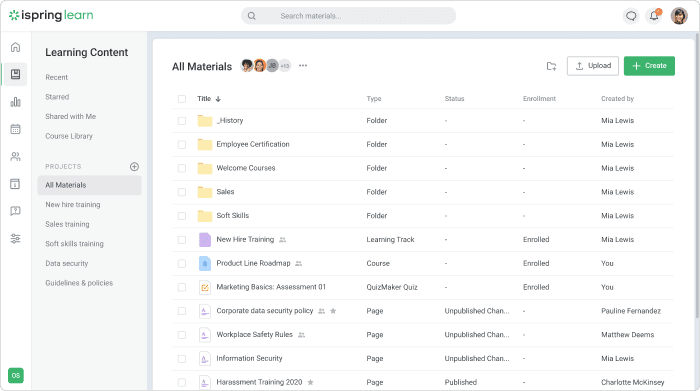
Creating Content Right In The LMS
You can create page-like courses with media and simple quizzes right on the platform. The LMS also comes with the powerful authoring toolkit; iSpring Suite, for creating advanced slide-based courses with quizzes, role-plays, and interactions.
Comprehensive Reporting
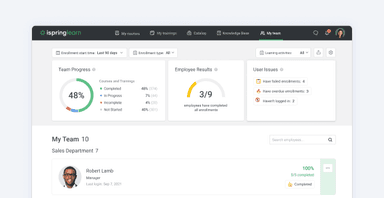
iSpring LMS generates over 20 in-depth training reports. They provide detailed information about teams and individual learners, so you can quickly identify those who excel and spot those who need more support, and give insights into which courses are effective and which need improvement.
Mobile Compatibility
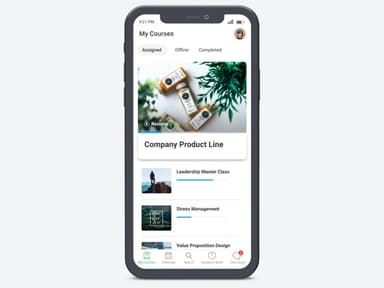
With the mobile apps for iOS and Android, training materials will be easy to access, so employees can take courses in small chunks when in transit or during a meal or a break. Offline learning support provides uninterrupted access even when there is no internet connection.
Performance Management And 360° Feedback
iSpring LMS includes tools for analyzing employee performance, tracking competencies, and providing 360° feedback, to help organizations track development after the course is completed. The LMS also includes a visual organizational chart, which allows managers to track team structure, learner progress, and skill gaps for more targeted training.
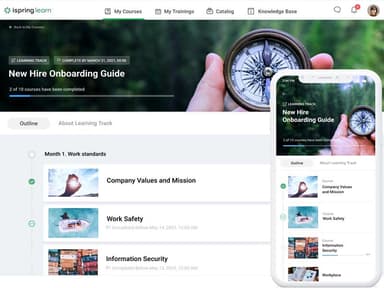
Ready-Made Courses And Content Library
The system also offers access to a library of pre-built courses and materials to easily deploy training programs without starting from scratch. The AI-powered iSpring Suite authoring tool offers automatic content suggestions, interactive slide creation, and text-to-speech capabilities, allowing organizations to save time while increasing learner engagement.
Pros And Cons of iSpring LMS
Pros
Mobile-friendly access, including offline learning
Integrated content management and course library features
Creating courses with iSpring Suite is easy and accessible
Cons
The on-the-job training module has limited value for some users
Admin tasks sometimes require extra steps
iSpring LMS Reviews
Total 42 reviews
4.6
All reviews are from verified customers
Rating Distribution
5
Stars67%
4
Stars31%
3
Stars2%
2
Stars0%
1
Stars0%
Share your experience
Katie T.
Computer Software, 51-100 employees
More than a year
“an amazing partner with tons of features”
Pros
What I really like about iSpring is the sheer number of features it offers. The team is always open to hearing about what you need or what new tools could benefit your business. Partnering with them has been simply amazing and it's been exciting to see all the new features they keep rolling out!
Cons
Adding images to the Knowledge Base could be simpler and I'd love it if their LMS platform included a wider variety of free courses to choose from.
Rating Distribution
Ease of use
10
Value for money
10
Customer Support
10
Functionality
10
Ivan B.
Hospital & Health Care, 51-100 employees
More than a year
“excellent features and useful support”
Pros
iSpring LMS comes with excellent features such as posting news updates, a knowledge library, scheduling training sessions, delivering online modules and a detailed reporting system. Plus they release updates regularly and the customer support is genuinely useful. Any time I report a problem they resolve it. I am extremely satisfied.
Cons
The notifications can become a bit much for the team at times. I'd really prefer a more refined notification system, although you can choose to turn them off completely if needed.
Rating Distribution
Ease of use
10
Value for money
8
Customer Support
10
Functionality
10
Matthew B.
Computer Software, 101-500 employees
Less than a year
“easy navigation and course creation”
Pros
The platform is easy to navigate, creating and updating courses is simple and figuring out the admin side of things is mostly easy. So I'd definitely recommend it.
Cons
I noticed that the API options available right out of the box are pretty limited and the customization features could be broader. So having more choices for different user roles would also be a big help.
Rating Distribution
Ease of use
10
Value for money
8
Customer Support
8
Functionality
10
Frequently Asked Questions
Does iSpring LMS offer an API?
Yes, iSpring LMS provides an API for custom integrations and automation of workflows.
What language does iSpring LMS support?
iSpring Learn supports the English language.
What other apps does iSpring LMS integrate with?
The beautifully engineered iSpring LMS integrates with a variety of third-party applications, including Zoom, Salesforce, Slack, Microsoft Teams, Google Workspace, and HR/payroll systems.
Does iSpring LMS support mobile devices?
Yes, the software is compatible with both iOS and Android devices. It also offers offline learning features that can be accessed from various locations iSpring ensures consistent user access to training resources.
What types of pricing plans does iSpring LMS offer?
iSpring LMS offers two main subscription plans: Business starting from $4.46/user/month for 300 users, and Enterprise plan for a custom price. The cost is based on the number of active users. Contact us for a customized iSpring price quote.
Who are the typical users of iSpring LMS?
iSpring Learn is used across industries such as healthcare, retail, manufacturing, automotive, and technology for employee, partner, and customer training.
What level of support does iSpring LMS offer?
iSpring LMS provides 24/7 live technical support via chat, email, and phone, along with a comprehensive knowledge base and online community, all delivered by highly trained iSpring experts.