



Last Updated
Overview
OurPeople is an employee communication platform that helps companies engage their distributed workforce. It keeps teams informed and productive with features like push notifications, chat, and knowledge center. However, the setup process could be time-consuming. Still, OurPeople's communication and engagement tools are essential for effective employee interaction.
Overall Rating
Based on 11 users reviews
4.9
Rating Distribution
Positive
100%
Neutral
0%
Negative
0%
Starting Price
$1,200
per year
OurPeople Specifications
- Activity Dashboard
- Asynchronous Learning
- Activity Tracking
- Access Controls/Permissions
OurPeople Features
Updates
It allows companies to send important announcements, notifications, and messages to all employees or targeted teams. Messages can be scheduled ahead of time or sent immediately. Recipients receive updates via email, SMS, or push notifications.
Chat
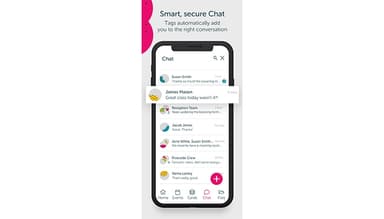
The platform enables two-way dialogue between employees and promotes team communication. Users can have private one-on-one chats and group chats for teams or departments. It allows employees to share images and reactions within conversations.
Forms
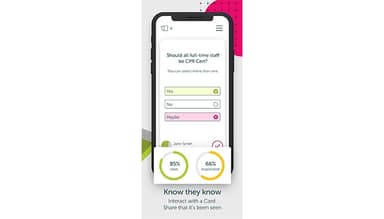
OurPeople offers customizable digital forms to replace paperwork processes. It has templates for timesheets, vacation requests, expense reports, and more. Responses are automatically submitted, and their completion status is tracked.
Knowledge Center
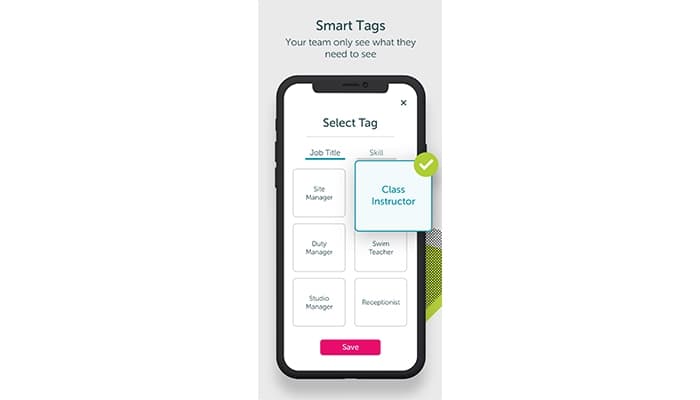
Companies can maintain a knowledge center where essential documents, training materials, SOPs, and best practices are consolidated. Content is organized into folders, and tag-based permissions allow granular access control. This enables employees to access OurPeople's knowledge centre via mobile.
Events
Users can create, schedule, and manage various types of events. Details like date, time, and venue are communicated via updates. Staff self-register using a simple RSVP function. Attendance metrics provide insights.
Open Shifts
It enables organizations to post available hours to cover absenteeism or seasonal needs. Employees request slots, and managers approve or reject sign-ups seamlessly via the app. Real-time gap identification ensures proper staffing levels.
Pros And Cons of OurPeople
Pros
Built-in knowledge base and training features
Comprehensive usage analytics and reports
Mobile accessibility for a distributed workforce
Omnichannel communications via app, SMS, email
Cons
Minimal training and implementation support
Setup might be time-consuming
OurPeople Pricing
Reach | Communicate |
|---|---|
$1,200per year | $2,000per year |
|
|
Disclaimer: The pricing details were last updated on Sep 14, 2026 from the vendor's website. Please contact us for a tailored pricing list.
OurPeople Reviews
Total 11 reviews
4.9
All reviews are from verified customers
Rating Distribution
5
Stars91%
4
Stars9%
3
Stars0%
2
Stars0%
1
Stars0%
Share your experience
Not Specified, N/A employees
“essential communication for our sites”
Pros
After the initial setup, it's easy to use and the help documentation is excellent. Since users sign in with their own personal accounts, it helped us keep a real sense of community during our four-month closure. At our larger sites, it has now become an essential communication tool.
Cons
We had hoped it would fully replace our team WhatsApp and Facebook groups but it doesn't quite offer all the capabilities we need yet. That said the team is clearly open to feedback and some of the requests we previously made have already been turned into features so I'm expecting the chat side to improve further.
Rating Distribution
Ease of use
10
Value for money
10
Customer Support
10
Functionality
10
Marketing, 101-500 employees
Less than a year
“Easily workable app”
Pros
The app is user-friendly, and we've received excellent support from Our People during its development and organization-wide implementation.
Cons
I haven't really had any negative experiences with the app.
Rating Distribution
Ease of use
9
Value for money
10
Customer Support
9
Functionality
10
Not Specified, N/A employees
“powerful fit for growing teams”
Pros
When our company was larger, this software handled most of the features we needed and was very simple to work with.
Cons
The tagging features were fairly confusing for our team to understand and use.
Rating Distribution
Ease of use
10
Value for money
10
Customer Support
10
Functionality
10
Frequently Asked Questions
Does OurPeople offer an API?
Yes, it offers an API.
What languages does OurPeople support?
It supports the English language.
What other apps does OurPeople integrate with?
While the software integrates seamlessly with several third-party applications, no specific details about these integrations are provided.
Does OurPeople support mobile devices?
The software supports mobile devices.
What types of pricing plans does OurPeople software offer?
It offers flexible pricing plans, including Reach for $1,200 yearly and Communicate for $2,000 yearly. Contact us for a custom OurPeople cost quote.
Who are the typical users of OurPeople?
OurPeople caters to organizations of all sizes from industries and sectors including retail, food, leisure, travel and tourism, health and fitness, manufacturing, and healthcare.
What level of support does OurPeople offer?
OurPeople offers comprehensive support options, including email, phone, knowledge base, FAQs, and chat.