

Last Updated
Overview
For those grappling with accounting intricacies, Clear Biz offers relief. It simplifies data import, enhances task tracking, ensures deadline adherence, providing a solution for streamlined accounting processes. Explore Clear Biz features to focus on your core accounting tasks confidently and efficiently.
Clear Biz Specifications
- Time Tracking
- Task Management
- Reporting
- Budget Management
What Is Clear Biz?
Overview
Clear Biz is a cloud-based practice management solution designed specifically for accounting professionals. It streamlines the practice of accounting professionals. With Clear Biz, users can efficiently manage client and appointment scheduling, time and billing management, and communication logging. It also includes a personal tax calculator, making it a comprehensive tool for managing various aspects of an accounting practice.
What Is Clear Biz Best For?
Clear Biz is renowned for its much responsive tech support team. Its tech support team is known for their quick response times and their ability to effectively address any issues or concerns that users may have. Whether it is overcoming archiving client data cons, or dealing with program communications issues, the customer support team is knowledgeable enough to handle all your queries.
Clear Biz Pricing
The vendor offers the following two pricing plans:
- Basic Edition – $34.95/month
- Workflow Pro Edition – $49.95/month
Disclaimer: The pricing is subject to change.
Clear Biz Integrations
Clear Biz integrates with the following:
- QuickBooks
- Microsoft Excel
- Microsoft Outlook
- Maximizer
- Act!
How Does Clear Biz Work?
Here's how you can navigate the dashboard and make use of the software's features:
- Log in to Clear Biz with your credentials
- Access the dashboard for an overview of your financial data
- Import government, business, and personal information from various sources
- Easily organize and categorize client data for efficient management
- Generate financial reports and statements with user-friendly tools
- Track and manage client accounts and transactions
- Utilize the software's tax compliance features for accurate reporting
- Collaborate with team members by sharing and accessing data securely
- Set up notifications and reminders for important deadlines and tasks
Who Is Clear Biz For?
The platform specifically caters to small businesses. Clear Biz benefits the following:
- Accounts departments
- Finance teams
- Project managers
Is Clear Biz Right For You?
Are you looking for practice management software designed specifically for accounting professionals? Clear Biz might be the solution you need. Clear Biz is designed to handle the needs of small- to medium-sized practices. It helps streamline these tasks, making it easier for accounting professionals to stay organized and efficient.
Still uncertain about Clear Biz's compatibility with your requirements? Feel free to get in touch with our customer support team on 661-384-7070. They will guide you in making a well-informed decision.
Clear Biz Features
Importing Clients
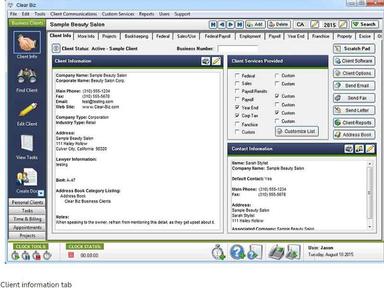
Clear Biz lets you import your clients’ government, business, and personal information from various software packages. It can get you up and running quickly, saving time and effort. It eliminates the need for manual data entry and reduces the risk of errors. Additionally, the platform can record client data to help users monitor client tasks effectively. It has over 200+ information fields, including customized fields and notes section. Clear Biz helps you keep client information organized and easily accessible. It ensures that all relevant client information is readily available when needed, improving efficiency and productivity.
Client Tasks
Clear Biz’s tasks section lets you view and organize your clients’ tasks. It makes it easy to quickly set up and schedule tasks because it has all federal and state due dates built in. This feature helps manage tasks and ensures that no deadlines are missed. It provides a clear overview of all tasks, making it easier to prioritize work.
Task Management
The task management functionality lets you view and organize your clients’ tasks. It makes it easy to quickly set up and schedule tasks because it has all federal and state due dates built in. Users can track the status of each return, who is working on it, and customize the number of steps it takes to complete a return.
Communication Logger
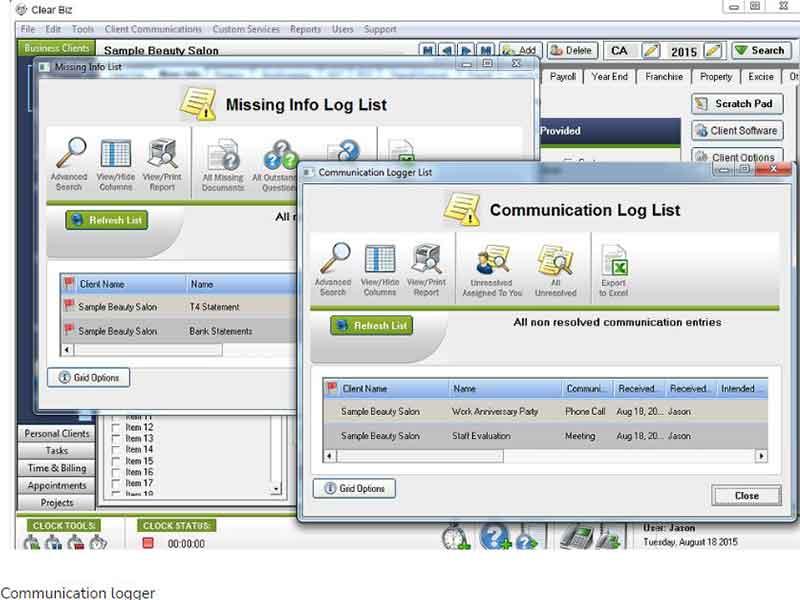
This feature allows you and your staff to log all phone calls and client communications. You can assign tasks and duties to other staff based on incoming communications. It ensures that all communications are recorded for future reference. Clear Biz helps in maintaining transparency and accountability within the team.
Appointments Scheduler
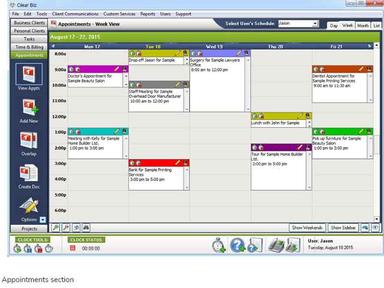
The appointment scheduler feature has multiple views that let you control your schedule. Clear Biz runs off a central database on the network so everyone can view and access each other’s schedules simultaneously. It aids in efficient time management. The platform ensures that appointments are scheduled without conflicts and everyone on the team knows each other’s schedules.
Time And Billing
The software offers a full-time tracking and accounts receivable system (AR) to track your account balances and productivity levels for your clients, staff, and projects. The invoicing system includes a new interface and tons of new options to choose from. It offers a comprehensive solution for time tracking and billing. Clear Biz ensures accurate invoicing based on the time spent on different tasks.
Pros And Cons of Clear Biz
Pros
Efficient scheduling and task management capabilities
Allows clients to add their own custom tasks in client folders
Comprehensive tax tools
Transparent communication logs
Automated client notifications
Cons
Steep learning curve, according to some user reviews
Initial data migration effort
Limited customization for some fields
Clear Biz Reviews
Total 9 reviews
3.3
All reviews are from verified customers
Rating Distribution
5
Stars11%
4
Stars44%
3
Stars22%
2
Stars11%
1
Stars11%
Share your experience
Joseph
Accounting, 1-10 employees
More than a year
“not a functional program for the value”
Pros
With this tool, I can conveniently store all my clients' information, track time, manage files, monitor employee activities, and control security access.
Cons
This program is not practical; it is overpriced for its limited functionality compared to an Excel spreadsheet. It struggles with QuickBooks integration, lacks accuracy, and isn't user-friendly.
Rating Distribution
Ease of use
6
Value for money
2
Customer Support
2
Functionality
4
Deanna
Accounting, 1-10 employees
Less than 6 months
“Maybe great for Canada; but US version severely lacking.”
Pros
This tool offers the ability to effectively track and generate reports.
Cons
Lack of support for US or state forms is a drawback.
Rating Distribution
Ease of use
6
Value for money
4
Customer Support
3
Functionality
8
Rebecca
Not Specified, N/A employees
Free Trial
“ClearBiz review”
Pros
Initially, I hoped this program would help us track office deadlines efficiently. While it does serve its purpose, our initial experience with setup was highly unsatisfactory. However, after expressing our concerns, we received the necessary assistance, for which I am grateful and appreciate their commitment to standing behind their product.
Cons
Navigating the program is not straightforward.
Rating Distribution
Ease of use
4
Value for money
6
Customer Support
6
Functionality
6
Frequently Asked Questions
Does Clear Biz offer an API?
No, Clear Biz does not offer an API to its users.
What language does Clear Biz support?
Clear Biz, a project management software, supports the English language.
What other apps does Clear Biz integrate with?
Clear Biz integrates seamlessly with popular tools such as Microsoft Outlook, Maximizer, QuickBooks, Act, and Microsoft Excel.
Does Clear Biz support mobile devices?
Yes, Clear Biz synchronizes with Microsoft Outlook, allowing data transfer to smartphones like Blackberrys, Android devices and iPhones.
What types of pricing plans does Clear Biz offer?
The software has two pricing plans: Basic Edition ($34.95/month) and Workflow Pro Edition ($49.95/month). Get a personalized Clear Biz cost per your company’s needs.
Who are the typical users of Clear Biz?
Typical users of Clear Biz include project managers and finance and accounting teams.
What level of support does Clear Biz offer?
Clear Biz offers many levels of support to its customers through FAQs, emails, and phone support options.
Is Clear Biz an ideal software for an accounting team?
Yes, Clear Biz practice management software offers several key functionalities, including client time tracking, track client billing, and scheduling and task management capabilities, making it an ideal communication and scheduling tool for accounting professionals.