


Last Updated
Overview
Financial Cents delivers streamlined accounting practice management. Explore its intuitive features and complete more work by simplifying data collection, enhancing team collaboration, and efficiently meeting deadlines. It's a robust solution for accounting firms striving for scalability. Explore Financial Cents software features to enhance your staff members' productivity.
Overall Rating
Based on 61 users reviews
4.9
Rating Distribution
Positive
100%
Neutral
0%
Negative
0%
Starting Price
$49
per user per month
Financial Cents Specifications
- Time Tracking
- Task Management
- Reporting
- Budget Management
Financial Cents Features
Workflow Management
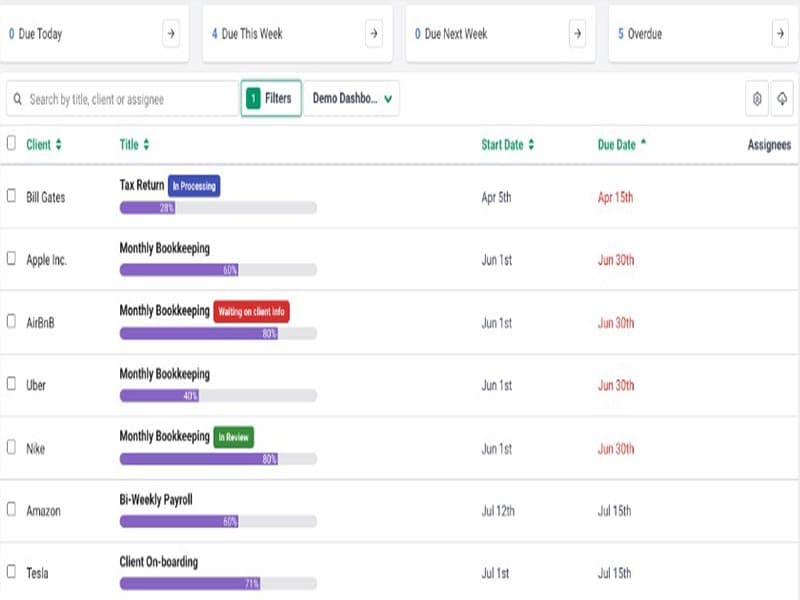
With this feature, track the status of client work, see who is working on what, and stay on top of all your accounting deadlines in one place. You can also organize client jobs into workflows, assign tasks to teams, and monitor progress in real-time. It helps you save time and increase employee productivity.
Time Tracking And Invoicing
The platform enables users to capture detailed timesheets. It allows you to generate invoices from tracked time and expenses. Time tracking helps you analyze profitability and identify process inefficiencies.
Client Database
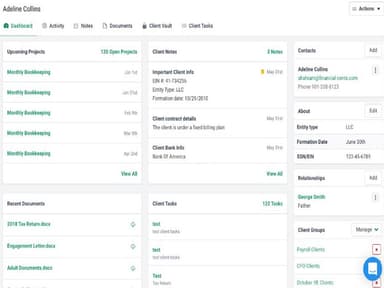
Maintain all client details, communications and files in one password-protected online database. Quickly search and filter thousands of client records. Moreover, team members can easily access the latest client information anywhere.
Capacity Management
Get a comprehensive overview of firm-wide capacity for optimal resource allocation and workload distribution. Financial Cents lets you identify constraints, over-utilized resources or periods of under-capacity. It helps smooth out workflows and prevents overbooking staff.
Pros And Cons of Financial Cents
Pros
Provides online syncing and access
Includes financial planning and bill payment features
Offers easy-to-read reports, as per one Financial Cents review
Multiple customer support options
Cons
Team plan may be limited for some users
Requires reliable internet connection to sync data and work properly
No API access
Financial Cents Pricing
Team Plan | Scale Plan |
|---|---|
$49per user per month | $69per user per month |
|
|
Disclaimer: The pricing details were last updated on Sep 07, 2026 from the vendor's website. Please contact us for a tailored pricing list.
Financial Cents Reviews
Total 61 reviews
4.9
All reviews are from verified customers
Rating Distribution
5
Stars90%
4
Stars10%
3
Stars0%
2
Stars0%
1
Stars0%
Share your experience
Charlie
Accounting, 1-10 employees
Less than 6 months
“Great CRM system, easy to use!”
Pros
This work flow management tool is very simple to use. My entire staff loves it because it's straightforward and efficient.
Cons
Personally, I have no complaints about it. The only thing I would mention is that it seems to be mainly tailored to US customers.
Rating Distribution
Ease of use
8
Value for money
8
Customer Support
8
Functionality
8
Stephanie
Accounting, 1-10 employees
Less than 6 months
“Amazing Product for Accountants”
Pros
The client portal system and automatic reminders have been a lifesaver for me. I honestly can't praise it enough.
Cons
The pricing structure charges the same amount per user. I would have preferred if it were an additional cost per user rather than doubling the price.
Rating Distribution
Ease of use
10
Value for money
10
Customer Support
10
Functionality
10
Behzad
Accounting, 11-50 employees
Less than 6 months
“Easy to Use”
Pros
I like the task management, client management and data management capabilities.
Cons
Invoicing is limited to time based billing, which is the only downside for me.
Rating Distribution
Ease of use
10
Value for money
8
Customer Support
8
Functionality
8
Frequently Asked Questions
Does Financial Cents offer an API?
No, API access is not available.
What languages does Financial Cents support?
It supports the English language.
What other apps does Financial Cents integrate with?
Financial Cents integrates with Google Drive, HubSpot, QuickBooks Online, Cognito Forms, Microsoft Outlook, Gmail, Salesforce, and Mailchimp.
Does Financial Cents support mobile devices?
The vendor has not indicated compatibility with mobile devices.
What types of pricing plans does Financial Cents offer?
The Financial Cents cost depends on two pricing plans: Team Plan ($49/user/month) and Scale Plan ($69/user/month).
Who are the typical users of Financial Cents?
Typical users of Financial Cents include marketing agencies, taxation departments, certified public accounting (CPA) firms, bookkeeping consultants, and accounting project management companies.
What level of support does Financial Cents offer?
Support options offered by the Financial Cents include chat, phone, email, FAQs, live representatives, and a knowledge base.
How is Financial Cents a game changer in financial software?
Financial Cents streamlines accounting processes, making it a game changer in financial software. It offers real-time collaboration and workflow management, revolutionizing how teams work.