


Moovila: AI-Supported Project Management Software
Last Updated
Overview
Moovila simplifies complex projects, enhances resource allocation, offers professional services automation, and fosters seamless collaboration. Accomplish objectives effortlessly with an organized platform offering intuitive navigation. With flexible pricing options, Moovila caters to startups and large enterprises alike. Explore the future of efficient project management for streamlined work environments.
Overall Rating
Based on 53 users reviews
4.5
Rating Distribution
Positive
92%
Neutral
8%
Negative
0%
Starting Price
$31.25
per month
Moovila: AI-Supported Project Management Software Specifications
- Time Tracking
- Task Management
- Reporting
- Budget Management
What Is Moovila?
Overview
Moovila is a cloud-based work management software for businesses of all sizes and industries. It offers a range of solutions to help organizations manage tasks, projects, and resources with precision and predictability.
The software is available as a desktop and mobile app, making it easy for teams to stay connected and collaborate on the go. In the following Moovila review, we discuss its features, pricing options, and other benefits.
What Is Moovila Best For?
What sets Moovila software apart from other project management tools is its innovative features and user-friendly interface. The software offers a range of unique features that set it apart from its competitors, including a project debugger tool, path visualization, a built-in AI assistant named Carmen, and automated risk management. These features assist in speeding up team progress and ensuring projects are finished on time and within budget.
Moovila Pricing
The following are the pricing plans offered by Moovila:
- Perfect Project - $31.25/user/month
- Perfect Project Sapphire - Custom
- Perfect Project Diamond - Custom
- Perfect Project For MSPs - Custom
- Activate - Custom
Disclaimer: Prices are subject to change.
Moovila Integrations
The software integrates with third-party applications, including:
- Google Drive
- Jira
- Box
- Hubspot
- Salesforce
- Dropbox
- Microsoft Teams
- Autocad
- Cesium
How Does Moovila Work?
Here is how to start with the software:
- Use your Moovila credentials to log in
- Choose a template or create a custom project from scratch
- Add tasks, assign resources, set deadlines, and define dependencies
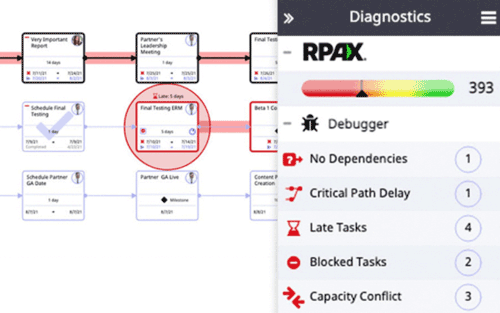
- Run the project debugger to check for any errors or risks in your plan
- Adjust your plan according to the suggestions and optimize your schedule
- Collaborate with your team and track your progress using the dashboard and chat features
Who Is Moovila For?
Moovila is perfect for businesses of all sizes seeking to optimize their processes. It is beneficial for companies that operate in industries, including:
- Construction
- Engineering
- Manufacturing
- Healthcare
- IT
Is Moovila Right For You?
Are you looking for a work management software that can help you streamline your operations, reduce costs, and improve customer satisfaction? Look no further than Moovila! Moovila is a cloud-based work management software that offers a range of features to help businesses manage projects and resources with precision and predictability.
The software is designed with security and scalability in mind. It is built on a robust infrastructure that ensures your data is always safe and secure. Moovila also provides real-time analytics, reporting, and measurement across your entire work landscape, with the ability to adjust instantly to changes.
One of the key challenges that Moovila solves is the challenge of managing complex projects with multiple stakeholders. With its Autonomous Project Monitoring and Management (APMM) system, businesses can proactively monitor risks and delays 24/7 to help them solve problems, improve margins, and increase customer satisfaction and retention.
If you’re unsure if Moovila is right for you to streamline project tasks, contact our customer support team at 661-384-7070. They’ll be happy to help you make the best decision.
Moovila: AI-Supported Project Management Software Features
Project Debugger
This feature allows you to check your project plan for any errors, risks, or dependencies that could affect your delivery. It also suggests how to fix them and optimize your schedule. This feature helps you create realistic and achievable plans that can save you time and money.
Path Visualization
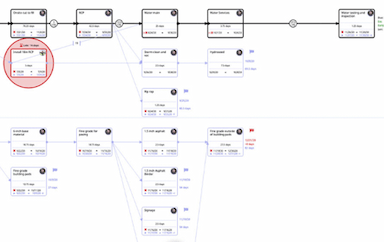
The software enables you to see the critical path of your project, the impact of changes, and the status of each task and resource. You can also drill down into the details and collaborate with your team members. Monitor your progress and make informed decisions using this feature.
AI Assistant
Moovila comes with Carmen, a built-in AI assistant, analyst, and project coach designed to help accelerate your team’s progress. Carmen monitors your project 24/7, alerts you of any issues or delays, and provides guidance on resolving them. Carmen also helps you create plans based on your team’s capacity and skills.
Automated Risk Management
The software uses a discrete math engine called RPAX that calculates the probability of success for each task and milestone. It also adjusts your plan in real-time based on your resources' performance and availability. This feature helps you mitigate risks and prevent costly delays.
Dashboard
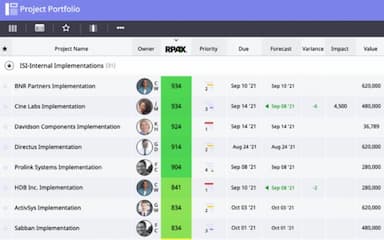
This feature lets you view and manage all your projects and tasks in one place. Customize your dashboard by adding widgets, filters, charts, and reports. Moreover, it gives you a clear overview of your portfolio and performance.
Pros And Cons of Moovila: AI-Supported Project Management Software
Pros
User-friendly interface
Cloud-based accessibility
Robust features
Business project list helps with portfolio management
Mitigates raising project scheduling risks
Cons
Occasional customer service shortfalls
Lacks advanced reporting features
Occasional software performance issues
Moovila: AI-Supported Project Management Software Pricing
Perfect Project5-20 users | Perfect Project Sapphire5-20 users | Perfect Project Diamond5 users-unlimited | Perfect Project For MSPs5 users-unlimited | ActivateContact for details |
|---|---|---|---|---|
$31.25 per month | Custom Pricing | Custom Pricing | Custom Pricing | Custom Pricing |
|
|
|
|
|
Disclaimer: The pricing details were last updated on Sep 25, 2026 from the vendor's website. Please contact us for a tailored pricing list.
Moovila: AI-Supported Project Management Software Reviews
Total 53 reviews
4.5
All reviews are from verified customers
Rating Distribution
5
Stars62%
4
Stars30%
3
Stars8%
2
Stars0%
1
Stars0%
Share your experience
Marketing and Advertising, 1-10 employees
“Perfect for me”
Pros
I was in search of a platform that could securely store and manage all my documents in one place while also aiding me in team management task automation team communication facilitation and offering a broad range of integrations.
Cons
As of now I havent encountered any issues with the tool.
Rating Distribution
Ease of use
8
Value for money
10
Customer Support
9
Functionality
8
Information Technology and Services, 11-50 employees
“Effective Project Management with a Stunning GUI”
Pros
The platforms graphical user interface (GUI) is visually appealing and well-designed, providing us with an efficient way to manage our project team. It seems to be tailored to meet the needs of project managers, offering a delightful user experience.
Cons
While the reporting functionality is decent, the limited export options are not ideal for our needs. We would prefer to export reports in CSV or PDF format, but currently, we can only export certain reports to JPEGs. Due to this limitation, we still rely on PowerBI for exporting and handling reports.
Rating Distribution
Ease of use
8
Value for money
7
Customer Support
8
Functionality
9
Sales, 11-50 employees
“Moovila has been a real game-changer for me.”
Pros
The automated risk management feature has been incredibly helpful, as it helps us keep our projects on track. We’ve also been using the project debugger, which helps us identify any issues and address them quickly. Moovila also offers a lot of integrations with third-party software, which makes it even more versatile.
Cons
Moovila is an incredibly powerful tool, but for smaller teams or organizations, the price can be quite steep. Also, I wish there was a way to use the software for simple task management, as it can be quite overwhelming getting to grip with the features.
Rating Distribution
Ease of use
9
Value for money
9
Customer Support
9
Functionality
8
Frequently Asked Questions
What types of pricing plans does Moovila offer?
Moovila work management platform offers several pricing plans, including Perfect Project for $31.25/user/month and customized pricing for Perfect Project Sapphire, Perfect Project Diamond, Perfect Project For MSPs, and Activate. Get a customized Moovila quote.
Who are the typical users of Moovila?
Moovila project management software is an ideal solution for businesses of all sizes and multiple project managers. It can be used for personal and professional projects. It is particularly useful for companies operating in industries such as healthcare, construction, engineering, manufacturing, and IT. It would help teams streamline operations if project managers started working with it.
What language does Moovila support?
The software supports the English language.
Does Moovila support mobile devices?
Yes, Moovila supports mobile devices.
Does Moovila offer an API?
Yes, the software has an API available on the project management side.
What other apps does Moovila integrate with?
The Moovila integrates with several third-party applications to mitigate other project related oddities, including Jira, Box, Hubspot, Google Drive Salesforce, Dropbox, Microsoft Teams, AutoCAD and Cesium.
What level of support does Moovila offer?
Moovila project portfolio management provides support to your project team through various options, including email/help desk, knowledge base, and phone support. It also offers a separate module purely focused on client success support.