


RXNT

Last Updated
Key Takeaways
Generated from the text of customer reviews
RXNT is a cloud-based EHR and practice management platform. Physicians, billing staff, and front-desk teams use it for documentation, scheduling, e-prescribing, and billing. Family medicine and behavioral health practices tend to benefit most. Users often point to its intuitive interface and integrated design as a strength, though some mention occasional delays in customer support. RXNT recently added custom template building and ‘Group Favorites’ to its Ambient IQ AI scribe.
Our Verdict
RXNT is a practical option for independent providers and small to mid-sized practices needing an integrated system without enterprise-grade complexity. It fits teams that want clinical documentation, scheduling, and billing under one login, without the need for separate systems. Pricing is accessible for small teams, and mobile access adds value for on-the-go workflows. All in all, we recommend this for cost-conscious care teams.
Overall Rating
Based on 251 users reviews
4.1
Rating Distribution
Positive
81%
Neutral
12%
Negative
7%
Starting Price
$126
per provider per month
RXNT Specifications
- Appointment Management/Scheduling
- e-Prescriptions
- Lab Integration
- Patient Portal
What Is RXNT?
RXNT is a cloud-based and AI-enabled integrated healthcare software suite built for medical practices of various sizes and specialties. It brings Electronic Health Records (EHR), e-Prescribing, practice management, and billing tools together in one connected system, so practices aren't managing separate platforms for each function.
Its e-prescribing feature is EPCS certified, letting providers prescribe Class II-V medication securely from any device. Practice management covers scheduling and revenue cycle management, aimed at getting practices paid faster with fewer billing errors along the way. RXNT also includes ‘Ambient IQ,’ an AI-powered scribe that records patient visits and turns them into a clinical note, cutting down on the time spent documenting manually. Altogether, it gives practices one system to manage care delivery, prescribing, and billing without switching between separate tools.
What Is RXNT Best For?
RXNT stands out with its included patient portal, giving patients direct access to medical records, lab results, and consent forms without having to call the office. Patients can schedule appointments, sign forms electronically, and pay bills online. Secure, HIPAA-compliant messaging keeps communication with providers in one place, and pharmacy savings options are browsable right through the portal too. This all-in-one portal enables greater transparency and gives patients more control over their healthcare journey. Practices end up fielding fewer routine calls, while patients stay more engaged in managing their own care.
How Much Does RXNT Cost?
RXNT price starts at $126/provider/month for its EHR Bundle plan. Other plans are:
- Full Suite: $335//provider/month
- PM Bundle: $213/provider/month
- E-Prescribing: $665/provider/year (annual subscription only)
Paid add-ons are also offered. These include:
- Advanced Reporting: $10/month
- EPCS: $85/year
Standard onboarding is included in the plans: E-Prescribing comes with 30 days of onboarding, while the EHR Bundle includes 45 days. The Practice Management and Full Suite Bundles each provide 60 days of onboarding. Data storage and data imports for patient demographics and insurance information are included. Customer support and training are also a part of it.
Additionally, users may incur extra costs. The following figures are estimates and may vary depending on provider terms.
- Custom Integrations: $1,000–$5,000/integration
- Additional Data Imports: $500–$2,500/import
- Historic Database Extension: $500–$2,000
- Additional Onboarding: $500–$1,500
- Additional Training Hours: $100–$250/hour
- Custom Workflow Configuration: $1,000–$3,000
- Specialty Template Customization: $500–$2,000
- Third-Party Interface Fees: $100–$500/month
- Hardware And Peripheral Setup: $500–$2,000
Reviewers generally see RXNT's base pricing as accessible for smaller practices, especially compared to other integrated EHR systems. Some note that add-ons like custom integrations, specialty templates, or additional onboarding can push costs higher than the initial subscription suggests.
Disclaimer: The pricing is subject to change.
RXNT Integrations
The software supports integration with a range of third-party platforms, including:
- Scalabull
- RevolutionEHR
- Bamboo Health
- Zoom for Healthcare
- RingCentral
- Google Workspace
How Does RXNT Work?
Here’s how you can navigate the software’s dashboard and make use of its features:
- Log in to the software from any device using your credentials
- Access the full suite of integrated solutions within the centralized dashboard
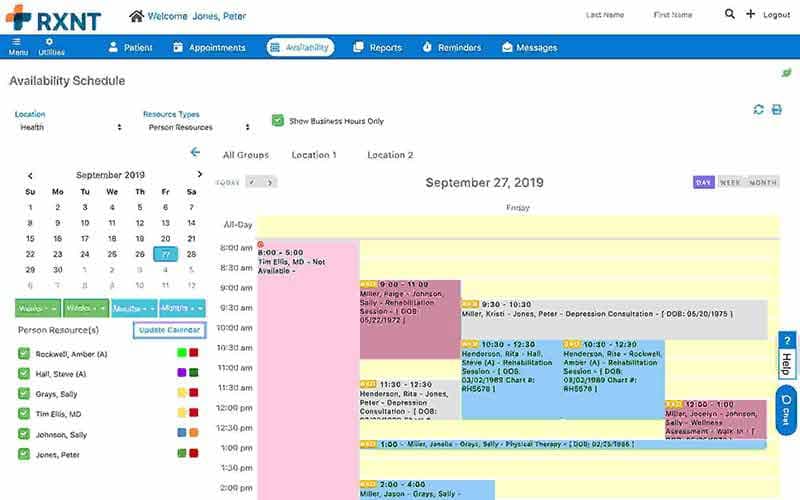
- Schedule appointments and send automated reminders to patients
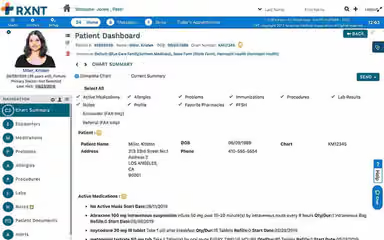
- Manage and document patient health records with customized templates, charts, and forms
- Customize charts, forms, and workflows within each specialty-focused solution
- Access the eRx software solution for efficient prescription management
- Use the patient portal for billing, appointments, and secure messaging
- Conduct video visits for remote care using the telehealth functionality
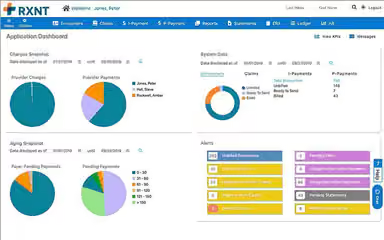
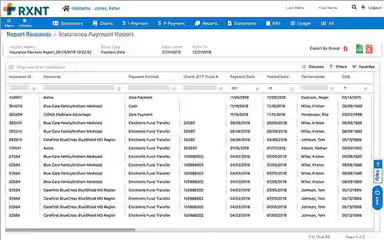
- Analyze performance metrics and financial reporting to optimize operations
- Submit accurate claims and reduce denials with revenue cycle management tools
Who Is RXNT For?
RXNT EHR software is suitable for healthcare facilities of all sizes across a variety of specialties, including:
- Family medicine
- Primary care
- Pediatrics
- Mental and behavioral health
- Urology
- Physical therapy
RXNT Use Cases
Based on an analysis of user feedback and the platform’s current features, RXNT works well in the following scenarios:
Independent Clinics Needing Streamlined E-Prescribing
Smaller medical practices and solo physicians often need a simple way to handle prescriptions. RXNT provides an easy-to-use e-prescribing platform that connects directly with pharmacies. It lets users save favorite pharmacies, prefill medications, and coordinate prescriptions between clinicians and support staff. Reviews note that staff find it easy to prepare scripts for provider approval. This process keeps prescriptions organized.
Hospice/Palliative Care Settings Needing Controlled Substance Workflow Support
Hospice and palliative-care providers often need to prescribe controlled medications quickly and safely. These settings require strict regulatory compliance while ensuring patients receive timely care. RXNT helps by offering Electronic Prescribing of Controlled Substances (EPCS), support for clinician co-signatures, and real-time pharmacy integration. Reviewers say they appreciate how ‘staff can enter orders for a controlled substance, and the doctor can sign electronically in real-time,’ and that it offers a ‘safe and secure prescribing program that is compliant.’
Practices With Heavy Administrative Burdens Looking For Usability
Medical practices that are overburdened by administrative complexity benefit when the software is simple to onboard, easy to navigate, and reduce data entry friction. RXNT provides logical dropdowns, intuitive user interfaces, templates for charting and medication, with easy to populate patient demographics. Users highlight that the system is ‘very easy to navigate’ and that the ‘patient profile is clear and direct’, showing it is easy to learn and straightforward to navigate.
Multi-Location Or Multi-Provider Practices Requiring Standardization
Organizations operating across multiple sites or with multiple providers rely on RXNT to maintain consistent workflows. Shared templates, standardized charting, and synchronized prescribing workflows help teams stay aligned, reducing duplicate work and maintaining accuracy across locations. Administrators benefit from unified data visibility for reporting and operational oversight.
FQHCs Managing Discounted Billing And PPS Claims
Federally Qualified Health Centers (FQHCs) often navigate complex reimbursement requirements, including sliding-fee discounts, Fee-for-Service (FFS), and Prospective Payment System (PPS) billing. RXNT automates these processes by applying discounts in real time, standardizing payer workflows, and tracking encounter-level claims for compliance and reporting. All in all, this helps FQHCs minimize manual recalculations and maintain financial accuracy.
RXNT User Sentiments
Most Positive Sentiments | Least Positive Sentiments |
|---|---|
Efficient Template Design | Patient Information Management |
|
|
Users consistently praise RXNT’s wide variety of templates, customizable options, and clear layout. Many mention that “endless templates” make documentation easier and help in transitioning smoothly from paper to digital. | This feature receives some criticism, particularly around duplicate patient profiles, updating records, and navigating patient data. Concerns are focused mainly on occasional data duplication. |
Streamlined e-Prescribing Process | Charting Performance & Usability Issues |
|
|
The e-prescribing process is frequently highlighted for its convenience, accuracy, and ability to integrate well into workflows. Users appreciate the speed and reliability, with one reviewer stating that “prescribing for patients became quick and efficient.” | Some reviewers highlight a few issues in charting, particularly around layout inconsistencies. One customer said, “At times, the number of steps required to complete notes are just a lot.” |
HIPAA Compliance & Security | Customer Support |
|
|
Users strongly value RXNT’s compliance and security. The platform is considered trustworthy for safeguarding sensitive patient data and meeting HIPAA standards. Negative feedback is rare. | Customer support receives mixed feedback. Many users report difficulty reaching support, delayed ticket responses, and slow resolution of urgent issues. |
Is RXNT Right For You?
If you're looking for an affordable, fully integrated EHR and practice management solution, RXNT may be a great fit for your practice. Its cloud-based software offers a complete suite of products built to improve workflows, patient care, and overall efficiency, running on both Windows and Mac, with Android and iOS apps available as well.
The vendor covers medical billing, electronic prescribing, patient engagement tools, and telehealth. Each product works as a stand-alone system or integrates into a unified practice management package, all built on the same platform, so data flows smoothly without complex interfaces getting in the way.
Additionally, RXNT has announced TEFCA connectivity and integrated QHIN access through a partnership with Kno2. On the security side, data encryption, access controls, and regular security assessments help safeguard PHI. The platform also holds ONC-HIT, Surescripts, and EPCS certification, along with full HIPAA compliance.
Ready to take the next step? Call us at (661)-384-7070 to learn exactly how this software can benefit your facility.
RXNT Features
Electronic Health Records
RXNT features an EHR that gives providers real-time access to patient health and prescription history, with integrated e-prescribing, scheduling, and custom charting and reports built in. The connected patient engagement portal keeps communication in the same system, and reporting also supports MIPS measures. Providers end up documenting encounters and pulling patient history without switching between separate tools throughout the day.
‘Ambient IQ’ (AI Scribe)
‘Ambient IQ’ records patient visits from the RXNT mobile app, transcribing the conversation and turning it into a full SOAP note automatically. Templates can be customized by specialty, with presets available for psychiatry, therapy, and diagnosis-oriented notes. Providers review, edit, and sign off before anything's finalized. As a result, physicians spend less time on after-hours charting, with more room to actually be present during the visit.
Practice Management
RXNT brings scheduling, medical billing, revenue cycle management, and reporting together in one system, built for practices, billing companies, and community-based organizations of any size. Claim scrubbing and tracking speed up reimbursement on the back end, while automatic reminders and online booking take manual scheduling work off staff's plate. More than 15 customizable dashboards then give practices visibility into how billing and clinical performance are actually trending. All of that adds up to less time spent on repetitive admin tasks, and more room to focus on growing patient capacity.
Medical Billing
The software lets billing companies manage claims, reporting, and reimbursement for multiple client practices from a single system. The ‘Charge Uploader’ tool handles bulk batches of unbilled charges at once, cutting out common delays before they turn into bottlenecks. An integrated clearinghouse and centralized billing office reporting further keep everything under one login. This structure supports taking on more clients without adding proportional overhead to manage them.
Electronic Prescribing
The platform's e-prescribing is EPCS-certified, letting providers securely prescribe controlled substances from the office or on the go through iOS and Android apps. Automatic PDMP integration through Bamboo Health backs this up, while real-time medication history checks for drug and allergy interactions before a script ever goes out. On the patient side, ‘RXnotify’ sends a text the moment a prescription reaches the pharmacy. The result is fewer prescribing errors on the provider's end, and support higher fill rates for patients.
Telehealth
Meeting the demand for virtual care usually means adding scheduling, messaging, labs, and video conferencing on top of an already busy workflow. RXNT covers scheduling, messaging, and reminders in the same platform, with mobile apps for managing prescriptions and labs from anywhere. ‘VideoBridge’ handles video by connecting to a provider's preferred platform, just by linking a waiting room URL to the appointment. This way, practices end up delivering virtual care without adding a separate system to manage it.
Pros And Cons of RXNT
Pros
Intuitive navigation makes patient information easy to access
E-prescribing makes prescription submission quick and convenient
Customizable templates accommodate different clinical documentation preferences
Integrated billing reduces the need for separate systems
Users appreciate scheduling for supporting efficient daily workflows
Cons
Some users find reporting tools limited for advanced requirements
Occasional lags can cause slowdowns during workflows
Mobile functionality can lack consistency across different workflows
RXNT Pricing
EHR Bundle | PM Bundle | E-Prescribing | Full Suite |
|---|---|---|---|
$126 per provider per month | $213 per provider per month | $665 per provider per year | $335 per provider per month |
|
|
|
|
Disclaimer: The pricing details were last updated on Sep 25, 2026 from the vendor's website. Please contact us for a tailored pricing list.
RXNT Reviews
Total 251 reviews
4.1
All reviews are from verified customers
Rating Distribution
5
Stars52%
4
Stars29%
3
Stars6%
2
Stars6%
1
Stars7%
Share your experience
Medical Practice, 1-10 employees
“support has gone missing”
Pros
I've been using it for years without any issues and the software itself is very simple and user-friendly to work with.
Cons
The trouble started when I finally needed help and customer service was nowhere to be found. I've been calling since Thursday and now it's Monday with absolutely no response. To be fair, there was another issue about a month ago where support wasn't very responsive either though it was at least somewhat adequate. That problem eventually got fixed but I never got a return call and only heard back through email.
Rating Distribution
Ease of use
5
Value for money
4
Customer Support
3
Functionality
4
Hospital & Health Care, 1-10 employees
“reasonably priced!”
Pros
It is simple to use and affordable, with integrated billing, scheduling and a patient portal. It includes ready-made chart templates for simple notes and I find it quick to add patient records and send orders to labs or pharmacies for medications.
Cons
I have to select several different forms to create a complete note and there's no way for me to merge multiple forms into a single encounter.
Rating Distribution
Ease of use
9
Value for money
9
Customer Support
9
Functionality
9
Mental Health Care, 1-10 employees
“Strikes perfect balance”
Pros
I've found it to hit the sweet spot between being simple and powerful. Its easy to use, integrates smoothly with my daily routine and offers every core feature I need. Their support staff replies quickly and that responsiveness really helps.
Cons
Generally, I only run into a few small bugs or occasional slowdowns but they happen infrequently and haven't meaningfully disrupted my day-to-day work.
Rating Distribution
Ease of use
10
Value for money
10
Customer Support
10
Functionality
10
Frequently Asked Questions
How long does it take to implement RXNT software?
The implementation time for RXNT varies depending on factors such as practice size, type of solution, and customization needs, typically ranging from a few days to a few weeks.
Is RXNT cloud-based?
Yes, RXNT is cloud-based.
What level of support does RXNT provide?
RXNT offers phone and email support options. The vendor has a dedicated customer service team and support staff that offers regular system upgrades. A help center is also available.
What are the main features of RXNT?
RXNT's main features include e-prescribing, practice management, EHR, patient engagement, medical scheduling, and telehealth.
How much does RXNT cost?
RXNT offers four standard pricing plans which include, Full Suite ($335/provider/month), PM Bundle ($213/provider/month), EHR Bundle ($126/provider/month), and E-Prescribing ($665/provider/year). Contact us for a personalized RXNT cost quote tailored to your specific requirements.
Which languages does RXNT support?
RXNT supports the English language.
Does RXNT offer a free trial?
No, RXNT does not offer a free trial.
Does RXNT have a mobile app?
Yes, RXNT offers a mobile application that works on both Android and iOS devices.
Is RXNT free?
No, RXNT is not free.
What other apps does RXNT integrate with?
RXNT does integrate with several third-party software. These include Scalabull, RevolutionEHR, Bamboo Health, Zoom for Healthcare, RingCentral, and Google Workspace.
Does RXNT offer an API?
Yes, RXNT offers an API.
Who are the typical users of RXNT?
The typical users of RXNT include specialties like family medicine, pediatrics, urology, and more.