


Last Updated
Overview
Mailmeteor helps businesses boost email deliverability through personalized mass mailing directly from Gmail or Outlook. While advanced automation requires a paid plan, its intuitive interface simplifies outreach for sales teams and freelancers seeking professional communication. Overall, it is a useful tool for real-time tracking, automated follow-ups, and seamless spreadsheet integration.
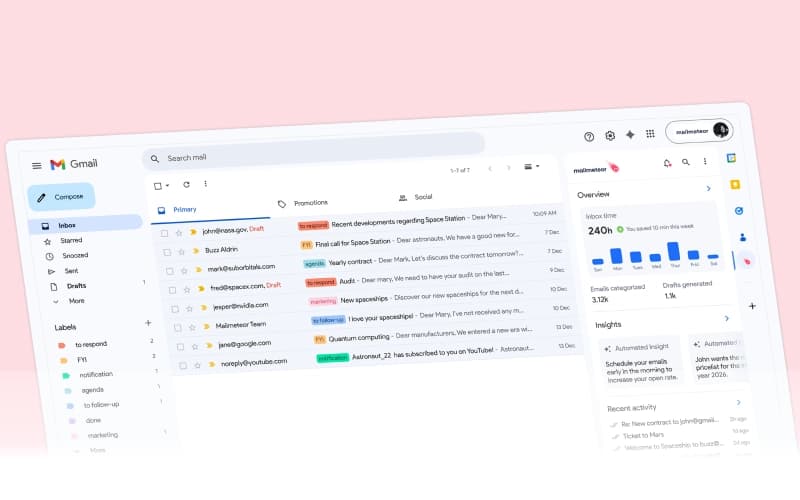


Mailmeteor Specifications
- Sales Automation
- Activity Tracking
- Reporting and Analytics
- Performance Tracking
Mailmeteor Features
Send Mass Emails
Mailmeteor software enables users to send up to 2,000 personalized emails daily directly through Gmail or Outlook. By using the platform to mimic natural sending patterns, the software ensures high deliverability rates. This feature helps businesses reach large audiences while maintaining a professional appearance in the recipient's primary inbox.
Schedule Emails
This feature allows users to plan their email campaigns in advance for optimal engagement. The platform provides flexible scheduling options, ensuring messages land in the inbox at the exact time recipients are most likely to open them. Users can easily manage, pause, or reschedule their campaigns from a central dashboard.
Customize Links
Mailmeteor allows for the creation of unique call-to-action links for every recipient. Users can personalize both the anchor text and the destination URL using spreadsheet data. This feature enhances interactivity and provides specific insights into which individual contacts are engaging with the shared content or offers.
Import Contacts In 1 Click
The platform simplifies audience management by allowing users to add recipients instantly from Google Sheets, Excel, or CSV files. This feature supports one-click synchronization, eliminating the need for manual data entry. Users can also segment these imported lists using advanced filters to target specific groups within a campaign.
Detailed Reports
This feature provides users with in-depth analytics and real-time tracking for every campaign sent. The software monitors essential metrics, including open rates, clicks, replies, and bounces. These comprehensive reports allow businesses to measure performance accurately and refine their communication strategies based on reliable, up-to-the-minute data
Pros And Cons of Mailmeteor
Pros
Intuitive and easy to use interface
Saves significant time on email campaigns
Reliable mass email delivery
Cons
Support responsiveness can vary
Deliverability is affected by email server blocks
Mailmeteor Reviews
Total 19 reviews
4.7
All reviews are from verified customers
Rating Distribution
5
Stars74%
4
Stars21%
3
Stars5%
2
Stars0%
1
Stars0%
Share your experience
paola b.
Education Management, 11-50 employees
More than a year
“Great flexibility with excellent outcomes”
Pros
Absolutely incredible! This tool is super flexible and really covers everything I need. I am completely satisfied with it.
Cons
One limitation I have noticed is that I cannot seem to add multiple recipients from different sheet columns when creating a campaign through Google Sheets, unless I combine the addresses into the same column.
Rating Distribution
Ease of use
10
Value for money
10
Customer Support
10
Functionality
9
mikoel t.
Civic & Social Organization, 1-10 employees
More than a year
“Starter plan has certain restrictions”
Pros
After purchasing the Starter plan I noticed the email sent to me doesn't show as opened and the JPG file I attached isn't being included in the email. I added the attachment so I am trying to figure out how to fix that.
Cons
With the Starter plan, attachments are not being sent properly and I also cannot use an alias email which is limiting.
Rating Distribution
Ease of use
5
Value for money
6
Customer Support
6
Functionality
6
Andrew R.
Information Technology and Services, 11-50 employees
Less than 6 months
“Outreach tracking works really well”
Pros
Connecting it with Google Sheets is fantastic and makes running outreach campaigns is not a hassle. Email formatting stays surprisingly consistent across different clients which has been a huge plus. The interface is simple so there's barely any learning curve and the delivery and tracking have been reliable for managing campaigns.
Cons
Template customization is a bit limited for more advanced use cases. It would also be better with stronger segmentation features for handling larger lists.
Rating Distribution
Ease of use
9
Value for money
9
Customer Support
10
Functionality
8
Frequently Asked Questions
Does Mailmeteor have a mobile app?
Yes, Mailmeteor offers a dedicated mobile app.
Does Mailmeteor offer an API?
Information regarding an API is currently unspecified by the vendor.
Who are the typical users of Mailmeteor?
Mailmeteor features are used by organizations across industries and sectors, including computer software, education, hospitality, and arts and crafts.
What other apps does Mailmeteor integrate with?
Mailmeteor integrates with various third-party applications, such as Salesforce, SugarCRM, and Pipedrive CRM software.
What level of support does Mailmeteor offer?
Mailmeteor offers support through contact forms, FAQs, and a help center.
What language does Mailmeteor support?
Mailmeteor primarily supports the English, Spanish, and French languages.
What types of pricing plans does Mailmeteor offer?
Mailmeteor price starts at $4.99/user/month for the Starter plan, with higher tiers including Premium at $12.99/user/month and Pro at $24.99/user/month. A free version, called Hobby, is also available. Get a detailed Mailmeteor cost breakdown tailored to your specific requirements.