


Pleo
Last Updated
Key Takeaways
Generated from the text of customer reviews
Our Verdict
Overall Rating
Based on 24 users reviews
4.3
Rating Distribution
Positive
79%
Neutral
8%
Negative
13%
Starting Price
$14
per user per month
Pleo Specifications
- Expense Tracking
- Invoice Management
- Account Reconciliation
- Multi-Currency Support
Pleo Features
Expense Management
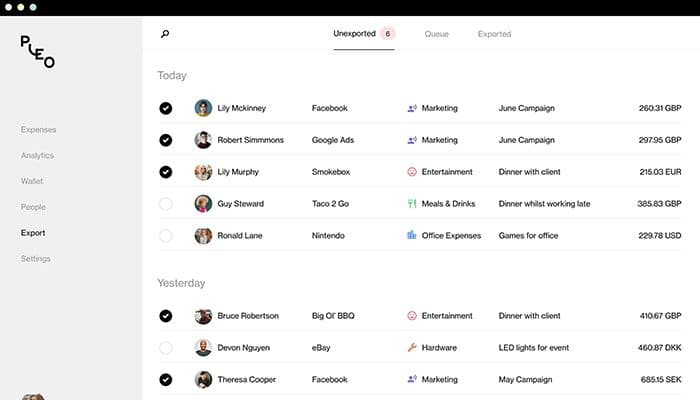
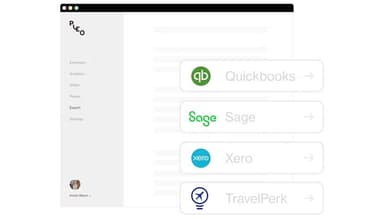
Pleo automates expense reporting by prompting employees to capture receipts when they make purchases. Finance teams can track company spending in real time, request missing information, and set card limits or review thresholds. It also helps export spending data to accounting tools such as QuickBooks, reducing manual entries and the risk of errors.
Reimbursement
Employees can submit out-of-pocket expenses and mileage claims directly through the app instead of completing separate expense forms. Receipt details can be captured with OCR, while mileage rates are applied automatically based on the journey. Finance teams can route claims for approval, flag expenses that fall outside company policies, and schedule approved reimbursements.
Invoice
Pleo Accounts Payable automates the invoice process from receipt through approval and payment. OCR extracts information such as amounts, VAT, and payment terms, while approval rules route invoices according to amount, team, vendor, or project. So, teams can then pay suppliers in more than 50 currencies and sync invoices and payment data with their accounting system.
Pros And Cons of Pleo
Pros
Automatic receipt capture after purchases
Individual spending limits for each user
Direct syncing with accounting systems
Significant reduction in expense reporting work
Easy distribution of cards across teams
Cons
Some features can experience occasional technical errors
Cash withdrawal fees can be relatively high
Some card payments face acceptance limitations
Pleo Pricing
BuildSmall (1-49 employees) | OptimizeSmall (1-49 employees) | ScaleMedium (50-1,000 employees) | LeadMedium (50-1,000 employees) |
|---|---|---|---|
$14 per user per month | $18 per user per month | Starts at $249 per month | Starts at $499 per month |
|
|
|
|
Disclaimer: The pricing details were last updated on Sep 23, 2026 from the vendor's website. Please contact us for a tailored pricing list.
Pleo Reviews
Total 24 reviews
4.3
All reviews are from verified customers
Rating Distribution
5
Stars75%
4
Stars4%
3
Stars8%
2
Stars0%
1
Stars13%
Share your experience
IT, 51-100 employees
More than a year
“Expense tool for small business”
Pros
The ability to navigate smoothly, the simplicity of operation, and the clarity of presentation.
Cons
I have concerns with functionality, technical errors, and customer service.
Rating Distribution
Ease of use
8
Value for money
2
Customer Support
4
Functionality
8
IT, 11-50 employees
More than a year
“Game-changing expenses software”
Pros
Before I started using Pleo, managing expenses was a real pain and very time-consuming. Setting up users on Pleo is easy, allowing me to set limits quickly, and the virtual cards make it simple to get people started right away. The visibility of spending is fantastic, and the nudges to add receipts save me a lot of time.
Cons
Pleo's feature for fetching receipts from my email inbox is great, but it doesn't always work perfectly, so I still have to find the receipt manually. It'd be great if this was more reliable.
Rating Distribution
Ease of use
10
Value for money
9
Customer Support
8
Functionality
10
Legal, 51-100 employees
More than a year
“Xero long time user”
Pros
Free budget version, easy to use, and integration with accounting software.
Cons
The price per user above the basic plan is too high. Uploading expense pictures is not convenient; I can't cut or modify receipt photos. There's also inconsistency between the app and desktop versions.
Rating Distribution
Ease of use
8
Value for money
9
Customer Support
9
Functionality
9
Frequently Asked Questions
What types of pricing plans does Pleo offer?
Pleo price starts at $14/user/month for the Build plan for small businesses (1 to 49 employees). Its other plan includes Optimize at $18/user/month. The plans for medium businesses (50-1000 employees) include a Scale plan starting at $249/month and a Lead plan starting at $499/month. Enterprise pricing is custom-based for businesses with over 1,000 employees. Get a detailed Pleo cost breakdown tailored to your specific requirements.
Does Pleo offer an API?
Yes, Pleo offers an API.
What language does Pleo support?
Pleo primarily supports various languages, such as English, Dutch, French, and German.
What other apps does Pleo integrate with?
Pleo supports integration with many platforms, such as Personio, QuickBooks, BambooHR, Xero, and Okta.
Does Pleo have a mobile app?
Yes, Pleo offers a dedicated mobile app.
Who are the typical users of Pleo?
Pleo is used by organizations across industries and sectors, including retail, hospitality, travel, technology, media, and marketing.
What level of support does Pleo offer?
Pleo offers support through email, chat, help center, and general resources, such as FAQs and webinars.