



Last Updated
Key Takeaways
Generated from the text of customer reviews
CharmHealth is an EHR software used by physicians, specialists, therapists, and front-desk staff in primary care and specialty clinics. Users value having all patient data in one system, while some note slow support responses. Recently, CharmHealth introduced Ria, an AI solutions advisor that answers pricing, billing, and setup questions and guides new users through onboarding.
Our Verdict
CharmHealth EHR suits independent practices and multi-provider specialty clinics that want charting, billing, and patient communication on one cloud platform. Its usage-based pricing scales with patient volume, which favors new and part-time practices, though add-ons can make the total harder to predict as clinics grow. We recommend it for practices that prioritize customization and cost control.
Overall Rating
Based on 172 users reviews
4.3
Rating Distribution
Positive
83%
Neutral
12%
Negative
5%
Starting Price
$0.50
per encounter per month
CharmHealth EHR Specifications
- Appointment Management/Scheduling
- e-Prescriptions
- Lab Integrations
- Patient Portal
What Is CharmHealth EHR?
CharmHealth EHR is a cloud-based platform that combines electronic health records, practice management, patient engagement, and medical billing in a single system. Scheduling, charting, and billing all run from the same patient record, so information captured at one stage is already there at the next. Practices can also use CharmHealth's revenue cycle management and medical billing tools as their billing needs grow.
What Is CharmHealth EHR Best For?
CharmHealth stands out for its AI-assisted clinical documentation, combining CharmCopilot and AI Scribe. CharmCopilot can generate structured chart notes, assessments, diagnoses, and treatment plans, while AI Scribe provides real-time transcription and customizable note formats. These AI documentation tools make the platform a fit for practices that want to simplify clinical documentation across different specialties and encounter types.
How Much Does CharmHealth EHR Cost?
CharmHealth pricing starts at $0.50/encounter/month (monthly minimum of $25) with the Encounter Plan, which includes unlimited providers, users, and patient records. The platform uses tiered usage-based and provider-based models and offers the following plans:
- Free Plan: $0 (limited to 50 encounters/month)
- Provider Plan: $200/provider/month
Beyond the base subscription, additional costs may include:
- Quickbooks Integration: $1,000 one‑time + $350 annual maintenance fee
- Direct Provider Messaging: $20/provider/month
- e‑Claims Clearinghouse (Variable By Transaction): $25/month minimum fee for 0-50 transactions and $0.25/transaction for 51+ transactions
- AI Scribe Add‑on: Includes two plans: Plan 1 for $125/provider/month (unlimited encounters) or Plan 2 for $2/encounter with a $20 monthly minimum
- Telehealth Add‑on: $20/provider/month
- Text/Voice Calls Add‑on: $20/month for 0-250 messages and calls, and $20 + $0.08/additional message/call for usage exceeding 250 messages and calls
- Immunization Registry: Includes a one-time setup fee of $100/provider and a monthly cost of $25/provider/month
Users often describe CharmHealth as a cost-effective option, particularly for small practices and startup clinics with limited budgets. Its free version and usage-based plans can help keep initial costs manageable. However, some users note that adding optional features can increase the overall cost.
Disclaimer: The pricing is subject to change.
CharmHealth EHR Integrations
CharmHealth EHR integrates with the following:
- PointClickCare
- MatrixCare
- Surescripts
How Does CharmHealth EHR Work?
Here’s how you can access the platform and start using its features:
- Log in to the software using your credentials to access your practice workspace
- Configure your profile, facility details, roles, privileges, and other practice settings
- Create customizable templates and forms for documenting patient visits and care
- Add patients and set up appointments and pre-appointment questionnaires to organize patient information
- Document patient encounters using customized charting templates, while reviewing past notes, treatment plans, lab results, images, and other patient information within the chart
- Connect supported laboratories and e-prescribe medications electronically from the EHR
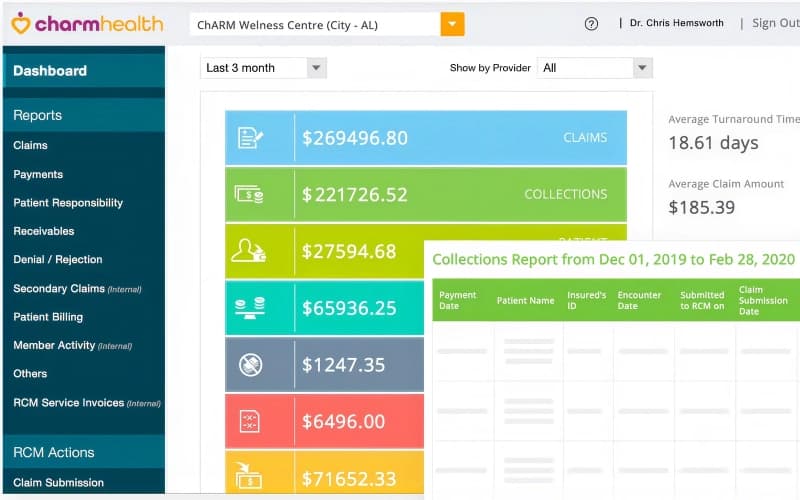
- Manage invoices, claims, and receivables to handle billing after patient encounters
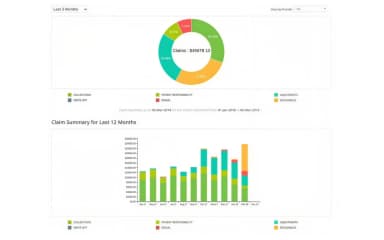
- Review practice and clinical reports to monitor patient, appointment, billing, and other operational data
Who Is CharmHealth EHR For?
CharmHealth caters to a range of medical and dental specialties, including:
- Family practice
- Internal medicine
- Pediatrics
- Psychiatry
- Integrative medicine
- Dental
CharmHealth EHR Use Cases
Based on our analysis of user reviews and CharmHealth’s features, we have highlighted some key use cases where the software performs well:
Practices That Want To Reduce Phone Volume Through Patient Self-Service
For small clinics without a dedicated scheduler, phone calls to book and confirm appointments can take up much of the front desk's day. CharmHealth EHR lets patients book directly from the practice website or patient portal, and automated text and voice reminders can reduce confirmation calls. Practices with many visit types should review the booking page first, since some reviewers find its patient-facing layout somewhat difficult to customize.
Specialty Clinics That Need Integrations For Labs And Supplements
Functional and integrative medicine clinics often depend on outside partners for both specialty testing and supplement fulfillment, which can mean juggling several portals. CharmHealth EHR connects to around 29 labs, including specialty labs such as Boston Heart Diagnostics and Vibrant America. The same marketplace links to Fullscript, Wholescripts, and VitaminLab for supplement orders. Keeping lab orders and supplement recommendations in the patient's chart helps clinicians follow a treatment plan from one record.
Teams That Want Heavy Template Customization And Specialty Charting
Acupuncturists, therapists, and similar specialists often document assessments that don't fit a standard SOAP layout. CharmHealth EHR's custom templates, custom health vitals, and image annotation tools let these practices build notes around their own assessment formats. Providers can record specialty-specific measurements as custom vitals and mark findings directly on imported images within the chart note.
Practices That Need Streamlined Inventory And Supplement Management
When a practice sells supplements, OTC medications, or lab kits from its own shelves, inaccurate stock counts can lead to missed sales or expired products. CharmHealth EHR's inventory management tracks current stock levels and lets front-desk staff convert a visit’s prescribed items into a sale invoice. It calculates reorder points automatically and offers reports on items nearing their reorder point and items that have expired.
CharmHealth EHR User Sentiments
Most Positive Sentiments | Least Positive Sentiments |
|---|---|
| All-Patient Data in One Accessible Layout | Response Time Issues |
|
|
| Users often say having patient data, scheduling, billing, etc., in a single system is very helpful. From one review: “The best use of CharmHealth for us was having all our patient data in one location that was easily accessible, and well laid out.” | A frequent complaint is that support is slow or variable. As pointed out by a user, “Support sometimes takes up to a week to respond to an email." |
| Customizability | Online Booking Usability Problems |
|
|
| Many reviews praise being able to customize templates, roles, macros, etc., for their practice type. | Users mention that the online booking process can be confusing or unreliable for patients. As one user put it, “I have had issues with patients not being able to book online due to the captcha system.” |
| Ease Of Setup | Gaps In E-Prescribing And Lab Order Workflow |
|
|
| Users appreciate being able to implement the system quickly without needing external IT support. As one user put it, “As a small business owner and medical provider, I was able to set up and implement the use of Charm all by myself.” | Several reviews mention that some lab order workflows are awkward, or e-prescribing is slow / hard to configure. |
Is CharmHealth EHR Right For You?
If your practice wants to combine customizable clinical documentation with AI-assisted charting and patient self-service, CharmHealth EHR software is worth an evaluation. Its cloud-based architecture, multi-facility support, and unlimited providers support practices as they expand, while its subscription options accommodate different practice sizes and usage levels. Its security framework includes HIPAA compliance, 256-bit encryption, audit trails, and data backups. CharmHealth EHR is also ONC 2015 Edition Cures Update certified.
Still not sure about CharmHealth EHR? Contact us at (661) 384-7070 for further guidance.
CharmHealth EHR Features
Clinical Decision Support
CharmHealth provides Clinical Decision Support (CDS) rules under Settings > Encounter > CDS that enable providers to receive clinical alerts and guidance during care. The platform supports configurable CDS interventions related to Clinical Quality Measures (CQMs) and high-priority health conditions, along with drug-drug and drug-allergy interaction alerts during prescribing. These capabilities support the clinical decision-support measures documented for Meaningful Use.
Charm Health Note App
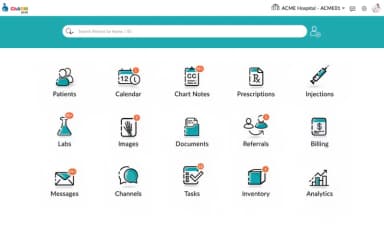
With CharmHealth EHR, providers can access patient details, appointments, encounter notes, medications, and lab records through the Charm Chart Note App on iPad. The app also supports offline charting and synchronization when the device reconnects to the network, allowing providers to continue documenting when internet access is unavailable.
Real-Time Prescription Benefits
The application’s integrated Real-Time Prescription Benefit (RTPB) feature adds patient-specific prescription benefit and pricing information to the e-prescribing workflow. Through Surescripts, providers can view formulary eligibility, prescription pricing, pharmacy information, and therapeutic and payer alternatives, as well as whether prior authorization is required, when the relevant patient benefit information is available. RTPB depends on eRX, which is a paid add-on on the Free and Encounter plans.
CharmConnect
CharmHealth’s Charm Connect and patient messaging features enable secure communication within care teams and between practices and patients. The platform supports 1-on-1 chat, group chat, document sharing, two-way text messaging, and message notifications. Charm Connect also provides Patient Channels for communication between patients and selected practice members, while Two-way Text allows patients to reply directly to practice messages. CharmConnect is a separately subscribed add-on.
Telehealth Capabilities
The platform offers Charm TeleHealth, available as an add-on on the Free and Encounter plans, which enables providers to conduct video consultations through CharmHealth’s integrated video platform or Zoom. Providers can write chart notes during the telehealth session, share files, and use screen sharing features. When secure document sharing is enabled, patients can upload files for providers to review. The service supports desktop and mobile access and multi-user video sessions.
Flow Sheets
CharmHealth’s Flowsheets feature helps providers monitor patient health data over time by organizing vitals, lab results, and custom parameters in a single view. Clinicians can track parameters such as pain severity, blood pressure, blood glucose, plot data to visualize changes over time, and flag abnormal values for review.
Physician SOAP Note Charting
CharmHealth’s SOAP Note Charting enables providers to document patient encounters using structured SOAP chart notes. Providers can use customizable templates and features such as Repeat, Past Rx, Past Dx, and Past Labs to reuse information from previous encounters. The platform also supports medical image annotation, allowing providers to mark imported images and store the annotations as part of SOAP or Comprehensive chart notes.
Pros And Cons of CharmHealth EHR
Pros
Intuitive interface simplifies charting and scheduling
Customizable templates adapt to specific practice needs
Built-in messaging enables secure team collaboration
Cons
Some templates may need further refinement
Online booking captcha may block patients
CharmHealth EHR Pricing
Free Plan(Limited to 50 encounters per month) | Encounter Plan(monthly minimum of $25) | Provider Plan |
|---|---|---|
$0 per month | $0.50 per encounter per month | $200 per provider per month |
|
|
|
Disclaimer: The pricing details were last updated on Oct 02, 2026 from the vendor's website. Please contact us for a tailored pricing list.
CharmHealth EHR Reviews
Total 172 reviews
4.3
All reviews are from verified customers
Rating Distribution
5
Stars56%
4
Stars27%
3
Stars9%
2
Stars3%
1
Stars5%
Share your experience
Medical Practice, 1-10 employees
“comprehensive cloud-based system”
Pros
Right from the start, the interface felt very user-friendly and handling patient charts and scheduling has been amooth. I really appreciate that it brings everything together in one comprehensive cloud-based system. The patient portal is a major advantage too, making communication and document sharing much simpler which has noticeably boosted our practice's efficiency and helped improve patient engagement.
Cons
At first, the number of features can be a little overwhelming because the platform offers so much. The customization options are definitely a benefit but they also take some upfront time to configure the way you want. Once that initial setup is out of the way though, everything works very smoothly.
Rating Distribution
Ease of use
10
Value for money
10
Customer Support
10
Functionality
10
Health, Wellness and Fitness, 1-10 employees
“Months of unresolved issues”
Pros
One thing that helped was the pricing model since it charges per note instead of a monthly fee. It also lets me customize appointment notes and keep documents on file that can be sent to patients.
Cons
The electronic prescribing for controlled substances failed to renew correctly and support was completely ineffective. Over the last three months, I've spent hours calling, emailing and even chatting with AI trying to get it fixed. Charm's engineers made one mistake after another which caused major disruption to my practice for more than three months. My requests were ignored, promised calls and emails never happened and I still have not received an appropriate response after all this time. There has been no accountability or responsibility at all.
Rating Distribution
Ease of use
4
Value for money
4
Customer Support
3
Functionality
4
Hospital & Health Care, 500+ employees
“Well laid out”
Pros
Working with it is really comfortable for a small to mid-sized clinic. The interface is uncomplicated, with clean layouts that are quick to learn and easy to follow. It also feels dependable from a privacy standpoint since patient information is stored securely and as a student nurse, that matters a lot because protecting confidentiality is essential. Managing patients is also very convenient, whether it's updating health histories, reports, notes, summaries or prescriptions. The patient portal is simple to handle too so patients can check their own records without much trouble. On the scheduling side, staff can create, cancel or reschedule appointments in just a few clicks and patients being able to book online helps save time and keeps things organized.
Cons
That said I have run into slowdown issues a few times. Whenever I try loading larger files or charts, the system can start lagging which gets frustrating. I can see this becoming a bigger issue for larger clinics especially during busy hours. Support could also be improved since responses sometimes take longer than expected. And while it is affordable at the start, the cost can climb if a clinic needs additional features to expand the platform.
Rating Distribution
Ease of use
10
Value for money
9
Customer Support
9
Functionality
10
Frequently Asked Questions
Does CharmHealth have an app for providers?
Yes, CharmHealth offers several mobile apps for healthcare providers, including Chart Note, Scheduler, RCM, and CharmConnect.
Does CharmHealth support electronic prescribing for controlled substances?
Yes. CharmHealth integrates with Surescripts to electronically transmit Schedule II–V prescriptions. It also integrates with Appriss PMP Gateway to provide access to state PDMP data.
Can patient data be exported from CharmHealth when a practice changes EHRs?
Yes, CharmHealth supports individual patient data exports in FHIR 4.0.1 and HL7 C-CDA 2.1 formats, as well as bulk exports in FHIR 4.0.1 (NDJSON) format. Practices can also export billing data, including invoices and insurance claims, as CSV files.
Does CharmHealth support interoperability with other EHRs such as Epic?
CharmHealth does not list a direct Epic integration. However, its Surescripts Record Locator and Exchange (RLE) integration allows practices to retrieve and share patient records with external EHRs connected to the RLE network, subject to patient consent.
Does CharmHealth support Quest Diagnostics integration?
Yes. CharmHealth offers a Quest Diagnostics lab interface that supports both sending orders and receiving results in the patient chart.