


DroneDeploy
Last Updated

Overview
DroneDeploy provides teams with greater visibility into large and complex sites. While there's limited support for combining multiple flights into one map, its centralized platform brings aerial, ground, and robotic data together for consistent site documentation. Overall, it suits organizations seeking frequent monitoring across distributed or demanding environments.
Overall Rating
Based on 8 users reviews
4
Rating Distribution
Positive
63%
Neutral
38%
Negative
0%
Starting Price
$1,908
per year
DroneDeploy Specifications
- Project Planning And Scheduling
- Document Management
- Quality Control
- Budget Management
What Is DroneDeploy?
DroneDeploy, now acquired by Procore, is a visual AI and robotics platform that helps teams capture, view, and analyze site conditions using 360 cameras, drones, and robots. It brings together visual data from across a site to support progress tracking, earthwork measurement, quality inspections, and safety monitoring.
The platform's AI capabilities can proactively identify potential schedule or safety risks, as well as visual issues such as rust, leaks, debris, and tripping hazards. Using the software, teams can track work progress, coordinate trades, verify completed work and payments, and access visual site data without depending entirely on in-person visits.
What Is DroneDeploy Best For?
The platform stands out for its 'Dock Automation' feature, which reduces manual work involved in routine drone mapping. Teams can plan flights, capture site data, upload it, and process the results through one automated workflow. Its built-in RTK provides GPS corrections for accurate mapping, while repeatable flight plans support consistent site data. This is useful for large construction and industrial sites that require regular drone flights.
How Much Does DroneDeploy Cost?
DroneDeploy price starts at $1,908/year for its Ag Lite plan. It comprises a single pilot license, stand count analysis, RGB plant health, and up to 1,000 images/map. It offers a free trial as well. Other plans it offers include:
- Flight & Analysis Plan: $4,188/year
- Advanced Flight & Analysis Plan: Custom pricing
Its pricing also depends on the selected product(s), which are available at custom pricing. These include:
- DroneDeploy Aerial
- DroneDeploy Aerial Pro
- DroneDeploy Ground
- DroneDeploy Ground Pro
Other than the base subscription cost, buyers should also budget for the following potential additional costs associated with the software:
- Safety AI Add-On: ~$2,500–$4,000/year/site or org tier
- Progress AI Add-On: ~$3,000–$5,000/year/org tier
- Dock Automation Add-On: ~$4,000–$6,000/year software fee plus $12,000–$18,000 hardware/dock
- Robotic Automation Add-On: ~$5,000–$8,000/year/site
- DroneDeploy Firewall Add-On: ~$500–$1,000/year/drone or device
- Overage Fees Past Image Caps: ~$0.10–$0.25/image over plan limit
- Consumer/Prosumer Drone Hardware: $1,500–$6,000/unit, spanning DJI Mavic 3 Enterprise to Matrice 350 RTK
- RTK/GCP Equipment: $3,000–$8,000 for ground control point base stations and RTK modules
- Physical Drone Dock: $12,000–$18,000/dock plus ~$150–$300/month for connectivity and power
DroneDeploy’s pricing can be on the higher side, particularly for teams that need multiple seats or advanced features. Some users find the standard package sufficient for basic needs, while others feel the cost of Pro features and add-ons can make the ROI harder to justify.
Disclaimer: The pricing is subject to change.
DroneDeploy Integrations
DroneDeploy software integrates with several third-party apps, including:
- Box software
- Climate FieldView
- Egnyte
- FlyFreely
- Google Drive
How Does DroneDeploy Work?
Follow the steps below to understand how the software typically works:
- Create a project in DroneDeploy and mark out the site area to be mapped using the mobile app
- Configure flight parameters such as altitude, overlap, and coverage, then let the drone follow the automated path
- Capture aerial imagery as the drone collects overlapping, geotagged photos across the site during the flight
- Once the flight is complete, upload the images so the platform can process them in the cloud into orthomosaic, digital surface models, and 3D models
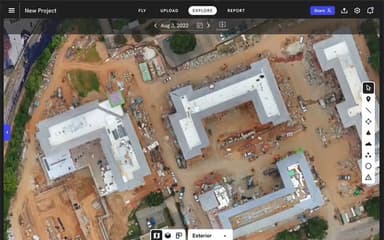
- Review the processed maps and models to measure distances, elevations, stockpile volumes, and earthworks quantities
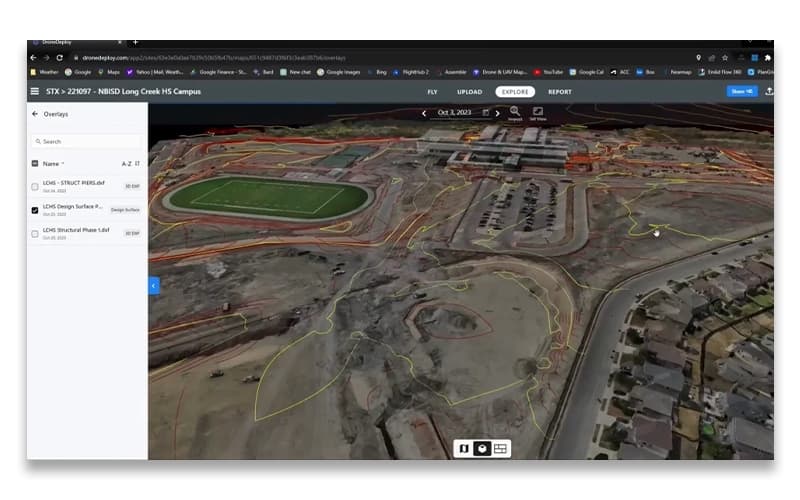
- Overlay CAD or BIM design files against current site conditions to see how actual progress compares to plan
- Add annotations and measurements directly on the maps to flag issues and share findings with the rest of the team
- Compile the resulting data into reports that stakeholders can access across individual projects or an entire portfolio of sites
Who Is DroneDeploy For?
The platform mainly caters to the following businesses:
- Construction
- Mining
- Agriculture
- Heavy civil
- Roofing
DroneDeploy Use Cases
Based on DroneDeploy features and user feedback, we have identified the following business scenarios where it is well suited:
Data Center Teams Managing Campus-Wide Documentation
Data center owners and project teams can use DroneDeploy to maintain a dated visual record from preconstruction through operations and maintenance. Using the software, teams can document underground utilities, pads, racks, fit-out work, and infrastructure before areas are covered or changed. Users particularly appreciate the platform's ability to combine captured data on a unified platform, making it easily accessible.
Property Managers Managing Distributed Portfolios
DroneDeploy can be used by property managers overseeing multiple buildings to document roofs, facades, and parking lots without sending inspection crews to every property. Timestamped aerial records give teams a consistent way to compare property conditions and assess maintenance needs. It also helps them determine where capital spending is most urgent. The same records can also be shared with owners, vendors, and other stakeholders when reviewing completed work, insurance matters, or ongoing service requirements.
Construction Teams Verifying Work And Managing Project Progress
Construction projects often need a reliable record of what was completed, when it happened, and what the site looked like at the time. DroneDeploy gives project teams dated aerial maps and 360-degree imagery that can be referenced during OAC meetings, coordination calls, and progress reviews. When questions arise around work in progress, RFIs, change orders, or requisitions, the recorded site conditions provide additional evidence beyond written updates or recollection.
Utility Teams Documenting Underground And Critical Infrastructure
Before a trench is backfilled, utility crews need an accurate record of what was installed and where it sits. DroneDeploy can capture coordinates, depth, and site imagery while pipes and cables are still exposed. This helps create documentation that crews can refer to during future work. The same approach can be applied to inspections of overhead lines, poles, substations, and vaults without relying on repeated site visits or more disruptive inspection methods.
Is DroneDeploy Right For You?
DroneDeploy is a good fit for organizations that need greater visibility into asset conditions while reducing the amount of manual effort required for routine inspections. It is particularly valuable for teams that have to manage large, remote, or hazardous sites where inspection frequency, worker safety, and reliable documentation are important operational priorities.
For security-conscious organizations, DroneDeploy provides enterprise security controls and maintains SOC 2 Type 1 and Type 2 and ISO 27001 certifications. Data is encrypted in transit and at rest, while options such as SSO, two-factor authentication, role-based permissions, and audit trails support controlled access to inspection data. Moreover, it is trusted by leading names in the industry, such as Turner, Rio Tinto, and Woodside Energy.
DroneDeploy's recent focus on robotics and AI also reflects the industry's shift toward more automated inspection programs. The platform now supports scheduled missions with docked drones and ground robots. This enables organizations to collect repeatable inspection data and identify changes earlier.
Still doubtful if DroneDeploy is the right fit for you? Connect with us at (661) 384-7070 for further guidance.
DroneDeploy Features
DroneDeploy Aerial
This feature brings drone flight planning, site mapping, and aerial data analysis into one platform. It lets teams capture repeatable site maps using RTK and PPK, then work with high-resolution maps, photos, videos, and panoramas to review project conditions. This feature also supports measurements and automated insights for different tasks. These include progress tracking, cut-and-fill analysis, underground documentation, and structure inspections.
DroneDeploy Ground
DroneDeploy turns on-site 360 captures into organized visual records that teams can review alongside drawings and floor plans. Project engineers can document rooms regularly, while teams can compare existing conditions with BIM to spot differences and track interior progress. It also supports issue tagging, collaboration, and report sharing, making it suited to projects where detailed ground-level documentation is needed.
DroneDeploy Robotics
The platform captures dated aerial maps and 360-degree imagery that provide documented evidence of site progress for OAC meetings, coordination discussions, and project reviews. These records can support evaluations involving work in progress, RFIs, change orders, and requisitions. They serve as a consistent reference for actual site conditions.
Industrial Inspection
DroneDeploy supports automated missions that capture and upload inspection data from drones and ground robots. Each capture remains tied to its real-world location. Historical records make it possible to compare asset conditions over time. At the same time, machine learning can identify gauge readings, objects, and safety protocol gaps that may require attention.
Pros And Cons of DroneDeploy
Pros
Strong collaboration and sharing capabilities
Accurate 3D models and site documentation
Effective progress tracking and site visibility
Strong safety and analysis capabilities
Centralized aerial and ground data
Cons
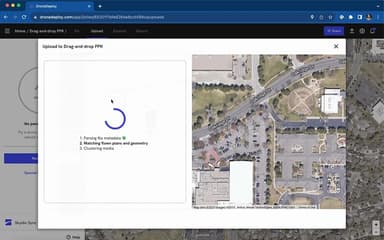
Occasional issues uploading 360° walks
3D model alignment and upload could be improved
Connectivity interruptions can require uploads to be restarted
DroneDeploy Pricing
Flight & Analysis Plan | Ag Lite Plan | Advanced Flight & Analysis Plan |
|---|---|---|
$4,188 per year | $1,908 per year | Custom pricing |
|
|
|
Disclaimer: The pricing details were last updated on Oct 09, 2026 from the vendor's website. Please contact us for a tailored pricing list.
DroneDeploy Reviews
Total 8 reviews
4
All reviews are from verified customers
Rating Distribution
5
Stars38%
4
Stars25%
3
Stars38%
2
Stars0%
1
Stars0%
Share your experience
Dairy, 11-50 employees
“Does the job but has some problems”
Pros
The processing time is great, it is fairly easy to use and it is also quite efficient. Also there are some features that look promising but I feel like they still need some work for example, the stand counts are not quite accurate yet.
Cons
I have noticed that it has glitches during mission flights with major delays in updating the drone's status. Also it usually takes 8 to 10% of the battery before it starts the mission and begins collecting data.
Rating Distribution
Ease of use
5
Value for money
5
Customer Support
5
Functionality
5
Small Business, 11-50 employees
“Very happy with it!”
Pros
DroneDeploy is a lot like an iPhone, MacBook or iPad but it is a smooth, polished tool that makes everything easy for the user like us. Also the interface is really intuitive and pilots can quickly create and share plans, updates and drafts. Even though we have come across a couple of minor issues while using it but these were likely due to user mistakes. The support team is amazing and always quick to respond. Andrea Ku in particular, was super helpful, patient and understanding. She even made a step by step video to show me where I went wrong and offered resources to prevent future problems. It was probably one of the best support experiences I have had.
Cons
Similar to other Apple products, it is quite expensive. Remote pilots or their businesses have to make a substantial investment to get into its ecosystem. Customization is also limited to what it allows. While the high cost and restrictions ensure stability and minimize issues it really confines it to large organizations, established pilots or institutions. So I feel like smaller companies or new pilots won't be able to afford it. And the new pilots are more likely to use affordable alternatives like Litchi, Drone Link or other reality capture software.
Rating Distribution
Ease of use
5
Value for money
4
Customer Support
5
Functionality
7
Small Business, 11-50 employees
“Great all-in-one product”
Pros
DroneDeploy is really easy for beginners to pick up. Plus it has lots of extra features and can connect to a lot of different GIS systems which I find a nice bonus. The website is also really simple to manage which allows me to easily keep track of all my projects.
Cons
Well I just wish the live streaming features could be easier to implement for drones.
Rating Distribution
Ease of use
9
Value for money
10
Customer Support
10
Functionality
10
Frequently Asked Questions
Who are the typical users of DroneDeploy?
The platform suits construction, mining, utility, and property management businesses.
What other apps does DroneDeploy integrate with?
DroneDeploy integrates with different third-party systems such as Box, Google Drive, Flyfreely, and Climate FieldView.
Does DroneDeploy offer an API?
Yes, it offers API access.
Does DroneDeploy have a mobile app?
Yes, a mobile app is available for Android and iOS devices.
What level of support does DroneDeploy offer?
The vendor offers support via email, phone, live chat, and the help center.
What languages does DroneDeploy support?
DroneDeploy software is available in multiple languages, including English, Spanish, and Portuguese.
What types of pricing plans does DroneDeploy offer?
The vendor offers multiple plans. These include Ag Lite Plan ($1,908/year), Flight & Analysis Plan ($4,188/year), and Advanced Flight & Analysis Plan (custom pricing). It offers a free trial as well. Get a tailored DroneDeploy cost estimate.