


HeavyBid
Last Updated

Overview
HeavyBid software empowers construction businesses with powerful estimating and bid management tools, streamlining complex processes and saving time. While occasional frustrations may arise with bid item organization, HeavyBid's robust features and excellent customer support ultimately simplify your workflow.
HeavyBid Specifications
- Accounting
- Project Scheduling
- Project Tracking
- Document Management
HeavyBid software empowers construction businesses with powerful estimating and bid management tools, streamlining complex processes and saving time. While occasional frustrations may arise with bid item organization, HeavyBid's robust features and excellent customer support ultimately simplify your workflow.
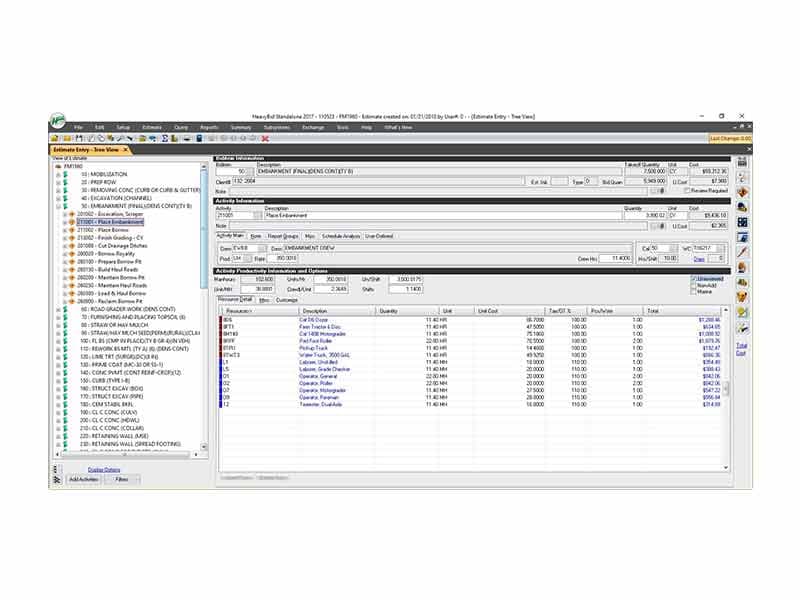
HeavyBid is a construction estimating software that allows you to build, analyze, adjust estimates and manage bid day. The software assists in automating repetitive processes by tracking data from various sources, including previous estimations, standardized libraries, historical expenses, performance statistics, and integrated RSMeans.
You may rapidly create, review, and update estimates and run pricing computations to find problems. In addition, you can utilize HeavyBid to break down complex work into more digestible chunks and structure estimates to meet the organization's needs. You can also compare estimates from subcontractors and suppliers.
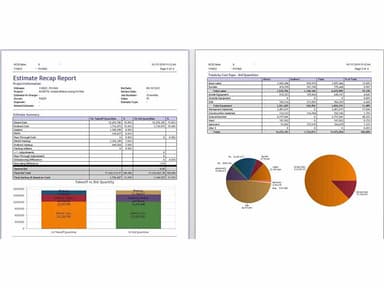
Construction businesses of all sizes in the transportation, utility, power, oil, gas, and heavy civil industries can use HeavyBid. It also provides phone and email customer care 24 hours a day, seven days a week. To better grasp estimations, you can also create estimate recap reports. Microsoft Project, Excel, Primavera P6, Word, and Outlook are all supported.
HeavyBid Software Pricing
HeavyBid Software Demo
Our Thoughts
Contractors and subcontractors can use HeavyBid's estimating and bidding solutions to help automate daily activities. In a matter of minutes, you'll be able to perform complex calculations. In addition, it facilitates collaboration and transparency by allowing numerous estimators to work on the same bid.
Contact us at (661) 384-7070 to determine if HeavyBid software is the ideal platform for you.
HeavyBid Features
Estimation
Heavybid construction software enables you to copy and reuse previous estimations to save time and minimize data entering errors. With just a few clicks, you can add activities to estimates. Moreover, to construct estimates automatically, you can access bid items, activity, and material codebooks.
Bid Management
Using the keyword search option, you can find bid products in seconds. You can also add required columns to the bid pricing screen To receive detailed information. Estimates should be color-coded according to cost kinds. Finally, you can customize Word and Excel-based bid proposals in just a few minutes.
Quote Management
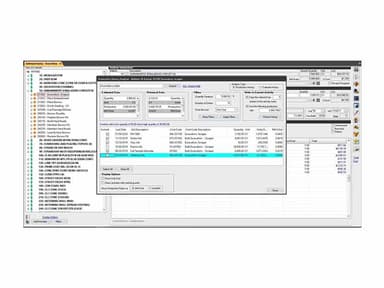
To make it easier to access data, you can also create folders for subs and suppliers. HeavyBid enables you to make several quotation comparisons, revise estimates, and find the best price. In addition, you can compare the scopes of different quotations and make last-minute revisions.
HeavyBid Reviews
Total 12 reviews
4.2
All reviews are from verified customers
Rating Distribution
5
Stars33%
4
Stars50%
3
Stars17%
2
Stars0%
1
Stars0%
Share your experience
Construction, 500+ employees
More than a year
“organized estimating”
Pros
Helped me organize construction estimating by keeping a large set of bid items organized in one workflow. It also brings labor, equipment and material costs together so I can review everything in the same place across different projects. Overall, it boosted my estimating accuracy, sped up bid preparation and made cost checks much more easy.
Cons
There's definitely a learning curve particularly for new users. Setting up estimates can feel a bit involved when the project is smaller and the interface could use some work to feel more accessible. I'd also like smoother importing and exporting so it plays better with other estimating or project management tools.
Rating Distribution
Ease of use
7
Value for money
7
Customer Support
10
Functionality
9
Construction, 500+ employees
More than a year
“powerful mass excavation estimating”
Pros
It is an exceptionally strong platform for mass excavation and heavy civil estimating. The way it structures bids fits really well with the real-world complexity of turnkey infrastructure projects. When building estimates, the detail level is impressive. There's a lot of granular control over labor, equipment and material costs. It also stays fast when you're working through huge item lists which makes it feel reliable when you're up against tight deadlines.
Cons
That said even though the software is very capable, the user interface feels a bit dated compared to newer cloud-based tools. There's also a noticeable upfront time investment to get things rolling especially when you're configuring initial cost codes and setting up the master database before you start seeing the payoff.
Rating Distribution
Ease of use
10
Value for money
8
Customer Support
9
Functionality
8
Construction, 11-50 employees
Less than a year
“Fast estimating with copy workflow”
Pros
Since I'm not the primary estimator at my company, this software has been a really efficient way to work alongside our lead estimator. They can enter all of our equipment and materials with pricing already built in which means my part is mostly just adding the hours and quantities. That setup speeds up the whole estimating process and makes it much easier to keep things organized. It also fits our workflow well because we often run similar jobs back-to-back. Being able to copy an existing estimate, assign it to a new job and then tweak the quantities or production values saves a lot of time and keeps our numbers consistent.
Cons
One thing I'm not crazy about is how the "save completed estimate" step works. I'd really like an option to save directly to my Google Drive. Right now, I have to export the file manually and then upload it which adds an extra step. A direct Google Drive integration would make saving, sharing and organizing finished estimates noticeably more efficient.
Rating Distribution
Ease of use
10
Value for money
10
Customer Support
9
Functionality
9