


Last Updated

Overview
Upgrade your asset management with Inspectivity, the all-in-one inspection platform. Eliminate paper-based chaos and gain complete control over your inspection workflows. Capture accurate data with mobile apps and customizable templates. Collaborate seamlessly with your team and improve communication. Gain actionable insights from inspection data to optimize maintenance strategies. Ensure regulatory compliance and improve overall asset reliability. Start your journey now.
Inspectivity Specifications
- Project Planning and Scheduling
- Budget Management
- Resource Allocation
- Document Management
Inspectivity Features
Asset Centric Inspections
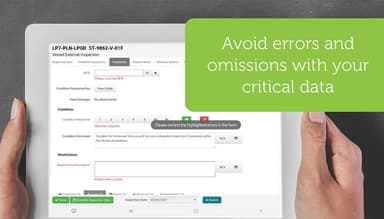
Capture and record inspection data efficiently using mobile apps or web forms, eliminating the need for paper-based processes. Improve data accuracy and reduce the risk of errors. Track the history of your data to never lose critical assets. Manage data exports on already existing digital platforms.
Smart Mobility
Leverage Inspectivity's mobile capabilities to conduct inspections offline and synchronize data automatically when back online. Ensure seamless data collection in a more timely manner whilst working in remote locations as well.
Templating
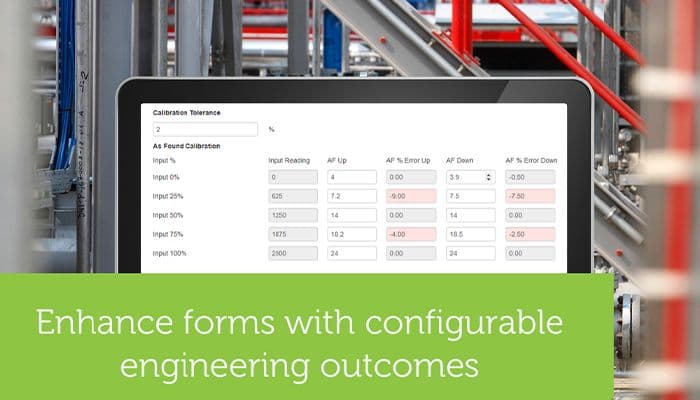
Simplify inspection creation and standardize inspections with pre-built or custom templates that include checklists, procedures, and data fields. Ensure consistency and reduce the time needed to create new inspections.
Inspection Management
Organize and assign inspections to team members, track progress, and receive automated notifications for deadlines. You can streamline inspection workflows and improve accountability by having enabled proactive conversations.
Inspection Dashboard
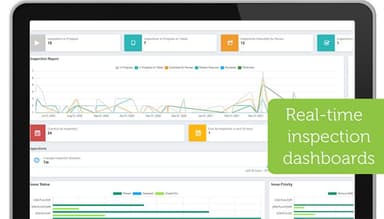
Visualize inspection data through intuitive dashboards that provide key metrics and trends. Empower data-driven decision-making for asset maintenance.
Issue Management
Resolve issues effectively with issue management. Identify, track, and address inspection findings seamlessly. Assign corrective actions, monitor progress, and ensure timely resolution of issues based on inspection outcomes.
Inspectivity API
Integrate the software with your existing enterprise software using the robust API. Enable data exchange and streamline workflows across multiple systems.
Pros And Cons of Inspectivity
Pros
Offers mobile offline access
Integrates very easily with existing software
Users have commended its enhanced security
Offers excellent customer support
Cons
May require initial training for some users
Very complex integrations might require assistance from IT
According to some Inspectivity reviews, a way to edit all forms at the same time is not available
Inspectivity Reviews
Total 13 reviews
4.8
All reviews are from verified customers
Rating Distribution
5
Stars77%
4
Stars23%
3
Stars0%
2
Stars0%
1
Stars0%
Share your experience
David
Product, 11-50 employees
Less than a year
“Product Review”
Pros
The product is quite intuitive, and the technical support team is incredibly responsive.
Cons
Navigating the knowledge base pages can be pretty complex and challenging. There are only 25 reports available for printing, though I understand why this is the case.
Rating Distribution
Ease of use
10
Value for money
10
Customer Support
10
Functionality
10
Craig
Utilities, 11-50 employees
Less than a year
“Kleenheat Maintenance”
Pros
It eliminates the need for paper-based inspection forms, which are prone to damage or loss. The inspection data is live and instantly accessible to a supervisor. Eventually, it will integrate with our management system, automating report attachments to work orders and saving significant time on document scanning and emailing. Photos can be attached to documents, allowing me to take pictures of specific items.
Cons
Getting the inspection documents right requires some effort, but once that's done, the process becomes simple.
Rating Distribution
Ease of use
10
Value for money
10
Customer Support
10
Functionality
10
Dilan
Product, 500+ employees
Less than 6 months
“Excellent platform and customer service”
Pros
The platform offers a high degree of flexibility, allowing both administrators and users to customize their inspections to fit the project. Even with this flexibility, Inspectivity provides a broad range of features that add tremendous value to the projects it's used on.
Cons
With great flexibility comes great complexity. This was the toughest part of adopting the software, but it's unavoidable. Training is essential for both superusers and regular users to grasp the platform and software capabilities effectively.
Rating Distribution
Ease of use
10
Value for money
10
Customer Support
10
Functionality
10
Frequently Asked Questions
Does Inspectivity offer an API?
Yes, Inspectivity offers an API (REST) that allows you to integrate the platform with your existing enterprise software.
What language does Inspectivity support?
The software supports the English language.
What other apps does Inspectivity integrate with?
Specific third-party software integrations aren't explicitly listed on the Inspectivity website.
Does Inspectivity support mobile devices?
Yes, Inspectivity offers robust mobile capabilities.
What types of pricing plans does Inspectivity offer?
Inspectivity offers three tiers of pricing plans, namely Essentials, Professional, and Enterprise.
Who are the typical users of Inspectvity?
Inspectivity caters to asset owners, maintenance and reliability teams, and inspection service providers.
What level of support does Inspectivity offer?
Inspectivity is known for its excellent customer service provided. They offer comprehensive support options, including user manuals, online training materials, and a responsive technical support team.