

Last Updated

Overview
KYRO software offers a robust solution for digitizing workflows and maximizing profits in demanding industries like construction and vegetation management. While its offline functionality has some limitations, its centralized document management and real-time project tracking provide unparalleled visibility, empowering teams to meet deadlines and stay within budget.
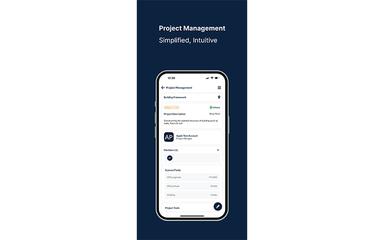
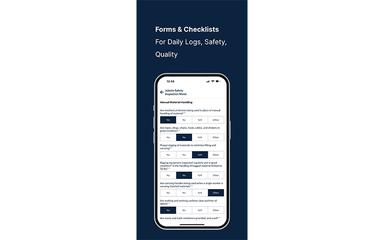
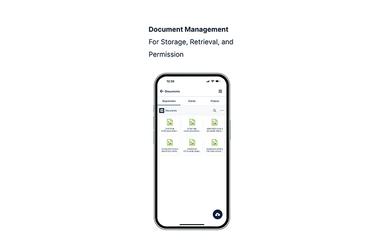
KYRO Specifications
- Project Planning and Scheduling
- Document Management
- Progress Tracking
- Safety Management
What Is KYRO?
KYRO is an AI-powered construction management platform designed to resolve operational inefficiencies for field-service businesses. It provides a unified system to connect on-site crews with office staff, eliminating communication gaps and paperwork. Moreover, the software includes features like AI-driven voice notes that transcribe multiple languages into project updates, reducing errors and delays. By automating administrative tasks such as timesheet generation, KYRO helps contractors of all sizes improve cash flow and focus on core operational growth.
KYRO Pricing
The KYRO cost ranges in the following three plans, alongside a 21-day free trial:
- Basic: $25/user/month
- Pro: $50/user/month
- Enterprise: Custom quote
Disclaimer: The pricing is subject to change.
KYRO Integrations
KYRO software supports integration with multiple platforms, such as:
- QuickBooks
- Sage
- Xero Accounting Solution
- Deltek Vision
- Salesforce
- Slack Software
- Microsoft Teams
Who Is KYRO For?
KYRO is ideal for general contractors, subcontractors, finance managers, and other such professionals across a range of industries, including:
- Construction
- Vegetation management
- Electric utilities
- Telecommunication
- Oil and gas
- Water utilities
- Real estate
Is KYRO Right For You?
KYRO is an excellent fit for contractors and field service companies aiming to enhance communication and operational efficiency, particularly those with a diverse workforce. Its standout feature is the AI-powered, multilingual voice-to-text capability, which ensures clear communication regardless of language barriers. This field-first design has earned it high user satisfaction, as evidenced by G2 badges, including being named a “Higher Performer of Fall 2024” in the construction management and construction project management fields. With its commitment to data security and privacy as it complies with standards like SOC 2, KYRO provides a robust solution for firms prioritizing seamless field-to-office data flow.
Still not sure about KYRO? Contact our support team at (661) 384-7070 for further guidance.
KYRO Features
AI-Powered Communication
This feature bridges the gap between field and office with tools designed for clarity. Field crews can record voice notes in their native language, which are automatically transcribed and translated by AI. Likewise, its image markups provide precise visual context for on-site issues.
Centralized Project Management
This tool allows users to gain complete control over projects from a single, intuitive dashboard. Users can rapidly set up new projects by uploading work orders, assigning tasks to team members, and monitoring progress in real-time to ensure milestones are met on schedule and within budget.
Unified Document Management
The platform keeps all critical project files secure, organized, and accessible from anywhere. It provides a central repository for blueprints, contracts, and compliance documents, ensuring that every team member works with the most current versions to prevent costly errors.
Automated Timesheets
KYRO helps streamline payroll and improve cash flow by replacing manual time tracking. It simplifies logging hours for field crews, automatically flags anomalies for review, and accelerates the billing cycle. In this regard, it reduces administrative burdens and ensures accuracy in labor cost management.
Digital Forms And Reporting
The software helps eliminate paperwork and standardize data collection with customizable digital forms. Field teams can easily complete safety checks, inspections, and daily reports directly from their mobile devices. It also enables them to attach photos, providing comprehensive updates and maintaining compliance records.
Pros And Cons of KYRO
Pros
AI-powered tools enhance workflow efficiency
Improves decision-making with an AI Copilot
Unified platform for all construction operations
Cons
Occasional mobile data syncing delays
Reporting customization could be more advanced
KYRO Reviews
Total 9 reviews
4.6
All reviews are from verified customers
Rating Distribution
5
Stars56%
4
Stars44%
3
Stars0%
2
Stars0%
1
Stars0%
Share your experience
Maria E.
Enterprise, 500+ employees
“Simple invoicing made easy”
Pros
I can send out big updates and let the whole team know what needs to be done in the field without writing long emails. Being able to take notes in Spanish is a big plus for smoother communication with our crew.
Cons
It seems to be built mainly for vertical operations which is fine but I find connecting projects and sharing data with other apps for appointments and supply management really frustrating. Tracking and invoicing work well but this part could use some improvement.
Rating Distribution
Ease of use
7
Value for money
8
Customer Support
7
Functionality
6
Devin P.
Enterprise, 500+ employees
“Complete financial tool with room for growth”
Pros
The automation here handles all the boring work like creating invoices and tracking payments. It saves me so much time, so I can focus on more important tasks that need my attention.
Cons
One thing I've found annoying is that the system doesn't allow me to break down costs by individual line items or create custom reports for different stakeholders. It's really tough to get a detailed expense breakdown within projects because of this limitation.
Rating Distribution
Ease of use
9
Value for money
8
Customer Support
8
Functionality
7
Baza R.
Small-Business, 11-50 employees
“Streamlined billing made simple”
Pros
It's efficient to have invoices created and sent out automatically once a job is done. The automated billing system works perfectly for me.
Cons
Tracking overdue invoices takes way more effort than it should and figuring out payment patterns is just confusing. It could definitely be more simple.
Rating Distribution
Ease of use
7
Value for money
8
Customer Support
8
Functionality
6
Frequently Asked Questions
Does KYRO have a mobile app?
Yes, KYRO offers a mobile app for both Android and iOS devices.
Does KYRO offer an API?
Yes, KYRO offers an API.
What other apps does KYRO integrate with?
KYRO integrates with various third-party platforms, including NetSuite, Deltek Vision, Acumatica, and Slack, among others.
What language does KYRO support?
KYRO is primarily available in English, but its AI-powered voice note feature supports transcription and translation from multiple languages, including Spanish.
What types of pricing plans does KYRO offer?
The KYRO price ranges in three custom plans: Basic ($25/user/month), Pro ($50/user/month), and Enterprise with a custom quote. Request a personalized KYRO pricing quote for your business.
What level of support does KYRO offer?
KYRO provides support through chat, email, a help center, and a community, alongside general resources, such as blogs, whitepapers, videos, brochures, and FAQs.
Who are the typical users of KYRO?
The typical users of KYRO features are professionals in the construction, vegetation management, electric utilities, telecommunication, and oil and gas industries.