


O3 Software
Last Updated

Overview
O3 is a construction management software known for improving project delivery and achieving operational excellence. Users can centralize data, manage resources, and collaborate with ease. While there is need for more advanced reporting features, O3 excels in user-friendliness and its focus on streamlining workflows.
O3 Software Specifications
- Accounting
- Project Scheduling
- Project Tracking
- Document Management
O3 Software Features
WorkFace Planning
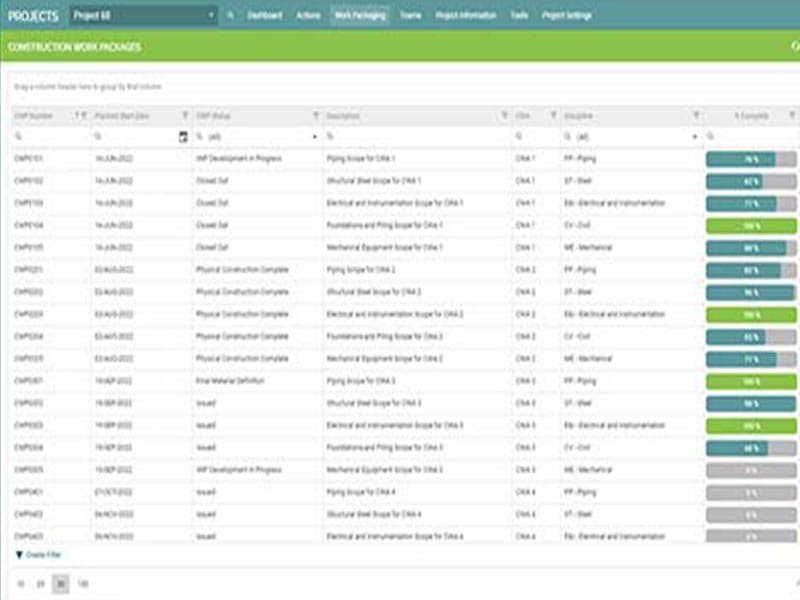
Effective WorkFace Planning needs a single piece of construction software to plan, manage, and track all Installation Work Packages across all disciplines, functions, and package phases. O3 is the first comprehensive WorkFace planning software solution that combines sophisticated graphical work packaging with real constraint management and complete reporting and analysis to find and fix problems before they slow down productivity.
Reporting and Analytics
It is essential to provide real-time insights into the status and health of engineering and procurement. With O3 construction software, you can utilize a variety of Key Performance Indicators (KPIs) and dashboards, with the flexibility to dig down and apply corrective actions.
Scheduling
With construction management software O3, you can elevate the degree of scheduling and planning for engineering and procurement to level four. You can also connect the project schedule directly to the progress reporting and package status.
Pros And Cons of O3 Software
Pros
Efficiently review activities created by planners and schedulers across various projects
Enhanced transparency and visibility in construction tracking
An intuitive and clean-looking layout
Reduces the time required for data analysis
Cons
As per some software users, receiving emails for every action is overwhelming and distracting
Increasing data volumes can slow down the bulk upload process
Some functions can be difficult to comprehend
O3 Software Reviews
Total 25 reviews
4.4
All reviews are from verified customers
Rating Distribution
5
Stars52%
4
Stars40%
3
Stars8%
2
Stars0%
1
Stars0%
Share your experience
Product, 500+ employees
More than a year
“We use O3 Heavily in Offshore Oil and Gas”
Pros
I love how it provides almost all the information needed to understand planned or completed work, including drawings, photos, and work pack histories.
Cons
The navigation is not very easy. They've created repositories or tabs for various customers, making it unclear where to put specific information. This might be a problem with our rollout as it's supposed to be customizable per site.
Rating Distribution
Ease of use
7
Value for money
7
Customer Support
10
Functionality
6
Product, 500+ employees
Less than 6 months
“Observations on O3 Utilities”
Pros
It's an excellent tool for visualizing the status of ongoing construction tasks in real-time, keeping me updated continuously.
Cons
Users need to customize the dashboards to view the necessary and meaningful reports.
Rating Distribution
Ease of use
7
Value for money
7
Customer Support
10
Functionality
7
Construction, 500+ employees
More than a year
“Installation Package”
Pros
I really like the organizational features, the well-structured information, and the layout that makes everything easy to navigate.
Cons
Some information was not uploaded correctly, probably because the person who did it didn't follow the procedure.
Rating Distribution
Ease of use
8
Value for money
9
Customer Support
9
Functionality
9
Frequently Asked Questions
Does O3 Software offer an API?
Yes, the O3 Software offers an API to use.
What language does O3 Software support?
O3 Software supports the English language.
What other apps does O3 Software integrate with?
The vendor has not provided details regarding its integrations.
Does O3 Software have a mobile app?
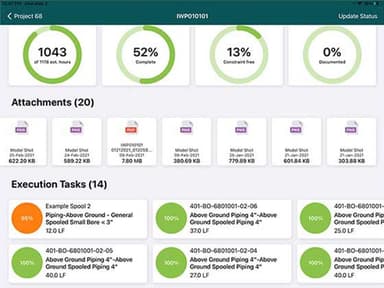
Yes, it offers a mobile app available for both iOS and Android.
What types of pricing plans does O3 Software offer?
The pricing plan varies based on business needs and size, with custom pricing available for WorkFace Planning for Construction and Installation, WorkFace Planning Software and AWP Certification, and Enterprise Edition and Training. Contact us for an updated O3 Software cost.
Who are the typical users of O3 Software?
Organizations across various industries and sectors use the software, including oil and energy, construction, engineering, chemicals, and renewables.
What level of support does O3 Software offer?
O3 Software offers multiple support options including chat, phone, email, and help desk.