

Last Updated

Overview
ProContractor by Viewpoint is a cloud-based construction project management software that aims to provide users with easier estimates, field operations, and document control. Although some users find the estimating module challenging, the software shines in its ability to streamline communication and workflow across your entire team.
ProContractor Software Specifications
- Project Planning and Scheduling
- Budget Management
- Resource Allocation
- Document Management
What Is ProContractor?
Overview
ProContractor by Viewpoint is a cloud-based project management software specifically designed for the construction industry. It empowers contractors of all sizes to streamline workflows and improve efficiency across their projects. ProContractor equips teams with the tools they need to manage everything from initial estimates and bids to field operations, financials, and document control. This comprehensive solution helps construction companies enhance collaboration, reduce costs, profitably execute projects, and easily track progress – all from the convenience of a desktop application or even a mobile device with ProContractor Mobile.
ProContractor Pricing
ProContractor Integrations
The vendor has not disclosed any information about third-party applications.
Who Is ProContractor For?
The software is ideal for companies involved in various construction sectors, including:
- Residential construction
- Commercial construction
- Civil construction (roads, bridges, etc.)
- Specialty construction (electrical, plumbing, HVAC)
- Renovation and restoration projects
Is ProContractor Right for You?
If you're a construction company seeking complete control over your projects, from the office to the field, look no further than ProContractor. The software tackles the challenges faced by busy construction teams. It streamlines communication and collaboration, ensuring everyone has access to mission-critical project information – contracts, budgets, schedules – anytime, anywhere.
Your data is safeguarded in a secure cloud environment, and the software scales to meet the needs of your growing business. Existing ProContractor users can leverage the power of the mobile extension, ProContractor Mobile, empowering field crews to capture real-time progress with photos and notes, manage equipment usage, and even track weather and jobsite conditions. This ensures smooth information flow and eliminates the need for manual data entry, ultimately helping to ensure prompt payment.
Still not sure if ProContractor is right for you? Contact our customer support team at 661-384-7070, who will help you make the best decision.
ProContractor Software Features
Reporting
Enable users to generate a variety of reports to track project performance, identify trends, and make data-driven decisions. These reports can include visual assemblies and verification for better project clarity, ensuring all stakeholders have a clear picture of project progress.
Project Tracking
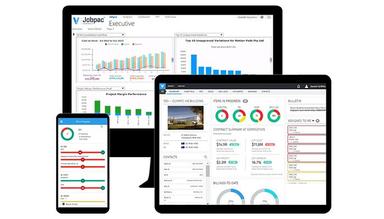
Manage projects and gain real-time visibility into project progress, allowing you to monitor the status of tasks, identify potential delays, and keep projects on track.The software provides a centralized dashboard accessible from your desktop application or even a mobile device with ProContractor Mobile. This ensures everyone on the team, from the office to the job site, has access to the latest information and can track progress.
Estimating
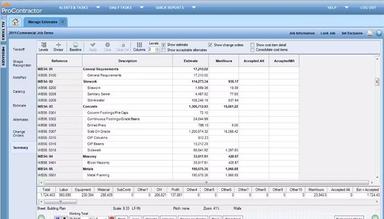
Streamline the take-off and estimating process, leading to increased efficiency and profitability. It includes features such as seamless take-off, digitized take-off, and easy-to-use estimating tools. Allow contractors to create accurate estimates quickly and efficiently, potentially reducing project risk and ensuring projects are completed profitably.
Take-offs
Create and manage project schedules efficiently. Define task dependencies, allocate resources, and set realistic timelines to keep projects on schedule. ProContractor also helps identify potential scheduling conflicts and allows for adjustments to be made proactively.
Document Management
Streamline document management by offering a secure central repository to store, track, and share all project-related documents. Eliminate the need for paper-based filing systems and ensure everyone has access to the latest versions of critical documents, even when working remotely. ProContractor's mobile settings screen allows for easy access control, ensuring only authorized personnel can view and modify sensitive and important project documents.
Pros And Cons of ProContractor Software
Pros
Improves communication and workflow
Provides efficient estimating processes
Helpful for accounting
Cons
Reporting system difficult to navigate
According to ProContractor reviews, their customer service is unresponsive
ProContractor Software Reviews
Total 25 reviews
3.2
All reviews are from verified customers
Rating Distribution
5
Stars24%
4
Stars32%
3
Stars12%
2
Stars8%
1
Stars24%
Share your experience
Evan
IT, 1-10 employees
“Very Poor Technical Support”
Pros
The technical support was extremely poor, which made the overall experience quite frustrating from my IT perspective. If you can't get proper assistance with installing the product, it's hard to develop a positive opinion about it.
Cons
The technical support is very poor and responds very slowly to requests. When they finally did get back to me, I asked for an estimate of the time it would take to help me with the installation. I had a case number, but instead of providing the estimate, they closed my case for lack of response. They also mentioned it would take 4 to 6 weeks before receiving help with my installation, which is unacceptable.
Rating Distribution
Ease of use
4
Value for money
5
Customer Support
5
Functionality
5
Jessica
Construction, 51-100 employees
More than a year
“This Program Sucks”
Pros
This program is really dreadful. I've had a terrible experience with it and I wouldn't recommend it to anyone at all.
Cons
Everything about this system is terrible. The customer service is a joke. My program kept crashing every time I tried to run a report. I opened a ticket on November 12, and as of December 27, no one has contacted me. I've called their support at least six times, waiting on hold for nearly 30 minutes each time. Save your money and go for a different system. This one is awful.
Rating Distribution
Ease of use
4
Value for money
2
Customer Support
2
Functionality
2
Kayla
Construction, 11-50 employees
More than a year
“10 years in Procontractor”
Pros
I've become quite fond of Procontractor. I quickly mastered it and now frequently get calls asking for advice. I've also started using Spectrum, another product from Viewpoint, but I still firmly prefer Procontractor above all else!
Cons
The time it takes for certain reports to run is frustrating when you host your own server. I've noticed that it runs much faster with the cloud.
Rating Distribution
Ease of use
10
Value for money
10
Customer Support
7
Functionality
9
Frequently Asked Questions
Does ProContractor offer an API?
The vendor has not disclosed this information.
What language does ProContractor support?
ProContractor primarily supports the English language.
What other apps does ProContractor integrate with?
The vendor has not disclosed this information.
Does ProContractor support mobile devices?
Yes, the software supports mobile devices and has a mobile application.
What types of pricing plans does ProContractor offer?
The vendor has not disclosed pricing information.
Who are the typical users of ProContractor?
Typical users of ProContractor involve construction companies of all sizes, from small subcontractors to large general contractors.
What level of support does ProContractor offer?
Viewpoint offers support through a customer portal, which includes access to knowledge articles, online help, and the ability to contact support via chat or phone.