



Last Updated

Overview
SmartPM, a cloud-based platform, turns project schedules into dynamic analytics. It empowers teams with data-driven insights for proactive risk management and optimized project timelines. While it may have a learning curve for new users, it excels in identifying potential roadblocks and enhancing project outcome prediction accuracy with delay analysis capability.
Overall Rating
Based on 25 users reviews
4.8
Rating Distribution
Positive
92%
Neutral
8%
Negative
0%
Starting Price
$400
per project per month
Smartpm Specifications
- Project Planning and Scheduling
- Budget Management
- Resource Allocation
- Document Management
Smartpm Features
Schedule Quality Analysis
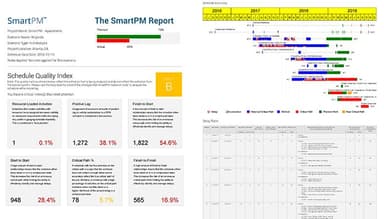
This feature is designed to scrutinize the planning phase of your projects. It uses advanced algorithms to evaluate the robustness of your schedules, identifying potential bottlenecks and inefficiencies. By doing so, it ensures that your project timelines are realistic and achievable, thereby minimizing the risk of missed deadlines.
Executive Dashboard And Project Workspace
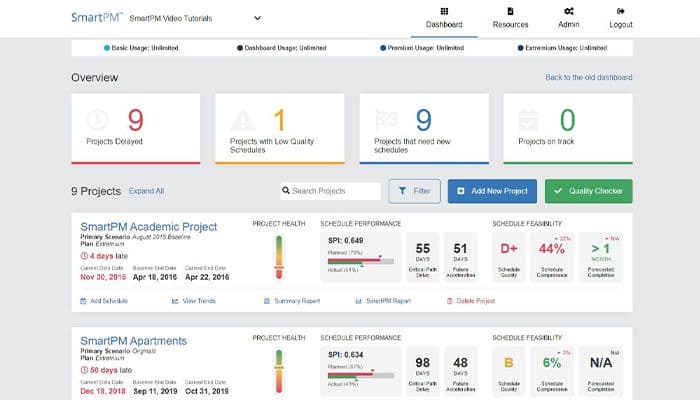
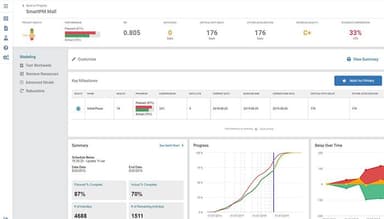
Serving as a comprehensive platform for project management, this feature aggregates data from various sources and presents it in an intuitive, easy-to-understand format. This inclusive view of project data facilitates informed decision-making, ensuring that project goals align with strategic objectives. It also fosters collaboration by providing a shared workspace for project teams.
Predictive Analytics And Risk Analysis
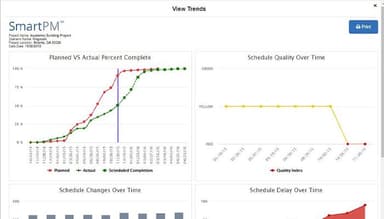
Leverage the power of data to forecast project outcomes with predictive analytics and risk analysis. It uses sophisticated statistical models to analyze past project data and predict future trends. This foresight allows project managers to anticipate potential issues and take preventive measures. Furthermore, it aids in risk assessment by identifying and quantifying project risks for proactive risk mitigation strategies.
Automated Reviews And Reports
Streamline the process of monitoring project progress and communicating it to stakeholders. The platform automates the generation of detailed reports, eliminating manual errors and saving valuable time. These reports provide a clear and accurate picture of project performance, facilitating timely interventions when necessary. Moreover, they serve as a reliable source of information for stakeholder meetings, ensuring that all parties are well-informed about project status.
Pros And Cons of Smartpm
Pros
Offers a much broader set of analytics than other tools
Helps in identifying delay-causing activities in a project
The team is receptive to ideas to improve the software
Provides comprehensive dashboards for quick insights
Cons
Users cannot archive closed-out projects
Users can't compare two schedules with same data date
Some reviewers find the delay analysis feature to be complex
Smartpm Pricing
SmartPM Pricing Plan |
|---|
$400per project per month |
|
Disclaimer: The pricing details were last updated on Sep 14, 2026 from the vendor's website. Please contact us for a tailored pricing list.
Smartpm Reviews
Total 25 reviews
4.8
All reviews are from verified customers
Rating Distribution
5
Stars88%
4
Stars4%
3
Stars8%
2
Stars0%
1
Stars0%
Share your experience
Construction, 101-500 employees
More than a year
“Performance Management”
Pros
SmartPM helps us visualize the massive amounts of schedule data we generate. We can spot schedule issues much earlier than just looking at a Gantt Chart.
Cons
Some of the terms used are a bit confusing, like "Backdated Activities" and "Should Start Should Finish."
Rating Distribution
Ease of use
10
Value for money
10
Customer Support
10
Functionality
10
Construction, 101-500 employees
Less than a year
“Streamlined Project Analytics”
Pros
What impressed me most about SmartPM was its ability to streamline project management with its intuitive features, which has empowered efficient decision-making and facilitated successful project outcomes.
Cons
One issue I've noticed with SmartPM is its SPI calculation accuracy, especially when the planned percentage completion hits 100%. The frequent pop-up notifications interrupt discussions and reduce the platform's convenience. Also, the Gantt chart interface could use some improvements to match the intuitive experience provided by Primavera's Gantt display.
Rating Distribution
Ease of use
10
Value for money
10
Customer Support
10
Functionality
10
Construction, 51-100 employees
Less than 6 months
“Improving our Scheduling Practices”
Pros
SmartPM is more than just another scheduling tool; it's a game-changer. Its intuitive design makes creating and managing schedules incredibly easy. No matter if you're new to scheduling or a pro, SmartPM adjusts to your level of expertise, offering a smooth experience throughout. One standout feature is its powerful scheduling engine. With advanced algorithms, SmartPM optimizes schedules for peak efficiency, considering various constraints and dependencies. This results in fewer delays, better resource use, and ultimately, happier stakeholders. Plus, its collaboration features are top-notch. Team members can work together in real-time, share updates, and communicate effortlessly. SmartPM keeps everyone aligned at every stage. As someone who values data-driven decisions, I appreciate SmartPM's analytics and reporting tools. With customizable dashboards and detailed reports, I can track progress, pinpoint bottlenecks, and make well-informed decisions to keep projects on track. This has enhanced the overall health of our schedules across all our current projects.
Cons
We use columns in Microsoft Projects to track levels, towers, and buildings. It would be really beneficial to see these in the software.
Rating Distribution
Ease of use
10
Value for money
10
Customer Support
10
Functionality
10
Frequently Asked Questions
Does SmartPM offer an API?
Yes, SmartPM offers an API.
What language does SmartPM support?
SmartPM software supports English.
What other apps does SmartPM integrate with?
SmartPM intergates with AutoDesk Construction Cloud and Procore.
Does SmartPM support mobile devices?
Yes, SmartPM is compatible with mobile devices.
What types of pricing plans does SmartPM offer?
The platform offers a single plan of $400/project/month. You can also get a custom quote for SmartPM pricing.
Who are the typical users of SmartPM?
SmartPM primarily caters to the construction industry. It is also a popular tool for professionals in consultancy, insurance, and contractor-based service providers.
What level of support does SmartPM offer?
SmartPM offers support through email, phone, FAQs, and a dedicated knowledge base.
What is the role of SmartPM in delay analysis contracts and maintaining project timelines?
SmartPM is a comprehensive schedule analytics solution built to play a crucial role in delay analysis contracts. This solution helps maintain project timelines by identifying potential delays early on. It also allows for future schedule compression, ensuring that projects stay on track.
How does SmartPM support implementation and training and handle multiple projects?
SmartPM provides robust implementation and training support to ensure users can effectively utilize all its features. It is capable of handling multiple projects simultaneously, even handling intricate project portfolios, through its project workspace summary pages. These pages provide a high-level overview of all ongoing projects, making it easier to manage many projects at once.
How does SmartPM help businesses provide competitive pricing for their delay analysis contracts?
In addition to building scenario rules in SmartPM, the current bar chart graphics provide a visual representation of project schedules. These features enable users to create various project scenarios and analyze their impact on the project’s cost and timeline.