


Church Windows
Last Updated
Overview
Church Windows delivers integrated church management, helping organize congregation data and finances effectively. The platform offers reliable tools for daily operations. Although reporting options could expand further, its modular design and detailed tracking provide solid benefits for church handling.
Church Windows Specifications
- Contact Management
- Customer Communication Tracking
- Mobile CRM (limited, via web access)
- Analytics and Reporting
Church Windows Features
Membership Management
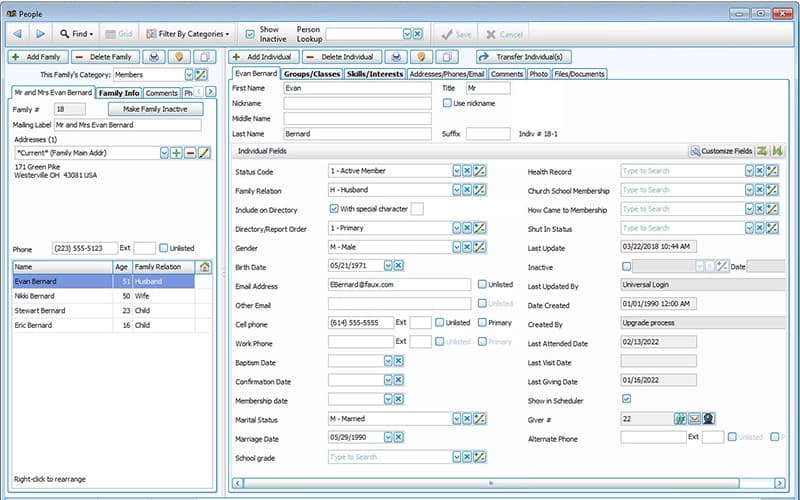
It maintains detailed records of families, individuals, and visitors. Users can access interactive dashboards for quick views of congregation details. The system accurately tracks attendance and involvement patterns and centralizes data entry to avoid duplicates. Teams can coordinate outreach efforts more effectively, supporting better pastoral care through organized profiles.
Donations Tracking
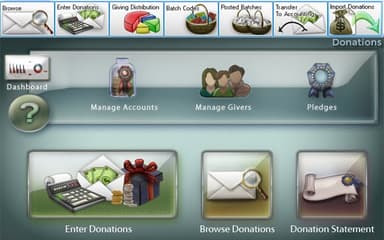
The platform records contributions, pledges, and giving histories precisely. Churches can easily generate flexible statements and detailed summaries. It transfers funds to accounting without manual re-entry, and users can monitor donor patterns over time, ensuring transparent reporting for leadership. Teams acknowledge gifts promptly to encourage participation, and it aids stewardship programs with reliable data.
Event Scheduling
Church Windows features tools to manage calendars, rooms, and equipment reservations. Administrators can assign volunteers and track resource availability, and an integrated view prevents overlapping bookings. Users can customize recurring activity setups and coordinate multiple events across facilities. Teams communicate assignments clearly, reduce conflicts in busy schedules, improve planning accuracy, and ensure event success.
Fund Accounting
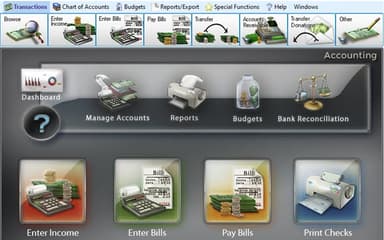
It offers fund-based tracking for nonprofit finances, allowing users to create customizable charts of accounts and budgets. The system manages payables, receivables, and reconciliations, with reports that emphasize income and expenses by category. This helps ensure compliance with organizational policies and enables teams to analyze spending trends efficiently. It also supports making informed budget decisions and promotes accurate financial management.
Pros And Cons of Church Windows
Pros
Keep organized with detailed membership records
Easily track contributions with accurate donation summaries
Customize event views to suit your needs
Cons
Limited filtering options reduce data analysis flexibility
Access restricted, limiting visibility into important information
Church Windows Reviews
Total 30 reviews
4.4
All reviews are from verified customers
Rating Distribution
5
Stars63%
4
Stars27%
3
Stars3%
2
Stars3%
1
Stars3%
Share your experience
Religious Institutions, 1-10 employees
More than a year
“too click-heavy and awkward”
Pros
One thing they do very well is customer support. Whenever I send an email I usually get a helpful and friendly response within 24 hours.
Cons
Using it feels extremely click heavy. Even after three years with the software it still doesn't feel user friendly and almost everything comes across as awkward to work through. I can usually figure out how to complete what I need and the support team is super helpful but compared with QuickBooks and Aplos, this really lags behind in usability and overall user experience. The window control is especially frustrating! You'll be working in one section of the register and then it suddenly shifts you somewhere else which means you're constantly scrolling back and forth.
Rating Distribution
Ease of use
3
Value for money
4
Customer Support
4
Functionality
4
Civil Engineering, 11-50 employees
Free Trial
“reliable church contribution tracking”
Pros
This software helps us manage member contributions effectively and supports the progress of our church projects very well.
Cons
We haven't come across any drawbacks with this software and we would definitely recommend it to other users.
Rating Distribution
Ease of use
10
Value for money
10
Customer Support
10
Functionality
10
Farming, 11-50 employees
Less than 6 months
“organized check-ins and directory”
Pros
Handling check ins and maintaining the directory feels very organized with this software and it does a really good job of keeping everything in order.
Cons
A downside is that it doesn't seem to be very well known. I hadn't heard of it until my father mentioned it and I also think it should be a bit more accessible.
Rating Distribution
Ease of use
8
Value for money
8
Customer Support
8
Functionality
8
Frequently Asked Questions
What apps does Church Windows integrate with?
Church Windows integrates with Vanco, AatrixeFile, Notebird, and more.
Does Church Windows offer an API?
The vendor has not shared information about its API.
What languages does Church Windows support?
Church Windows primarily supports English.
Does Church Windows have a mobile app?
No. Church Windows does not have a standalone mobile app.
What types of pricing plans does Church Windows offer?
Church Windows price is subscription-based, depending on modules and tiers. Get a tailored Church Windows cost estimate.
Who are the typical users of Church Windows?
Church Windows is used by churches and religious organizations.
What level of support does Church Windows offer?
Church Windows provides support through phone and ticketing system.