


ChurchTrac
Last Updated
Key Takeaways
Generated from the text of customer reviews
ChurchTrac, a cloud-based management platform, serves churches of all sizes and helps smooth day-to-day workflow. While new users say setup takes time and requires extra support, most appreciate having one system for building service plans instead of juggling separate tools. A recent 2026 update added website templates with a homepage, menu, starter pages, and Connect Cards that churches can customize.
Our Verdict
ChurchTrac suits churches that want records, giving, service and song planning, and communication in one system. Most reviewers call its pricing a strength and report it stands out since accounting is built in, though some larger churches using only part of it wished for a lighter option. We recommend ChurchTrac for churches wanting a website, online giving, and member portal.
Overall Rating
Based on 30 users reviews
5
Rating Distribution
Positive
100%
Neutral
0%
Negative
0%
Starting Price
$29
per month
ChurchTrac Specifications
- Contact Management
- Customer Communication Tracking
- Email Integration
- Customer Segmentation
What Is ChurchTrac?
ChurchTrac is a cloud-based software designed to assist churches in managing their daily operations from the same platform. Instead of requiring many separate subscriptions, it offers a single login for member records, fund accounting, online giving, worship and volunteer scheduling, child check-in, and event registration.
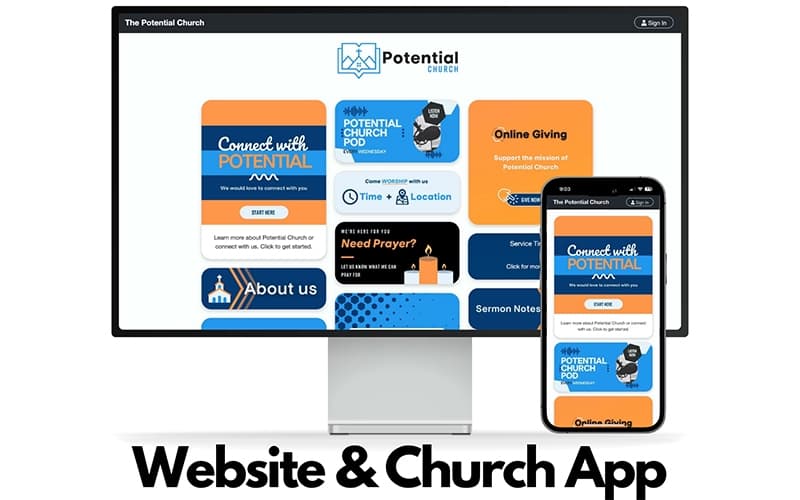
Churches using Church Connect also get a free website and mobile app builder, which allows members to update their profiles, sign up for events, and donate online. ChurchTrac reduces the number of tools that churches need to pay for and learn to manage separately, particularly smaller ones without a dedicated IT team.
What Is ChurchTrac Best For?
What sets this platform apart is how it automates routine follow-ups and administrative tasks that usually fall through the cracks. Instead of a staff member remembering to text a first-time guest or check in on someone hospitalized, ChurchTrac sends that first text automatically, then adds a task reminding a pastor to make a personal call. Birthdays, anniversaries, and other milestones trigger their own reminders without anyone having to track dates by hand. The same system also reacts to everyday church activity: when a new name is added to the database or someone donates for the first time, ChurchTrac can send a message, add a note, or log an accounting entry on its own, keeping records current without extra manual work.
How Much Does ChurchTrac Cost?
ChurchTrac pricing starts at $29/month for 75 names. The platform offers the following prices for different number for names:
- 125 names: $39/month
- 250 names: $59/month
- 500 names: $79/month
- 1000 names: $99/month
- Unlimited names: $119/month
Apart from the base subscription cost, churches should keep the following potential costs in mind:
- Enhanced Messaging: Around $7/month for 250 messaging credits
- Online Giving: Approximately 2.2% + $0.30 per transaction through payment processing
- Website And App Services: Starting at around $477 for optional website and app design and setup
- Accounting Setup: Starting at around $399
- Additional Storage: Around $3–$6/month
Most reviewers see ChurchTrac's pricing as reasonable since accounting is included as a built-in feature rather than as a separate tool, with one noting that other platforms may charge more. However, larger churches using only part of the platform felt the cost was on the higher side for simple management operations.
Disclaimer: The pricing is subject to change.
ChurchTrac Integrations
The platform offers integration with the following third-party software:
- Stripe
- SongSelect
- PraiseCharts
- MinistrySafe
How Does ChurchTrac Work?
Log in to ChurchTrac to bring your church's day-to-day operations into one connected system. Follow the steps below to use its key features:
- Set up your church directory and groups, track attendance, and import your existing member data for free, so your people records live in one place instead of scattered spreadsheets
- Connect your bank accounts to ChurchTrac's fund accounting tools, so transactions sync automatically and sort into unlimited designated funds and budgets
- Turn on online giving so your congregation can donate by card, text, or recurring gift, with contribution statements generated automatically and no revenue share taken from your donors
- Use the song library, service outline, and volunteer scheduling tools to create your worship schedule. Then, let folks mark out unavailable dates and receive text or email reminders
- Start Church Connect, which combines your church's website and app into one so that members can update their personal profiles, register for events, and give online with just one login
- Connect event registrations, fees, and an unlimited number of child check-in kiosks with safe labels for allergies and remarks to a single common calendar for all ministries
- Round things out with church email, texting, phone tree, and automations for guest follow-up and birthday or anniversary workflows
Who Is ChurchTrac For?
ChurchTrac software caters to a wide range of church roles and ministry types, such as:
- Church plants
- Church administrators
- Worship leaders
- Church bookkeeping
- Pastoral staff
- Children's ministry
- Multi-campus churches
ChurchTrac Use Cases
Based on our evaluation of ChurchTrac's features and market positioning, here are common ways that the platform is used:
Multi-Campus Churches Struggling To Maintain Coordination Across Locations
Managing multiple campuses requires balancing various staff, volunteer teams, and service schedules at each. ChurchTrac pulls attendance, donating, and member data into a single shared database while providing each campus with its own calendar and schedule. Leadership can see the whole church at once instead of piecing together separate spreadsheets from each site. This matters because the software grows with the church. A church that adds a second or third location may not need to upgrade systems, since the same platform keeps working as it expands.
Church Bookkeepers Who Never Trained As Accountants
Most church treasurers are volunteers, not accountants, so fund tracking and monthly reconciliation can get confusing fast. ChurchTrac offers fund accounting within the platform, so treasurers work with tools designed for how churches manage money rather than adapting software made for regular businesses. Bank sync helps pull transactions in, and built-in giving reports cut down on manually matching donations to deposits. Because the setup already reflects how churches handle finances, many new treasurers find they can get comfortable with it faster than with general accounting software.
Pastoral Staff Keeping Up With Member Follow-Up
A pastor can meet dozens of people in one week, hospital visits, new guests, counseling talks, and details slip without a system. ChurchTrac enables pastoral staff to add private notes to a member's profile, make follow-up reminders, and message someone directly all in one spot. Role-based access also ensures that a pastor only sees information pertinent to their area. This works well because it's built around pastoral care itself, not a general contact tool adjusted for churches.
Children's Ministries Balancing Security With Volunteer Simplicity
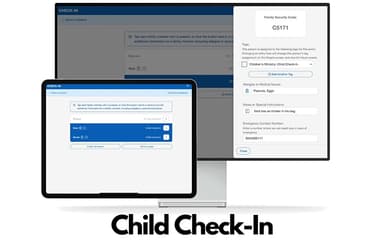
Sunday check-in needs to be fast enough for volunteers to run and secure enough for parents to trust. ChurchTrac's check-in stations print security-coded labels, support unlimited stations, and let parents self-check-in by QR code or phone number. The built-in MinistrySafe integration also lets ministries order background checks and training for volunteers without leaving the platform. Other children's ministry software might make churches choose between ease of use and safety. Here, both run through the same simple system.
Is ChurchTrac Right For You?
ChurchTrac may be a good fit for church administrators, treasurers, pastoral staff, and children's ministry leaders who struggle to keep congregation member details, donations, service scheduling, and communication organized as their church, staff, or number of campuses grows.
The platform may also suit churches that need shared access to church data across a growing staff. Users can add team members, set role-based permissions, and manage everything from one cloud-based system.
ChurchTrac maintains an audit trail so administrators can see what was done in the system, and it collaborates with MinistrySafe for background checks and training for churches that need to keep an eye on volunteer safety. Churches should nevertheless make sure that these resources adhere to the particular regulations set forth by their state or denomination. ChurchTrac protects accounts with bank-grade TLS encryption, isolated databases per church, hashed passwords, and regular offsite backups.
Still not sure if ChurchTrac is right for you? Contact us at (661) 384-7070 so we can help you make the best decision.
ChurchTrac Features
Church Admin And People Database
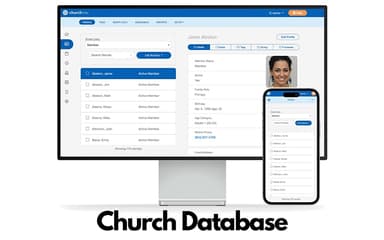
ChurchTrac keeps track of every member's contact info, notes, and activity in one directory that churches can print or host online. Groups can be set up for small groups, messaging lists, or reports. Attendance can be tracked by headcount, by individual name, on a printed roster, or at a live check-in kiosk. Churches switching from spreadsheets get free help importing their data.
Church Accounting And Fund Tracking
Church bookkeeping isn't the same as business accounting, so ChurchTrac builds fund accounting in directly. Churches can set up unlimited designated and restricted funds across more than one bank account, sync bank statements automatically with custom import rules, and create a budget for the whole church or a separate budget for each ministry. New users also get a free setup review to check that funds and categories are set up right from the start.
Online Giving And Contribution Tracking
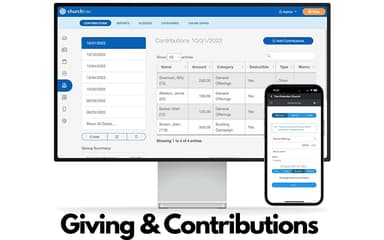
Churches can accept tithes and online donations without ChurchTrac taking a cut of the gift. The only fee is from Stripe, and churches can qualify for lower non-profit rates. Donors can choose to cover the transaction fee themselves, set up a recurring gift or text-to-give in seconds, and print, email, or generate their own giving statement.
Unified Calendar, Events, And Check-In
One calendar connects event registrations, attendance, volunteer scheduling, and child check-in, while each ministry can still show its own separate calendar on the church's website or app. Event signups can use ready-made fields or a custom form. Payments can be full, partial, or a donation, with no added convenience fee. Check-in supports unlimited stations and prints secure labels with allergy notes and security codes.
Church Website And App Builder
Church Connect lets churches build a website without writing code, with free hosting and a free mobile app for iOS and Android included. Built-in tools cover guest forms, prayer request forms, event registration cards, and online giving. Basic traffic stats are included, and churches can connect a GA4 account for more detailed analytics.
Pros And Cons of ChurchTrac
Pros
Child check-in helps keep kids safe during services
Attendance reports show how engaged members are over time
Worship tools bring service planning together in one place
Combines accounting, giving, and membership tools into one system, replacing several separate programs
Reporting tools make it simple and hassle-free to prepare year-end giving statements and financial reports
Cons
Automatic bank transaction imports don't always work reliably
Getting set up can take a lot of time and support for new users
Budgeting doesn't clearly reflect split categories where funds are split between income and expenses
ChurchTrac Reviews
Total 30 reviews
5
All reviews are from verified customers
Rating Distribution
5
Stars100%
4
Stars0%
3
Stars0%
2
Stars0%
1
Stars0%
Share your experience
Religious Institutions, 1-10 employees
Less than 6 months
“church focused tools!”
Pros
Putting together a 5-star review for the software feels deserved because they handle so many things exceptionally well. The first thing that drew us in was that it was built specifically for churches. We originally began searching for nothing more than a replacement for our accounting software. This stood out right away because the subscription price (including the accounting tools we needed) was lower than many other accounting programs on the market. It delivered far more than accounting by including a very capable and strong church management system. Another big reason we chose this was the outstanding support they offer. Beyond regular phone support they provide webinars, youtube videos, online tutorials and a full online user guide. After watching a few of their presentations it became clear that their help goes well beyond basic software assistance. It really feels like they offer ministry guidance too almost as if you've brought in a consulting team to help your church operate in a more organized, effective and efficient way while also offering plenty of encouragement along the way.
Cons
We've been in the middle of transitioning to the software for about a month and up to this point we really haven't run into any negative issues. It takes some time to get used to at the beginning but it's hard to say what more they could realistically do to make that process go faster.
Rating Distribution
Ease of use
10
Value for money
10
Customer Support
10
Functionality
10
Religious Institutions, 11-50 employees
Less than a year
“Quick to learn”
Pros
Interface is user friendly, it's simple to use and correcting mistakes is very easy. Even without any previous experience using the software it didn't take long to learn.
Cons
One thing I'd like to see improved is the ability to add two lines to a customer's giving or pledging at once instead of having to enter them one line at a time.
Rating Distribution
Ease of use
10
Value for money
10
Customer Support
10
Functionality
10
Non-Profit Organization Management, 1-10 employees
More than a year
“Excellent value”
Pros
Delivers a lot for the price and that value has been one of its biggest strengths. The customer support has also been outstanding. Over time I've been able to replace several different programs and manage everything in one place instead. It's very user friendly and doesn't take long to learn. The reporting tools have been especially helpful from preparing tax returns to tracking where the ministry is headed. Member management has also been a real asset.
Cons
A limitation is the donation setup since members currently don't have more than one giving option. Besides Stripe it would be really helpful if this software also allowed links for contributions through CashApp, PayPal and Venmo.
Rating Distribution
Ease of use
10
Value for money
10
Customer Support
9
Functionality
10
Frequently Asked Questions
What level of support does ChurchTrac offer?
Support is available via a support ticket system.
Does ChurchTrac offer an API?
No, it does not offer API.
What languages does ChurchTrac support?
The vendor offers support in the English language.
Does ChurchTrac have a mobile app?
The vendor offers a dedicated mobile app for Android and iOS users.
Who are the typical users of ChurchTrac?
Common users of ChurchTrac include church plants, church administrators, worship leaders, church bookkeeping, pastoral staff, children's ministry, and multi-campus churches.
What other apps does ChurchTrac integrate with?
ChurchTrac software integrates with a few third-party apps, including Stripe, SongSelect, PraiseCharts, and MinistrySafe.
What types of pricing plans does ChurchTrac offer?
ChurchTrac price starts at $29/month for 75 names. Other offers are 125 names for $39/month, 250 names for $59/month, 500 names for $79/month, 1000 names for $99/month, and unlimited names for $119/month. Request a tailored ChurchTrac price quotation.