Last Updated

Overview

CheckMyNumber helps users clean, standardize, and enrich phone data in Salesforce. While it could benefit from clearer method usage documentation, its global number validation, automatic formatting, and Salesforce integration make it a reliable option for teams maintaining accurate Customer Relationship Management (CRM) records.

Overall Rating

Based on 1 users reviews

5

Rating Distribution

Positive

100%

Neutral

0%

Negative

0%

Starting Price
$20

per user per month
CheckMyNumber Specifications

  • Contact Management
  • Workflow Automation
  • Alerts/Notifications
  • Task and Activity Management
View All Specifications

What Is CheckMyNumber? 

CheckMyNumber is a Salesforce-native tool developed by Noltic, a Salesforce consulting and development firm specializing in finance, accounting, inventory management, healthcare, and life sciences. It helps businesses clean up their phone data by validating, parsing, and formatting numbers from around the world. 

The platform reduces inconsistencies in customer contact records by standardizing inputs and improving data quality. It also makes communication workflows more reliable with capabilities like number type recognition, automated formatting, and a ready-to-dial display of phone numbers. The software reflects how Noltic uses Salesforce expertise to build reliable systems that solve real business problems. 

What Is CheckMyNumber Best For? 

CheckMyNumber is best known for its phone number validation and analysis tools built directly into Salesforce. It works particularly well in environments where contact records pull from multiple regions and consistency in format, number type, carrier, and time zone data directly affects how reliably outreach can be planned and executed. Both Salesforce admins working without code and developers building custom Apex logic can use the platform, making it a practical fit across teams with varying technical backgrounds. 

CheckMyNumber Integrations 

The software integrates natively within Salesforce, including Sales Cloud and Service Cloud environments, with both code and no-code configuration capabilities 

How Much Does CheckMyNumber Cost? 

CheckMyNumber pricing starts at $20/user/month, billed annually, with a minimum requirement of five users. In addition to the base subscription costs, organizations should account for the following expenses: 

  • Implementation: Typically ranges from $500–$2,500 for initial setup, including trigger configuration and object-level formatting rules in Salesforce 
  • Data Migration: Generally estimated between $1,000–$5,000 for cleaning and standardizing existing phone records during setup 
  • Training And Onboarding: Usually ranges from $500–$1,500 for basic admin and team onboarding, especially around Flow usage and setup 
  • Customization And Configuration: Generally ranges from $750–$4,000 for tailored validation rules, defaults, and workflow adjustments 
  • Ongoing Support/Premium Support: May range from $0–$2,400 annually depending on support level and internal Salesforce expertise 
A 14-day free trial is also available. For accurate pricing based on your organization’s needs, it’s recommended to request a custom CheckMyNumber price estimate.

Disclaimer: The pricing is subject to change. 

How Does CheckMyNumber Work? 

Access CheckMyNumber within Salesforce to manage and standardize phone number data through a native CRM environment and follow the given steps to benefit from its features: 

  • Set up validation rules by choosing formatting preferences, default regions, and object-level settings that match the structure of your Salesforce environment 
  • Select or connect Salesforce records so phone numbers from new or existing customer entries can be reviewed and processed within the system 
  • Run validation and formatting to standardize phone numbers, check correctness, and apply consistent formats 
  • Review added details such as phone number type and related information to better organize and manage customer contact data 
  • Use Flow actions or automation to keep phone data updated as part of ongoing Salesforce processes and workflows 
  • Check updated Salesforce records to make sure customer phone data stays clean, organized, and consistent across different objects 
You can also schedule a free CheckMyNumber demo to explore its full functionalities. 

Who Is CheckMyNumber For? 

CheckMyNumber is ideal for a wide range of industries and business types, including: 

  • Professional services 
  • Financial and advisory services 
  • Technology 
  • E-commerce 

CheckMyNumber Use Cases 

Based on our analysis of CheckMyNumber’s current capabilities, we have identified key scenarios where this software is a good fit for Salesforce-based organizations managing phone data at scale: 

1. Salesforce-Dependent Organizations Cleaning Inherited Or Migrated Contact Data 

Organizations that have moved from legacy systems, combined multiple databases, or built up records over time often deal with uneven phone data, such as missing country codes, mixed formats, or invalid entries. This can make it harder for teams to maintain clean CRM records at scale. CheckMyNumber may be suitable for Salesforce data teams in this situation, helping standardize and validate existing phone records directly within the platform without needing manual cleanup work. 

2. Global Sales And Support Teams Handling Multi-Region Customer Records 

Teams working in different regions often deal with phone numbers entered in varying local formats, which can create inconsistency in records and affect outreach or reporting. CheckMyNumber can support Salesforce-based sales and support teams by helping normalize international phone data, making it easier to keep contact records consistent for globally distributed customer bases. 

3. Operations Teams Reducing Dependence On External Data Processing Tools 

Some organizations use external scripts, spreadsheets, or third-party tools to clean and format phone data before it reaches Salesforce. This can lead to fragmented processes and extra maintenance effort. CheckMyNumber may be useful for operations or Salesforce admin teams that want to handle phone validation and formatting directly inside Salesforce, supporting a more organized approach to phone data management. 

4. Revenue Teams That Need More Detailed Information About Contact Numbers 

In organizations where outreach timing and prioritization depend on contact details, simply knowing whether a number is valid is often not enough. Teams that need to distinguish between mobile and VoIP numbers, account for time zone differences before making calls, or identify when two records may refer to the same contact often run into gaps with basic data tools. For revenue operations and Salesforce data teams working with this level of contact complexity, CheckMyNumber may offer a more suitable fit than standard validation utilities. 

Is CheckMyNumber Right For You? 

If your team uses Salesforce to manage customer records across different regions, CheckMyNumber may be a practical option for handling phone data more consistently. It is a native Salesforce app for parsing, formatting, and validating phone numbers for all countries and regions of the world.  

The software supports both code-based and no-code workflows, including Apex and Flow actions, and uses Google’s Libphonenumber library for phone number processing. Organizations such as PwC and TripAdvisor use it to maintain cleaner and more reliable phone records at scale. 

Still unsure about CheckMyNumber? Connect with our customer support staff at (661) 384-7070 for further guidance.

CheckMyNumber Features

Global Phone Validation

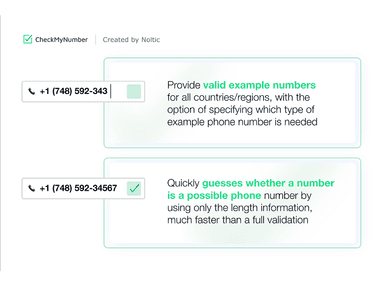
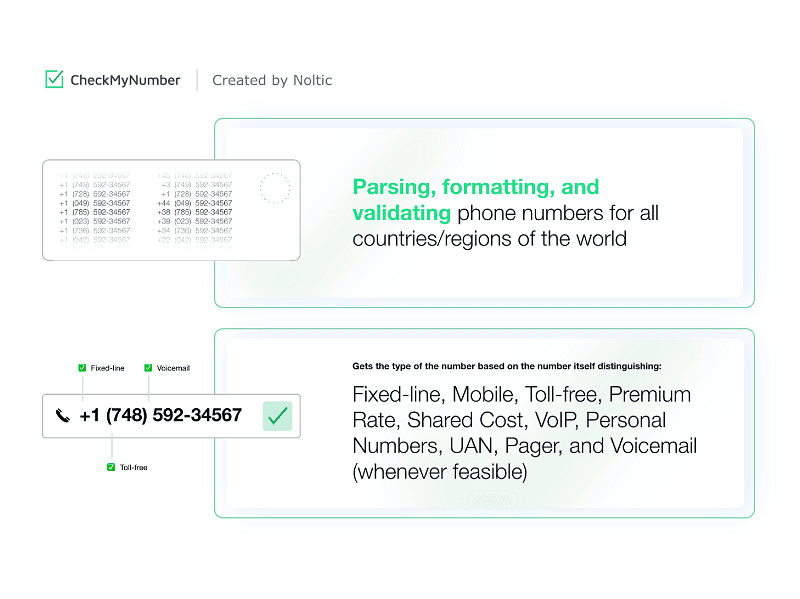
CheckMyNumber supports parsing, formatting, and validating phone numbers for all countries and regions. The platform takes incoming phone data and helps bring it into a consistent structure so it can be stored and used more reliably inside Salesforce. This makes it easier for teams to manage contact records that often come from different sources or formats.

See How It Works
Number Type Identification

The software classifies phone numbers into types such as Fixed-line, Mobile, Toll-free, Premium Rate, Shared Cost, VoIP, Personal Numbers, UAN, Pager, and Voicemail (whenever feasible). It reviews the structure of each number to determine its likely type, which helps Salesforce users better understand what kind of contact they are dealing with. As a result, working with large sets of CRM records becomes clearer and more organized.

See How It Works
Number Match Confidence Scoring

The platform provides a confidence score that indicates whether two phone numbers may represent the same contact. It compares patterns and structural similarities to support decision-making around duplicate records. This is helpful for teams trying to keep CRM records clean and reduce repeated entries.

See How It Works
Flow-Based Phone Formatting

The tool connects with Salesforce Flows through a “Format phone numbers” action and can be used with ready-made templates in both sandbox and production setups. It fits into automated processes like record-triggered updates, field assignments, and record updates, allowing phone formatting to run as part of existing workflows rather than separate steps.

See How It Works
Object-Level Formatting Rules

Formatting rules can be defined at the object level using internationally recognized phone standards. Once set, these rules apply within Salesforce objects to keep phone data consistent based on how records are structured. Teams are able to maintain uniform formatting without manually adjusting values each time.

See How It Works

Pros And Cons of CheckMyNumber

Pros

  • Reduces manual effort in cleaning contact records

  • Increases CRM data reliability for sales teams

  • Helps identify phone types for better outreach decisions

  • Improves duplicate detection through number comparison scoring

  • Supports automated phone processing through Flow actions

Cons

  • Absence of public repository may reduce code visibility for developers

  • Documentation could better explain platform-specific differences

  • Debugging can be slightly harder due to hidden method behavior

CheckMyNumber Reviews

Total 1 reviews

5

All reviews are from verified customers

Rating Distribution

5

Stars

100%

4

Stars

0%

3

Stars

0%

2

Stars

0%

1

Stars

0%

Share your experience

SD

Seamus D.

Small Business, 11-50 employees

Less than a year

5.0
June 2020

Expert salesforce team, reasonable cost, excellent delivery

Pros

I find the Noltic team to be top-notch! Unlike most SFDC consultancies, Noltic is all about delivery. They are incredibly efficient and have a team of experts. Additionally, Noltic is fast without compromising on the quality of work they are very conscientious.

Cons

I have nothing negative to say. They are exceptional. It is rare to come across a company so dedicated to delivering on time services and within budget.

Rating Distribution

Ease of use

10

Value for money

9

Customer Support

9

Functionality

10

Frequently Asked Questions

Does CheckMyNumber offer an API?

Information about an API is currently unspecified by the vendor.

Does CheckMyNumber have a mobile app?

No, CheckMyNumber does not offer a dedicated mobile app.

What language does CheckMyNumber support?

CheckMyNumber software primarily supports English.

What types of pricing plans does CheckMyNumber offer?

CheckMyNumber price starts at $20/user/month, billed annually, with a minimum of five users required. A 14-day free trial is also available. Get a detailed CheckMyNumber cost breakdown to make an informed decision.

What other apps does CheckMyNumber integrate with?

CheckMyNumber integrates natively within Salesforce environments, including Sales Cloud and Service Cloud, and works directly within existing CRM setups.

Who are the typical users of CheckMyNumber?

CheckMyNumber features are used by Salesforce admins, sales and support teams, and CRM data teams working with global phone data to keep records clean and consistent.

What level of support does CheckMyNumber offer?

CheckMyNumber offers support via phone, email, and an online contact form.