Last Updated
Key Takeaways
Generated from the text of customer reviews
Jane App is a cloud-based practice management platform built for allied health, wellness, and mental health clinics. Users appreciate its intuitive scheduling, billing, and charting tools, along with integrated telehealth and patient engagement features. While it’s praised for ease of use, some users note limited customization for complex workflows. Recent developments include an AI Scribe feature that handles documentation.
Our Verdict
Jane App is a strong fit for solo and small group practices seeking a simple, all-in-one solution. It supports efficient scheduling, documentation, and invoicing with minimal training. The software is considered cost-effective for solo practices, and its clean interface and client-focused design make it valuable for growing wellness clinics.
Overall Rating
Based on 160 users reviews
4.7
Rating Distribution
Positive
93%
Neutral
5%
Negative
2%
Starting Price
Starts at CAD $54
/month
Jane App Specifications
- Appointment Management/Scheduling
- e-Prescriptions
- Lab Integration
- Patient Portal
What Is Jane App?
Jane App is a cutting-edge, cloud-based practice management software tailored specifically for health and wellness practitioners. It provides a comprehensive platform to streamline operations, simplify administrative tasks, and enhance productivity.
As a comprehensive solution, the Jane App enables users to conveniently book appointments online, create customizable charts and forms, manage payments, generate invoices and reports, and more, all through an intuitive user interface. By automating routine workflows, Jane App helps eliminate paper waste and saves valuable time for practitioners.
What Is Jane App Best For?
The software shines through its versatile online booking capabilities. It offers a custom-branded, client-friendly portal that allows patients to conveniently schedule appointments from any device. This innovative feature has gained considerable popularity among users. Beyond online booking, Jane App also provides a robust suite of billing, charting, and patient management tools, making it suitable for diverse healthcare settings.
What Are The Benefits Of Using Jane App?
- User-Friendly Interface: Jane App is designed to be intuitive and easy to use, even for those with limited technical skills
- Customization: Offers extensive customization options for forms, charts, and reports to fit various practice needs
- Multi-Disciplinary Support: Suitable for a wide range of health and wellness practitioners, making it ideal for multi-disciplinary clinics
- Client Management: Provides tools for client communication, including automated reminders and a client portal
- Reporting And Analytics: Offers a variety of reports to help practitioners understand their business performance and make data-driven decisions
- Security And Compliance: Ensures data security and compliance with healthcare regulations like HIPAA
How Much Does Jane App Cost?
Jane App pricing starts from $54/month for the Balance plan (supports up to 20 appointments and unlimited admins and locations). The plans are as follows:
- Balance - $54/month (Single practitioner profile, up to 20 appointments/month)
- Practice - $79/month (plus $17.50/month/part-time practitioner, plus $35/month/full-time practitioner)
- Thrive – $99/month (plus $20/month/part-time practitioner, plus $40/month/full-time practitioner)
In addition to the base subscription, organizations should consider the following potential costs:
Integrations And Add-Ons:
- AI Scribe: $15/practitioner/month
- Group Telehealth: $15/practitioner/month
- Insurance Billing: $20/month + $5/additional practitioner
- Third-Party Integrations (Clearinghouses, Payment Processors, Custom APIs): $0–$500+/month depending on complexity.
Implementation And Setup: Estimated to be $0–$1,000 for extra support or consultancy, while support and maintenance may incur the cost of $0–$500/month, depending on the level of service.
Users see Jane App’s pricing in terms of the full picture: smaller practices may start with the Balance plan, while expanding clinics might go for Practice or Thrive for unlimited bookings, more advanced scheduling, and tools for keeping patients engaged. Optional add-ons and additional practitioner licenses drive the total cost of ownership, making early planning essential.
Disclaimer: The pricing is subject to change.
Jane App Integrations
It integrates with the following third-party software:
- Clinic Sites
- TELUS eClaims
- Physitrack
- MailChimp
- Teleplan
How Does Jane App Work?
Here’s how to get started with the software after its successful installation:
- Log in to your Jane App account using your username and password
- Set up client profiles by adding basic contact information, medical history, notes, and more
- Create practitioner and staff accounts to manage permissions and assign roles
- Build your service menu by adding types of sessions, treatments, and packages offered
- Configure your booking policy by setting availability, cancellation rules, and payment methods
- Design your practice website template to create a professional online presence
- Send client reminders and notifications by setting auto-respond features
- Schedule your first appointment through the calendar or online booking portal
- Start documenting sessions using customizable charting templates and forms
Who Is Jane App For?
The software is helpful for:
- Solo practitioners
- Independent health clinics
- Wellness businesses
- Small practices
- Physiotherapists
- Psychologists
Jane App Use Cases
Based on Jane EMR reviews and its features, the software effectively addresses diverse practice needs by translating features into practical solutions that ease clinic operations, improve patient management, and support business growth.
1. New Practices Seeking Easy Onboarding
Jane App works well with new or small practices that need a straightforward start without heavy technical burdens. Its intuitive design and comprehensive setup support simplify initial implementation. Reviews note the easy onboarding process and reliable customer support, which reduces the learning curve and speeds up going live. This ease of adoption helps new practices focus on patient care sooner while minimizing administrative distraction.
2. Clinics Prioritizing All-In-One Efficiency
For clinics aiming to consolidate scheduling, billing, and patient management into a single system, Jane App offers a centralized platform that streamlines operations. Features like automated appointment reminders, integrated billing, and secure patient records enhance workflow efficiency. User feedback frequently mentions how this integration reduces double work and saves staff time, resulting in smoother day-to-day management and improved clinic productivity.
3. Practices Focused On Patient Engagement And Retention
Clinics looking to attract and retain patients benefit from Jane’s online self-scheduling, automated communication, and customizable patient intake forms. Reviews highlight how these tools increase appointment bookings and reduce no-shows. The software’s flexible appointment management supports multi-provider setups, enhancing service accessibility. As a result, practices see improved patient satisfaction and clinic revenue growth.
Jane App User Sentiments
Most Positive Sentiments | Least Positive Sentiments |
Customer Support | Speed & Technical Issues |
|
|
Reviewers consistently highlight Jane’s support team as friendly, responsive, and helpful. For example, a reviewer said, “I absolutely love how responsive Jane’s customer service is.” | Many users report occasional glitches and loading issues that require refreshing the page to keep appointments accurate. As a reviewer said, “Sometimes it glitches and you have to refresh the page to make sure all appointments are up to date.” |
Ease of Use | Onboarding Complexity |
|
|
Many reviewers praise Jane’s clean layout and large template library as intuitive and time-saving. For example, a reviewer said, “Jane is so very easy to use once you get into it!” | Several users describe the setup process as lengthy and sometimes frustrating, with a few abandoning setup after problems. A user said, “I spent over a month setting up my account only to abandon it... I was locked out of my account.” |
Scheduling & Booking | Customization & Integration Gaps |
|
|
Users appreciate Jane’s online booking, reminders, and scheduling tools, highlighting their role in improving clinic efficiency and reducing no-shows. One user noted they were “happy to use this application as it works to support after-hours bookings.” | Users appreciate built-in features but often ask for more third-party integrations. As a user noted, Jane “doesn't offer integration with a picture app or staff tracking.” |
Is Jane App Right For You?
Need a system that can grow as your business expands? Jane App seamlessly scales to support solo practitioners and large integrated clinics. With multi-user access and robust features for teams, Jane App maintains a unified view of your practice, no matter its size.
Rest assured that Jane App's dynamic software will evolve with you as your practice grows. With new features and enhancements added regularly based on user demand, you'll have the flexibility and control to optimize workflows for years.
Still not sure if Jane App is right for you? Get in touch with our customer support team at (661) 384-7070, and it will help you make the best decision.
Jane App Features
Online Booking
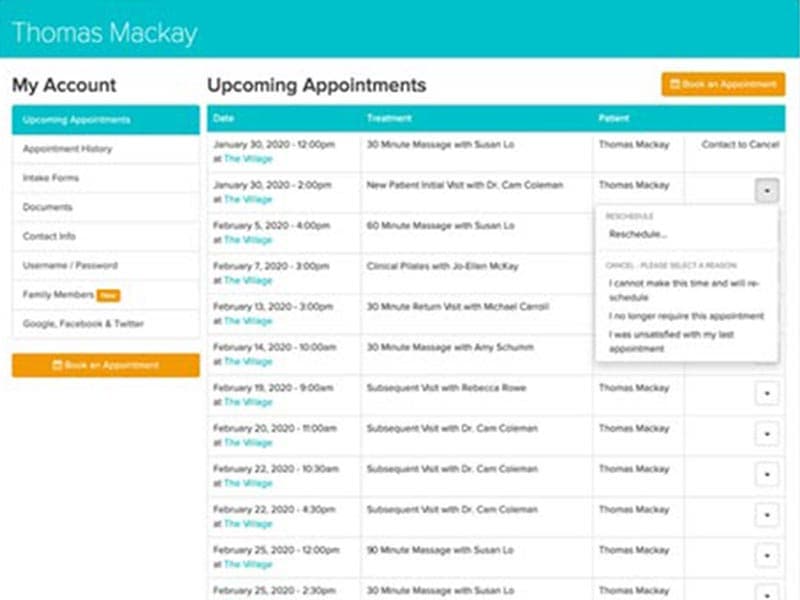
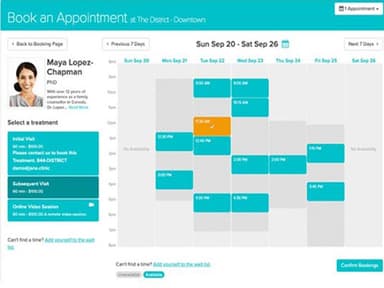
Jane App allows users to create customizable online booking pages for clients. Practitioners can display their services and availability, and clients can easily self-schedule appointments online from any device. This helps reduce no-shows and makes the booking process more convenient for customers. The online booking feature also allows practices to capture more booking inquiries from their website.
Charting
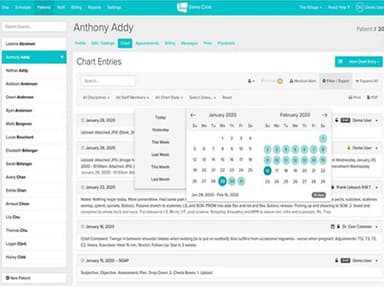
The software provides comprehensive charting capabilities. Users can create and customize SOAP notes, intake forms, assessments, and other documentation templates. Practitioners can efficiently capture all clinical details and patient information. Jane App also allows sharing charts across staff for collaboration. Digital charting eliminates paper files and makes patient records easily accessible online.
Payments
Jane App has a robust payment processing system integrated into the software. Practices can accept online and in-person client payments from the dashboard. The system supports various payment methods, including credit cards, debit cards, and e-checks. Practices no longer need additional payment hardware since Jane App is PCI compliant. The payment feature streamlines booking to billing workflows.
Reporting And Analytics
Jane App generates detailed reports to track key metrics and business insights. Through built-in reporting dashboards and exportable reports, practices can monitor financials, resource utilization, no-show rates, and more. Practices can enhance decision-making by accessing real-time data to track performance and better manage their operations.
Staff Scheduling
The feature offers a centralized calendar where practices can manage staff, clients, and locations. Staff can easily track appointments, payments, client history, and no-shows in one place. Built-in waitlists, automated notifications, customizable permissions, quick search, and visual time-slot highlights make scheduling simpler.
Telehealth
Jane App offers HIPAA-compliant telehealth features for conducting 1:1 online visits. Practitioners can also host group video sessions for up to 12 clients (as an add-on) securely through the software, allowing providers to connect with multiple patients virtually. The telehealth features are seamlessly integrated with booking, charting, and billing workflows, improving efficiency. Additionally, the platform lets clinicians conduct virtual sessions for related groups like couples or families.
Pros And Cons of Jane App
Pros
Jane account can be accessed from any device with an internet connection
Syncs files, calendar, and notes across all user profiles
Centrally stores sensitive healthcare records securely
Scales easily as practices expand operations
Cons
Web-based access requires an internet connection
The learning curve for new users transitioning
Software upgrades may involve adjustments
Jane App Reviews
Total 160 reviews
4.7
All reviews are from verified customers
Rating Distribution
5
Stars79%
4
Stars14%
3
Stars4%
2
Stars1%
1
Stars2%
Share your experience
Medical Practice, 1-10 employees
Less than a year
“Amazing customer support experience”
Pros
Customer support was amazing as I had a very positive interaction with them. Although I presented an unexpected error of my own, they tried to assist immediately. While they could not resolve it fully on the first try, still offered to call me back and promised that if the call didn't fix it, they would email me step by step instructions. I missed the return call but they followed up as promised with detailed, step by step instructions that included screenshots. By following the guidance, I was able to fix the issue. Their patience and thoroughness made the entire process much less stressful than anticipated. So yes I am very grateful for the support provided.
Cons
We faced a separate issue unrelated to that call. To add direct billing/e-claims for our patients, we were essentially required to upgrade to a more expensive package and then faced additional upcharges. The intention was to accommodate patients who were declining appointments because we did not offer direct billing. However this change became a costly hurdle instead. For a small clinic like ours which is still building its patient base during a challenging phase, this was very disappointing and felt like a significant setback.
Rating Distribution
Ease of use
9
Value for money
7
Customer Support
10
Functionality
8
Mental Health Care, 1-10 employees
More than a year
“Smooth transition with the best support”
Pros
I'm really happy that ClinicSites has now become Jane Website. The best thing is that transition felt smooth and I find their customer support fantastic!
Cons
Initially billing individual clients within a group appointment was confusing. However I liked that customer support patiently guided me through each step of the process.
Rating Distribution
Ease of use
9
Value for money
8
Customer Support
10
Functionality
8
Medical Practice, 1-10 employees
More than a year
“User-friendly for high student turnover clinic”
Pros
At our school clinic, we run Jane across twelve treatment rooms and bring in between forty and sixty new students each year. This level of turnover means we spend significant time teaching students how the software works but I find it user-friendly enough for this purpose. Our team also values the responsive customer support and the regular system updates that introduce genuinely helpful features. Plus whether using the Clinic Manager view, Client interface or Practitioner screen, booking and managing appointments feels easy for most newcomers even for my older clients, who often find technology challenging. The automated notifications, reminder emails and SMS alerts are especially useful when onboarding so many new users and clients each year.
Cons
I have identified two administrative pain points. The Payments batches are fixed and cannot be customized and the reporting function tends to remove UTM tracking data. These issues are more problematic for our internal bookkeeping and administration than for our clients day to day experience. Since payment batching can span multiple service days, charges from the same date can be split across separate batches depending on the clinic's hours. For those who understand UTM parameters, the loss of this data is significant for specific workflows, even if most front-line users do not notice its absence in daily operations.
Rating Distribution
Ease of use
10
Value for money
10
Customer Support
10
Functionality
10
Frequently Asked Questions
Who are the typical users of the Jane App?
Jane App is ideal for solo practitioners, small independent healthcare businesses, and clinics with up to 10 practitioners across different specialties.
Does Jane App support mobile devices?
Yes, the Jane App works great on tablets, smartphones, laptops, and desktop computers running platforms like Android, Apple, and Microsoft.
What languages does Jane App support?
The platform is available in English language. Jane App supports clinics and practitioners in Canada, the US, the UK, and Australia. It is also becoming increasingly available in other international markets.
Is Jane App free?
No, Jane software is not free. You must subscribe to access all its features and benefits for managing health and wellness practices.
What level of support does Jane App offer?
Jane App offers unlimited support and friendly human assistance via phone, email, and chat.
Does Jane App have an app?
No, Jane App is entirely web-based and cloud-hosted. It can be accessed via any modern web browser from any internet-connected device.
How much does Jane App cost?
Jane App pricing offers affordable monthly packages starting from $54/month based on the number of practitioners in a clinic, with no long-term contracts. Contact us for a custom Jane App cost tailored to your practice's needs.