



Last Updated
Overview
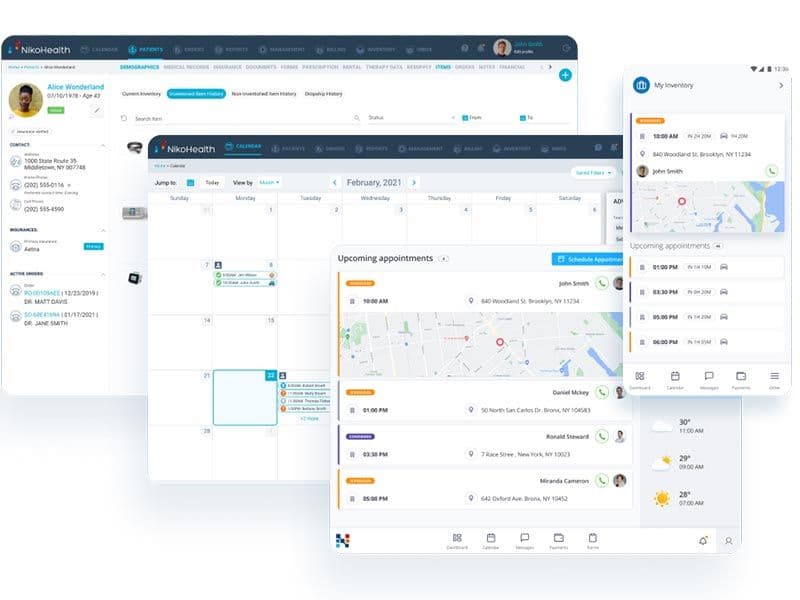
NikoHealth offers a cloud-based solution tailored for home and durable medical equipment sectors. With real-time insights and streamlined workflows, it optimizes revenue cycles and enhances decision-making efficiency. It caters to businesses of all sizes, integrating seamlessly with third-party applications for comprehensive supply chain management. Read its complete profile today!
NikoHealth Specifications
- Appointment Management/Scheduling
- Mobile App
- Billing and Invoicing
- Claims Management
What Is NikoHealth?
NikoHealth is a cloud-based home medical equipment (HME) and durable medical equipment (DME) management software. Office teams can manage operations through its centralized platform, while drivers and technicians can use its Delivery App on iOS and Android for navigation, delivery documentation, and order updates.
The primary function of NikoHealth is to automate business processes within the HME/DME industry. It brings patient intake, order processing, inventory, delivery, resupply, and billing into one system, so a fulfilled delivery or shipped resupply order can generate an invoice without re-entry. It also checks insurance eligibility before fulfillment, scrubs claims before submission, and auto-posts payer remittances.
What Is NikoHealth Best For?
A standout function of NikoHealth is its real-time insights, which give HME/DME teams one view of revenue, orders, and inventory. The software keeps track of each order from sale through payment and denial, while order metrics track acceptance and fulfillment rates and provide insight into order cycle time. Inventory reports show stock levels and asset values as items move. Together, these views can help managers spot bottlenecks before they affect deliveries or cash flow.
How Much Does NikoHealth Cost?
NikoHealth pricing is estimated at $1,500–$6,000/month. Actual pricing may vary and is customized based on business requirements. Beyond the base subscription, additional costs may include:
- Implementation And Onboarding: Estimated at $1,000–$5,000 one-time, depending on workflow configuration, billing setup, and go-live support
- Data Migration And Cleanup: May range from $1,000–$10,000 one-time, based on data volume, migration complexity, and cleanup requirements
- Staff Training And Backfill: Typically costs $500–$3,000 one-time, depending on training needs and staff coverage
- Third-Party Integrations: Estimated at $500–$5,000+/integration, depending on connector complexity and customization
Disclaimer: Pricing references are based on publicly available third-party information and industry benchmarks. Actual costs may vary.
NikoHealth Integrations
NikoHealth offers an integration ecosystem and APIs, allowing users to integrate it with various third-party applications and systems, including:
- McKesson
- Cardinal Health At-Home
- Encore Healthcare
- Tennr
- Parachute Health
How Does NikoHealth Work?
Here’s a step-by-step guide on how you can navigate NikoHealth’s dashboard and make use of its features:
- Log in using your credentials and access the centralized dashboard
- Manage your HME/DME processes from intake to payments
- Automate workflows like payments, reconciliation, and reporting
- Streamline inventory, ordering, and delivery with tools for mobile teams
- Integrate key services through the solution partner network
- Track orders through their lifecycle, from referral to delivery and billing
- View analytics and business insights from their performance dashboards
Who Is NikoHealth For?
NikoHealth is designed for businesses of all sizes, from small startups to large enterprises, in the HME/DME sectors. The software is particularly beneficial for:
- CPAP and respiratory suppliers
- Orthotics and Prosthetics (O&P) providers
- Medical supply resupply businesses
- HME/DME providers
NikoHealth Use Cases
Based on our analysis of user feedback and NikoHealth’s current capabilities, we have identified key scenarios where this software is a good fit:
Centralized Billing For HME Providers With Multiple Sites
When an HME or DME company operates across several branches, NikoHealth helps consolidate claims, payments, and denials workflows into one platform. Rather than each branch managing billing independently, administrators can get unified visibility and consistency in reimbursement handling, with support for multiple service locations, NPIs, and tax IDs. This aligned process can help reduce siloed billing errors and support closer revenue cycle oversight.
High-Volume Claims Environments With Frequent Denials
Organizations that regularly submit large volumes of claims and face frequent denials may find NikoHealth’s automation useful. Its claim error checks, underpayment tracking, and payer-specific rules help teams reduce rework and resolve denials faster. Additionally, its Denials Detail Report shows remark codes and reasons, which may help teams resolve insurance issues sooner.
HME Providers Connecting Intake With Billing
Some HME/DME providers also manage patient-facing tasks such as intake, authorizations, and prescriptions. In such settings, NikoHealth’s patient intake and documentation tools connect front-end intake and back-end billing, helping reduce duplicate data entry. Furthermore, its Playbook feature guides staff through required documentation to help ensure records are complete before billing.
Providers With Inventory, Delivery, And Logistics Complexity
For operations that supply durable medical equipment across geographies, coordinating inventory and delivery logistics is often critical. NikoHealth can suit settings where demand fluctuates, deliveries need scheduling, and inventory must be tracked across multiple locations. Its inventory tools support stock tracking across location, while delivery scheduling helps HME/DME providers coordinate equipment distribution.
Small-To-Midsize DME Firms Looking To Scale
When smaller DME or HME providers scale, they often outgrow spreadsheets or basic systems. NikoHealth can be a fit during this transitional phase, since it can migrate existing payers, pricing, product catalogs, inventory, patients, and orders into one system. It can then handle claims, inventory, scheduling, and reporting together, helping teams manage increasing workloads without adding disconnected tools. This can help organizations scale operations while maintaining oversight of day-to-day processes.
NikoHealth User Sentiment
Most Positive Sentiments | Least Positive Sentiments |
|---|---|
| Ease Of Use & Workflow | Customer Support Responsiveness |
|
|
| Users widely appreciate NikoHealth’s clean and intuitive interface once they are familiarized with its modules. Many highlight how scheduling, order management, and billing processes become smoother as staff adapt to the workflow. It’s particularly valued for its modern design compared to legacy DME/HME systems. | The most consistent area of concern across reviews is delayed or inconsistent response times from support. Users report waiting too long for issue resolution or not receiving adequate technical follow-up. As one customer shared, “Support is polite but very slow to respond when issues arise, especially with integrations.” |
| Automation & Claims Management | System Performance & Occasional Lag |
|
|
The automated claim submission and denial tracking functions receive strong feedback, especially from high-volume DME providers. Reviewers say it significantly reduces manual workload and claim delays. One review stated, “NikoHealth made claim tracking so much faster — no more manual follow-ups every day.” | While many appreciate the platform’s web-based interface, several users mention performance drops during high-volume processing or when switching between modules. Occasional lag is reported during claims batching or data exports. |
| Integrations | Learning Curve For New Users |
|
|
| The platform’s integration capability is frequently praised for reducing manual work and improving data accuracy. Users emphasize its ability to connect with other systems like billing and inventory, resulting in faster and more efficient operations. | New users, particularly those transitioning from paper-based systems, describe the onboarding as time-consuming. Some users report needing extra training to understand the platform’s full workflow. |
Is NikoHealth Right For You?
If your organization is handling high referral volumes or recurring resupply orders and needs to coordinate intake, fulfillment, and billing in one system, NikoHealth is worth consideration. The platform is built to process thousands of daily claims across payers and locations, and it supports multiple service sites, NPIs, and tax IDs under one account.
Trusted by organizations such as Prime Care HME, Thuasne USA, and In-Home Respiratory, NikoHealth is SOC 2 Type II audited and maintains ISO 27001 certifications, alongside HIPAA compliance. It also protects data through AES-256 encryption, AWS hosting across multiple availability zones, and annual penetration testing.
Still unsure if NikoHealth is the right choice for you? Contact us at (661) 384-7070 and we can help you make an informed decision.
NikoHealth Features
Billing And Revenue Cycle Management
NikoHealth consolidates multi-channel billing into a single platform. It allows teams to manage the billing lifecycle from payer to patient. This includes intelligent automation for claims management, payer contract management, insurance eligibility verification, patient estimates, and upfront collections. It also supports primary, secondary, tertiary, and patient billing, payer remittances auto-posting, and submits recurring rental invoices.
Inventory Management
NikoHealth provides real-time inventory control, helping users track products from the initial purchase order to the time users receive them. It allows operators to manage multiple inventory sites, track shipments, and create a custom product catalog. Users can also use barcode scanning technology and label printing for inventory management. Products can be managed with serial, lot, and warranty tracking, and purchase orders are generated when items reach set reorder points.
Order Management
NikoHealth simplifies order management by allowing users to manage and process orders from the point of collection to final delivery. It provides automated order notifications and allows for the management of doctors (referring providers) and sales representatives. It can also help validate referring providers’ NPI and PECOS automatically and flag required authorizations, inactive insurance, or missing prescriptions.
Analytics And Reporting Tools
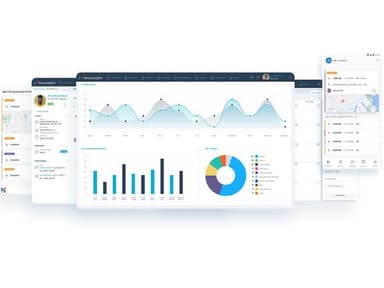
NikoHealth provides visibility into important data, including metrics, KPIs, revenue cycle insights, orders and sales metrics, and inventory control. For more tailored analysis, users can prepare custom reports in their own environments (e.g., Power BI and Tableau). These reports let users examine revenue cycle performance, order and sales activity, and inventory levels across their operations.
Patient EMR
Within the patient profile, users can gain access to demographic data, insurance, order history, documents, financial information, and more. Automated address recommendations support deliverability, and length-of-need renewals can be tracked alongside prescriptions and authorizations. These tools give staff access to patient details, track renewal requirements, and flag documentation that needs attention.
Documents Management
NikoHealth centralizes prescriptions, orders, insurance records, Explanations Of Benefits (EOBs), and authorizations in digital patient files. Teams can upload, categorize, and access documents remotely, while incoming faxes arrive in an Inbox. AI-powered fax tools can also classify documents and extract key information, helping reduce manual sorting.
Pros And Cons of NikoHealth
Pros
Improves claim, payments, and denial tracking
Helps reduce order delays and prevent stock shortages
Helps identify revenue gaps and track operational performance
Mobile-friendly interface improves on-the-go access
AI fax intake reduces manual data entry
Cons
Potential system downtime for updates
High dependency on vendor support for issue resolution
Customer support response time could be improved
NikoHealth Reviews
Total 7 reviews
4.4
All reviews are from verified customers
Rating Distribution
5
Stars86%
4
Stars0%
3
Stars0%
2
Stars0%
1
Stars14%
Share your experience
Small Business, 11-50 employees
“ongoing system improvements focused on enhancing UX”
Pros
They continually improve the system and clearly reinvest resources in enhancing the end user experience.
Cons
Resupply reporting and the UI don't support our specific product classes.
Rating Distribution
Ease of use
10
Value for money
9
Customer Support
9
Functionality
9
Sleep Medicine, 11-50 employees
More than a year
“Worse than paper”
Pros
nothing
Cons
horrible programming. The architecture is horrible and disjointed. One piece of the software doesn't talk to the other. Clunky, slow, too much time to execute a simple process with Niko.
Rating Distribution
Ease of use
1
Value for money
1
Customer Support
1
Functionality
1
Mid Market, 51-100 employees
“faster claims and reimbursement”
Pros
It has made a real difference in our billing operations. We can work more efficiently, handle more claims in less time and get reimbursed faster by our major payers. Onboarding and the move to the platform went smoothly, with good support throughout. Their team has also been consistently helpful, suggesting practical ways to fit their workflows into our existing processes instead of making us change how we work.
Cons
Reporting is the main area that has frustrated us with NikoHealth. We'd like to see more complete, detailed information in one report, rather than having to combine data from different sources. Still, their team has listened to our feedback and is actively working on several of the improvements we've asked for.
Rating Distribution
Ease of use
10
Value for money
9
Customer Support
8
Functionality
8
Frequently Asked Questions
Is there a free version of Niko Health?
No, Niko Health does not list a free plan or free trial on its website.
What does NikoHealth need from a supplier to start implementation?
NikoHealth usually asks for a current workflow overview, data samples, and an integration list to begin. Onboarding typically includes weekly meetings to keep timelines on track. Training combines a library of starter courses with role-based sessions built around each supplier’s workflows.
Can Niko Health track claim status for follow-ups?
Yes, Niko Health tracks claim statuses and automatically updates them for follow-ups for electronic payers. This eliminates the need for users to check payer portals individually. For multi-payer claims, suppliers can set rules for whether balances move to the next payer automatically or are handled manually.
Does NikoHealth support CMNs and payer documentation requirements?
Yes, NikoHealth lets suppliers configure payer-specific CMNs and documentation workflows, along with compliance and frequency guidelines. Rules can be set by payer and plan, HCPCS code, or item. The system also warns when authorizations expire and shows upcoming expirations, so teams can renew them in time.
How does Niko Health manage CPAP resupply?
Niko Health automates CPAP resupply by generating recurring resupply orders from frequency and quantity rules set by payer and product – days before each due date. Resupply campaigns contact patients by text or email with secure magic links to confirm orders. Voice AI calls can follow up with patients who do not respond to text or email.
Can NikoHealth stop rental billing when equipment is picked up?
Yes, NikoHealth automatically stops active rental billing when users select Pickup in the Transfer Type field during the Order Complete workflow. This helps prevent further rental charges after equipment has been returned.