


Waystar
Last Updated
Overview
Waystar offers end-to-end revenue cycle management, simplifying workflows across finance, billing, and payments. While the platform's extensive range of features may present a learning curve for new users, its comprehensive suite of tools is designed to enhance financial performance, reduce administrative burdens, and improve the overall patient experience.
Waystar Specifications
- Appointment Management/Scheduling
- e-Prescriptions
- Lab Integration
- Patient Portal
What Is Waystar?
Waystar is a cloud-based healthcare revenue cycle management platform that offers end-to-end solutions to simplify revenue cycle workflows. By leveraging advanced analytics, automation, and real-time data insights, it helps healthcare providers optimize billing processes, manage claims more efficiently, and ensure compliance with industry regulations. Committed to transforming the healthcare financial landscape, Waystar empowers its clients to focus on delivering high-quality patient care while achieving greater financial stability and operational efficiency.
What Is Waystar Best For?
Waystar stands out with its single-platform approach. Unlike other point solutions, it offers all revenue cycle capabilities in a unified solution, bringing together financial clearance, billing, coding, and payment functions. This allows providers to have end-to-end visibility and control of the revenue cycle on one dashboard.
How Much Does Waystar Cost?
Waystar pricing starts at approximately $11,000/year, with the following additional plans priced on a custom basis:
- Starter
- Core
- Performance
- Premium
Beyond the annual subscription, organizations may encounter the following costs:
- Implementation costs: Initial setup, onboarding, and training typically range from $2,000 to $10,000+
- Support and training: Premium training or concierge services may cost $500 to $5,000+/engagement
- Integration costs: EHR or practice management integrations may involve a one-time fee ranging from $1,000 to $7,500+
- Hosting and managed services: Advanced hosting or managed services can add approximately $100 to $300/provider/month
Disclaimer: Pricing references are based on publicly available third-party information and industry benchmarks. Actual costs may vary.
Waystar Integrations
The software integrates with the following third-party software:
How Does Waystar Work?
Here’s how to get started with the software after its successful installation:
- Log in to the Waystar centralized dashboard
- Configure system users and permissions for security and access control
- Streamline your financial clearance workflow by conducting thorough eligibility checks
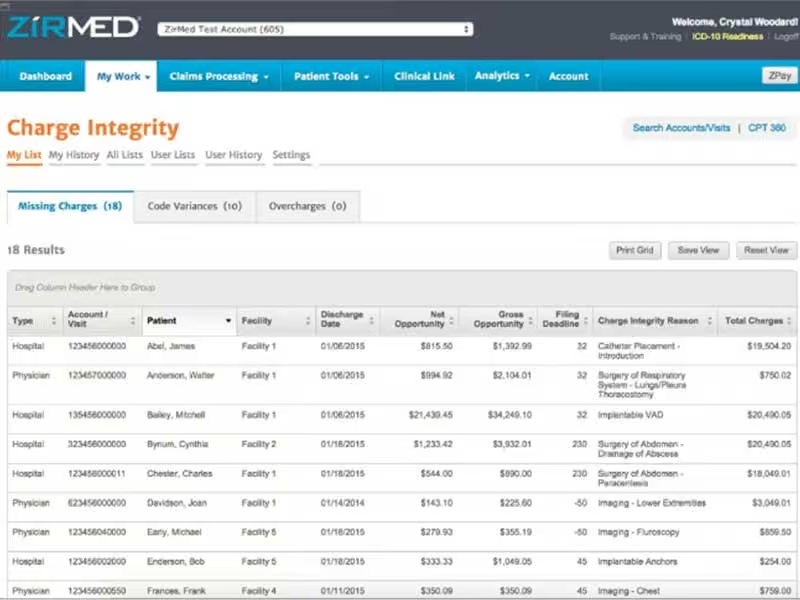
- Setup charge integrity rules to capture complete and accurate charges
- Define billing rules and authorized billing codes libraries
- Facilitate seamless data exchange by integrating with external partners and systems
Who Is Waystar For?
The software is suitable for the following healthcare settings:
- Ambulatory Surgery Centers
- Clinical laboratories
- FQHC
- Home health + hospice
Is Waystar Right For You?
Is your billing department drowning in manual tasks?
Waystar could be the lifejacket your revenue cycle needs to stay afloat. With built-in automation and intelligence, mundane tasks are taken off users' plates so they can focus on strategic duties. Complex workflows run seamlessly in the background with minimal oversight.
Data security and compliance are a top priority at Waystar. The platform meets industry standards with bank-grade encryption, role-based access and detailed audit trails. Regular third-party assessments ensure information is protected.
Waystar Features
Financial Clearance
Waystar's financial clearance module simplifies the front end of the revenue cycle. It offers real-time eligibility verification, automated prior authorization tracking, and patient estimation tools. Providers can offer instant price transparency to patients. The system reduces claim denials by verifying benefits upfront. It also flags outstanding balances for collection before a claim is filed.
Revenue Capture
The revenue capture feature ensures complete and accurate charge capture. It validates charges against billing guidelines to avoid revenue leakage. The system detects unbilled services using analytics and highlights them for coding. Revenue capture reduces manual efforts with claims scrubbing and billing intelligence.
Claim Management
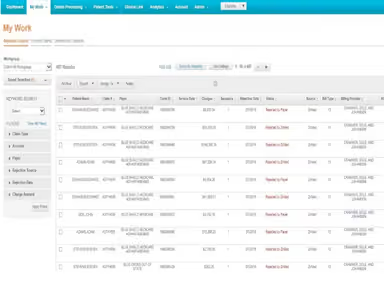
Waystar's claim manager simplifies claim submission processes. It offers features like automated claim monitoring and attachment management. The system tracks Medicare, Medicaid, and commercial claim workflows. Automated alerts notify users about rejected or pending claims. Claim management improves turnaround time, compliance, and overall reimbursements.
Payment Management
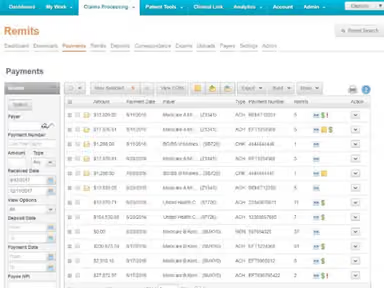
The payment management module streamlines payment posting, ERA reconciliation, and deposit management. It interfaces with multiple payer portals for Electronic Funds Transfers. Users can configure rules-based posting of payments and EOBs. The system calculates contractual adjustments and timely filing deadlines. Agencies can leverage self-service portals to pay invoices online.
Analytics And Reporting
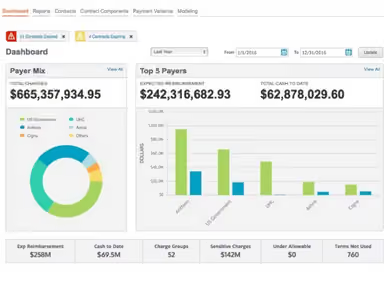
Powerful reporting tools offer critical business intelligence. Users access role-based customizable dashboards and reports. They can filter data to spot problems and take prompt action. Standard templates alongside ad-hoc reporting capabilities improve decision-making. Managers can track KPIs, compare performance, and devise strategies with easily understood visuals.
Pros And Cons of Waystar
Pros
Single platform for end-to-end revenue cycle
Robust automation and real-time visibility
Improves payment posting, cash flow, and productivity
Cons
Implementation support may be needed initially
It can have a steep learning curve
Waystar Reviews
Total 15 reviews
4.4
All reviews are from verified customers
Rating Distribution
5
Stars73%
4
Stars13%
3
Stars0%
2
Stars7%
1
Stars7%
Share your experience
Healthcare, Accident and Health Contingency, 51-100 employees
Less than 6 months
“Misleading Billing Practices”
Pros
I have no positive feedback to share, I dislike it as they misled in their advertising.
Cons
We chose this service based on its advertised integration with another clinical software we use for billing. However, the actual integration has been problematic. Despite using their software for less than two months at a monthly cost under $1000, we were shocked to see an additional charge of $15,000 on our bill. So I would say test thoroughly before transitioning to their software.
Rating Distribution
Ease of use
2
Value for money
2
Customer Support
2
Functionality
3
Healthcare, 1-10 employees
More than a year
“Waystar is a Reliable Choice”
Pros
Tracking claims and errors for correction is good. Also navigating the site and pages is easy.
Cons
I cannot pinpoint anything I dislike as everything operates smoothly.
Rating Distribution
Ease of use
10
Value for money
10
Customer Support
10
Functionality
10
Healthcare, Accident and Health Contingency, 11-50 employees
More than a year
“Gets the Job Done”
Pros
It is a great program that integrates with our complex operating system, facilitating easy claims processing, monitoring and corrections or resubmissions as necessary.
Cons
In general, we are satisfied with Waystar it is cost-effective and integrates well with our billing program Allscripts. The only downside is that not all payors are covered, necessitating a second system for insurance verification or claims submissions at times.
Rating Distribution
Ease of use
10
Value for money
10
Customer Support
10
Functionality
10
Frequently Asked Questions
What level of support does Waystar offer?
Waystar provides expert implementation and continuous support, with a dedicated client services team readily available to assist.
Who are the typical users of Waystar?
Waystar's users are healthcare organizations like hospitals, physician practices, surgery centers, and labs.
What languages does Waystar support?
The software supports the English language.
Does Waystar support mobile devices?
Yes, Waystar offers responsive design for accessibility from tablets and smartphones over a mobile web interface.
How much does Waystar cost?
Waystar pricing starts at around $11,000/year, with Starter, Core, Performance, and Premium plans offered at custom pricing and additional costs depending on implementation, integrations, and service level. Customized Waystar cost quotes can be provided based on requirements.
Is Waystar free?
No, Waystar is not a free software. It has various subscription-based pricing plans tailored for organizations of all types and sizes.
How does Waystar simplify healthcare payments and enhance consumer-friendly financial experiences?
At the True North client conference, Waystar demonstrates how its unified platform provides the tools and analytics needed to create a simple, transparent consumer financial experience. The software helps providers streamline workflows and uncover revenue, optimizing healthcare payments.