


Eyefinity EHR
Last Updated
Overview
Eyefinity is an optometric practice management solution designed to streamline daily operations and enhance patient care. With integrated EHR, billing, and scheduling tools, it optimizes workflow and efficiency for optometry practices. While its cloud-based system ensures accessibility, some users have reported occasional slow load times during peak hours.
Eyefinity EHR Specifications
- Appointment Management/Scheduling
- e-Prescriptions
- Lab Integration
- Patient Portal
What Is Eyefinity?
Overview
Eyefinity is a cloud-based practice management solution tailored for eye care practitioners. This user-friendly software enables practices to optimize data management, ultimately enhancing patient experiences and operational efficiency. Eyefinity allows eye care professionals to easily understand patient histories, measure treatment effectiveness, and efficiently plan visits. Key services include customized templates, patient engagement, reports and analytics.
What Is Eyefinity Best For?
The e-prescribing feature by Eyefinity EHR system simplifies prescription management, reducing the risk of errors associated with handwritten prescriptions. Providers can access patients' medication histories and allergies, ensuring safe and accurate prescription decisions. This streamlined process helps save time for both providers and patients, eliminating the need for paper prescriptions and pharmacy waits.
Eyefinity EHR Pricing
Eyefinity cost is based on a customer’s needs and requirements.
Eyefinity Integrations
Eyefinity EHR and practice management system integrated with various software diagnostic equipment systems, including:
- Eyescape digital imaging systems
- Demandforce
- Weave
- ECR Vault
- ZEISS
- Topcon
- 4PatientCare
How Does Eyefinity Work?
Here's how to get started with the software after its successful installation:
- Log in using your credentials and create a patient record
- Integrate diagnostic devices with the software to seamlessly transfer patient data
- Utilize customizable templates for exams and efficient documentation
- Enhance patient engagement by guiding them to sign in to the Eyefinity patient portal
- Access the comprehensive analytics tool to measure practice performance and patient outcomes
- Communicate securely within the practice by sending messages
- Generate reports to analyze practice performance and identify areas for improvement
- Explore the software's integrations to enhance functionality
Who Is Eyefinity For?
Eyefinity electronic health records software system has been designed explicitly for optometrists and ophthalmologists. It caters to :
- Single location optometry practices
- Multi-location practices
- Retail chain practices
Is Eyefinity Right For You?
Are you looking for a software to help elevate your eye care practice management and patient satisfaction to a new level? Then look no further, as Eyefinity EHR could be an ideal fit for your practice. With features such as image management, exam protocols, a patient portal, billing, and scheduling, Eyefinity practice management software reduces administrative burdens and offers an exceptional patient experience.
The software is ONC-ATB certified and ensures data safety and privacy. Moreover, it is highly scalable and grows with the needs of your practice. Simplify day-to-day complexities for improved workflow and efficiency.
Still not sure if it's the right choice for you? Contact us at (661) 384-7070, and our support team will assist you in making an informed decision.
Eyefinity EHR Features
Billing
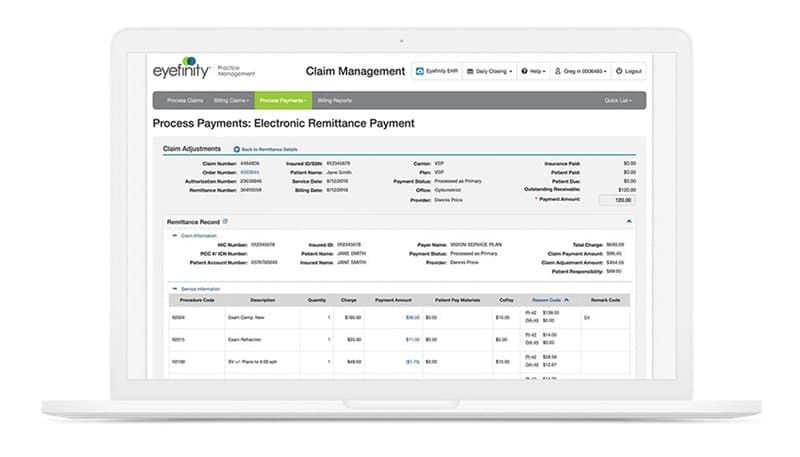
Eyefinity offers a robust billing feature that streamlines financial workflow, reduces administrative overhead and improves revenue capture. With Eyefinity, you can efficiently manage insurance claims, track payments, and generate accurate invoices. The system supports various billing models, making it adaptable to different practice structures.
Telehealth
This feature allows eye care professionals to conduct virtual visits with patients, ensuring continuity of care, even when in-person visits are impossible. The telehealth feature supports secure video consultations, enabling clinicians to perform eye examinations, discuss treatment plans, and answer patient queries remotely from your device.
Comprehensive Analytics
Eyefinity provides comprehensive analytics tools that empower eye care practices with data-driven insights. These analytics tools offer deep visibility into practice performance, patient trends, and financial metrics. Practices can track key performance indicators, assess marketing campaigns' effectiveness, and identify improvement areas.
Image Management
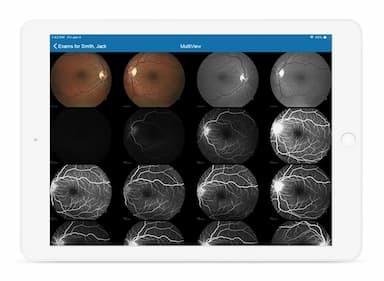
The software allows you to capture, store, and manage high-quality images of the eye, including retinal scans and visual field tests. These images can be easily accessed within the EHR, facilitating diagnosis and treatment planning. The image management feature also supports securely sharing photos with patients and referral partners, enhancing collaboration and patient engagement.
Integrated Scheduling
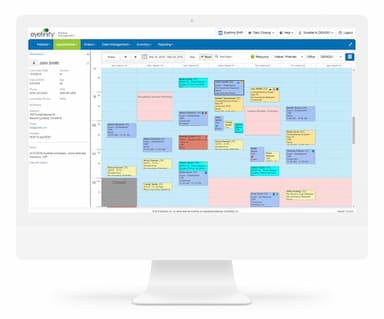
Eyefinity's integrated scheduling feature offers a user-friendly interface for scheduling patient appointments, managing provider availability, and optimizing the appointment book. Integrated scheduling saves time and ensures that appointments align with provider availability and that patients are seen promptly, enhancing the patient experience.
Exam Protocols
The software offers customizable exam templates to ensure consistency and thoroughness in patient care. Providers can create and modify exam protocols tailored to specific patient needs, allowing for efficient and standardized eye examinations. This feature supports accurate diagnosis and treatment planning while improving practice efficiency.
Patient Portal
The Eyefinity patient portal empowers patients by granting them secure access to their electronic health records, including test results, treatment plans, and visit summaries. Patients can schedule appointments conveniently online, reducing administrative burden and improving scheduling efficiency. Additionally, it fosters better communication between providers and patients.
Pros And Cons of Eyefinity EHR
Pros
Comprehensive patient records
Efficient scheduling and appointment management
Streamlines both administrative and financial operations
Providers can review and save patient images
Users can get prescription history easily from a pharmacy
The cloud-based software offers built-in templates
Cons
Has a learning curve for beginners
The reporting feature is a bit complex
Documentation capabilities need improvement, according to some reviews
Eyefinity EHR Reviews
Total 49 reviews
3.7
All reviews are from verified customers
Rating Distribution
5
Stars31%
4
Stars35%
3
Stars20%
2
Stars6%
1
Stars8%
Share your experience
Optometry, 11-50 employees
More than a year
“Do not use ”
Pros
Mobility.
Cons
Very time consuming to enter basic charting. You have to hit so many buttons. It crashes. It's not intuitive at all. It seems like no one in the field was consulted in the design of this EHR and it shows.
Rating Distribution
Ease of use
1
Value for money
1
Customer Support
1
Functionality
1
Healthcare, 51-100 employees
More than a year
“Customizable and user friendly”
Pros
The system is simple and easy to use. Also, it is quick to learn, which speeds up the training process for new.
Cons
Though it is not very customizable compared to other EHR software and it seems to lag frequently.
Rating Distribution
Ease of use
6
Value for money
4
Customer Support
5
Functionality
5
Healthcare, 11-50 employees
More than a year
“Not recommended...”
Pros
It connects with EPM for orders and billing. The fax letter feature and the pharmacy link are also great additions.
Cons
It feels feels clumsy, cumbersome and inefficient, clearly not designed by a doctor. The iPad version is so different from the desktop version that it seems like a completely different program. The contact lens ordering and finalizing process is not intuitive at all. The auto-coding feature is consistently incorrect with every VSP patient. There are far too many steps required for simple tasks like printing an Rx and the inability to "name" an Rx beyond the limited list of types is restrictive. For example, "hobby/sports" is a category but I cannot label an Rx "Music" or "Golf," which is frustrating. Ordering a soft contact lens in one eye and a hybrid in the other is challenging and RGP orders do not forward properly. The contact lens trial feature is confusing when dealing with multiple lenses and types. Its inconvenient that I have to finalize a record before sending a referral letter as the "Preliminary" label shows up on the letter to a specialist. Sometimes there is not enough time to finalize the record before sending the referral during an exam. The requirement to commit to a "Plan" before a diagnosis is not practical and dose not follow the SOAP process that doctors are trained in. Additionally, the body indicator feature interferes with clinical drawings when sketching a pathology.
Rating Distribution
Ease of use
2
Value for money
3
Customer Support
4
Functionality
3
Frequently Asked Questions
Is Eyefinity EHR certified?
Yes, Eyefinity software is ONC Health IT Certified.
Does Eyefinity EHR offer an API?
Yes, Eyefinity EHR software offers an API.
Can Eyefinity telemedicine solution be integrated with any EHR system?
Eyefinity can integrate with existing practice management systems and has telehealth capabilities.
What are the primary features offered by Eyefinity EHR?
Key Eyefinity EHR features include a patient portal, billing, scheduling, image management, and documentation.
What is the level of support provided by Eyefinity?
Eyefinity offers support via FAQs, form submission, online training and phone.
Which languages are supported by Eyefinity?
Eyefinity PM software supports the English language.
Which practice size does Eyefinity suit well?
Eyefinity eye care cloud-based solutions are designed to help optometry practices of all sizes elevate patient care.
Does Eyefinity EMR offer a mobile app?
Yes, the platform offers a mobile application.
What kind of pricing plans does Eyefinity offer?
The software offers custom pricing plans. Get in touch with us for a personalized Eyefinity EHR cost according to your requirements.