

ClockIt
Last Updated

Overview
ClockIt is simple clock-in and clock-out software that automates payroll, tracks PTO, generates reports, and provides location tracking. The software also offers real-time custom notifications about your time clock events. Although scheduling events is not very flexible, its responsive customer support helps you resolve issues promptly.
Overall Rating
Based on 2 users reviews
4.5
Rating Distribution
Positive
100%
Neutral
0%
Negative
0%
Starting Price
$2.99
per user per month

ClockIt Specifications
- Attendance And Time Tracking
- Leave Management
- Alerts/Notifications
- Mobile App
What Is ClockIt?
ClockIt is a cloud-based time and attendance platform. Its features help employees clock in via mobile app, browser, kiosk, or Slack, all while the punches sync smoothly to the dashboard. It mitigates any chances of manual reconciliation that most teams do before payroll, all thanks to its PTO accruals, shift schedules, as well as payroll reports that derived from that same record. In turn, managers can see in real time who is working, where and how long.
What Is ClockIt Best For?
The software is best known for its kiosk mode that’s essentially free to use to anyone who has subscribed to the forever free plan. It turns a spare iPad or Windows tablet into a punch clock with PIN or photo capture and without any paid subscription required to turn it on. Businesses, more specifically, job sites, or retail floors, find it particularly helpful since that means one tablet by the door replaces dedicated punch-clock hardware.
How Much Does ClockIt Cost?
The pricing of ClockIt starts at $2.99/user/month. Pricing is per-user based and increases as the company expands its headcount. It also offers a Free Forever plan and a 14-day free trial, so users can test the tool for their business needs.
Beyond the base subscription, organizations should also budget for the following additional costs based on industry benchmark:
- Setup And Onboarding – While free for most small businesses, enterprises should budget $500–$2,500 for custom onboarding
- Data Migration – Budget $0–$1,500 to import attendance data accumulated over the years via third-party consultant
- Custom Integrations – Paid plan has the API access. Nonetheless, budget around $0–$2,000+ based on the integration customization
ClockIt’s pricing is generally well-received, and users – especially SMB owners - find it quite affordable for both PTO as well as time tracking. Although some note that occasional pricing confusion somewhat detracts from the overall experience, others praise its inexpensive cost per user and extensive feature-set.
Disclaimer: The pricing is subject to change.
ClockIt Integrations
ClockIt supports integrations with several third-party applications, including:
How Does ClockIt Work?
Navigating the tool is quite easy. Here’s how:
- Sign up for the account and set it up
- Afterwards, define team members, as well as locations and roles
- Download the mobile app for employees (available for both iOS and Android)
- Help the staff members log into the app with their details
- Use IP limits, geo-fencing, punch locations for job sites
- Create shift schedules and work breaks, and assign employees to relevant shifts
- Enable PTO or leave tracking features and configure accrual rules
- Ensure that employees can clock in and out by installing biometric time clocks or kiosks
- Use the dashboard to monitor active shifts, view timesheets, and track KPIs
- Set real-time notifications for admins, managers, and employees as needed
- Export the timesheet data and create a payroll report for a smooth payroll processing
Who Is ClockIt For?
The software suits the needs of the following sectors:
- Retail
- Accounting
- Construction
- Healthcare
- Manufacturing
- Non-profit
- Real estate
- Education
- Firms
- Cafes and restaurants
ClockIt Use Cases
Our analysis of ClockIt’s capabilities has helped us identify a few scenarios that fit the software:
Small Businesses Replacing Spreadsheets With Payroll
Totaling hours by hand can be quite a cumbersome process, and it takes only a simple miscalculation to completely throw off payroll accuracy or trip a compliance issue. ClockIt's one-click payroll reports help here by extracting all the work duration, overtime, and PTO into a CSV or Excel export. This turns a process that used to eat hours per pay period into one that takes most businesses a relatively short period of time.
2. Multi-Site Operations That Need Attendance Visibility
An operations manager covering five job sites shouldn't have to call five different supervisors to find out who's actually working and who's not. This is where managers' dashboard comes in. It updates the moment someone clocks in or out. On top of that, it shows punch location, IP address, and leaves status for every site on one screen. This negates the overwhelming process of waiting on an end-of-day report to catch a no-show.
3. Shift-Based Teams On Variable Schedules
When a singular email chain is the one source of coordination, rotating shifts and split schedules can turn into chaos quite easily. For organization, shift planning can take care of all the unlimited custom schedules with set work and break durations. It also forwards notifications straight to employees, and ties planned hours to the same record as actual clocked hours. Subsequently, a manager can see the gap between the two without cross-referencing two systems.
4. HR Teams That Manage Leave Request And PTO Accruals
Tracking leaves – or PTOs – via spreadsheets isn’t truly reliable, especially when it’s being edited by two people in the same week. Instead, a PTO and vacation tracking feature – provided by ClockIt - covers multiple leave types, accrual rules (be it weekly or annual), and manager approval flows. Employees can request time off from the app, admins approve it there too, and the balance updates without anyone touching a formula.
Is ClockIt Right For You?
If your business manages shift-based teams, or still generating payroll reports manually, then ClockIt is worth a look. The software has been in the market since 2015 and has built a reputation among 20,000+ businesses as customers. Its clock-ins can work on mobile, web, kiosk, or even Slack - essentially what covers most of what a field crew or a remote team actually needs on a daily basis.
ClockIt's security is verified through its various certificates. It has 256-bit SSL encryption, along with SOC 2 Type II, and GDPR compliance. In addition, the software includes ISO 27001 certification and PCI DSS. Before treating certificates as interchangeable, it's important to determine which ones are relevant for your particular industry. Companies that need accurate workforce data, but don’t want to invest heftily in complex enterprises might find the tool aligned with their HR need.
If you are still unsure about ClockIt, contact us at (661) 384-7070, and we will help you make a well-informed decision.
ClockIt Features
Geofencing And Location Tracking
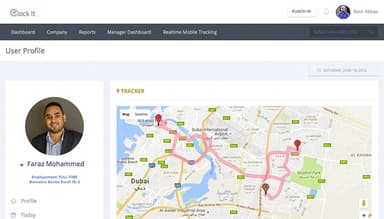
It can track employee locations when they clock in and out and ensure they do so from approved workplace addresses. Admins can set up geo-fences and receive alerts about early departures or late arrivals along with their work duration. To prevent buddy punching or time theft, this feature helps them enable photo capture at the point of punch and whitelist particular IP addresses to limit clock-ins to authorized networks.
Time And Attendance
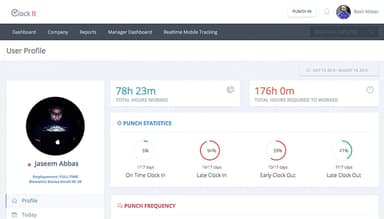
ClockIt's time and attendance feature allows businesses to automate tracking of employee work hours, absences, and other metrics. Employees can clock in and out from any device, and their times are synced across the system. Through their attendance dashboard, managers can view real-time reports on who is currently at work, who is absent, and who’s on leave.
PTO, Leaves, And Vacation Tracking
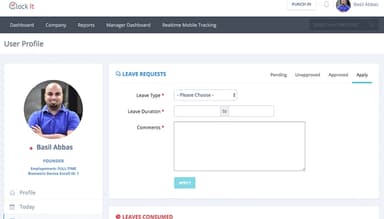
It allows you to set up accrual rules, track multiple types of PTO, and enable employees to request and manage their leave and vacation time. The software supports weekly, bi-weekly, monthly, and annual accrual periods and provides real-time PTO balance information to both employees and admins. In addition, the attendance view displays both: employees who are on leave right alongside those who have clocked in.
Shift Planning And Employee Scheduling
The software enables users to create custom schedules, specify work durations and break times, and assign shifts to their employees. The system can send notifications to employees about their schedules, making it easier to manage your workforce. Shift data is connected to the attendance record, so planned versus actual hours are tracked in the same system. This facilitates the real-time detection of schedule deviations or no-shows.
Time Clock Notifications
Realtime notifications are sent to administrators, managers, and workers via a mobile app, email, Slack, or Teams for more than 15 events (early clock ins, absence, etc.). Alerts are based on employee group or location, so managers aren't alerted on every single late arrival when their sole concern is their own site.
Reports And Payroll Export
ClockIt’s reporting suite generates work duration, overtime and PTO reports that can be exported to CSV and Excel with one click. All clock-in methods and locations are included in one report. Reports are generated in real time and can be filtered by employee, team, project, or date range.
Pros And Cons of ClockIt
Pros
Smooth interface with detailed reporting
Flexible reporting options for payroll needs
Easy time tracking with historical hour references
Cons
Manual time edits require correction requests
Management dashboard is difficult to use on mobile
ClockIt Pricing
Forever Free Plan | Monthly |
|---|---|
$0.00 per month | $2.99 per user per month |
|
|
Disclaimer: The pricing details were last updated on Sep 25, 2026 from the vendor's website. Please contact us for a tailored pricing list.
ClockIt Reviews
Total 2 reviews
4.5
All reviews are from verified customers
Rating Distribution
5
Stars50%
4
Stars50%
3
Stars0%
2
Stars0%
1
Stars0%
Share your experience
Electricity, Custom Product, 1-10 employees
More than a year
“Simplicity in Efficiency”
Pros
Clockit is simple, nicely design and to the point. It embraces the philosophy that less is more, making it a highly effective tool with a minimalist approach.
Cons
It would be useful if the software could send a text or email reminder when an employee forgets to clock out.
Rating Distribution
Ease of use
10
Value for money
10
Customer Support
10
Functionality
10
Manufacturing, Electricity, 11-50 employees
Less than 6 months
“Great price and covers primary needs”
Pros
The software makes it very easy for employees to clock in and out each day and track their hours. It is a great solution that simplifies time management.
Cons
The software lacks some essential functions that would benefit both employees and payroll processing.
Rating Distribution
Ease of use
8
Value for money
10
Customer Support
8
Functionality
7
Frequently Asked Questions
Does ClockIt offer an API?
Yes, the software provides an API.
What language does ClockIt support?
ClockIt supports the English language.
What other apps does ClockIt integrate with?
The platform integrates with several third-party applications, such as Slack, Microsoft Teams, Google Chat, Asana, Xero, and ADP.
Does ClockIt support mobile devices?
Yes, the vendor offers a dedicated mobile app for both iOS and Android users.
What types of pricing plans does ClockIt offer?
Investment in ClockIt starts at $2.99/user/month for the Monthly plan. The vendor also offers a 14-day free trial for the paid one as well as a Free Forever plan for users to test the platform. Get in touch with us to get a personalized ClockIt cost estimate.
Who are the typical users of ClockIt?
The software caters to the following industries and sectors: retail, accounting, construction, healthcare, manufacturing, non-profit, real estate, education, firms, and cafes and restaurants.
What level of support does ClockIt offer?
The platform offers chat, email, and phone support to its users.