


Compease
Last Updated

Overview
Compease helps employers make pay decisions more consistent by comparing employee salaries with structured ranges and market data. While adding unusual roles can be difficult, its compensation guidance supports a more informed review process. It is aimed at small and midsize organizations seeking a clearer compensation process.
Overall Rating
Based on 11 users reviews
4.7
Rating Distribution
Positive
100%
Neutral
0%
Negative
0%
Starting Price
$2
per user per month
Compease Specifications
- Compensation Management
- Workforce Analytics
- Payroll integration
- Employee Information Management
What Is Compease?
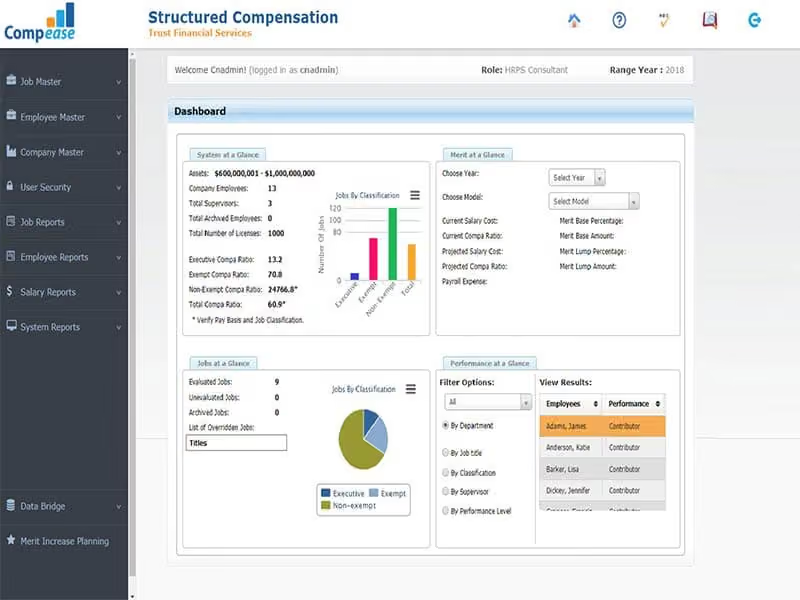
Compease is a salary administration and compensation management platform from Navari. It helps organizations analyze, design, and execute salary administration strategies using market-driven salary data and compensation planning tools. The software provides a dashboard for identifying potential pay-equity gaps by comparing employee pay with established salary ranges.
Its salary administration approach helps organizations maintain consistent compensation practices as their strategies change over time.
What Is Compease Best For?
Its standout feature is ‘Merit Planning’, which connects salary range comparisons with planning for pay increases. HR teams and compensation managers can use the dashboard to spot potential “equal pay for equal work” blind spots by reviewing where employees’ pay sits within their salary ranges. Combining compa-ratios with the merit increase plan also helps users prepare a comprehensive salary budget report. This feature makes Compease particularly useful for organizations reviewing pay equity alongside their next round of salary increases.
How Much Does Compease Cost?
Compease price is estimated to start at $2/user/month for its base plan. Its plans can be tailored to meet the unique requirements of different organizations.
Besides the base subscription cost, buyers should budget for the following potential additional expenses:
- Implementation And Setup: $3,000 (one-time)
- Data Migration And Job Evaluation Setup: $1,500 (one-time)
- HRIS Or Payroll Integration: $2,500 (one-time)
- Staff Training: $1,000 (one-time)
- Supplemental Salary Survey Data: $2,500/year
- Extra Compensation Consulting: $200/hour
Disclaimer: Pricing references are based on publicly available third-party information and industry benchmarks. Actual costs may vary.
Compease Integrations
Compease integrates with Performance Pro and other payroll systems.
How Does Compease Work?
Log in to the platform and follow these steps to understand how Compease supports the salary planning process:
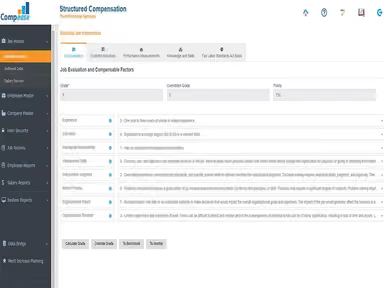
- Evaluate job roles by assessing the knowledge, skills, problem-solving, and accountability each position requires
- Establish salary ranges using market salary data and the value of each role within your organization
- Review employee pay against salary ranges through the dashboard to identify potential pay equity gaps
- Develop a merit increase plan around your organization’s compensation policies and available budget
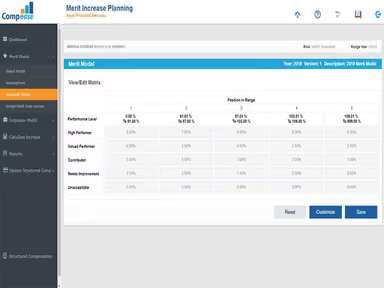
- Use the ‘Merit Matrix’ to assign proposed increase percentages for employees
- Combine compa-ratios with the merit increase plan to prepare a salary budget report for review
Who Is Compease For?
Compease software mainly caters to businesses across the following industries and sectors:
- Financial services
- Healthcare
- Retail
- Education
- Nonprofit
Compease Use Cases
Based on Compease features and user feedback, the following scenarios highlight where it can support HR and compensation teams:
HR Teams Allocating A Fixed Annual Increase Budget
HR teams can use Compease to build an annual merit plan around an approved budget and internal pay policies. The salary budget report brings proposed increases together for review. Before seeking approval, teams can assess how those adjustments affect overall spending.
Compensation Teams Investigating Uneven Pay In Comparable Roles
Compease’s dashboard highlights where employee salaries sit within their assigned ranges. For compensation teams reviewing comparable roles, this provides a starting point for examining differences that may have developed through hiring offers or previous increases. Those differences still need investigation, but the review helps identify which cases deserve attention. Users particularly appreciate detailed salary reports for managing compensation equity.
Growing Businesses Reviewing Roles With Expanded Responsibilities
Job evaluation gives HR teams a basis for reassessing positions as their responsibilities change. Compease allows teams to consider the knowledge, skills, problem-solving, and accountability involved in each role. A position that now carries greater responsibility can be reviewed against these factors to support a discussion about its salary.
Employers Revisiting Salary Ranges For Hard-To-Fill Vacancies
Compease provides market salary data that HR teams can consult when reviewing pay ranges for open positions. If recruitment has stalled, this can help assess whether the approved salary needs reconsideration. Hiring managers then have a clearer basis for discussing budget changes, while recognizing that compensation may be only one factor affecting recruitment.
Is Compease Right For You?
Compease may suit HR teams that need to explain salary decisions to leadership, compare employee pay with market data, and plan merit increases using consistent criteria. Its compensation reports and pay-positioning views can support internal discussions about salary ranges and proposed adjustments.
For employers reviewing pay transparency, Compease provides job grading and pay equity analysis that can support clearer explanations of salary differences. Its product portal connects these tools with transparent compensation practices.
The software is used by organizations such as Harvard University, Planet Aid, and the University of Detroit Mercy.
Massachusetts introduced pay range disclosure requirements on October 29, 2025, requiring covered employers with at least 25 employees in the state to disclose ranges in job postings. Compease’s market salary data and structured salary planning can help HR teams establish ranges to support these disclosures. However, the vendor does not explicitly confirm compliance with the law or automated disclosure functionality.
Are you still not sure about Compease and need expert advice to make an informed decision? Reach out to us at (661) 384-7070 now.
Compease Features
Merit Matrix
This feature helps HR teams plan salary increases around their compensation policies and budget. It helps assign a consistent merit-increase percentage for each employee. Using Compease, teams can compare proposed percentages and their expected budget impact before finalizing the plan.
Job Value
Compease enables users to assess roles based on their required knowledge, skills, problem-solving, and accountability. The resulting job value score helps organizations compare positions and determine how roles fit within their salary structure.
Dashboard Analytics And Pay Equity Qlik Sheet
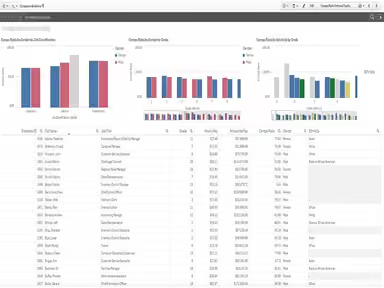
Compease dashboard displays employee pay against assigned salary ranges, pay positioning, and compa-ratios. HR teams can use these views to flag potential differences that need further investigation. That said, it's important to note that a dashboard alert alone does not establish that pay inequity exists.
Job Evaluation Report
This feature summarizes the results of a position assessment for HR and compensation teams. Reviewers can use Compease to inspect documented evaluation results and compare positions when considering an assigned job value or salary grade.
Pros And Cons of Compease
Pros
Simplifies merit planning and budget projections
Market data supports salary comparisons
Supports multiple regional pay structures
Enables consistent job evaluation and grading
Offers easy job description editing capabilities
Cons
Limited reporting customization
Excel exports may need manual formatting
Minimum wage description may not be accurate for every geographical location
Compease Reviews
Total 11 reviews
4.7
All reviews are from verified customers
Rating Distribution
5
Stars73%
4
Stars27%
3
Stars0%
2
Stars0%
1
Stars0%
Share your experience
Online Media, 1-10 employees
Less than 6 months
“interface is easy to navigate”
Pros
Getting it set up with my team wasnt difficult and the interface made navigation simple while helping organizing our workflow.
Cons
Because it isn't decentralized if a breach occurs, my data could easily be tampered with or stolen.
Rating Distribution
Ease of use
10
Value for money
9
Customer Support
8
Functionality
9
Construction, 51-100 employees
Less than a year
“really efficient at what it does”
Pros
It works very efficiently and does exactly what it promises to do.
Cons
We didn't find much to criticize since it covered the things we needed.
Rating Distribution
Ease of use
10
Value for money
9
Customer Support
9
Functionality
9
Health, Wellness and Fitness, 500+ employees
Free Trial
“Offers useful salary ranges”
Pros
Offers useful salary ranges for building a meaningful salary administration program and helps with writing job descriptions.
Cons
No major issues. Breaking duties down by percentage isn't my preference though I work around it and understand why Compease includes that feature.
Rating Distribution
Ease of use
10
Value for money
9
Customer Support
10
Functionality
7
Frequently Asked Questions
Does Compease offer payroll management?
No, it doesn’t offer payroll management. However, it integrates with different payroll systems.
What are the best alternatives to Compease?
HRsoft, Paycom, Workleap, and salary.com are among the popular Compease alternatives.
Can organizations use location-specific salary data for employees in different markets?
Yes. Users can select a city and state to access localized compensation information when reviewing pay for different locations.
Does Compease help determine whether a position is exempt or non-exempt?
Its built-in FLSA functionality provides recommendations on a position’s exempt status. The vendor describes this as a recommendation rather than a definitive classification decision.
Does Compease offer a free plan or trial?
No, it doesn't offer a free plan or trial version.