
Last Updated Jan 31, 2026

Key Takeaways

Generated from the text of customer reviews

Darwinbox is a recruitment platform used by HR teams in large enterprises across IT, manufacturing, retail, and banking sectors. Users value its AI-driven recruitment features, automated workflows, and mobile-first access. Recurring concerns include setup complexity and slow support response times. Recent updates feature AI-powered analytics and enhanced onboarding.

Our Verdict

Darwinbox is a reliable choice for mid to large organizations seeking an integrated, AI-enabled HR and recruitment platform. It fits enterprises with distributed workforces or complex HR processes, offering strong analytics and automation. Pricing is tailored to enterprise scale. Recommended for teams needing consolidated HR, recruitment, and payroll management.

Get A Firsthand Look At Software
Watch Free Demo

Overall Rating

Based on 19 users reviews

4.5

Rating Distribution

Positive

95%

Neutral

5%

Negative

0%

Starting Price
Custom

What Is Darwinbox?

Darwinbox software is a cloud-based, end-to-end HRMS/HCM platform that allows organizations to manage the entire employee lifecycle, from recruitment and onboarding to payroll, performance, and offboarding, from a single platform. The system's modules include Core HR, Time and Attendance, Payroll and Expenses, Recruitment and Onboarding, Talent and Performance Management, and People Analytics and Reporting.

The platform uses a mobile-first design, allowing employees to perform HR tasks on their mobile devices. Darwinbox supports configurable workflows, role-based permissions, and employee movement processes, which makes it suitable for companies with multiple departments, locations, or complex HR structures. This approach provides HR teams with the tools they need to manage processes consistently across the organization, while giving employees direct access to relevant HR information. 

What Is Darwinbox Best For?

Darwinbox specializes in recruitment, with an integrated Applicant Tracking System (ATS) that streamlines job postings, shortlisting, and onboarding. Darwinbox's automatic resume parsing and AI-driven shortlisting reduce manual screening and speed up the process of finding the most suitable candidates. The ATS integrates directly with core HR and onboarding modules, ensuring new hire information is automatically added to employee records. 

Darwinbox Pricing

Darwinbox offers custom, quote-based pricing that is tailored to each organization's unique requirements. The software cost depends on multiple factors, including employee count, module selection, and regional compliance requirements. 

For further pricing details, schedule a consultation to get a detailed Darwinbox pricing quote.

Darwinbox Integrations

Darwinbox integrates with various third-party applications, including:

How Does DarwinBox Work?

  • Log in to your Darwinbox account using your credentials and follow these steps to get started: 
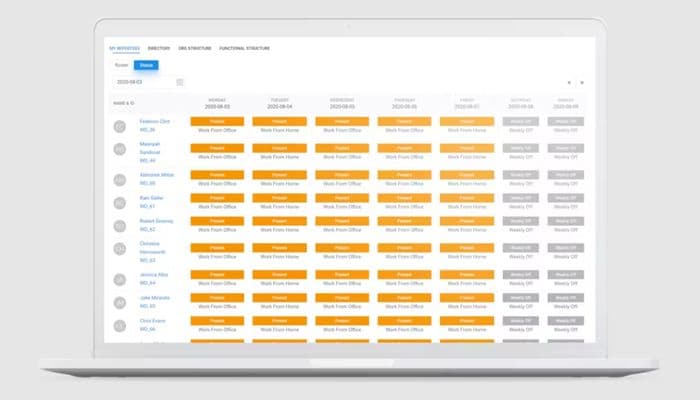
  • Go to the dashboard to access employee records, approvals, attendance logs, and key HR tasks 
  • Update or manage employee profiles, documents, compensation details, and reporting structures 
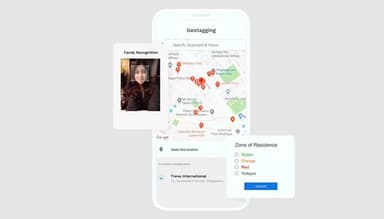
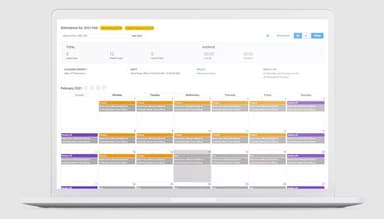
  • Track attendance using mobile check-ins, geo-tagging, or integrated biometric devices 
  • Review and approve leave requests, time sheets, and workflow tasks assigned to your role 
  • Manage recruitment by posting jobs, tracking applicants, and initiating onboarding steps 
  • Process payroll by syncing attendance, salary components, and deductions to generate pay slips 
  • Use the mobile app to complete daily HR tasks, such as leave submission, approval, and document submission 
You can also watch a Darwinbox demo to learn more about its functionalities.

Who Is Darwinbox For?

Darwinbox caters to large enterprises, non-profit organizations and public administrations across major industries to manage their workforce needs, which include: 

  • Banking and financial services
  • IT and ITE
  • Manufacturing
  • Retail

Darwinbox Use Cases

Based on our review of Darwinbox's capabilities and how enterprises generally deploy it, we've identified several scenarios where the platform fits well. Some are simple requirements, while others involve more complex HR processes that require extensive configuration. 

Managing Large, Distributed Workforces 

Darwinbox helps HR teams manage attendance, payroll, and role updates across multiple locations. Many businesses experience gaps when different sites follow different processes, particularly for travel and expense workflows or HR documentation. The platform centralizes these records and includes facial recognition for attendance, facilitating verification for field or shift-based teams. 

Organizations That Need Configurable HR Processes 

Some companies use custom workflows to manage internal approvals, manpower budgeting, and position management. Others require restricted access controls to protect sensitive data. Darwinbox adapts to these structures, helping teams formalize their screening processes, create forms, and maintain consistency without having to search for multiple tools. 

Enterprises With Frequent Role Changes 

Growing businesses experience regular promotions, transfers, and departmental updates. Darwinbox handles changes in real time, making sure that payroll, records, and analytics are all in sync without manual involvement. 

Teams Prioritizing Mobile HR Tasks 

Many employees prefer to complete routine tasks on their phones. Darwinbox's mobile-first experience supports check-ins, approvals, document access, and signature requirements without depending on the desktop version. This helps avoid delays and simplifies the HR workload. 

Businesses Looking For Consolidated People Analytics 

Some HR teams require quick metrics, while others rely on detailed analytics to track the recruitment funnel, workforce patterns, and performance outcomes. Darwinbox combines data from attendance, recruitment, and core operations to help with daily decision-making and long-term planning. 

Organizations Focusing On Engagement And Recognition 

Companies wanting to inspire employees can use built-in communication and reward tools. This keeps employees connected and enables HR to strengthen engagement without switching between platforms. 

Darwinbox User Sentiments

Most Positive Sentiments

Least Positive Sentiments

User Experience And Ease of UsePerformance And Speed
  • 70% were Positive
  • 15% were Negative
  • 15% were Neutral/Mixed
     
  • 10% were Positive
  • 70% were Negative
  • 20% were Neutral/Mixed

Users generally praise Darwinbox's user-friendly design and mobile-first interface, which make HR processes such as attendance, leave management, and approvals accessible from any device. 

One reviewer noted that, 'The interface is simple and user-friendly, making HR processes much smoother.' 

Users report lag and slowness, particularly when dealing with large amounts of data, which impacts efficiency. 

A user reported that, 'Configuration took longer than expected and required assistance from the Darwinbox team.'

Automation And Workflow EfficiencyCustomization Complexity
  • 65% were Positive
  • 10% were Negative 
  • 25% were Neutral/Mixed
  • 15% were Positive
  • 65% were Negative
  • 20% were Neutral/Mixed

Reviewers appreciate automated workflows, especially for recruitment, onboarding, payroll, and approvals, because they save time and reduce manual errors. 

A user reported, 'Integration with our payroll and ATS systems saved significant time on repetitive tasks.'

While Darwinbox provides flexible workflows, reviewers point out that configuring the system for complex organizational requirements can be time-consuming and difficult. 

According to one reviewer, 'Setting up custom workflows for multiple departments took more effort than anticipated.'

Mobile-First Employee AccessSupport And Issue Resolution
  • 60% were Positive
  • 15% were Negative
  • 25% were Neutral/Mixed
  • 20% were Positive
  • 60% were Negative
  • 20% were Neutral/Mixed

Employees and managers find the mobile app useful for viewing pay slips, leave balances, and HR documents, which increases transparency and accessibility. 

'Accessing pay slips and leave balances via the mobile app is very convenient.' 

Some users report slow support response times and difficulty resolving technical issues, which affects adoption and daily operations. 

A user noted that ‘Support tickets take longer than expected to resolve, which affects the HR operations.

Is Darwinbox Right For You?

To determine if Darwinbox software is the right fit for your business, consider your specific processes, size, and requirements. Its standout valuation offers a highly customizable HRMS solution. Benefit from deep analytics for data-driven decisions and ensure sensitive employee data protection. Enjoy highly customizable workflows tailored to your unique HR processes.

Still not sure about the software? Please read through Darwinbox reviews and contact our customer support team at (661) 384-7070 for guidance toward the best decision.

Pros And Cons of Darwinbox

Pros

  • Robust scalability

  • User-friendly mobile app interface

  • Efficient automation streamlines processes

  • Promotes data-driven decisions by providing analytics

Cons

  • Initial setup requires careful customization

  • Advanced features may overwhelm new users

Frequently Asked Questions

Yes, Darwinbox offers APIs to its users.

The software supports the English language along with Arabic, Bahasa, and Thai.

Darwinbox integrates with various third-party applications such as Kissflow, Tydy, and AuthBridge.

The software has quote-based, custom pricing plans tailored to the requirements of different businesses. Get a personalized Darwinbox cost according to your needs.

Typical users of the software include banking services and the IT, manufacturing, and retail industries.

The software offers an extensive knowledge base and has an ‘Ask Darwin’ portal for inquiries.