


myStaffingPro
Last Updated

Overview
Looking for HR software to help you track applicants and parse CVs? Look no further than myStaffingPro. It is meticulously crafted to streamline every facet of the recruitment process. With its intuitive user interface, the platform empowers businesses to effortlessly improve their applicant tracking and recruit top-tier talent.
myStaffingPro Specifications
- Employee Information Management
- Recruitment and Applicant Tracking
- Performance Management
- Attendance and Time Tracking
myStaffingPro Features
Recruiting
myStaffingPro reduces time-to-fill by providing tools for customized job postings, application management, and collaboration with hiring teams. It offers applicant tracking functionality, enabling efficient candidate tracking and management.
Applicant Tracking
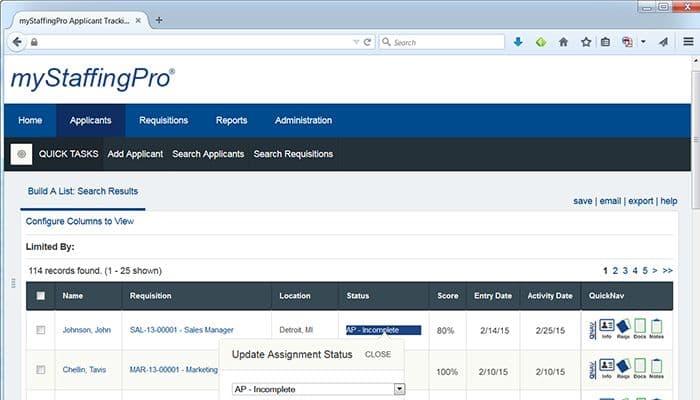
The software features a SaaS ATS that offers a centralized database for storing and managing candidate profiles, resumes, and application materials. Through a single interface, it provides recruiters convenient access to candidate information, communication history, and application status.
Qualifying
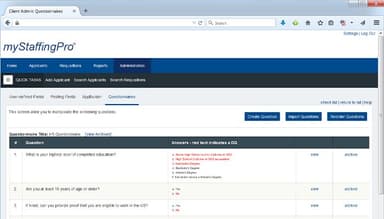
myStaffingPro allows users to design their hiring robot by setting up automated screening and shortlisting criteria. This time-saving feature automatically filters out unqualified candidates, allowing recruiters to focus on the most suitable applicants.
Onboarding
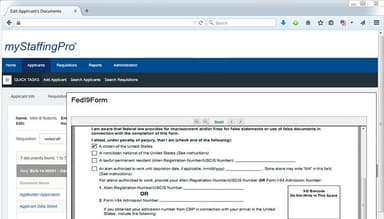
myStaffingPro streamlines are paperless and secure onboarding processes. It enables HR professionals to efficiently manage new hire paperwork, automate onboarding tasks, and ensure a seamless transition for new employees. Employees can easily access the software's portal to complete essential documents like W-4s and Form I-9 and direct deposit authorizations according to organizational requirements.
Reporting and Analytics
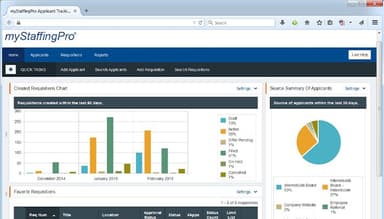
Utilize myStaffingPro's dynamic recruiting analytics system to gain valuable insights through a customizable dashboard. Access at-a-glance summaries and detailed breakdowns, identify bottlenecks and optimize recruitment strategies precisely. Users can analyze cost and source data to evaluate the effectiveness of their hiring efforts and make data-driven decisions.
Data Management
The platform offers robust tools for efficiently handling and organizing candidate and employee data. HR professionals can securely store and manage all pertinent information, such as resumes, applications, interview notes, and onboarding documents. The software ensures data integrity, accuracy, and compliance with privacy regulations, enabling users to quickly search, retrieve, and update data as required.
Pros And Cons of myStaffingPro
Pros
Great customer service
Easy system set-up
Convenient resume parsing
Intuitive dashboard
Efficient tracking of applicants
Cons
Resource intensive
Few requests per page, as per some myStaffingPro reviews
myStaffingPro Reviews
Total 1 reviews
4
All reviews are from verified customers
Rating Distribution
5
Stars0%
4
Stars100%
3
Stars0%
2
Stars0%
1
Stars0%
Share your experience
Retail, 500+ employees
More than a year
“Easy to Use, Simplifies our Processes”
Pros
The tracking process, starting from the initial application to the job offer, is excellently organized. It is mobile-friendly and seamlessly integrates with other PayChex products.
Cons
Certain aspects of the navigation are not intuitive, and since this is potentially the applicant's first experience with the company, it would be beneficial for it to proceed seamlessly. Furthermore, as we expanded and opened more locations, we eventually outgrew this program.
Rating Distribution
Ease of use
6
Value for money
8
Customer Support
8
Functionality
6
Frequently Asked Questions
Does myStaffingPro offer an API?
Yes, myStaffingPro offers an API.
What language does myStaffingPro support?
The software supports the English language.
What other apps does myStaffingPro integrate with?
myStaffingPro integrates with PAYCHEX, Microsoft Dynamics, Ascentis, and bambooHR.
Does myStaffingPro support mobile devices?
Yes, myStaffingPro supports mobile devices.
What types of pricing plans does myStaffingPro offer?
The software offers varying pricing plans depending on your needs. Get customized myStaffingPro cost.
Who are the typical users of myStaffingPro?
Consultants and trainers are the typical users of myStaffingPro.
What level of support does myStaffingPro offer?
myStaffingPro offers immediate technical support, email and desktop help, and FAQs.
What are myStaffingPro alternatives?
Rippling, TimeClockPlus, and Paycor are myStaffingPro alternatives.
Is myStaffingPro time consuming like other ats systems?
No, myStaffingPro system takes very little time and is not time consuming.