


Recruitee
Last Updated

Key Takeaways
Generated from the text of customer reviews
Recruitee provides applicant tracking and recruitment software for growing companies. Teams use it to manage hiring across technology, hospitality, and professional services. Users praise its ease of use and collaborative hiring pipeline, while few reviewers want more detailed reporting. Organizations with an active Tellent HR subscription can now link HR positions and skills to job openings, so recruiters can assess candidates against role requirements.
Our Verdict
Tellent Recruitee suits organizations, especially mid-market companies, that need a structured approach to hiring across several open roles. Pricing requires a one-year commitment and increases with headcount, which may not fit organizations with occasional hiring needs. We recommend Recruitee for growing companies with ongoing hiring needs that want recruiters and hiring managers to manage vacancies and coordinate candidate evaluations.
Overall Rating
Based on 46 users reviews
4
Rating Distribution
Positive
80%
Neutral
4%
Negative
15%
Starting Price
$354
per month for 5 jobs
Recruitee Specifications
- Recruitment and Applicant Tracking
- Alerts/Notifications
- Mobile App
- Task Assignment And Tracking
What Is Recruitee?
Recruitee is an ATS that moves applications, candidate feedback, and hiring decisions out of scattered inboxes and job boards into one shared pipeline. Recruiters publish openings to career sites and multiple job boards, move applicants through the hiring stages, and schedule interviews, while hiring managers leave evaluations on the same candidate profile.
Recruitee also provides recruitment reporting and candidate sourcing tools. Employee referrals are supported, along with integrations for HR and business applications. Once hiring is complete, new-hire information can be transferred to an HRIS.
What Is Recruitee Best For?
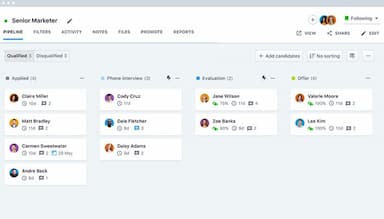
Recruitee’s ‘Customizable Candidate Pipelines’ let recruiters build hiring stages around each role. Candidates can move from the initial application to screening and interviews before reaching evaluation and offer stages. Teams can change the order of these stages or remove steps they do not need. Separate pipelines can also be created for different jobs. Per-job pipelines show recruiters where each candidate stands in that role’s hiring process without forcing every vacancy through the same stages.
How Much Does Recruitee Cost?
Recruitee pricing starts at around $354/month for 5 jobs. Pricing varies by plan, employee count, and billing period. Contracts require a minimum one-year commitment, with monthly payments available. The tool offers a free trial account for 18 days. Its paid plans with custom pricing include:
- Start
- Advance
- Optimize
Other additional costs that may influence the final price include:
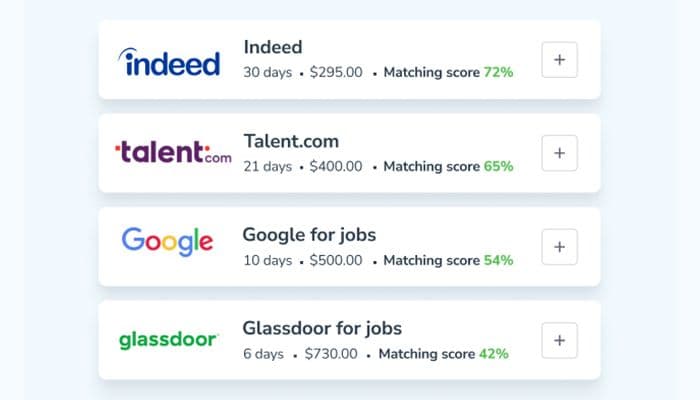
- Optional Add-Ons: Texting, Journeys, AgencyHub, WhatsApp Hiring, and Tellent HR HRIS cost extra. Estimated cost: $20–$150+/month
- Single Sign-On (SSO): Available as a paid add-on on the Start and Advance plans; included in Optimize
- Premium Job Advertising: Paid job-board campaigns are charged separately. Estimated cost: $100–$500+/campaign
- Custom Integrations: Custom development may cost $1,000–$5,000+ based on integration complexity
Recruitee receives mixed pricing feedback. Some users find the cost reasonable for its functionality, while others consider it expensive compared with alternatives. The difference is more noticeable as hiring volume increases. Overall, perceived value varies depending on company size and recruitment needs.
Disclaimer: Pricing references are based on publicly available third-party information and industry benchmarks. Actual costs may vary.
Recruitee Integrations
Recruitee integrates with many third-party applications, including:
How Does Recruitee Work?
Users can start using Recruitee software by following these steps:
- Sign up for the 18-day free trial or join an existing company account through an invitation
- Go to Jobs > Add job and enter the position details, application form, hiring team, and requirements
- Select or create a candidate pipeline and adjust its hiring stages
- Publish the job and review incoming applicants
- Open candidate profiles to review applications, add notes, schedule interviews, and request evaluations
- Move candidates through the pipeline as they progress
- Set workflow automations to trigger actions at specific hiring stages
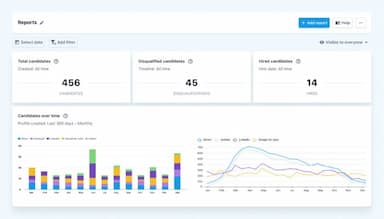
- Open Reports to review candidate sources, pipeline progress, time per stage, and disqualification reasons
Who Is Recruitee For?
Recruitee caters to the following sectors and industries:
- Transportation and logistics
- Hospitality and food service
- Staffing and recruiting
- Retail and consumer goods
- Information technology
Recruitee Use Cases
Based on Recruitee’s capabilities and functionality, we have identified several scenarios where this might be a good fit. Some of them include:
Companies Hiring In Several Departments With Different Hiring Processes
An organization recruiting for engineering, sales, and operations may need a different screening and interview sequence for each vacancy. Engineering roles might include technical assessments, while sales positions can involve different interview stages and decision makers. Recruitee lets hiring teams use department-specific evaluation forms and share candidate feedback with the relevant decision makers.
Recruiting Teams Working With Hiring Managers On Candidate Decisions
Recruiters have to keep the hiring process going while department managers make actual hiring decisions. When feedback sits in email threads or separate documents, recruiters may have to chase responses and piece together candidate history. Recruitee software gives hiring managers access to candidate information, shared feedback, and evaluations without requiring them to handle the administrative side of recruitment.
Growing Companies Managing Multiple Openings With A Small Recruiting Function
For a lean recruiting team, the challenge is not simply the number of applicants. Different vacancies also need to move forward at the same time. A recruiter might screen candidates for one role while waiting for interview feedback on another and preparing an offer for a third. Pipelines, evaluations, and workflow automations in Recruitee can reduce the administrative work involved in coordinating these parallel hiring processes.
Organizations Building Recruitment Around Their Own Careers Site
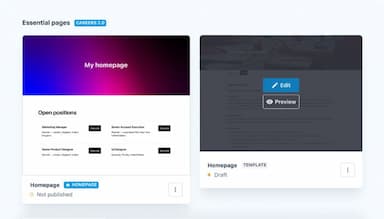
A company that recruits regularly may want applicants to use its own careers site instead of relying entirely on individual job-board listings. The need becomes greater when vacancies span several departments or when jobs need to be presented consistently. Recruitee includes careers-site builders and job publishing tools for organizations that manage recruitment as an ongoing process rather than occasional hiring.
Is Recruitee Right For You?
Recruitee fits organizations where hiring requirements include strict candidate data controls. Tellent Recruitee is ISO 27001 certified and has a SOC 2 Type II assurance report. Its GDPR tools cover include consent requests and withdrawal, data retention with automatic deletion, anonymization, and CSV export of candidate profiles. It also supports role-based access, two factor authentication, and SSO, and all candidate date stays within the EU.
As hiring teams grow, unlimited users allow more people to participate without adding user-based costs. Start supports up to five active job posts, while Advance and Optimize allow unlimited posts. API access is also available for organizations that need to connect recruitment data with other systems.
Tellent Recruitee also received external recognition in 2026 when Fosway named it a Core Leader in the 9-Grid for Talent Acquisition.
Recruitee is less suitable when payroll or broader HR administration is the main requirement because those functions fall outside the ATS. Tellent HR can be added when wider HR capabilities are needed.
Still doubtful if Recruitee is the right fit for you? Get in touch at (661) 384-7070, and we will help you make an informed decision.
Recruitee Features
AI Screening Assistant
The AI Screening Assistant compares each applications with job's criteria and gives explanable results, while recruiters keep the final decision on who moves forward; Start includes standard reports. It is available on Advance with 100 credits/month and in full on Optimize.
Matching Assistant
This feature looks beyond candidates applying to the current vacancy. It searches talent pools and other jobs in Recruitee for people whose profiles match the requirements of an open position. Recruiters can therefore revisit candidates already in their database instead of limiting their search to new applicants.
Talent Pools
Recruitee's Talent Pools store candidates for future openings. Recruiters can assign existing candidates from their profiles or add new ones by job mailbox, manual entry, CSV import, bulk CV upload, or the Chrome sourcing extension. These profiles remain accessible when another position calls for similar experience or skills.
Structured Evaluation Forms
Evaluation Forms give interviewers a defined set of criteria to work through when assessing a candidate. Recruiters can create a form for a particular hiring stage and specify what interviewers should evaluate. Team members can then complete their assessments, which are saved with the candidate’s record.
Recruitment Analytics And Custom Dashboards
This feature shows how candidates progress through different parts of the hiring process. Reports cover candidate sources, pipeline stages, time spent at each stage, and reasons for disqualification. With Custom Dashboards, teams can bring selected reports into a single view and focus their reporting on the recruitment activity they want to monitor.
Pros And Cons of Recruitee
Pros
Posts a single job opening to multiple job boards at once
Helps build a branded careers site without code
Lets recruiters move candidates between stages by drag and drop
Cons
Standard reports offer limited detail for teams tracking hiring performance
Archive data cannot be easily restored
Recruitee Pricing
Start | Advance | Optimize |
|---|---|---|
Custom pricing | Custom Pricing | Custom Pricing |
|
|
|
Disclaimer: The pricing details were last updated on Oct 06, 2026 from the vendor's website. Please contact us for a tailored pricing list.
Recruitee Reviews
Total 46 reviews
4
All reviews are from verified customers
Rating Distribution
5
Stars50%
4
Stars30%
3
Stars4%
2
Stars0%
1
Stars15%
Share your experience
Hospitality, 101-500 employees
More than a year
“Simple tool with live process view”
Pros
It is a simple recruiting tool that's easy to set up. Plus it lets recruiters and hiring managers see a live, current view of the whole hiring process. I mean they can see every step from where applicants come from, through all stages, to the job offer and final signing.
Cons
The login process and how it looks on a mobile screen can be a bit confusing and cluttered when you are hiring for many different roles. And I think the design could be simpler and fit the screen better.
Rating Distribution
Ease of use
7
Value for money
7
Customer Support
6
Functionality
8
Education Management, 1-10 employees
Free Trial
“Makes everything simple to organize”
Pros
The tool makes everything simple such as easy to organize, even candidates. Plus it is simple to talk and work with the rest of the team.
Cons
In my opinion, the price is a bit higher than it needs to be.
Rating Distribution
Ease of use
9
Value for money
9
Customer Support
9
Functionality
8
Marketing and Advertising, 11-50 employees
More than a year
“posting jobs is very easy with it”
Pros
It makes posting and listing jobs very simple. It also lets you list openings on many different job sites. Plus the hiring team can work together during the process, sharing candidate profiles, notes and feedback.
Cons
I noticed the tool does not have very strong or detailed reporting features.
Rating Distribution
Ease of use
9
Value for money
9
Customer Support
9
Functionality
9
Frequently Asked Questions
Is Recruitee free to use?
No. Recruitee has no free plan. It offers an 18-day free trial with no credit card required.
How does user licensing work in Recruitee?
Recruitee doesn't license by user. Every plan includes unlimited users aned admin give each person a role with set permissions.
How does Recruitee support collaborative hiring?
Recruitee lets hiring managers review candidates and share their assessments with recruiters, while role-based access controls which parts of the hiring process each team member can access.
Can recruiters export candidate records when switching systems?
Yes. Recruitee supports candidate-data exports through CSV, its API, individual profile downloads, and integrations. However, bulk CV export is not available as a ZIP download; extracting CV files in bulk requires API work.
What happens to Recruitee access when an account administrator leaves?
Account ownership can be transferred to a colleague, and data contributed by the previous account owner remains intact. Recruitee advises disabling two-factor authentication before transferring ownership if it is enabled on the account.
Can Recruitee track administrative changes made within an account?
Yes. Recruitee's audit logs record events such as changes to user roles, company settings, candidate records, and data exports. However, they do not provide a complete log of every instance in which a user accesses data.