


TimeForge
Last Updated

Overview
TimeForge is a labor management solution renowned for its exceptional scheduling capabilities. Its centralized platform seamlessly handles time tracking, team communication, labor costs, and compliance. Though initial training may be needed, its intuitive interface and comprehensive features make it a valuable asset for businesses of all sizes.
Overall Rating
Based on 2 users reviews
5
Rating Distribution
Positive
100%
Neutral
0%
Negative
0%
Starting Price
Custom Pricing
TimeForge Specifications
- Employee Information Management
- Recruitment and Applicant Tracking
- Performance Management
- Attendance and Time Tracking
TimeForge Features
Time Tracking
With TimeForge, employees can check their hours, shifts, and pay directly from a browser or mobile app. This tool helps cut down the clock-in questions that land on a manager's desk. Workers can also log tips and mileage independently, keeping records accurate for taxes and reimbursements. Moreover, managers can correct errors for one employee or several at once, keeping attendance data reliable.
Task Management
The software's customizable checklists let staff complete and check off tasks from any device, whether they are working in the kitchen, warehouse, or on the sales floor. Items can be assigned to specific employees or departments, with due dates and follow-up reminders attached. This keeps store execution consistent across locations and gives operators a documented audit trail.
Employee Scheduling
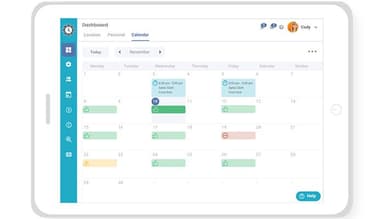
Through TimeForge's 'AutoScheduler', users can flag potential scheduling problems, such as overtime, back-to-back shifts, or employees assigned to the wrong location, before a schedule is posted. Admins can factor in staff availability, labor rules, and existing assignments when building shifts. This reduces the small errors that often slip through manual scheduling and helps managers avoid costly compliance issues.
Collaboration
The platform allows teams to attach photos, files, and notes directly to tasks. This capability helps provide managers with the visual proofs of completed work and a way to flag issues as they come up. Comments can also be enabled or disabled depending on how much back-and-forth a task requires. This keeps communication tied to the specific task at hand instead of scattered across texts or messaging apps.
Sales And Labor Metrics
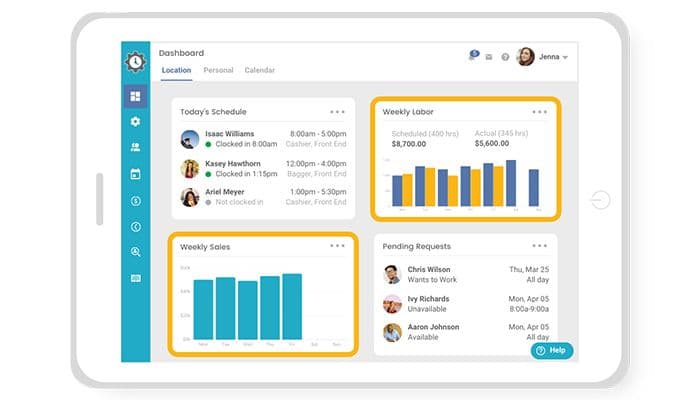
Users can drill sales and labor data for any single location or multiple across an entire portfolio of stores. TimeForge's forecasts help teams break down demand in 15-minute increments, covering drivers like online orders, guest traffic, and delivery times. Additionally, it allows businesses to generate custom reports in just two steps, giving operators the specific numbers they need without digging through spreadsheets.
Labor Analytics And Reporting
TimeForge provides over 150 prebuilt reports covering scheduling, HR, attendance, and sales, all accessible from one central dashboard. Reports can be scheduled for automatic delivery, saved as favorites, or exported to Excel, CSV, or PDF within a few clicks. This removes the manual work of pulling data together and gives operators reliable numbers on demand.
Pros And Cons of TimeForge
Pros
Accurate schedules reduce conflicts and support more reliable coverage
Real-time monitoring enables faster, more informed labor decisions
Web access reduces manager dependency for multi-location payroll tasks
Payroll tools reduce administrative effort for managers
Mobile scheduling lets employees manage shifts and requests independently
Cons
Occasional fingerprint issues may require alternative clock-in methods for staff
Narrow employee fields can slow down reviewing detailed staff information
Limited custom reporting can make it harder to retrieve specific data
TimeForge Pricing
Simple | Core Labor | Workforce Plus |
|---|---|---|
Custom Pricing | Custom Pricing | Custom Pricing |
|
|
|
Disclaimer: The pricing details were last updated on Sep 14, 2026 from the vendor's website. Please contact us for a tailored pricing list.
TimeForge Reviews
Total 2 reviews
5
All reviews are from verified customers
Rating Distribution
5
Stars100%
4
Stars0%
3
Stars0%
2
Stars0%
1
Stars0%
Share your experience
Entertainment, 51-100 employees
Less than 6 months
“Flight 509 Review of TimeForge”
Pros
The assigned representative who assisted us during implementation was phenomenal. They were attentive to our needs, pleasant to work with, and provided prompt answers. Among our numerous vendors, TimeForge stands out as the best. The user-friendly interface and evolution of scheduling make it easily adaptable without requiring extensive explanations. The option to swap shifts is incredibly convenient.
Cons
The software lacks integration with our sales program, rendering some options useless. Additionally, there is no Quickbooks export file available.
Rating Distribution
Ease of use
8
Value for money
10
Customer Support
10
Functionality
8
Retail, 51-100 employees
Less than 6 months
“Much needed system to manage employees & payroll in today's business world”
Pros
TimeForge provides us with a comprehensive system to manage scheduling, employee attendance, time-off requests, real-time labor percentages, and sales projections. As managers become more comfortable and knowledgeable with the system, the time required to complete these tasks has significantly reduced. Previously, we relied on an old-fashioned time clock system with time cards, followed by manual entry into an Excel spreadsheet for payroll processing. Scheduling was either handwritten or done on a weekly Excel spreadsheet. With TimeForge, everything can be monitored in real-time. Administrators can independently access and work within the system, pulling payroll data for each location. Employees also have access to a phone app, allowing them to view their schedules, request time off, and request shift swaps with manager approval.
Cons
Initially, my concern revolved around the cost. As an independent grocer in rural areas, any additional expenses act as a deterrent for me as an owner, despite the discount we received as members of Associated Wholesale Grocers. However, after completing the training process with [sensitive content hidden] (who was wonderful), and once the managers were trained, we found that the service pays for itself through the savings in my and the managers' time, as well as the availability of real-time data for labor hour optimization. What initially appeared as a "con" has transformed into a "pro" with measurable savings.
Rating Distribution
Ease of use
10
Value for money
8
Customer Support
10
Functionality
8
Frequently Asked Questions
Does TimeForge have a mobile application?
Yes, it offers a mobile app for both Android and iOS devices.
What level of support does TimeForge offer?
The platform offers support through online help desk, email, and phone.
Who are the typical users of TimeForge?
Businesses across various industries, including grocery, restaurants, convenience stores, specialty retail, and franchises, benefit from TimeForge.
What types of pricing plans does TimeForge offer?
The software's price ranges between $1.00 and $3.45/user/month, according to its published tiered plans (Simple, Core Labor, and Workforce Plus). You can request a personalized TimeForge price quote now.
What other apps does TimeForge integrate with?
The platform supports integration with Paylocity, ADP, UKG, Paychex Flex, and Shopify.
What language does TimeForge support?
The TimeForge software is primarily available in English and Spanish.
Does TimeForge offer an API?
Yes, it offers an API.