


Paychex Flex

Last Updated

Key Takeaways
Generated from the text of customer reviews
Paychex Flex is a cloud-based payroll and HR platform for payroll administrators and HR teams. Construction firms with job sites across multiple states benefit most from its payroll handling. Users like its tax filing accuracy, while criticism centers on its dated navigation. Paychex recently introduced WISE, an agentic AI layer that helps automate payroll and HR tasks.
Our Verdict
Paychex Flex suits growing or multi-location businesses that want payroll, HR, and compliance handled under one platform. Its tiered structure lets companies scale from basic payroll into full HR support without switching systems. Entry pricing is reasonable, though costs climb with add-ons at higher tiers. We recommend it for compliance-driven and location-heavy operations.
Overall Rating
Based on 516 users reviews
4
Rating Distribution
Positive
75%
Neutral
15%
Negative
10%
Starting Price
$39
per month
Paychex Flex Specifications
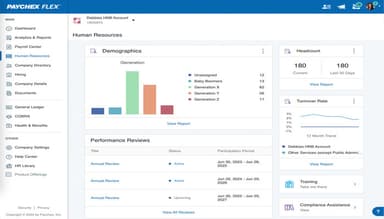
- Employee Information Management
- Recruitment and Applicant Tracking
- Performance Management
- Attendance And Time Tracking
What Is Paychex Flex?
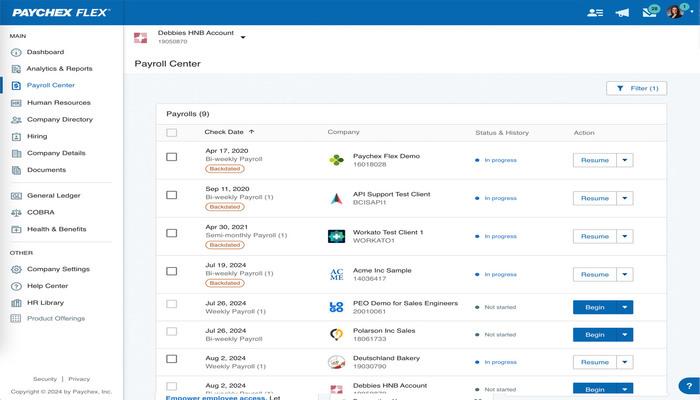
Paychex Flex is a cloud-based solution that processes payroll runs and calculates, files, and pays federal, state, and local payroll taxes on a business's behalf. It covers employees who work across multiple states. Before a payroll run is finalized, the platform's automation flags missing hours, incorrect entries, and other errors so they can be corrected ahead of time.
Employees can also review their own paychecks in advance through a feature called Paychex Pre-check, which catches pay discrepancies before payday. On the HR side, the mobile app extends these same tasks to any device, so approving time-off requests or updating employee information doesn't require sitting at a desk. Together, these tools help cut down the manual checking that payroll and HR teams would otherwise do by hand.
What Is Paychex Flex Best For?
Paychex Flex stands out for its voice-activated processing. Using the Paychex Voice Assist, admins can start a pay period, review totals, and submit payroll using voice commands on a Google Assistant-compatible device. This hands-free option lets a pay run get submitted between meetings or while traveling.
How Much Does Paychex Flex Cost?
Paychex Flex pricing is estimated to start at $39/month plus $5/employee/month. The vendor offers various plans at custom pricing, which includes:
Payroll Plans
- Paychex Flex Select
- Paychex Flex Pro
Payroll + HR Plans
- Paychex Flex Enterprise
- HR Pro
- HR PEO
Businesses should also account for additional modules and service fees that may increase the overall cost.
- Payroll Setup Fees: ~$300–$3,000 one-time for complex implementations
- Additional Payroll Runs: ~$50–$150 per extra payroll cycle
- Custom Reports/Data Exports: ~$50–$200 per request
- Garnishment Processing: ~$5–$15 per garnishment/payment
- PEO Services: ~$40–$150+/employee/month or 2–6% of payroll
Users have mixed opinions on Paychex Flex pricing, with some praising its affordability while others report that costs can increase with add-ons and additional features.
Disclaimer: Pricing references are based on publicly available third-party information and industry benchmarks. Actual costs may vary.
Paychex Flex Integrations
It integrates with various business applications, including:
How Does Paychex Flex Work?
Here's how you can access the platform and start using its features:
- Log in with your Paychex Flex credentials to reach the dashboard
- Enter payroll data such as hours, salaries, bonuses, or time off for the pay period
- Review the calculated pay before confirming the run
- Approve and submit payroll for direct deposits, tax filings, and pay stubs
- Track employee time and attendance through the Time and Attendance tool
- Manage retirement plans and other HR tasks from the same dashboard
- Configure custom reports to monitor payroll and HR data
Who Is Paychex Flex For?
Paychex Flex software caters to businesses of all sizes across different industries and sectors, including:
- Healthcare
- Human resources
- Real estate
- Construction
- Education
- Hospitality
Paychex Flex Use Cases
Based on our analysis of user reviews and Paychex Flex features, we have identified a few scenarios where the platform tends to be the right fit:
Growing Businesses Hiring On Scale
Paychex Flex is built in tiers, from Essentials through Enterprise, with a separate PEO layer on top. This works well for businesses that expect to add HR needs, new locations, or benefits programs as they scale, since new features switch on from the same dashboard. There is no need to migrate payroll history to a different provider once the current plan is outgrown.
Companies Outsourcing HR And Compliance Support
Paychex's PEO option puts payroll, HR, benefits, and compliance under a co-employment model. Using this service, the business doesn’t have to run the payroll itself. This suits smaller teams that do not have a dedicated HR person. This way, they can shift the administrative and compliance workload onto Paychex instead of internal staff. However, the tradeoff is having less day-to-day control over how HR processes are handled.
Organizations Managing Payroll Across Multiple States Or Locations
Paychex Flex Enterprise adds customization built for businesses operating in more than one location. This fits companies with offices, job sites, or remote staff spread across several states, where payroll tax rules shift from one place to the next. It centralizes payroll and reporting across locations, though cross-state tax calculations are not always perfectly precise and are worth double-checking during setup.
Employers In Industries With Heavier Compliance Demands
Paychex serves healthcare, real estate, construction, education, and hospitality businesses, industries where safety documentation and risk tracking carry more weight than most. Add-ons like OSHA services and compensation or risk-management tools exist for exactly this reason. They let employers in these fields keep required documentation organized inside the same platform as payroll.
Teams Trying To Cut Down On Repetitive HR Questions
Paychex Flex's self-service setup lets employees pull up pay stubs, W-2s, direct deposit details, and time-off balances on their own. This is particularly important for HR teams fielding constant pay-related questions, since it cuts down on interruptions and speeds up record lookups. One gap worth noting is that time-off requests are not supported through the mobile app, so some of that traffic lands on HR.
Is Paychex Flex Right For You?
If you are looking for payroll software that also covers core HR functions, employee self-service, and compliance-related tasks, Paychex Flex is worth considering. It works well for businesses that want to manage payroll, time tracking, benefits, and HR administration from one platform instead of relying on separate systems.
From a security and compliance standpoint, Paychex Flex checks several important boxes. It maintains SOC 1 Type 2 and SOC 2 Type 2 reports, with its security program built on the NIST Cybersecurity Framework and ISO/IEC 27001. The platform has also received recent third-party recognition, including a 2026 Lighthouse Tech Award for Best Small Business-focused Solution, a spot on TIME's list of Top WorkTech Companies, and continued placement as a Fortune Future 50 company.
On the compliance side, tax year 2026 brings a serious change. Under the federal "No Tax on Overtime" provision, employers must now report qualified overtime separately on Form W-2 using Box 12 code TT. Paychex has already published dedicated guidance for its clients on how this affects payroll reporting. This is a decent signal that the platform is tracking the change rather than leaving businesses to sort it out mid-filing season.
Still not sure if Paychex Flex is the right fit for your business? Get in touch at (661) 384-7070, and we'll help you make an informed decision.
Paychex Flex Features
Attendance Management
Using this feature, employees can clock in and out, submit time-off requests, and check their schedules from a dashboard. Managers can review those requests, build schedules, and track hours worked on their end. Keeping all of that in one place cuts down on the manual back-and-forth that attendance tracking usually involves.
Self-Service Portal
The self-service portal lets employees log into their own account to pull up pay stubs, tax forms, and other employment records without going through HR first. That direct access tends to reduce repetitive requests landing in HR's inbox and gives employees more visibility into their own information.
Retirement Plan Management
The platform makes it easier for businesses to set up and manage retirement benefits, including 401(k) plans, directly through the platform. It covers employee enrollment, contribution tracking, compliance, and reporting. Handling all of that in-house means the administrative load of running a retirement plan doesn't fall entirely on HR staff.
Online Time Clock
Employees clock in and out using whatever method or hardware the company has set up, and the Paychex Flex Time mobile app extends that same access to phones. Through the app, Android and iOS users can also pull up pay stubs and tax documents while they are away from a desk.
Tax Management
Paychex Flex helps with payroll tax calculations, payments, and filings to run automatically through the platform. The system updates as tax laws change. Businesses also get direct access to tax specialists when questions come up, rather than having to track regulatory changes on their own.
Pros And Cons of Paychex Flex
Pros
Offers multi-factor authorization for better security
New-hire onboarding follows a structured workflow
Payroll tax filings require minimal manual effort
Payroll processing handles multi-state employees well
Reports are easy to customize for payroll needs
Cons
Navigation can feel dated in some places
Finding specific settings takes extra clicks
Mobile app offers fewer admin capabilities
Paychex Flex Pricing
Paychex Flex Select | Paychex Flex Pro | Paychex Flex Enterprise | HR Pro | HR PEO |
|---|---|---|---|---|
Custom Pricing | Custom Pricing | Custom Pricing | Custom Pricing | Custom Pricing |
|
|
|
|
|
Disclaimer: The pricing details were last updated on Sep 25, 2026 from the vendor's website. Please contact us for a tailored pricing list.
Paychex Flex Reviews
Total 516 reviews
4
All reviews are from verified customers
Rating Distribution
5
Stars53%
4
Stars22%
3
Stars11%
2
Stars4%
1
Stars10%
Share your experience
Accounting, 500+ employees
Less than a year
“reliable payroll software”
Pros
Payroll has been very dependable with this. It automates complicated tax filings, direct deposits and standard deductions accurately which really cuts out calculation mistakes. One of the biggest benefits is having a dedicated account representative who actually learns how your business works and provides personalized help something that's hard to find with other providers. The employee portal is also very user friendly, giving staff quick mobile access to pay stubs, tax documents and time off balances. Another big plus is the modular setup which makes it simple to expand the system with HR features, health benefits and retirement tracking as the company grows.
Cons
That said, the interface feels outdated and slow and moving around the platform can be frustrating since it often takes too many clicks to switch between employee and manager views. The reporting area is another weak point because creating custom reports is hard and often ends up requiring help from support. Pricing can also feel limiting due to the extra add on charges for things that seem necessary, such as special payroll runs or year end tax forms. On top of that the mobile app tends to be sluggish, logs users out too often and general customer support beyond the dedicated rep can be inconsistent and slow when issues need to be resolved.
Rating Distribution
Ease of use
8
Value for money
9
Customer Support
10
Functionality
10
Investment Management, 11-50 employees
More than a year
“Brings all my tasks together in one place”
Pros
Brings all of these complex payroll tasks together in one secure place. Having year end taxes calculated automatically and staying consistently compliant with local regulations gives a lot of peace of mind as a business leader.
Cons
The interface overall feels a bit dated and navigating through detailed payroll reports can be confusing at times.
Rating Distribution
Ease of use
8
Value for money
10
Customer Support
10
Functionality
8
Transportation/Trucking/Railroad, 51-100 employees
More than a year
“simple to work with interface”
Pros
Using time and attendance in the same system makes a big difference and the interface is much simpler to work with. Payroll can be finished in just a few minutes and the reporting features are really solid.
Cons
One frustration is how many different people are involved especially during implementation. Pricing seems to change every year and with so many products, too many representatives keep contacting us about additional offerings.
Rating Distribution
Ease of use
7
Value for money
8
Customer Support
7
Functionality
7
Frequently Asked Questions
Does Paychex Flex offer an API?
Yes, the software has an API available.
What language does Paychex Flex support?
The software supports the English and Spanish languages.
What other apps does Paychex Flex integrate with?
Paychex Flex integrates with various business applications, including Clover software, BambooHR, Sage Intacct, Mindbody, QuickBooks, and Xero.
What types of pricing plans does Paychex Flex offer?
aychex Flex pricing is estimated to start at $39/month plus $5/employee/month. Its plans include Paychex Flex Select, Flex Pro, Flex Enterprise, HR Pro, and HR PEO, with custom pricing based on business needs. Request for a Paychex Flex cost estimate.
Who are the typical users of Paychex Flex?
Paychex Flex serves businesses across various industries, including healthcare, human resources, real estate, construction, education, and hospitality.
What level of support does Paychex Flex offer?
The software provides support via live chat and phone support.