



Last Updated

Key Takeaways
Generated from the text of customer reviews
Tracker RMS is a combined applicant tracking system and recruitment CRM used by recruitment, sales, and operations teams. Among these, staffing agencies benefit most from its unified structure. Based on feedback, users have frequently praised its feature-to-cost ratio, but some have reported limitations in workflow customization and time-zone settings. Recently, the vendor has launched a LinkedIn RSC+ integration for Hiring Assistant.
Our Verdict
Tracker RMS is a practical choice for staffing agencies handling diverse placement models and company operations. It fits recruitment teams looking to unify workflows across sales, sourcing, and administration. While its $79/user/month starting price offers solid value, custom-priced upper tiers make long-term budgeting less predictable. We recommend Tracker RMS for managing permanent, temporary, and executive-search placements.
Overall Rating
Based on 16 users reviews
4.9
Rating Distribution
Positive
100%
Neutral
0%
Negative
0%
Starting Price
$79
per user per month

Tracker RMS Specifications
- Recruitment and applicant tracking
- Attendance and time tracking
- Employee onboarding
- Workforce analytics
What Is Tracker RMS?
Tracker RMS is recruitment management software (designed specifically for staffing and recruiting firms). It centralizes candidate sourcing, job management, client relationships, placements, onboarding, and back-office processes. While using it — recruiters can search and rank candidates, post vacancies, automate follow-ups, manage timesheets, and monitor performance. This connected approach reduces laborious, manual team efforts — while helping agencies maintain candidate engagement and coordinate teams.
What Is Tracker RMS Best For?
Tracker RMS’s strongest capability is its Resume Parsing, which automatically creates records from varied document formats. Apart from this, it automatically extracts qualifications, skills, and work histories to build structured candidate profiles. Auto-coding (its additional functionality) further maps candidate skill sets to strengthen search accuracy: it saves significant time on manual data entry and simplifies talent comparisons.
How Much Does Tracker RMS Cost?
$79/user/month is the starting price of Tracker RMS Launch plan. Beyond this cost, paid options include:
- Core: $99/user/month
- Professional: Custom pricing
- Enterprise: Custom pricing
You might incur the following additional costs:
- Setup And Onboarding: Typically $1,000 – $5,000+ (one-time), depending on the selected package and required configuration
- Full Data Migration: An estimated $1,500 – $8,000+ (one-time) may be included within onboarding, based on data sources, iterations, custom fields, and historical records
- Direct Spreadsheet Imports: Fixed at $250/import file for transferring client, contact, or candidate data from Excel, CSV, and similar files
- Bulk Resume Parsing: Published at $100/1,000 resumes for converting digitally readable resume files into candidate records
- Third-Party Integrations: Often $20 – $300+/user/month/tool, although each integration provider determines its subscription, implementation, and usage charges independently
- Background Screening And Compliance: Generally $25 – $75+/candidate screen through integrated providers such as AccuSourceHR or TrustID
Disclaimer: The pricing is subject to change.
Tracker RMS Integrations
Tracker RMS software offers integrates with more than 40 platforms, including:
How Does Tracker RMS Work?
User can get started with GigSmart features by following these steps:
- Log in to Tracker RMS using authorized account credentials
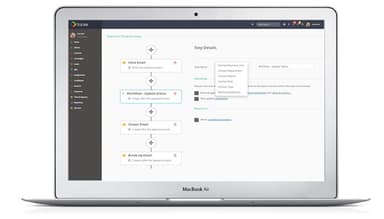
- Configure recruitment stages, custom fields, user permissions, templates, and dashboards according to agency processes
- Import candidate and client records, then parse resumes to create structured candidate profiles
- Create vacancies and publish them across the company career site and selected job boards
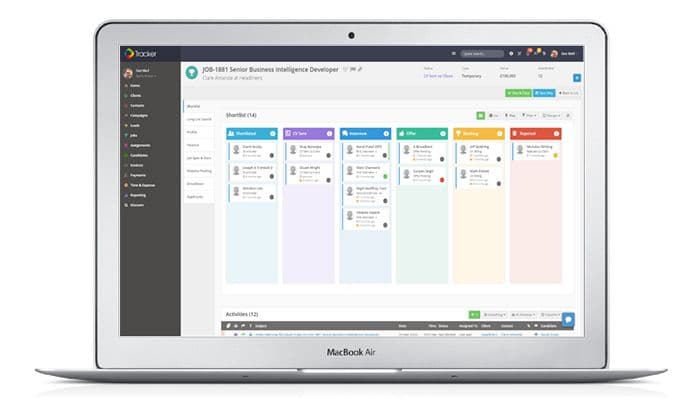
- Search and shortlist candidates before submitting suitable profiles to clients
- Manage candidate communications, interviews, compliance documents, and placement confirmations from connected records
- Track placements, timesheets, and invoices via reports and dashboards
Who Is Tracker RMS For?
The vendor supports recruitment operations across the following sectors:
- Healthcare
- Legal
- Information technology
- Accounting and finance
- Professional services
Tracker RMS Use Cases
Our analysis of user reviews and the platform features highlight these operational scenarios where the software could be a good fit:
IT Staffing Recruiter Handling High-Volume Applications
When technical roles open simultaneously, recruiters receive resumes in dozens of inconsistent formats. Tracker RMS tackles this volume by automatically parsing skills, work histories, and qualifications directly into structured candidate profiles. From here, recruiters can leverage ranked Boolean search tools. These tools are known for quickly transforming incoming tons of applications into evidence-based shortlists.
Healthcare Compliance Manager Coordinating Credentialed Placements
Managing clinicians means balancing strict certification timelines, client-specific prerequisites (such as state licenses and background checks), and complex placement rules. Through Tracker RMS, compliance managers could maintain centralized credential records. Candidates can also upload documentation directly via a dedicated portal — eliminating scattered email threads and giving teams total oversight from onboarding to assignment.
Temporary Staffing Coordinator Managing Variable Shifts
Staffing coordinators face constant shift changes and have to verify worker's availability before confirming placements; without real-time visibility, schedules quickly fall apart. Using Tracker RMS, they can manage candidate availability, absence requests, attendance records, and timesheets within one operational flow. They also leverage the integrated planner to match available staff with open shifts, following every placement through to final hour signoffs (a process user reviews highlight as key to keeping temporary operations under control).
Executive Search Consultant Presenting Senior Candidates
High-stakes placements demand polished client delivery and not a clutter of raw documents. Executive recruiters use Tracker RMS to compile shortlisted candidates within unified job records, sharing branded resumes and video profiles alongside live progress updates. With agency-formatted CVs generated in seconds, search consultants can shorten client review cycles and accelerate senior hires.
Is Tracker RMS Right For You?
The platform is built to support staffing agencies scaling across permanent, contract, temporary, and executive search operations. For instance, 6 Degrees Group reports using Tracker RMS across its 13-person recruiting firm. Unlimited jobs, applicants, and candidate records also prevent migration issues as database volume grows — though advanced workforce management and unlimited API access do require higher-tier plans.
To maintain its security, the vendor uses enterprise-grade encryption, continuously monitors data centers, regularly audits, uses two-factor authentication and role-based controls. Besides that, tools are fully GDPR and CCPA-compliant. Tracker RMS serves established organizations, including DealerFlex, LRS Consulting Services, Agility Partners, Elevation Recruitment Group, and The Mason Group.
Still deciding if Finalsite is right for you? Get in touch at (661) 384-7070, and we will help you assess it more clearly.
Tracker RMS Features
EVA
EVA acts as a conversational AI assistant across system records. It interprets voice or text commands against live data and activates the corresponding TrackerAI function. Its interface processes requests involving candidate ranking, profile summaries, screening questions, outreach drafts, interview preparation, and resume reformatting.
TrackerChat
It provides instant two-way communication inside Tracker. Chat history retains earlier conversations, while @mentions connect messages directly with relevant records for contextual discussion. The system also displays online colleagues, stores offline messages, and allows participants to resume previous conversations.
Expense Tracking
This feature converts uploaded receipt or invoice photographs into expense records through an AI scanner. It extracts receipt details and categorizes entries against corresponding purchase orders. Tracker retains each receipt and presents the associated expense entry for validation, approval, invoicing, and payroll processing.
Assignment And Project Management
Through card, list, and Gantt views, this functionality structures assignments into plans, phases, schedules, tasks, issues, risks, and assigned candidates. Default Project Plan Tasks add predefined activities to schedules, while submitted timesheets update the recorded progress of assigned work.
Pros And Cons of Tracker RMS
Pros
Resume parsing eliminates repetitive profile entry
Custom dashboards make performance trends visible
AI ranking accelerates shortlist comparisons
Automated follow-ups keep candidate outreach consistent
Candidate Planner clarifies temporary staff availability
Cons
Advanced workflow logic may complicate configuration
AI-generated drafts might produce uneven wording
Extensive dashboard widgets could come across visually dense
Tracker RMS Pricing
Launch | Core | Professional | Enterprise |
|---|---|---|---|
$79 per user per month | $99 per user per month | Custom Pricing | Custom Pricing |
|
|
|
|
Disclaimer: The pricing details were last updated on Oct 12, 2026 from the vendor's website. Please contact us for a tailored pricing list.
Tracker RMS Reviews
Total 16 reviews
4.9
All reviews are from verified customers
Rating Distribution
5
Stars88%
4
Stars13%
3
Stars0%
2
Stars0%
1
Stars0%
Share your experience
Staffing and Recruiting, 11-50 employees
Less than a year
“Would totally recommend!”
Pros
It's been around six months since we made the switch to Tracker RMS after using the same CRM/ATS for about 15 years. We have been extremely happy with the service we get regularly from Noah, Jillian and the entire team. Plus the system offers much more functionality than what we were used to with our previous platform.
Cons
There are certain fields that are fixed and cannot be removed or altered. But these are just a few so it is not a huge deal.
Rating Distribution
Ease of use
10
Value for money
10
Customer Support
10
Functionality
10
Pharmaceuticals, 11-50 employees
Less than 6 months
“Truly an amazing experience”
Pros
TrackerRMS platform is very simple to use, fast and highly efficient. Plus navigating through it is pretty easy too making our whole experience smooth and hassle-free.
Cons
I have not come across anything I dislike about it so far.
Rating Distribution
Ease of use
10
Value for money
10
Customer Support
10
Functionality
10
Construction, 11-50 employees
Less than 6 months
“Everything you need is in it”
Pros
What I liked most was how simple it was to navigate and how it kept track of all our projects.
Cons
Compared to other similar software it seemed to me a bit outdated.
Rating Distribution
Ease of use
9
Value for money
9
Customer Support
9
Functionality
9
Frequently Asked Questions
Does Tracker RMS offer an API?
Yes, the vendor offers REST API access in its Professional (custom pricing) subscription plan.
What language does Tracker RMS support?
The vendor website is available in English.
What other apps does Tracker RMS integrate with?
Tracker RMS supports third-party integrations with 40+ platforms, including Calendly software, ChatGPT, CoRecruit, CloudCall, Docusign, and Quickbooks.
Does Tracker RMS offer a mobile app?
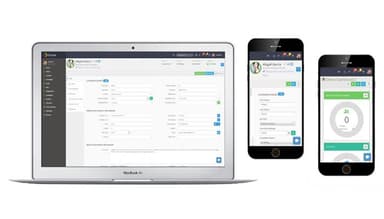
Yes, the platform offers a dedicated mobile app.
What types of pricing plans does Tracker RMS offer?
The starting Tracker RMS cost is $79/user/month for its Launch plan, whereas the Core plan costs $99/user/month. The other two plans, namely Professional and Enterprise, are custom priced. Get a flexible Tracker RMS price based on your organization’s requirements and size.
Who are the typical users of Tracker RMS?
Typical users include recruitment professionals across information technology, healthcare, accounting and finance, professional services, and legal sectors.
What level of support does Tracker RMS offer?
Tracker RMS provides direct assistance from its team and self-service guidance through the Tracker Academy knowledge base. Other support options include phone calls, contact form, and client portal communication.