


Last Updated

Key Takeaways
Generated from the text of customer reviews
VeriClock is a cloud-based employee time tracking tool. Payroll and admin teams use the platform to track staff hours. Users find the app easy to navigate, although some report occasional glitches when processing payroll for large numbers of employees. In March 2026, VeriClock updated the geofencing feature, so staff clock-ins follow job site boundaries more consistently.
Our Verdict
VeriClock is a simple and easy to use tool to track field crew hours for payroll. The platform fits employers who want to match crew clock-ins to job site locations. Subscription costs can rise as employers continue adding staff. We recommend VeriClock for construction and service employers who pay their field crews by the hour.
Overall Rating
Based on 19 users reviews
4.5
Rating Distribution
Positive
89%
Neutral
11%
Negative
0%
Starting Price
$6.50
per active user per month
VeriClock Specifications
- Attendance And Time Tracking
- Time And Attendance Tracking
- Leave Management
- Leave And Absence Management
What Is VeriClock?
VeriClock is a cloud-based platform designed for employee timekeeping and payroll preparation. Managers can build staff shifts in the employee scheduling tool and review time off requests through the time off tracking feature. The platform lets staff clock in and out by app, browser, or phone call.
Administrators can track job costs from staff hours through the job costing feature. Additionally, VeriClock lets payroll teams export staff hours as timesheet reports to calculate pay.
What Is VeriClock Best For?
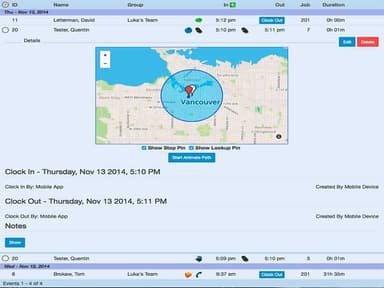
A notable feature of VeriClock is location management, which can use GPS to check whether staff clock in at approved job sites. Managers can set a circular boundary around each job site by street address or exact coordinates. The radius of a boundary ranges from 200 to 5,000 meters. VeriClock can clock out staff who leave their job site boundary during a shift. With continuous location tracking turned on, the GPS maps’ time slider lets managers replay staff routes from a shift. Location tracking stops at clock-out, so managers cannot see staff locations after a shift ends.
How Much Does VeriClock Cost?
VeriClock pricing starts at $6.50/active user/month on the Standard plan. Organizations with 75+ employees can move to the Enterprise plan, which uses volume-based pricing. The vendor also offers a 14 day free trial. Organizations can expect to pay the following extra costs on top of the base plan:
- Account Fee: $19/month for the company account on the Standard plan
- IVR User Add-On: $4.00/user/month
- IVR Phone Line: $10/line/month
- Toll-Free Calls: $0.07/call
- Account Setup Help: Approximately $300–$1,000/one time for extra help with job codes, overtime rules and approval steps
- Large-Team Onboarding: About $1,000–$3,000/one time for large teams that need setup help across several sites and crews
Users describe VeriClock’s pricing in mostly positive terms and call the platform affordable and cost-effective. Though, one user noted that the cost was hard to justify when VeriClock delivers value in only a narrow area.
Disclaimer: The pricing is subject to change.
VeriClock Integrations
VeriClock can integrate with the following accounting and payroll systems:
- QuickBooks
- Sage
How Does VeriClock Work?
Administrators and managers can access VeriClock and track staff time through the following steps:
- Log in to VeriClock through a web browser or the iOS or Android mobile app
- Add staff users and job codes, and limit staff time entries to approved jobs and cost codes
- Set circular geofences around job sites by coordinates, street address, or clock-in location, and choose whether VeriClock warns about or blocks clock-ins outside the geofences
- Build shifts from the day, week, or month view within the employee scheduling tool and set shift reminders by email or text message
- Review staff clock-ins and clock-outs on the main dashboard and approve single or multiple time entries
- Approve or decline staff time off requests through the time off tracking feature and add a note to the decision
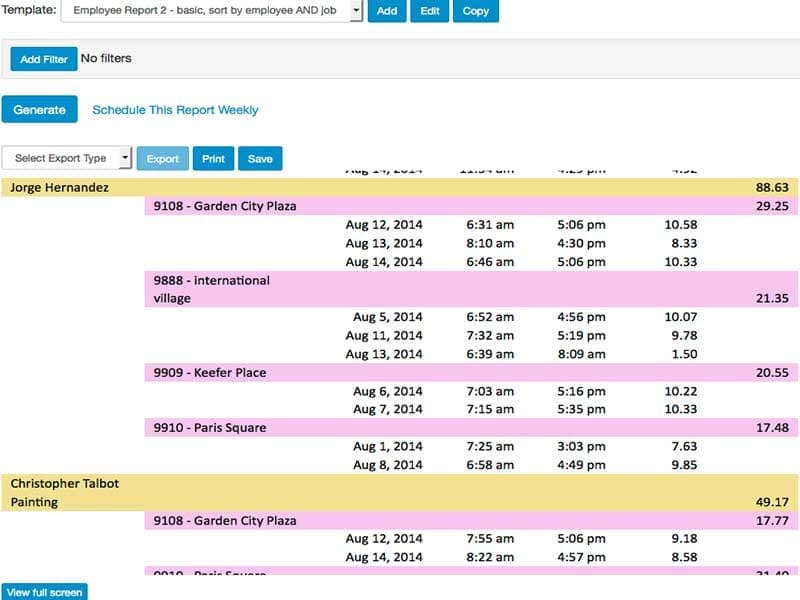
- Export payroll reports as CSV, XLSX, or PDF files
Who Is VeriClock For?
VeriClock serves businesses across various industries, including:
- Construction
- Cleaning
- Home healthcare
- Food service
- Landscaping
- Building maintenance
- Delivery and warehousing
VeriClock Use Cases
Based on our evaluation of VeriClock’s features and market positioning, we have determined common ways that cleaning companies, home healthcare agencies, construction firms and restaurants use the platform to track staff hours, work sites and time off:
1. Cleaning Companies Confirming Attendance At Unsupervised Client Sites
Cleaning crews often work in client buildings after closing time with no supervisor present to confirm their attendance. In VeriClock, managers can set a circular geofence around a client building by street address and choose a warning for crew members who leave the boundary before clocking out. VeriClock also provides device status information, including whether GPS was disabled or the device was powered off during recorded clock events. Managers can download crew GPS reports from VeriClock to review the billed hours when a client disputes a cleaning invoice.
2. Home Healthcare Agencies Covering Shifts Across Patient Homes
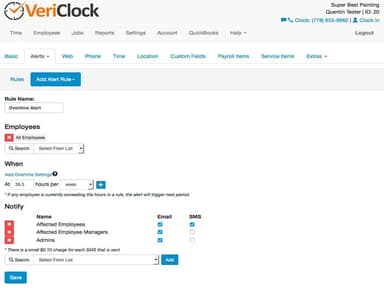
Home healthcare managers sometimes fail to notice a missed visit because caregivers travel alone between patient homes. The VeriClock mobile app lets caregivers clock in by tapping the scheduled shift for a home visit. The app automatically fills in the scheduled job and service item when caregivers clock in. If no caregiver clocks in when a scheduled shift starts, VeriClock lets managers receive a no-show alert by email or text message. Through the employee schedule, managers could reassign the missed shift to another caregiver.
3. Construction Firms Matching Crew Hours To Jobs
Job cost records at construction firms can sometimes be inaccurate if crews enter their work hours under the wrong job by mistake. VeriClock can require crews to select an approved job or cost code before recording their time. Custom fields in VeriClock let crews add project details to time entries for use in job cost reports. VeriClock can track crew mileage and job costs for staff payroll and customer bills.
4. Restaurants Keeping Shifts Staffed When Employees Take Time Off
When several employees ask for the same weekend off, weekend shifts at restaurants are frequently understaffed. Before approving a time off request, managers can check projected time off and remaining balances by employee or time off category in the time off tracking feature. VeriClock offers color coding to set approved time off apart from scheduled shifts on the employee schedule. Managers can review the color-coded schedule to identify potential staffing gaps before weekend shifts begin.
Is VeriClock Right For You?
If you are looking for software that logs staff work hours at multiple job sites, VeriClock can be a good fit. Businesses with growing teams can switch from the Standard plan to the Enterprise plan for multi-site and multi-crew work without losing their account data or settings. Companies such as Rada Resurfacing, Ferrer Mechanical, and Ground Force Services rely on the platform for staff time tracking. For security, VeriClock provides role-based access controls and internal SSL encryption between application servers and the database.
Still not sure about VeriClock software? Contact us at (661) 384-7070 for guidance regarding its functionality.
VeriClock Features
Time Tracking
With VeriClock’s time tracking feature, staff can log how long their breaks and lunch last. The feature can split overnight shifts at midnight. Managers can turn on automatic clock-out to clock staff out when a scheduled shift ends. VeriClock can also stop staff from adding the same time entry twice. Additionally, the audit trail lets admins review changes to time entries. Managers can review, approve, or reject time entries to address errors before payroll export.
Employee Scheduling
The employee scheduling tool within VeriClock lets managers add placeholder shifts for a role or a staff member. Open shifts can appear at the bottom of the schedule for managers to fill with staff. When managers save or publish a schedule, the tool flags overlapping shifts so they can review potential scheduling conflicts. VeriClock also allows managers to publish part or all of a schedule draft. Staff can view a published schedule by staff member, by job, or for the full team.
PTO Tracking
Using VeriClock, admins can create unlimited paid or unpaid time off types through paid time off (PTO) tracking. It supports accrual rules based on the calendar year, pay period, or hours worked. For unused time off, PTO tracking lets admins set carryover limits and end dates. Additionally, the web and mobile apps let staff view their balances and submit time off requests. Until managers approve a time off request, staff can edit or cancel the request in the web or mobile app. Furthermore, admins can restrict negative PTO balances to prevent employees from requesting more time off than their available balance.
Payroll Setup
Payroll setup lets admins set automatic lunch breaks for staff. VeriClock accepts payroll settings for a job, a staff member, or a group. Admins can limit payroll exports to staff time with an in-app signature. VeriClock lets admins sort staff time into billable, non-billable, or drive time. Once time entries are exported for payroll, admins can lock them to prevent further additions or edits. This helps keep previously exported hours unchanged.
Pros And Cons of VeriClock
Pros
Offers a simpler clock-in and clock-out procedure
Reduces the time spent on payroll
The support team usually responds quickly
Reduces manual entry of each employee’s work hours
Allows reports to be tailored to a company’s needs
Cons
May lack certain advanced features
Setup can be made simpler
Front-page calculations seem limited to a weekly schedule
VeriClock Pricing
Standard |
|---|
$6.50 per active user per month plus a $19 per month account fee |
|
Disclaimer: The pricing details were last updated on Oct 09, 2026 from the vendor's website. Please contact us for a tailored pricing list.
VeriClock Reviews
Total 19 reviews
4.5
All reviews are from verified customers
Rating Distribution
5
Stars63%
4
Stars26%
3
Stars11%
2
Stars0%
1
Stars0%
Share your experience
Telecommunications, 1-10 employees
Less than a year
“My fast, simple payroll helper”
Pros
It is fast and simple to use and it really cuts down the time I spend on payroll. It also makes it much simpler when I need to backtrack to find an employee's hours. The support team has been fantastic to work with and incredibly helpful.
Cons
Honestly, I can't think of any drawback, I have nothing but good things to say about this app.
Rating Distribution
Ease of use
10
Value for money
10
Customer Support
10
Functionality
10
Performing Arts, 11-50 employees
Less than 6 months
“solid tool that saves time”
Pros
For me, this is a really solid productivity tool because of the time savings it consistently delivers.
Cons
I can't find any downsides since, in my company, it performs the exact function I require.
Rating Distribution
Ease of use
9
Value for money
10
Customer Support
10
Functionality
9
Consumer Goods, 1-10 employees
More than a year
“The Tick All the Boxes”
Pros
As an admin and staff member, I find this software incredibly user-friendly. What I appreciate the most is the ability to navigate through the app effortlessly, without requiring any training.
Cons
There is nothing to mention that we disliked about it.
Rating Distribution
Ease of use
10
Value for money
8
Customer Support
10
Functionality
8
Frequently Asked Questions
Can employers turn on GPS features for only some employees in VeriClock?
Yes, employers can enable GPS tracking for individual employees rather than the entire workforce. VeriClock also provides employee consent management for location tracking.
Do businesses need special hardware to use VeriClock?
No, VeriClock does not require dedicated or specialized hardware. Employees can track their work hours using their existing smartphones, tablets, or computers.
Can businesses track employee hours with VeriClock for free?
Yes, but only during VeriClock's 14-day free trial, which includes access to all features and requires no credit card. After the trial, businesses must subscribe to a paid plan to continue tracking employee hours.
Can teams use VeriClock in French?
Yes, VeriClock can show dashboards in French for bilingual Canadian teams.
Does VeriClock require a long-term contract?
No, VeriClock has no minimum term. Customers can cancel at any time. Firms that want a steady price can sign a three-year or five-year agreement.