



Last Updated

Key Takeaways
Generated from the text of customer reviews
Zoho People, a cloud-based Human Resource (HR) platform, serves small to mid-sized businesses across industries such as IT, healthcare, education, media, and finance. While some users say advanced features take time to learn, most appreciate that its built-in learning tools simplify employee training. Recent updates include salary revision letter templates that now support appraisal-related mail merge fields, such as performance ratings, salary revisions, and designation changes.
Our Verdict
For HR teams that want to replace scattered spreadsheets with a single system, Zoho People is a good choice. Small teams in particular rate it as strong value for the price, though the total can climb once add-on modules and higher-tier features come into play. We recommend it for organizations that value affordability and straightforward day-to-day HR administration.
Overall Rating
Based on 47 users reviews
4.5
Rating Distribution
Positive
100%
Neutral
0%
Negative
0%
Starting Price
$1.50
per user per month
Zoho People Specifications
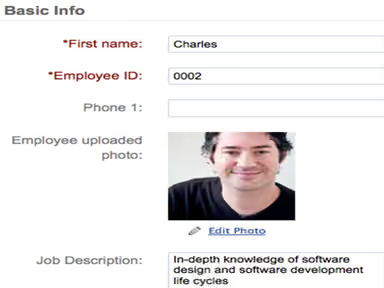
- Employee Information Management
- Recruitment And Applicant Tracking
- Performance Management
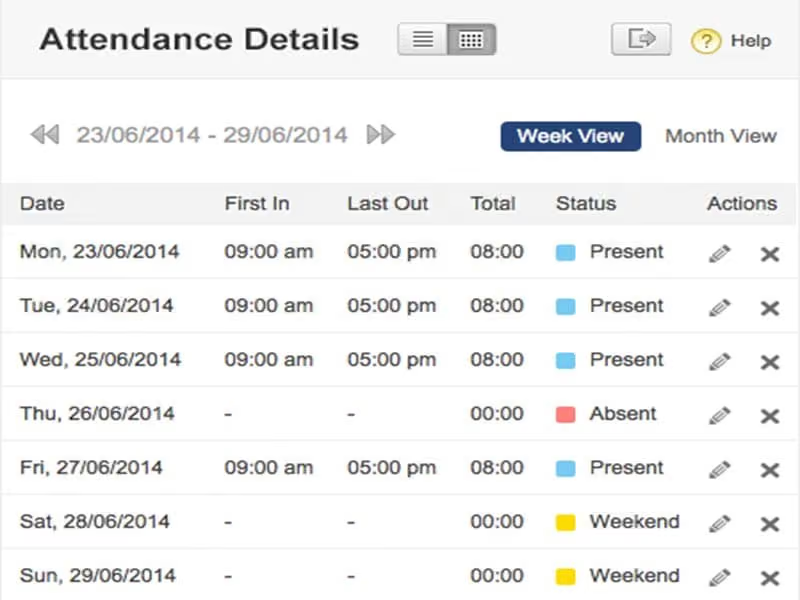
- Attendance And Time Tracking
What Is Zoho People?
Zoho People is HR software from Zoho Corporation, built to support employees from their first day through their exit. It brings together onboarding, leave, timesheets, offboarding, document storage, an HR help desk, and surveys, with custom forms and approval flows that HR can adjust to its own processes.
Beyond the basics, it covers attendance and shift rosters, along with performance tools such as goal setting, 360-degree feedback, and customizable appraisals. Timesheets track billable hours and overtime, and reports break data down by individual, team, and organization. HR can also set up multiple business entities with automatic employee IDs and guide each stage of a process with blueprints. Finally, employees can also access a self-service portal and the dedicated mobile app for Android and iOS for day-to-day requests and tasks.
What Is Zoho People Best For?
The platform is best known for ‘Zia,’ its built-in AI assistant, which answers questions, handles tasks, and pulls reports inside the HR system. Instead of asking the HR team for leave balances or policy details, employees can ask Zia in plain language by chat or voice and get a quick answer. It can also turn workforce data into visual analytics, so managers and leadership can see overall performance trends. Zia can also assist in writing and refining content to meet different requirements. Overall, it is suitable for organizations that want fewer repetitive HR requests, with multilingual support, role-based access, and analytics that spot trends and predict outcomes, so HR teams can focus on strategy.
How Much Does Zoho People Cost?
Zoho People pricing starts at $1.50/user/month under the Essential HR plan. Other paid plans are:
- Professional: $2.50/user/month
- Premium: $3.50/user/month
- Enterprise: $5/user/month
A Free plan is also offered, with support for up to five users. It also offers the following two pricing plans within the Zoho People Plus module:
- Premium: $4.50/user/month
- Enterprise: $10/user/month
For more than 500 users, organizations are urged to get a custom price quote for both modules.
A 30-day free trial is also available. Apart from the base subscription cost, businesses should keep the following potential costs in mind:
- Employee Data Migration: $1,000–$8,000
- Payroll, HRIS, And API Integrations: $2,000–$15,000
- Workflow Automation And Customization: $1,000–$10,000
- Admin And HR Team Training: $500–$5,000
Users generally view Zoho People as good value overall, especially small teams that like its accessible entry-level pricing and free plan. Some users, however, find costs add up as their needs grow, since modules are priced separately and certain features need higher tiers.
Zoho People Integrations
The software supports integration with many third-party platforms such as:
- DocuSign
- Slack software
- QuickBooks
- Microsoft
- G Suite
- Xoxoday
- Vantage Circle
It also integrates with other products in the Zoho suite, including:
- Zoho Vault
- Zoho Analytics
- Zoho Recruit
Moreover, Zoho People offers an API. It lets businesses access employee and form data to build custom applications and connect HR data with other systems. It supports XML and JSON formats and is independent of programming languages.
How Does Zoho People Work?
Log in to Zoho People to manage employee records, attendance, performance, and learning in one place. Follow the steps below to use its key features:
- Store all employee information in one central database and manage documents in one place
- Hire and onboard new staff by connecting a recruiting tool, sending offer letters with e-signatures, and setting up custom onboarding workflows
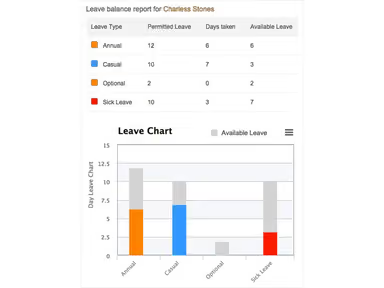
- Track attendance, timesheets, and shift rosters, and manage leave with clear visibility into balances and policies
- Run performance reviews and appraisals using different evaluation methods, and manage compensation
- Assign and manage employee training with the built-in learning module
- Answer employee questions through the HR help desk and keep track of open cases
- Collect honest feedback with engagement surveys and eNPS to see how employees feel about their work
- Connect payroll and expense tools to handle pay runs, benefits, compliance, and travel reimbursements
- Get reports and answers faster with HR analytics and Zia, on desktop or the mobile app
Who Is Zoho People For?
The platform is suitable for various industries and sectors, including:
- Finance
- IT
- Healthcare
- Media
- Education
Zoho People Use Cases
Based on our examination of the platform and user feedback, here are common ways organizations use Zoho People to solve real HR problems:
1. IT Teams Tracking Project Hours Across Multiple Workstreams
Hours in IT teams are often written down in different places, such as personal spreadsheets or chat threads, which makes them hard to review. With Zoho People's timesheets, employees record the time they work in one system, and managers can check it there. This gives managers a single source for hours worked instead of several scattered records.
2. Healthcare Providers Coordinating Shift Coverage
Hospitals and clinics need the right number of people on every shift, and coverage is often arranged through calls and messages. Zoho People's roster management lets HR set up shift schedules in one place. Zia, its AI assistant, can also show who has leaves left and who is free to work. Seeing both together helps HR fill gaps before a shift starts short.
3. Schools And Universities Managing Staff Performance Reviews
Review cycles for teaching and administrative staff often rely on forms that move between departments by email. Zoho People moves this into the system, with performance reviews and appraisals that can be customized and several ways to evaluate staff. Performance management is part of the Premium plan, so institutions that want it will need that tier.
4. Media Companies Measuring Employee Engagement
Deadlines keep creative teams busy, and HR may only hear about unhappiness when someone resigns. Zoho People's engagement surveys and Employee Net Promoter Score (eNPS) let HR ask employees how they feel about their jobs and the company on a regular basis. Hearing from staff this way gives HR a chance to notice concerns earlier.
Is Zoho People Right For You?
Zoho People may be a good fit for HR teams at growing businesses that need to manage more employees, locations, or business units. Settings can differ by person or shift, and appraisal cycles can run by location or role, so one system can cover units that each work in their own way. Its infrastructure is designed to scale with demand and support pretty reliable platform availability. The platform may also suit organizations that want several people to work in the same HR system.
For teams with privacy or industry rules to follow, Zoho People has features built around GDPR, such as letting employees see their data, correcting or deleting records on request, and exporting files with password protection. It also includes HIPAA-ready features, DCAA-compliant time tracking, and ISO 9001 certification. Buyers should still verify that the available controls meet their specific compliance requirements, since the GDPR information is not legal advice.
Additionally, stored data is encrypted with AES-256, and data in transit is protected as well. Multi-factor authentication, including biometrics and hardware keys, adds another layer. Activity logs record who changed what, and real-time backups run across servers.
Still not sure if Zoho People is right for you? Contact us at (661) 384-7070 for further guidance.
Zoho People Features
Onboarding Workflows
New hires can finish paperwork and e-sign items like offer agreements, company policies, and tax forms before their first day. HR can build workflows from ready-made fields or add custom ones, set role objectives, and follow each hire's progress through reports and reminders. Once a candidate finishes onboarding, they can be turned into an employee in one click.
Employee Records And Self-Service Portal
All employee details sit in one database, organized by department, job title, and location, with support for several business entities. Employee IDs can be generated automatically from rules such as entity, location, and department. A self-service portal called Spaces lets employees track daily tasks, view their career history, and read company updates, while transfers between departments or locations go through review and approval.
Offboarding And Exit Management
HR can build exit flows with clearance forms, exit interviews, and exit documents. Employees can start a resignation request and follow their clearance progress, and managers can act on a team member's behalf. Relieving and experience letters can be generated and sent by email, and exit interview answers give HR a view into what drives people to leave.
HR Analytics And Reporting
Ready-made reports are split into individual, team, and organization levels, so each person sees the data that fits their role. Custom reports can be built with a drag-and-drop editor, and a Zoho Analytics integration adds deeper dashboards. Reports such as hiring versus attrition, growth rates, and equal employment opportunity (EEO) records give HR clear numbers for staffing decisions.
Performance Management
Managers can set goals and key result areas, collect 360-degree feedback, and run appraisal cycles from custom templates that include self-appraisal, multi-rater input, and salary hikes. Regular reviews keep feedback going between cycles. A 9-box grid and a skill set matrix show who is ready for bigger roles and who fits a project.
Engagement Surveys
HR can send single-question eNPS surveys, short pulse surveys, or longer engagement surveys, with the option to keep answers anonymous. Surveys can be built from templates, sent to chosen employee groups, and followed by reminders. Employees can reply from the mobile app, which makes it easier to collect answers from people who are away from a desk.
Workflow Automation
Workflows run on a simple pattern of trigger, condition, and action, covering email alerts, automatic field updates, task checklists, and webhooks. Custom functions handle special cases, and schedulers send emails and reports on a set timetable. Templates for emails, letters, and mail merge keep standard documents like offer letters consistent, and blueprints guide users through each stage of an HR process.
Timesheets And Time Tracking
Employees log hours by hand or with a digital timer, and jobs can be marked billable or non-billable across projects and clients. A project dashboard compares estimated and logged hours, and approvals go to the right manager automatically. Overtime rules can follow federal, state, or company policies, and paid and unpaid breaks are tracked inside the timesheet.
Pros And Cons of Zoho People
Pros
Helps managers plan staffing needs using reliable workforce data
Built-in evaluation tools let teams review employee performance without a separate system
Flexible HRIS setup with field-level access by role helps teams control who sees sensitive data
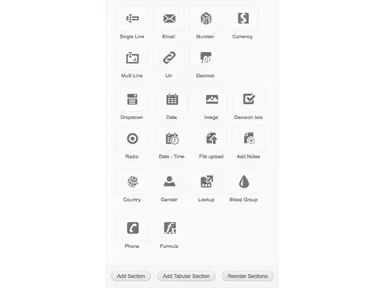
Customizable forms and workflows let teams shape the system around how they work
Onboarding and offboarding automation cuts down on manual work and mistakes
Cons
Location-based check-in can be unreliable when internet conditions are poor
Initial setup and configuration can feel complex for admins
The system can sometimes be slow to respond under load
Zoho People Pricing
Free | Essential HR | Professional | Premium | Enterprise | Zoho People Plus Premium | Zoho People Plus Enterprise |
|---|---|---|---|---|---|---|
Free forever (for up to five users) | $1.50 per user per month | $2.50 per user per month | $3.50 per user per month | $5 per user per month | $4.50 per user per month | $10 per user per month |
|
|
|
|
|
|
|
Disclaimer: The pricing details were last updated on Sep 25, 2026 from the vendor's website. Please contact us for a tailored pricing list.
Zoho People Reviews
Total 47 reviews
4.5
All reviews are from verified customers
Rating Distribution
5
Stars49%
4
Stars51%
3
Stars0%
2
Stars0%
1
Stars0%
Share your experience
Human Resources, 1-10 employees
More than a year
“No technical skills needed to get started”
Pros
From my experience no technical background was needed to get started. The way features are arranged makes sense to me and moving from one task to another feels natural.
Cons
When I tried to subscribe from overseas it proved rather awkward I couldn't complete payment with international cards unless I was physically located in the country where the license was issued.
Rating Distribution
Ease of use
8
Value for money
9
Customer Support
8
Functionality
8
Computer Hardware, 1-10 employees
Less than 6 months
“Budget-friendly and startup-ready”
Pros
As a startup this solution fits us well because it doesn't strain our budget. I feel it supports growing companies nicely and works across both service-based and product-focused teams.
Cons
I find the initial setup a little overwhelming and think an integrated help module would really benefit smaller teams trying to get the software configured since I've noticed it can occasionally be glitchy during everyday use.
Rating Distribution
Ease of use
8
Value for money
8
Customer Support
7
Functionality
8
Information Technology and Services, 11-50 employees
Free Trial
“High workflow control with clean layout”
Pros
What stands out to me is how much control I have over workflows. Attendance and leave tracking feel easy to manage, the layout looks clean and connections with other tools work well for my needs.
Cons
For me pricing can feel steep for small teams, there's often a learning curve for advanced features and the mobile app could be more simple.
Rating Distribution
Ease of use
8
Value for money
10
Customer Support
10
Functionality
8
Frequently Asked Questions
Can I move my existing employee data into Zoho People?
Yes, admins can import records, add employees one by one, or invite them to join. Employee lists can also be synced from email and workspace tools.
Does Zoho People work with biometric attendance devices?
Reviewers report connecting it with biometric devices to record check-ins and check-outs. One reviewer used this to track office attendance, while site-based staff can also send on-duty requests.
Does Zoho People support single sign-on?
Yes, through its connection with Zoho Directory. This adds single sign-on, password policies, session management, and directory sync, and admins can watch sign-in activity.
Does Zoho People offer a free trial?
Yes, Zoho People offers a 30-day free trial on all plans, and no credit card is needed to sign up.
Does Zoho People have an API?
Yes, it offers an API that works with any programming language, so IT teams can link HR data to other applications.
Can Zoho People be used to reward employees?
Rewards are handled through connections with third-party rewards and recognition tools. Managers can use these alongside performance reviews to recognize good work.
Can Zoho People support teams in more than one country?
Yes, Zoho says businesses in over 165 countries use it, and it can manage a global workforce with several business entities in one place. Pay periods can be set for different locations, and overtime rules can follow federal, state, or company policies.