




Last Updated
Key Takeaways
Generated from the text of customer reviews
Our Verdict
Overall Rating
Based on 517 users reviews
4.8
Rating Distribution
Positive
96%
Neutral
3%
Negative
1%
Starting Price
$54
per month
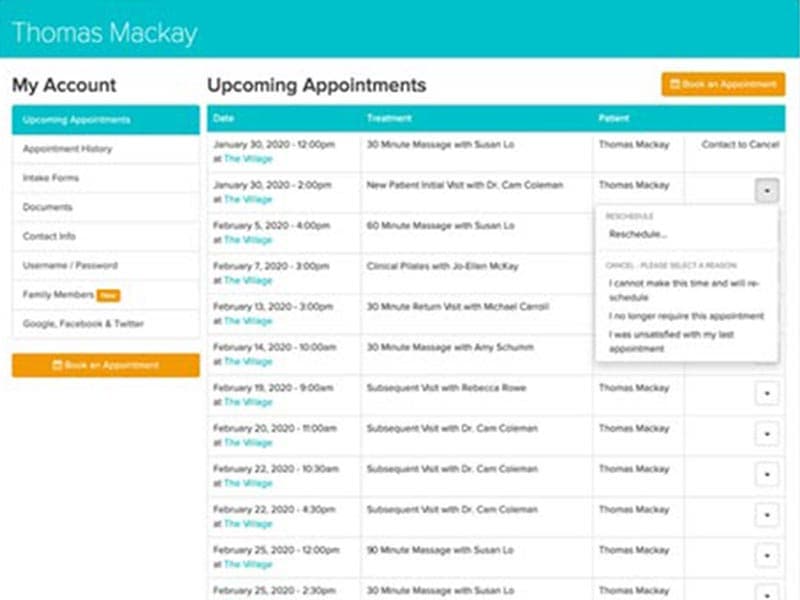
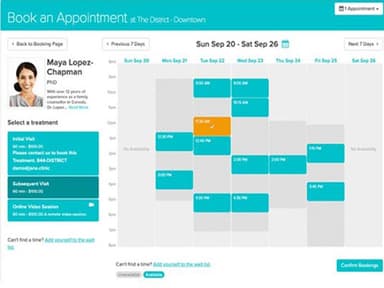
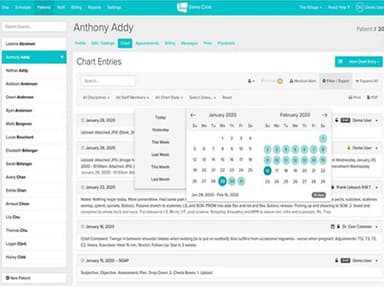
Jane App Specifications
- Appointment Management/Scheduling
- e-Prescriptions
- Lab Integration
- Patient Portal
Jane App Features
Clinical Documentation
Jane provides customizable clinical documentation that adapts to different disciplines and charting preferences. Practitioners can use SOAP, narrative, or hybrid formats, choose from more than 1,000 templates, or create their own. Notes, intake forms, surveys, and treatment plans remain connected to the patient record, while saved phrases and smart fields can reduce repetitive charting. The platform also supports supervision and co-signing workflows for practices where documentation requires additional review.
Telehealth
Jane offers built-in telehealth that connects virtual visits with scheduling, charting, reminders, and billing. Patients can join through a secure link, the patient app, or portal without downloading separate software. Additionally, practitioners can offer a virtual waiting room to patients, and utilize screen sharing, in-call chat, and audio/video controls during virtual visits.
Jane Payroll
Jane Payroll helps process pay runs, tax remittances, and year-end tax forms for both salaried employees and independent contractors. It can calculate and file CPP, EI, and income tax remittances and generate T4s and T4As at year-end. Staff can complete their own banking and tax setup, so the clinic owner does not have to enter these details manually.
Jane Websites
Jane Websites is an AI-powered website builder that creates a clinic website using information already stored in the Jane account. It supports customizable layouts, text, images, logos, and colors, while services, practitioners, and other details sync from Jane automatically. Websites also connect directly with Jane Online Booking and include built-in SEO foundations, mobile-friendly layouts, hosting, and dedicated support.
Virtual Assistants And Receptionists
The platform provides a trained, real-world assistant or receptionist who works directly within a clinic’s daily workflow, rather than adding another layer of software. The assistant works in the practitioner’s Jane account and can handle tasks such as answering calls, scheduling appointments, supporting billing, uploading documents, and tracking lab results.
Pros And Cons of Jane App
Pros
Customizable templates make clinical documentation easier
Easy to set up and adapt to clinic needs
Scheduling tools help reduce administrative burden
Cons
Some data imports may take longer in the UK
Email support responses can sometimes take longer
Jane App Pricing
Balance | Practice | Thrive |
|---|---|---|
$54 per month | $79 per month | $99 per month |
|
|
|
Disclaimer: The pricing details were last updated on Sep 14, 2026 from the vendor's website. Please contact us for a tailored pricing list.
Jane App Reviews
Total 517 reviews
4.8
All reviews are from verified customers
Rating Distribution
5
Stars83%
4
Stars13%
3
Stars2%
2
Stars1%
1
Stars1%
Share your experience
Medical Practice, 11-50 employees
Less than a year
“Great for managing bookings”
Pros
Managing appointments and bookings with it has been the biggest advantage for me since everything is handled in one place. The interface is clean, simple to navigate which makes daily use feel very natural.
Cons
Pricing could offer better value, especially for smaller practices. On top of that, customer support doesn't always feel as responsive as it should.
Rating Distribution
Ease of use
10
Value for money
8
Customer Support
9
Functionality
9
Medical Practice, 1-10 employees
More than a year
“Best-in-class support”
Pros
The customer support has been outstanding, honestly some of the best I've seen anywhere. And once I can create a macro that handles everything through voice prompts, it's going to save an incredible amount of time.
Cons
I'd really like to see push-button macros added. Same-day text reminders would also be very helpful and a built-in chat feature would be a welcome addition.
Rating Distribution
Ease of use
10
Value for money
10
Customer Support
10
Functionality
8
Alternative Medicine, 1-10 employees
Less than a year
“Patient team”
Pros
Being able to talk to a real person was a huge plus and every interaction was helpful and never made me feel judged, even when my questions probably sounded a bit silly. The chat support was also very user-friendly and whenever I asked detailed thoughtful questions, the answers I got back were just as specific and genuinely useful.
Cons
After spending 35 years working with another program, it definitely took a while to get used to it. That said, if I were younger and a little more adaptable, I think the switch would have felt much more natural.
Rating Distribution
Ease of use
10
Value for money
9
Customer Support
10
Functionality
9
Frequently Asked Questions
Can you text through the Jane App?
No, Jane does not allow users to send traditional SMS text messaging directly through the Jane App. However, it offers a built-in messaging hub for two-way chat.
Is Jane App suitable for busy chiropractic practices?
Jane can work for busy chiropractic practices, but its charting setup may require initial template customization. Users report notes taking under a minute after templates were built, while others also cite 3–5 minutes for new-patient notes and found the setup to be demanding.
Can Jane App replace paper intake forms and SOAP notes for an established clinic?
Yes. Jane supports digital intake forms and customizable chart templates for SOAP notes, so clinics can move these processes from paper into the platform. Practices transitioning from paper should still plan time to configure templates and train staff before going fully digital.
Is Jane App suitable for self-pay practices that also need superbills, insurance billing, and HEPs?
Yes. Jane supports self-pay visits and can generate superbills for patients seeking insurance reimbursement. It also supports direct insurance billing and integrates with Physitrack and Wibbi for home exercise programs.
Is Jane App suitable for therapists switching from SimplePractice?
Jane can be a suitable alternative for therapists seeking similar practice management capabilities, including scheduling, charting, billing, and client communication. However, practices should compare pricing, appointment limits, documentation tools, and treatment-plan features before switching, especially when moving from SimplePractice.