


Classe365
Last Updated
Overview
Classe365 revolutionizes education management with its tailored LMS, offering seamless administration from admission to alumni networking. Its diverse features cater to educational institutions, providing efficient enrollment along with employee and student management. While some users have reported a lack of customization options, Classe365 is praised for its comprehensive offerings.
Overall Rating
Based on 16 users reviews
4.8
Rating Distribution
Positive
94%
Neutral
6%
Negative
0%
Starting Price
$50
per month
Classe365 Specifications
- Activity Dashboard
- Asynchronous Learning
- Activity Tracking
- Access Controls/Permissions
What Is Classe365?
Overview
Classe365 is a comprehensive learning management system (LMS) designed specifically for the needs of higher education institutions, including universities, colleges, schools, academies, and corporate learning environments. With a wide range of features and solutions, it aims to transform the way institutions manage their educational processes. Classe365 helps you deliver a seamless learner journey from admission to alumni networking.
What Is Classe365 Best For?
Classe365 is equipped with a diverse LMS that includes pre-admissions and enrollment features. These features allow institutions to streamline the enrollment process. The LMS also enables administrators to manage applications, track admissions tasks, and facilitate seamless student onboarding.
Classe365 Pricing
The software provides different pricing plans depending on the number of users, such as:
- 1-100 users - $50/month
- 101-500 users - $250/month
- 501-1000 users - $500/month
- 1000+ users - Custom Pricing
Disclaimer: The pricing is subject to change.
Classe365 Integrations
The software offers integration with many third-party applications, including the one mentioned below:
- Google Analytics
- Google Workspace
- QuickBooks
- Google Apps
- Zapier
- Mailchimp
- Dropbox
- Microsoft 365
How Does Classe365 Work?
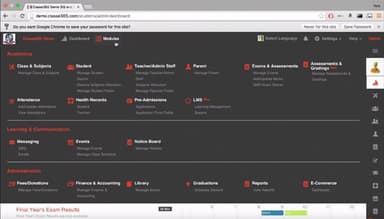
Once you have logged in, you can navigate the dashboard and make use of the Classe365 LMS features with the following guide:
- Access the Pre-Admission and Enrolment module to manage the admission process and create and customize admission forms
- Utilize the CRM module to manage interactions with prospective and current users
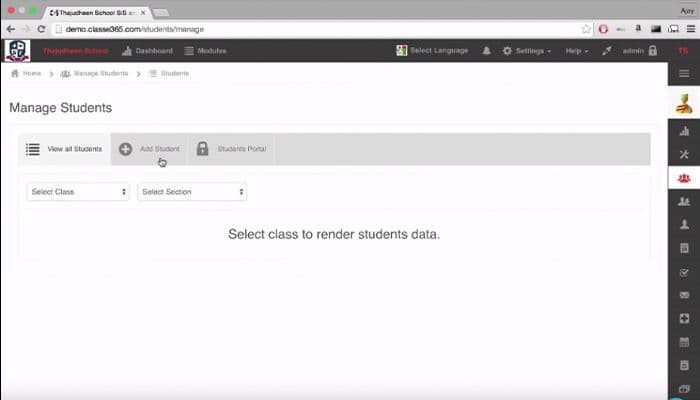
- Go to the student information system (SIS) module to manage student data and records, create and maintain student profiles, and track attendance, grades, and academic progress
- Navigate to the LMS module to deliver online courses and manage learning materials, create and organize course content, such as lectures, assignments, and quizzes
- To manage financial transactions related to student fees or compensation, go to the Fees & Invoicing tab, create fee and payment schedules, and generate and send invoices to students
- Scroll to the Finance and Accounting tab to manage the institution's financial processes and track and manage expenses, income, and budgets
- To facilitate online transactions within the LMS, scroll to the eCommerce module and set up an online store to sell course materials, merchandise, or event tickets
- Access the Fund Raising module to manage fundraising campaigns and donor relationships and create and promote fundraising campaigns
- Add logos, colors, and custom themes to customize the appearance and branding of the LMS software to match the institution's identity
Who Is Classe365 For?
Classe365 caters to the following sectors and industries:
- Education
- Healthcare
- Banking and finance
- Information technology
Is Classe365Right For You?
Are you looking for an LMS to manage your learning and administrative needs? If yes, look no further than Classe365. It offers a white-label module, allowing institutions to customize the platform's appearance and branding. This helps institutions create a cohesive user experience aligned with their own branding and identity.
The software is ISO-certified, prioritizes data security, and ensures compliance with regulations such as FERPA. It provides secure access controls, data encryption, and regular backups, ensuring the confidentiality and integrity of student information. Additionally, Classe365's LMS is scalable, accommodating the needs of both small and large institutions, making it suitable for businesses of any size.
Still not sure about the platform and need more information? Contact us at (661) 384-7070, and our team will help you decide whether the software suits your business needs.
Classe365 Features
Flipped Classes
Classe365 attends to the distinct needs and preferences of every learner. Its implementation of flipped classes empowers everyone to learn at their own personalized pace. Users have the flexibility to complete tasks at their convenience and mark their progress upon course completion.
Online Test Proctoring
To enhance the caliber of training and development offered to learners, the software has implemented a robust online evaluation system. This system ensures equitable learning opportunities for all users, fostering an environment of fairness and diligence. Particularly valuable during online assessments, instructors can effectively proctor tests and evaluate learners' proficiency with precision and efficiency.
Engaging Learning Experience
The platform's versatile LMS offers users an immersive and captivating learning journey, ensuring they remain engaged and retain information effectively. Classe365 achieves this by delivering interactive multimedia resources that cater to various learning styles. Through virtual simulations and interactive content, learners can gain deeper insights into abstract concepts and ideas, fostering a more enriched learning experience.
Pros And Cons of Classe365
Pros
Comprehensive student information system
Good value for money
User-friendly interface
Facilitates managers to carry out independent research
Diverse customer relationship management system
Cons
Some users complained about the lack of a custom field feature
The software fonts could be made bigger, as per some Classe365 reviews
Classe365 Pricing
1-100 users | 101-500 users | 501-1000 users | 1000+ users |
|---|---|---|---|
$50per month | $250per month | $500per month | Custom Pricing |
|
|
|
|
Disclaimer: The pricing details were last updated on Oct 23, 2026 from the vendor's website. Please contact us for a tailored pricing list.
Classe365 Reviews
Total 16 reviews
4.8
All reviews are from verified customers
Rating Distribution
5
Stars94%
4
Stars0%
3
Stars0%
2
Stars6%
1
Stars0%
Share your experience
Education Management, 101-500 employees
Less than a year
“Support that's always responsive”
Pros
The support team (Ravi and everyone else) has been incredibly helpful. They never seem annoyed when I ask questions or need things explained again and they're happy to walk through details until it makes sense. I've also really enjoyed the exporting capabilities, being able to pull data out the way I need is a big plus.
Cons
No real downsides to mention. Most of what I've sent are small feature requests but it already handles the big requirements well especially things like reports and student attendance.
Rating Distribution
Ease of use
10
Value for money
10
Customer Support
10
Functionality
9
Education Management, 51-100 employees
More than a year
“Teams integration saves the day”
Pros
Classe365 bundles a lot of genuinely useful features into one platform but their customer service is what really shines. The team is quick to respond, easy to talk to and they consistently go the extra mile to get things sorted. I also appreciate that they actively take feedback onboard and keep refining the platform over time. The way they added Microsoft Teams support to the live lectures feature is a perfect example of them paying attention to user needs and acting on it.
Cons
Some parts of the initial setup and technical configuration feel a bit tough if you don't have an IT background. Having a dedicated IT person manage those pieces would make the onboarding noticeably smoother. Clearer, more beginner-friendly setup instructions and extra guidance for non-technical users would also help a lot. That said, the support team is always available and ready to assist whenever you get stuck.
Rating Distribution
Ease of use
10
Value for money
8
Customer Support
9
Functionality
10
Primary/Secondary Education, 11-50 employees
More than a year
“Centralized school management for teachers”
Pros
Biggest advantage is how it centralizes day-to-day school processes. With this tool, you can handle attendance, grades, family communications and payments from a single portal. For a teacher, that translates into a big reduction in time spent jumping between multiple, non-integrated school platforms. A concrete example... when you enter a grade for a Diritto assignment, the system can automatically update the class register, notify the student and schedule a periodic report to parents so you avoid repeating the same manual steps across different tools.
Cons
Main downside is the learning curve and the initial setup. Since it's a very deep "all-in-one" system, you need a real adjustment period to make full use of it. If the school doesn't provide proper technical training, it's easy for a teacher to feel overwhelmed by an interface packed with functions that aren't always relevant day-to-day. Also, migrating data from older school management software to Classe365 can be technically demanding and often requires ongoing help from the technical support team.
Rating Distribution
Ease of use
8
Value for money
9
Customer Support
9
Functionality
9
Frequently Asked Questions
Does Classe365 offer an API?
Yes, Classe365 offers an API.
What language does Classe365 support?
The platform supports several languages, including English, Chinese, Czech, Danish, and more.
What other apps does Classe365 integrate with?
The software integrates with several applications, including QuickBooks, Google Analytics, Google Apps, Google Workspace, Zapier, Mailchimp, and Microsoft 365.
Does Classe365 support mobile devices?
Yes, Classe365 supports mobile devices and has the app available on both Google Play and App Store.
What types of pricing plans does Classe365 offer?
The software offers different pricing plans depending on the number of users, such as 1-100 users ($50/month), 101-500 users ($250/month), 500-1000 users ($500/month), and 1000+ users (Custom Pricing). You can also request a personalized Classe cost today.
Who are the typical users of Classe365?
The platform caters to several sectors and industries, including information technology, healthcare, education, banking, and finance.
What level of support does Classe365 offer?
Classe365's customer support team offers outstanding support in the form of a help desk, chat, email, and phone support.
Are there any Classe365 alternatives?
Yes, Moodle, Skillsoft, and Accord LMS are some of the alternatives to Classe365.
Does Classe365 enhance an organization's ongoing efforts and support all the modules?
Yes, the platform supports all the modules as per verified user reviews.