


Mykademy
Last Updated
Overview
MyKademy is an intuitive learning management system that enables organizations to create interactive training content. With a user-friendly interface, robust integration, and dynamic reporting tools, it streamlines the learning experience and ensures secure data management. Though the initial setup may need expertise, its versatility makes it suitable for various industries.
Mykademy Specifications
- Activity Dashboard
- Asynchronous Learning
- Activity Tracking
- Access Controls/Permissions
What Is Mykademy?
Mykademy is a cloud-based learning management system (LMS) streaming corporate training. It tracks and manages learner activities, customizes training academies, and provides a ready-made skill library.
Furthermore, the efficient and reliable platform offers content creation and 24/7 customer support. This LMS platform is a comprehensive solution for businesses aiming to enhance training efficiency and outcomes.
What Is Mykademy Best Known For?
The Mykademy learning management system allows users to easily create websites. With a range of ready-to-use templates and a user-friendly interface, businesses can personalize their brand by customizing design elements. There is no coding or technical knowledge required. It empowers organizations to establish a unique online presence for training academies.
Mykademy Pricing
Mykademy Integrations
The following third-party applications integrates with Mykademy software:
How Does Mykademy Work?
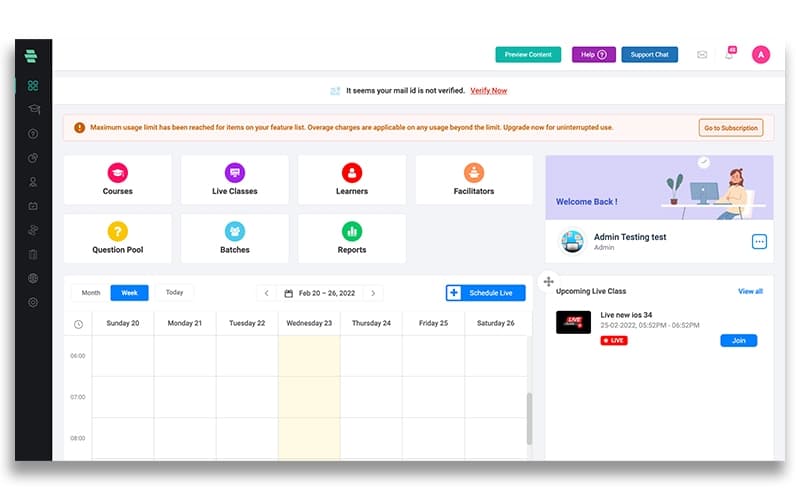
Here's how you can navigate the dashboard and make use of the software's features:
- Log in and access the dashboard
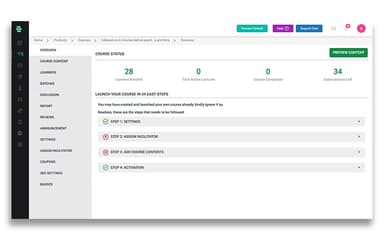
- Browse and select a course from the available options
- Enroll in the chosen course by following the prompts
- Access the live classes section to view upcoming sessions
- Join a live class at the scheduled time and interact with instructors and fellow learners
- Engage with fellow learners through discussion forums and group projects
Who Is Mykademy For?
The LMS is used in the following industries:
- Construction
- Manufacturing
- Healthcare
- Hospitality
- Retail
- Automotive
Is Mykademy Right For You?
Are you looking for an LMS platform that offers online classes, online learning programs, online teaching and a website builder? If so, then Mykademy might be the right choice. The software solves most of your online training needs with great security and scalability. Moreover, you can transform your online teaching with MyKademy video conferencing rooms.
Still not sure if it's the right choice for you? Contact our customer support team at 661-384-7070 and they will help you make the best decision.
Mykademy Features
Social Learning
The software facilitates social learning by providing features such as discussion forums, group projects, and collaboration tools. It allows learners to engage and interact with each other.
Polls And Voting
The platform includes built-in polling and voting capabilities, enabling instructors to gather feedback, conduct surveys, and promote learner engagement through interactive activities and support their online training journey.
Course Tracking
With comprehensive course tracking functionality, the software allows instructors to monitor and review learners' progress. It includes completed modules, quiz scores, and overall performance, ensuring a clear understanding of individual achievements.
Virtual Classroom
Mykademy LMS offers a virtual classroom feature, providing a seamless online learning environment where instructors can conduct live classes, deliver lectures, and facilitate real-time discussions. It supports various video conferencing platforms.
Content Management And Delivery
The software provides a robust course and curriculum builder, allowing instructors to create unlimited courses and upload several types of content such as videos, PDFs, documents, text, and audio files. It offers content dripping capabilities, enabling instructors to control learners' content access pace, ensuring a structured and organized learning experience.
Pros And Cons of Mykademy
Pros
User-friendly interface
Separate mobile applications for Android and iOS
Smooth payment integration
Comprehensive course tracking
Cons
The customer support team can be improved, according to some user reviews
Advanced functionality overwhelm
Some features may slow down with time
Mykademy Reviews
Total 1 reviews
5
All reviews are from verified customers
Rating Distribution
5
Stars100%
4
Stars0%
3
Stars0%
2
Stars0%
1
Stars0%
Share your experience
Education, E-Learning, 1-10 employees
Less than a year
“Totally loving the Mykademy platform. Must try!”
Pros
This software has made the transition from traditional teaching methods to online teaching incredibly smooth for me. The website builder is easy to comprehend, and I must acknowledge the exceptional onboarding support provided by the customer support team.
Cons
It would be great if they could add more templates to the website builder. During my previous conversation with them, they mentioned they were working on it.
Rating Distribution
Ease of use
10
Value for money
10
Customer Support
10
Functionality
10
Frequently Asked Questions
Does Mykademy offer an API?
Yes, the Mykademy LMS platform offers an API.
What language does Mykademy support?
Mykademy supports the following languages: English.
What other apps does Mykademy integrate with?
Mykademy integrates with Zoom, Google Analytics, Mailchimp, Stripe, Microsoft Teams, and Zapier.
Does Mykademy support mobile devices?
Yes, Mykademy supports Android- and iOS-supported mobile devices.
What types of pricing plans does Mykademy offer?
The vendor offers dynamic pricing plans. Get a personalized Mykademy cost according to your organization’s size and requirements.
Who are the typical users of Mykademy?
Typical users of Mykademy include construction, retail, manufacturing, automotive, healthcare, and hospitality industries.
What level of support does Mykademy offer?
MyKademy offers several options, including a 24/7 customer support team, chat, phone, email, a help desk, a knowledge base, FAQs, and forums.