


myQuest LMS
Last Updated
Overview
myQuest LMS is a learning management system (LMS) that enables engaging online training through gamified courses and microlearning. Its responsive authoring tools, online tutorials, and coaching features streamline content delivery for measurable skills development. While some customization is limited, regular updates and responsive support optimize the learning process.

myQuest LMS Specifications
- Activity Dashboard
- Asynchronous Learning
- Activity Tracking
- Access Controls/Permissions
myQuest LMS Features
Micro-Learning
The platform allows trainers to break down content into small, digestible pieces called ‘micro-learning’. This makes the content very easy for learners to consume in short bursts. Micro-learning has improved retention compared to large blocks of content.
Gamification
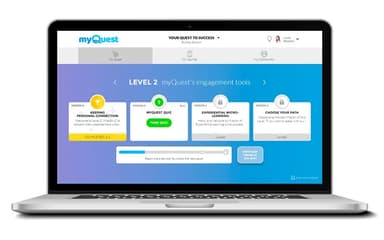
Courses are structured as interactive ‘Quests’ and are badged with points, levels, and rewards to motivate users to learn new skills. This approach uses game design principles to engage learners to actively participate enjoyably and effectively compared to passive content consumption.
Habit Formation Tools
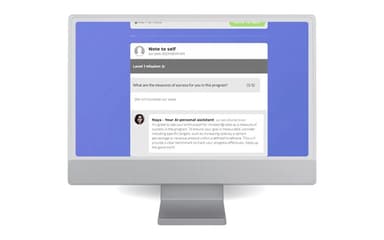
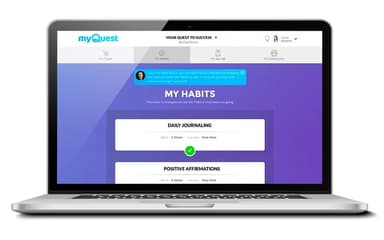
It helps learners form new positive habits by automatically sending reminders and rewarding them for practicing daily. This builds accountability, which strengthens habit development over time.
Smart Automated Communication
The platform can automatically send learners personalized messages and notifications tailored to their progress. This efficiently engages larger audiences with a more individualized coaching experience and creates an active learning environment.
Community Building
One of the myQuest features is community building. The software encourages peer-to-peer interaction and assistance via community building. Learners can interact with each other in the community section, respond to posts, and build meaningful connections.
Pros And Cons of myQuest LMS
Pros
Excellent course creation and engaging learning experience
Dedicated project manager for powerful coaching and delivering quality content
Microlearning capabilities enable the delivery of small, digestible content
Flexible course-building and content-authoring
Cons
Limited customization options for specific features
Personal support could be improved
myQuest LMS Reviews
Total 24 reviews
4.9
All reviews are from verified customers
Rating Distribution
5
Stars88%
4
Stars13%
3
Stars0%
2
Stars0%
1
Stars0%
Share your experience
Retail, 51-100 employees
More than a year
“helpful support and simple workflow”
Pros
Using myQuest has been fun and easy. On the rare occasion something isn't clear, there are amazing people who are quick to help and resolve any issues that come up.
Cons
The only downside for me is the limited selection of platform options available when uploading videos.
Rating Distribution
Ease of use
10
Value for money
10
Customer Support
10
Functionality
9
Professional Training & Coaching, 1-10 employees
Less than a year
“engaging gamified learning journey”
Pros
Among the LMS platforms I have used, myQuest is one of the most engaging. Its linear, gamified setup fits extremely well with how we run our programs, giving the learning journey a clear structure that really supports and strengthens the overall experience. The Resource Center has been especially useful because it acts as a dependable single source of truth, with all materials available in one central place. Another big advantage is how versatile the platform is as missions can be built in lots of interactive ways which helps keep every phase of the program interesting and engaging. That level of flexibility makes it possible to adapt the experience for different types of content and different learning styles, resulting in a richer and more dynamic online program.
Cons
There honestly aren't many downsides I'd mention as a user and we also haven't had any negative feedback about the platform's functionality itself. The only issue we've noticed from the client side is that if too many team members are editing the program builder in the back end at the same time, it can get a bit glitchy. That said, it's a manageable issue and can be easily avoided by scheduling update times and keeping clear communication between the people making changes.
Rating Distribution
Ease of use
10
Value for money
10
Customer Support
10
Functionality
10
Education Management, 11-50 employees
Less than 6 months
“interactive learning insights”
Pros
The service has been excellent and the way the content interacts with the user is something I have really appreciated. It gives me a clear view of the user's progress and helps me see how well the information is actually being absorbed.
Cons
Everything has been working perfectly, including the communication and support. Honestly I cannot think of anything I haven't liked so far.
Rating Distribution
Ease of use
10
Value for money
10
Customer Support
10
Functionality
10
Frequently Asked Questions
Does myQuest LMS offer an API?
No, myQuest does not offer an API.
What languages does myQuest LMS support?
The software supports the English language only.
What other apps does myQuest LMS integrate with?
myQuest integrates with Calendly, QuickBooks, Twilio, Zendesk, and Zoho.
Does myQuest LMS support mobile devices?
Yes, it supports mobile devices.
What types of pricing plans does myQuest LMS offer?
The price structure for myQuest is influenced by factors such as your organization’s size, the total number of users, and your unique requirements. Contact us for an up-to-date myQuest cost.
Who are the typical users of myQuest LMS?
The typical users of myQuest include those in the education, information technology, health, fitness, and professional training and coaching industries.
What level of support does myQuest LMS offer?
myQuest offers various support options, including chat, knowledge base, FAQs, help desk, telephone and email channels.